Example for Configuring IS-IS Route Summarization
This section provides an example for configuring IS-IS route summarization.
Networking Requirements
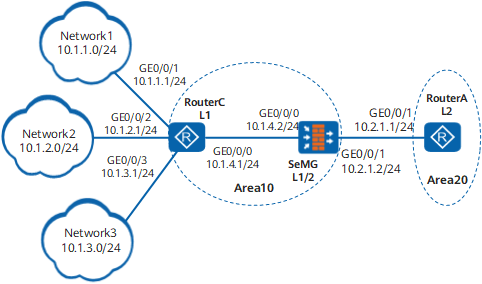
Figure 1 shows a networking example.
RouterA, FW, and RouterC are configured with IS-IS to communicate.
RouterA belongs to area 20. FW and RouterC belong to area 10.
Router is a Level-2 device. FW is a Level-1-2 device. RouterC is a Level-1 device.
FW maintains both the Level-1 and Level-2 LSDBs. The routes to network segments 10.1.1.0/24, 10.1.2.0/24, and 10.1.3.0/24 in the Level-1 area can be leaked into the Level-2 area. If the interface with the IP address 10.1.1.1/24 on RouterC regularly alternates between Up and Down states, LSPs in the Level-2 area will be frequently flooded and RouterA will often calculate routes using the SPF algorithm. This burdens the CPU of RouterA and may even cause route flapping on the network.
To solve this problem, configure FW to summarize routes to the three network segments into the route 10.1.0.0/16. This summarization reduces the number of routes to be maintained by FW and prevents interface-state alteration in the Level-1 area from affecting router convergence in the Level-2 area.
Configuration Roadmap
The configuration roadmap is as follows:
Enable IS-IS on each device, configure the levels, and specify network entities.
Check the IS-IS routing table of RouterA.
Configure FW to summarize routes.
Data Preparation
To complete the configuration, you need the following data:
Area addresses of RouterA, FW, and RouterC
Levels of RouterA, FW, and RouterC
Procedure
- Set the IP addresses for the interfaces, add the interfaces
to security zones, and configure the security policy.
# Configure RouterA.
<Router> system-view
[Router] sysname RouterA
[RouterA] interface GigabitEthernet 0/0/1[RouterA-GigabitEthernet 0/0/1] ip address 10.2.1.1 24[RouterA-GigabitEthernet 0/0/1] quit# Configure FW.
<FW> system-view[FW] sysname FW
[FW] interface GigabitEthernet 0/0/0
[FW-GigabitEthernet 0/0/0] ip address 10.1.4.2 24
[FW-GigabitEthernet 0/0/0] quit
[FW] interfaceGigabitEthernet 0/0/1
[FW-GigabitEthernet 0/0/1] ip address 10.2.1.2 24
[FW-GigabitEthernet 0/0/1] quit
[FW] firewall zone trust[FW-zone-trust] add interface GigabitEthernet 0/0/0
[FW-zone-trust] add interfaceGigabitEthernet 0/0/1
[FW-zone-trust] quit[FW] security-policy[FW-policy-security] rule name policy_sec_1[FW-policy-security-rule-policy_sec_1] source-zone local trust[FW-policy-security-rule-policy_sec_1] destination-zone local trust[FW-policy-security-rule-policy_sec_1] action permit[FW-policy-security-rule-policy_sec_1] quit# Configure RouterC.
<Router> system-view
[Router] sysname RouterC
[RouterC] interface GigabitEthernet 0/0/0[RouterC-GigabitEthernet 0/0/0] ip address 10.1.4.1 24[RouterC-GigabitEthernet 0/0/0] quit[RouterC] interface GigabitEthernet 0/0/1[RouterC-GigabitEthernet 0/0/1] ip address 10.1.1.1 24[RouterC-GigabitEthernet 0/0/1] quit[RouterC] interface GigabitEthernet 0/0/2[RouterC-GigabitEthernet 0/0/2] ip address 10.1.2.1 24[RouterC-GigabitEthernet 0/0/2] quit[RouterC] interface GigabitEthernet0/0/3[RouterC-GigabitEthernet0/0/3] ip address 10.1.3.1 24[RouterC-GigabitEthernet0/0/3] quit - Configure basic IPv4 IS-IS functions.
# Configure RouterA.
[RouterA] isis 1
[RouterA-isis-1] is-level level-2
[RouterA-isis-1] network-entity 20.0000.0000.0001.00
[RouterA-isis-1] quit
[RouterA] interfaceGigabitEthernet 0/0/1[RouterA-GigabitEthernet 0/0/1] isis enable 1[RouterA-GigabitEthernet 0/0/1] quit# Configure FW.
[FW] isis 1[FW-isis-1] network-entity 10.0000.0000.0002.00[FW-isis-1] quit[FW] interfaceGigabitEthernet 0/0/1
[FW-GigabitEthernet 0/0/1] isis enable 1
[FW-GigabitEthernet 0/0/1] quit
[FW] interface GigabitEthernet 0/0/0
[FW-GigabitEthernet 0/0/0] isis enable 1
[FW-GigabitEthernet 0/0/0] quit
# Configure RouterC.
[RouterC] isis 1
[RouterC-isis-1] is-level level-1
[RouterC-isis-1] network-entity 10.0000.0000.0003.00
[RouterC-isis-1] quit
[RouterC] interface GigabitEthernet 0/0/0[RouterC-GigabitEthernet 0/0/0] isis enable 1[RouterC-GigabitEthernet 0/0/0] quitThe configurations of GE0/0/1, GE0/0/2, and GE0/0/3 are similar to those of GE0/0/0.
- Run the display isis route command to
display the IS-IS routing table of RouterA.
[RouterA] display isis route
Route information for ISIS(1)
-----------------------------
ISIS(1) Level-2 Forwarding Table
--------------------------------
IPV4 Destination IntCost ExtCost ExitInterface NextHop Flags
----------------------------------------------------------------------------
10.1.1.0/24 30 NULL GigabitEthernet 0/0/1 10.2.1.2 A/-/L/-10.1.2.0/24 30 NULL GigabitEthernet 0/0/1 10.2.1.2 A/-/L/-10.1.3.0/24 30 NULL GigabitEthernet 0/0/1 10.2.1.2 A/-/L/-10.1.4.0/24 20 NULL GigabitEthernet 0/0/1 10.2.1.2 A/-/L/-10.2.1.0/24 10 NULL GigabitEthernet 0/0/1 Direct D/-/L/-Flags: D-Direct, A-Added to URT, L-Advertised in LSPs, S-IGP Shortcut,
U-Up/Down Bit Set
- Configure route summarization on FW.
# Configure FW to summarize the routes to network segments 10.1.1.0/24, 10.1.2.0/24, 10.1.3.0./24, and 10.1.4.0/24 into the route 10.1.0.0/16.
[FW] isis 1[FW-isis-1] summary 10.1.0.0 255.255.0.0 level-1-2[FW-isis-1] quit - Verify the configuration.
# Run the display isis route command to display the routing table of RouterA. The command output shows that the summary route 10.1.0.0/16 has been generated.
[RouterA] display isis route
Route information for ISIS(1)
-----------------------------
ISIS(1) Level-2 Forwarding Table
--------------------------------
IPV4 Destination IntCost ExtCost ExitInterface NextHop Flags
----------------------------------------------------------------------------
10.1.0.0/16 20 NULL GigabitEthernet 0/0/1 10.2.1.2 A/-/L/-10.2.1.0/24 10 NULL GigabitEthernet 0/0/1 Direct D/-/L/-Flags: D-Direct, A-Added to URT, L-Advertised in LSPs, S-IGP Shortcut,
U-Up/Down Bit Set
Configuration Files
Configuration file of RouterA
#
sysname RouterA
#
isis 1
is-level level-2
network-entity 20.0000.0000.0001.00
#
interface GigabitEthernet 0/0/1ip address 10.2.1.1 255.255.255.0
isis enable 1
#
return
Configuration file of FW
#
sysname FW#
isis 1
network-entity 10.0000.0000.0002.00
summary 10.1.0.0 255.255.0.0 level-1-2
#
interface GigabitEthernet 0/0/1ip address 10.2.1.2 255.255.255.0
isis enable 1
#
interface GigabitEthernet 0/0/0ip address 10.1.4.2 255.255.255.0
isis enable 1
#
firewall zone trust
 set priority 85
 add interface GigabitEthernet 0/0/0
 add interface GigabitEthernet 0/0/1
#
security-policy
  rule name policy_sec_1
    source-zone local
    source-zone trust
    destination-zone local
    destination-zone trust
    action permit
#
return
Configuration file of RouterC
#
sysname RouterC
#
isis 1
is-level level-1
network-entity 10.0000.0000.0003.00
#
interface GigabitEthernet 0/0/0ip address 10.1.4.1 255.255.255.0
isis enable 1
#
interface GigabitEthernet 0/0/1ip address 10.1.1.1 255.255.255.0
isis enable 1
#
interface GigabitEthernet 0/0/2ip address 10.1.2.1 255.255.255.0
isis enable 1
#
interface GigabitEthernet0/0/3ip address 10.1.3.1 255.255.255.0
isis enable 1
#
return