Web: Example for Configuring an OSPF NSSA
To import external routes only to a specific OSPF area, not stub areas, you can configure the area as an NSSA.
Networking Requirements
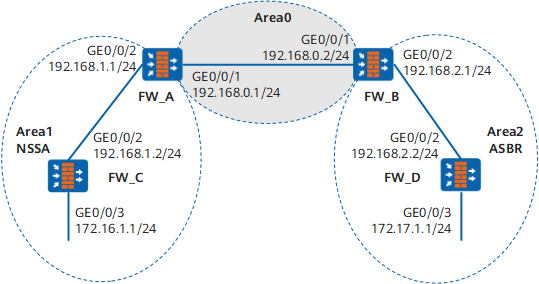
As shown in Figure 1, all Figure 1s run OSPF, and the AS is divided into three areas. FW_A and FW_B serve as ABRs to forward inter-area routes. FW_D serves as an ASBR and imports external routes (static routes).
It is required that Area1 should be configured as an NSSA, FW_C should be configured as an ASBR to import external routes (static routes), and routing information should be correctly advertised in the AS.
Configuration Roadmap
The configuration roadmap is as follows:
- Enable OSPF and configure basic OSPF functions on each FW.
- Configure a static route on FW_D and import it to OSPF.
- Configure Area1 as an NSSA. Run the stub command on each device in Area1. Check OSPF routes on FW_C.
- Configure a static route on FW_C and import it to OSPF.
- Check OSPF routes on FW_D.
Data Planning
To implement the configuration, you need to collect the following data:
- Router ID of FW_A (1.1.1.1), OSPF process ID (1), network segment in Area 0 (192.168.0.0/24), and network segment in Area 1 (192.168.1.0/24)
- Router ID of FW_B (2.2.2.2), OSPF process ID (1), network segment in Area 0 (192.168.0.0/24), and network segment in Area 2 (192.168.2.0/24)
- Router ID of FW_C (3.3.3.3), OSPF process ID (1), and network segments in Area 1 (192.168.1.0/24 and 172.16.1.0)
- Router ID of FW_D (4.4.4.4), OSPF process ID (1), and network segments in Area 2 (192.168.2.0/24 and 172.17.1.0)
Procedure
- Configure FW_A.
- Set interface IP addresses and assign the interfaces to security zones.
- Choose .
Click
 of GE0/0/1and set required parameters.
Zone
Trust
IPv4
IP Address
192.168.0.1/24
- Click OK.
Repeat the preceding steps to configure GE0/0/2 based on the parameters in the following table.
Zone
Trust
IPv4
IP Address
192.168.1.1/24
- Configure basic OSPF functions.
Choose .
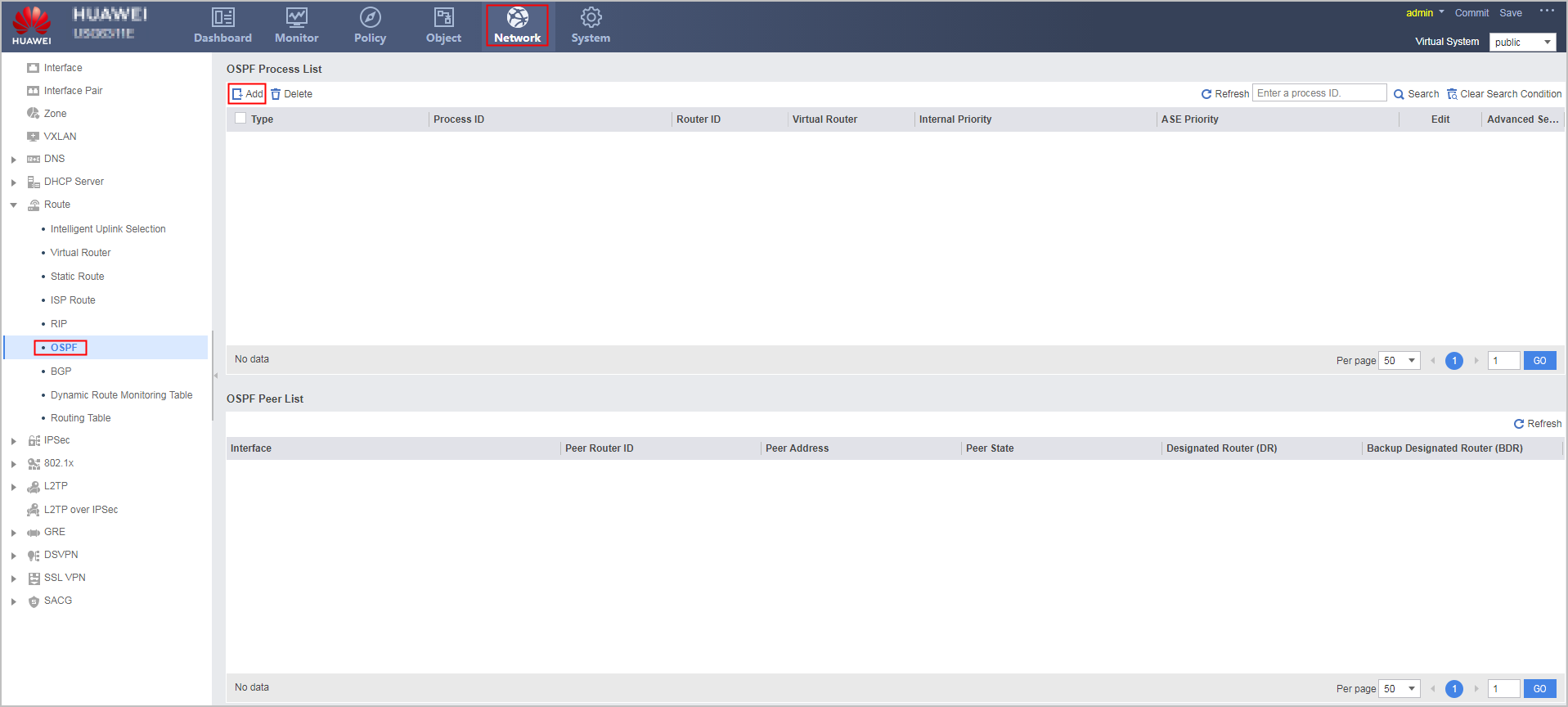
- Click Add to create an OSPF process.
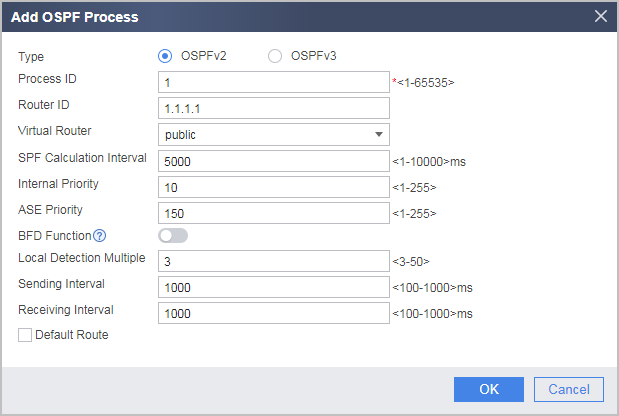
Configure the area where network segment 192.168.0.0 as Area 0.
- Click
 of the created OSPF process.
 - In the OSPF Process ID:1 navigation tree, choose .
- Click Add and configure the area where network segment 192.168.0.0 resides as Area 0.
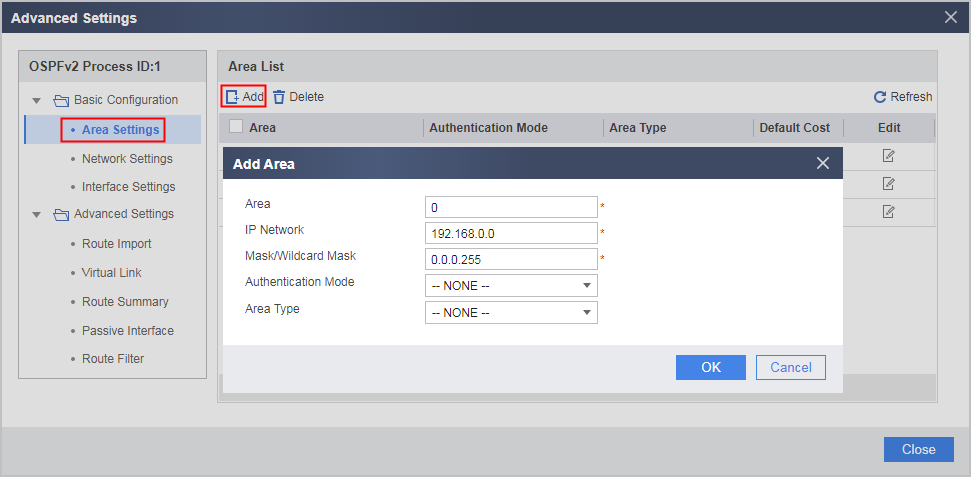
- Click OK.
- Click
- Repeat the preceding steps to configure the area where network segment 192.168.1.0 resides as Area 1.
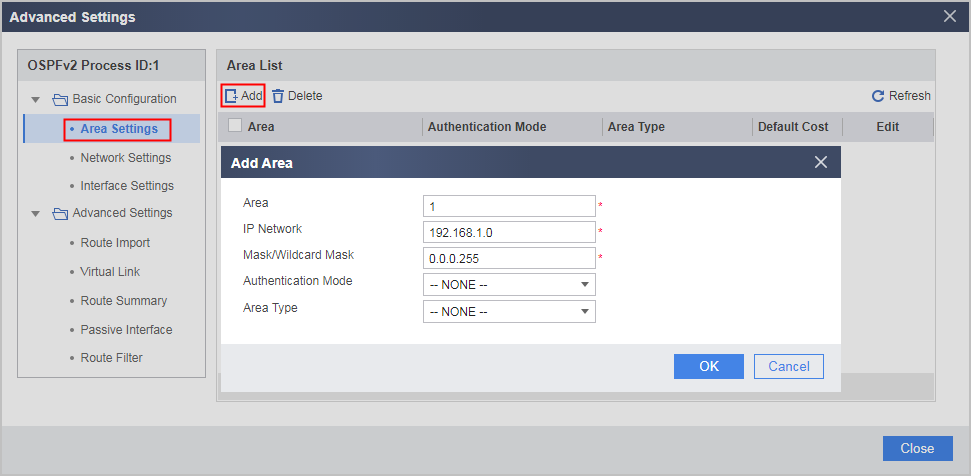
- Configure Area 1 as an NSSA.
- Click
 of Area 1.
 - Set Area Type to NSSA.
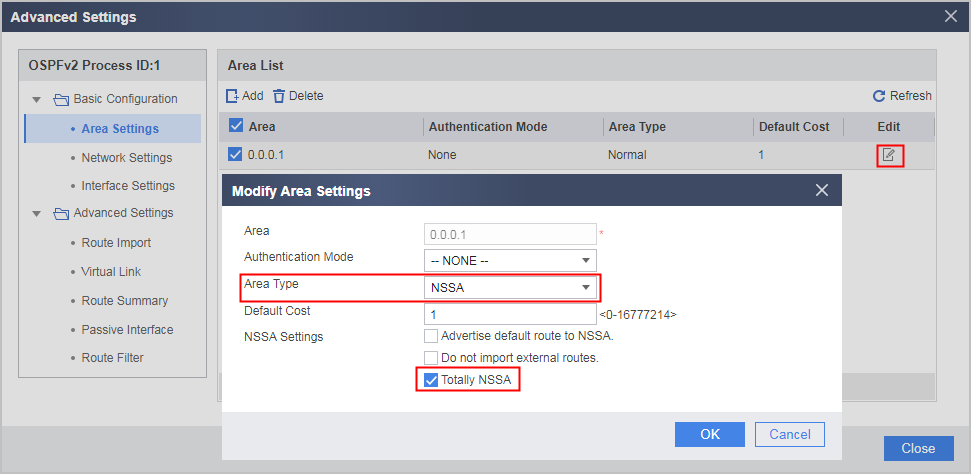
- Click OK.

You are advised to select Totally NSSA for the ABR (FW_A in this example), which can reduce the routing table capacity of NSSA routers. Do not select Totally NSSA for the other NSSA routers.
- Click
- Set interface IP addresses and assign the interfaces to security zones.
- Configure FW_B.
- Configure FW_C.
- By referring to Step 4 of FW_A, configure Area 1 as an NSSA.
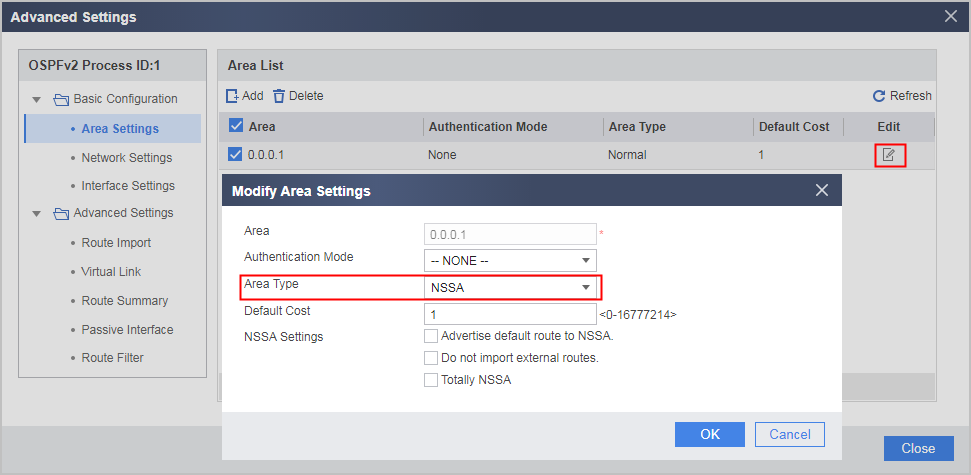
- Configure a static route and import it to OSPF.
Choose .
Click Add and set parameters as follows:
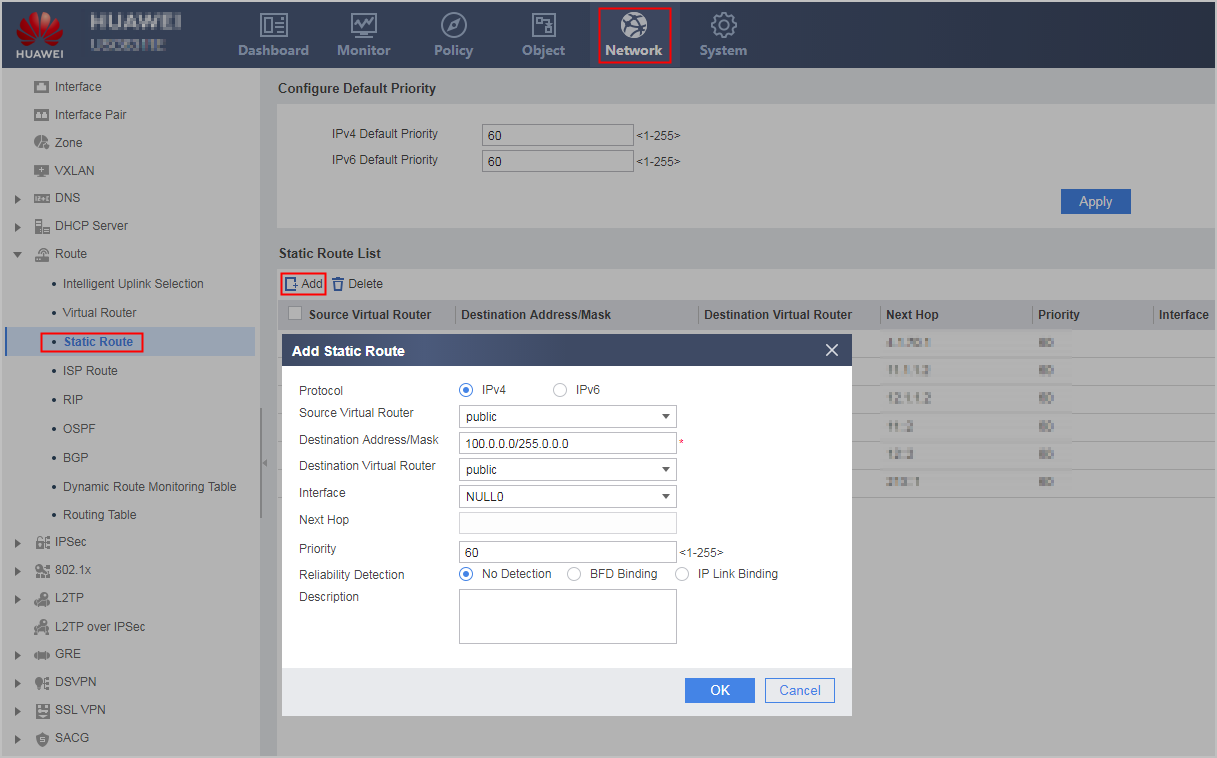
Click OK.
Click
of the created OSPF process.In the OSPF Process ID:2 navigation tree, choose .
Click Add to configure a static route and import the route to OSPF.
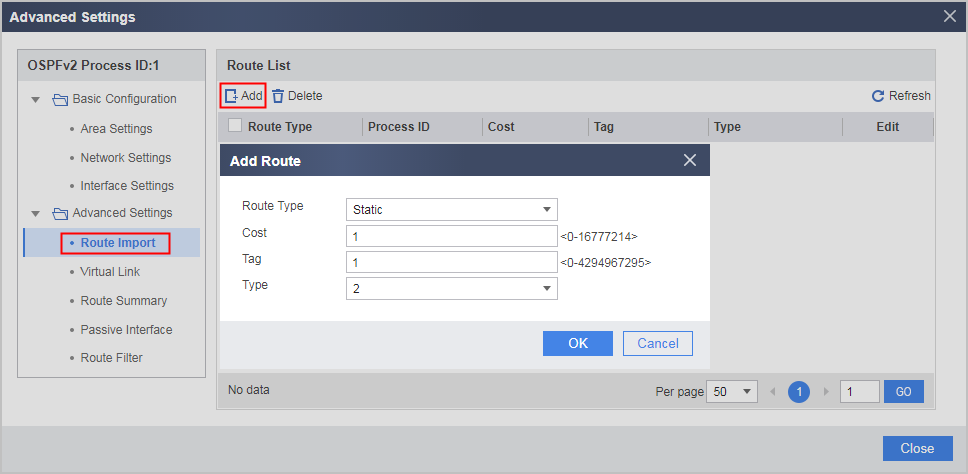
- Click OK.
- By referring to Step 4 of FW_A, configure Area 1 as an NSSA.
- Configure FW_D.
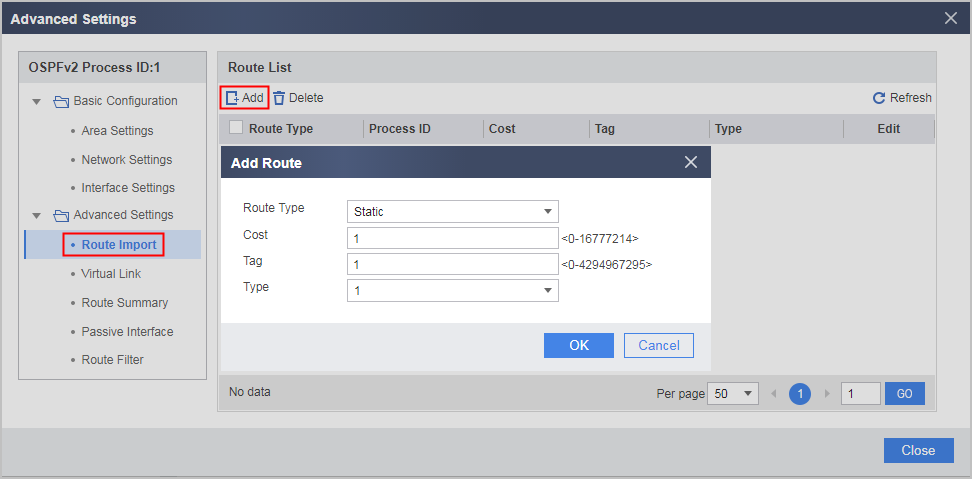
Verification
# Check OSPF routing table of FW_C.
[FW_C] display ospf routing
          OSPF Process 1 with Router ID 3.3.3.3
                   Routing Tables

 Routing for Network
 Destination        Cost  Type       NextHop         AdvRouter       Area
 0.0.0.0/0          2     Inter-area 192.168.1.1     1.1.1.1         0.0.0.1
 172.16.1.0/24      1     Stub       172.16.1.1      3.3.3.3         0.0.0.1
 192.168.1.0/24     1     Transit    192.168.1.2     3.3.3.3         0.0.0.1

 Total Nets: 3
 Intra Area: 2  Inter Area: 1  ASE: 0  NSSA: 0
When the area where FW_C resides is configured as an NSSA, no AS external route is found, but a default route is found in the routing table.
# Check OSPF routing table of FW_D.
[FW_D] display ospf routing

          OSPF Process 1 with Router ID 172.17.1.1
                   Routing Tables

 Routing for Network
 Destination        Cost  Type       NextHop         AdvRouter       Area
 172.16.1.0/24      4     Inter-area 192.168.2.1     2.2.2.2         0.0.0.2
 172.17.1.0/24      1     Stub       172.17.1.1      4.4.4.4         0.0.0.2
 192.168.0.0/24     2     Inter-area 192.168.2.1     2.2.2.2         0.0.0.2
 192.168.1.0/24     3     Inter-area 192.168.2.1     2.2.2.2         0.0.0.2
 192.168.2.0/24     1     Transit    192.168.2.2     4.4.4.4         0.0.0.2

 Routing for ASEs
 Destination        Cost      Type       Tag         NextHop         AdvRouter
 100.0.0.0/8        1         Type2      1           192.168.2.1     1.1.1.1

 Total Nets: 6
 Intra Area: 2  Inter Area: 3  ASE: 1  NSSA: 0
An AS external route imported by the NSSA exists in the routing table of FW_D.
Configuration Scripts
Configuration script of FW_A
#
 sysname FW_A
#
router id 1.1.1.1
#
interface GigabitEthernet0/0/1
 undo shutdown
 ip address 192.168.0.1 255.255.255.0
#
interface GigabitEthernet0/0/2
 undo shutdown
 ip address 192.168.1.1 255.255.255.0
#
ospf 1
 area 0.0.0.0
  network 192.168.0.0 0.0.0.255
 area 0.0.0.1
  network 192.168.1.0 0.0.0.255
  nssa default-route-advertise no-summary
#
security-policy
  rule name policy_sec_1
    source-zone local
    source-zone trust
    destination-zone local
    destination-zone trust
    action permit
#
return
Configuration script of FW_B
#
 sysname FW_B
#
router id 2.2.2.2
#
interface GigabitEthernet0/0/1
 undo shutdown
 ip address 192.168.0.2 255.255.255.0
#
interface GigabitEthernet0/0/2
 undo shutdown
 ip address 192.168.2.1 255.255.255.0
#
ospf 1
 area 0.0.0.0
  network 192.168.0.0 0.0.0.255
 area 0.0.0.2
  network 192.168.2.0 0.0.0.255
#
security-policy
  rule name policy_sec_1
    source-zone local
    source-zone trust
    destination-zone local
    destination-zone trust
    action permit
#
return
Configuration script of FW_C
#
 sysname FW_C
#
router id 3.3.3.3
#
interface GigabitEthernet0/0/2
 undo shutdown
 ip address 192.168.1.2 255.255.255.0
#
interface GigabitEthernet0/0/3
 undo shutdown
 ip address 172.16.1.1 255.255.255.0
#
ospf 1
import-route static
 area 0.0.0.1
  network 172.16.1.0 0.0.0.255
  network 192.168.1.0 0.0.0.255
#
ip route-static 100.0.0.0 255.0.0.0 NULL0
#
security-policy
  rule name policy_sec_1
    source-zone local
    source-zone trust
    destination-zone local
    destination-zone trust
    action permit
#
return
Configuration script of FW_D
#
 sysname FW_D
#
router id 4.4.4.4
#
interface GigabitEthernet0/0/2
 undo shutdown
 ip address 192.168.2.2 255.255.255.0
#
interface GigabitEthernet0/0/3
 undo shutdown
 ip address 172.17.1.1 255.255.255.0
#
ospf 1
 import-route static type 1
 area 0.0.0.2
  network 172.16.1.0 0.0.0.255
  network 192.168.1.0 0.0.0.255
#
ip route-static 1.1.1.0 255.0.0.0 NULL0
#
security-policy
  rule name policy_sec_1
    source-zone local
    source-zone trust
    destination-zone local
    destination-zone trust
    action permit
#
return