Web: Configuring OSPF Load Balancing
If there are multiple paths with the same cost destined for the same destination, load balancing among equal-cost routes can be configured to load balance IP packets among these paths, which increases the link utilization.
Networking Requirements
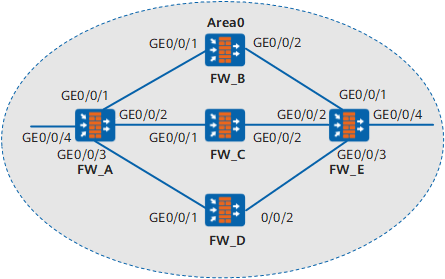
InFigure 1:
- FW_A, FW_B, FW_C, FW_D, and FW_E are connected to each other through OSPF.
- FW_A, FW_B, FW_C, FW_D, and FW_E belong to Area 0.
- Load balancing needs to be configured so that the traffic from FW_A to FW_E is load-balanced by FW_C and FW_D.
Device |
Interface |
IP Address |
Device |
Interface |
IP Address |
|---|---|---|---|---|---|
FW_A |
GE0/0/1 |
10.1.1.1/24 |
FW_C |
GE0/0/1 |
10.1.2.2/24 |
GE0/0/2 |
10.1.2.1/24 |
GE0/0/2 |
192.168.1.1/24 |
||
GE0/0/3 |
10.1.3.1/24 |
FW_D |
GE0/0/1 |
10.1.3.2/24 |
|
GE0/0/4 |
172.16.1.1./24 |
GE0/0/2 |
192.168.2.1/24 |
||
FW_B |
GE0/0/1 |
10.1.1.2/24 |
FW_E |
GE0/0/1 |
192.168.0.2/24 |
GE0/0/2 |
192.168.0.1/24 |
GE0/0/2 |
192.168.1.2/24 |
||
GE0/0/3 |
192.168.2.2/24 |
||||
GE0/0/4 |
172.17.1.1/24 |
Configuration Roadmap
The configuration roadmap is as follows:
- Enable basic OSPF functions on each FW for interconnection.
- Configure load balancing on FW_A.
- Configure a priority for equal-cost routes on FW_A.
Data Planning
To implement the configuration, you need to collect the following data:
- Router ID (1.1.1.1), OSPF process number (1), and network segments of Area 0 (10.1.1.0/24, 10.1.2.0/24, 10.1.3.0/24, and 172.16.1.0/24) of FW_A
- Router ID (2.2.2.2), OSPF process number (1), and network segments of Area 0 (10.1.1.0/8 and 192.168.0.0/8) of FW_B
- Router ID (3.3.3.3), OSPF process number (1), and network segments of Area 0 (10.1.2.0/8 and 192.168.1.0/8) of FW_C
- Router ID (4.4.4.4), OSPF process number (1), and network segments of Area 0 (10.1.3.0/8 and 192.168.2.0/8) of FW_D
- Router ID (5.5.5.5), OSPF process number (1), and network segments of Area 0 (192.168.0.0/24, 192.168.1.0/24, 192.168.2.0/24, and 172.17.1.0/24) of FW_E
- Number of equal-cost routes for load balancing on FW_A (2)
- Next hop weights of the routes from FW_A to FW_B, FW_C, and FW_D (2, 1, and 1, respectively)
Procedure
- Configure FW_A.
- Set interface IP addresses and assign the interfaces to security zones.
- Choose .
Click
 of GE0/0/1 and set required parameters.
Zone
trust
IPv4
IP Address
10.1.1.1/24
- Click OK.
- Repeat the preceding steps to configure other interfaces.
Interface Name
GE0/0/2
GE0/0/3
GE0/0/4
Zone
Trust
Trust
Trust
IP Address
10.1.2.1/24
10.1.3.1/24
172.16.1.1/24
- Configure basic OSPF functions.
Choose .
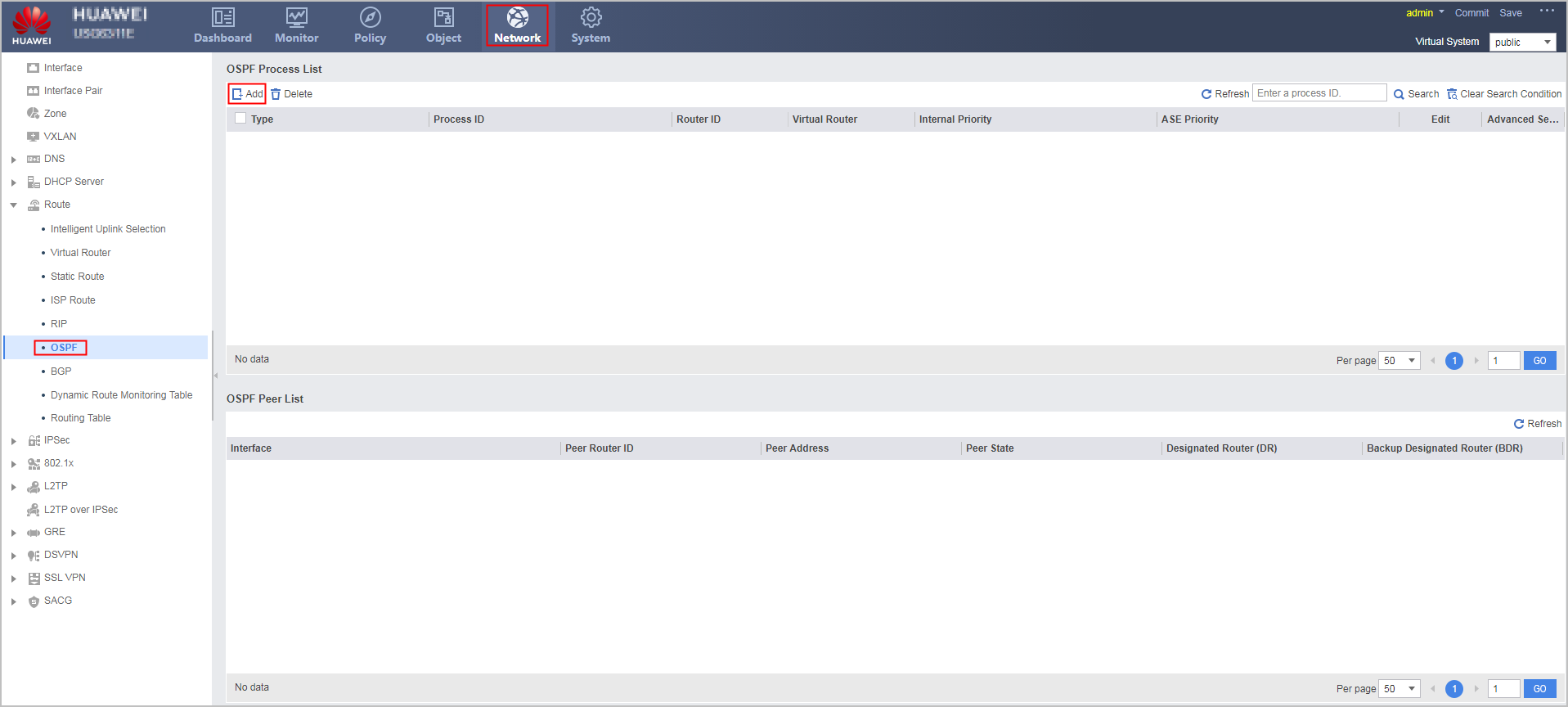
Click Add to create an OSPF process.
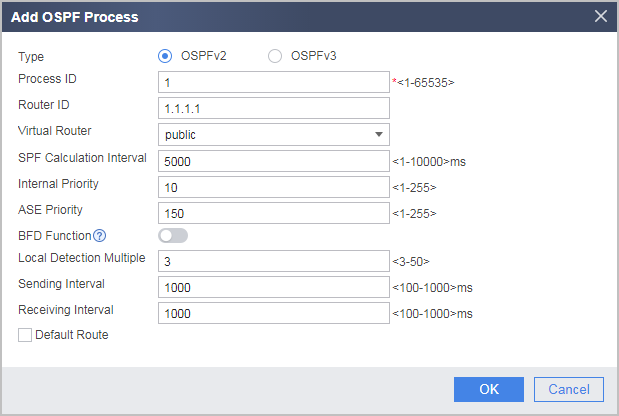
Configure the area where network segment 10.1.1.0 resides as Area 0.
- Click
 of the created OSPF process.
 - In the OSPFv2 Process ID:1 navigation tree, choose .
- Click Add and configure the area where network segment as Area 0.
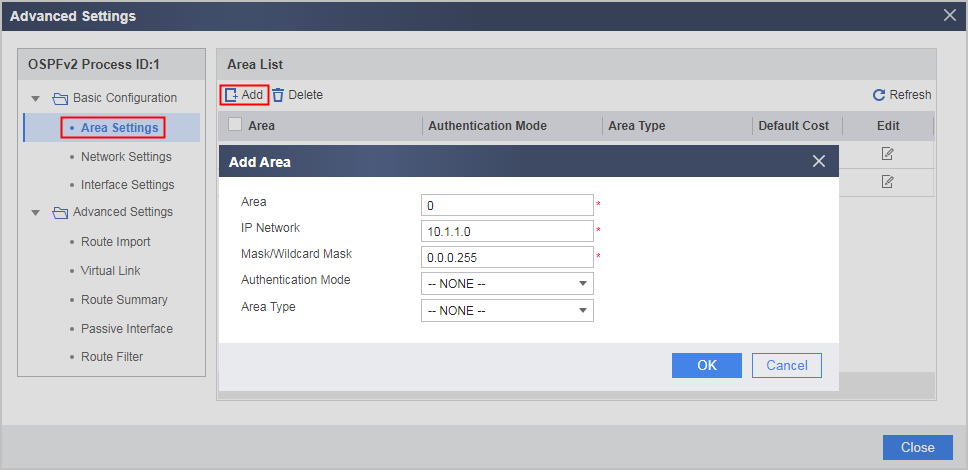
- Click OK.
- Click
- Repeat the preceding steps to configure the area where network segments 10.1.2.0, 10.1.3.0, and 172.16.1.0 reside as Area 0.
Advanced Settings
Area
0
IP Network
10.1.2.0
10.1.3.0
172.16.1.0
Mask/Wildcard Mask
0.0.0.255
- Set interface IP addresses and assign the interfaces to security zones.
- Configure FW_B.
- Configure FW_C.
- Configure FW_D.
- Configure FW_E.
Verification
# Check the routing table of FW_A.
[FW_A] display ip routing-table
Route Flags: R - relay, D - download to fib
----------------------------------------------------------------------------
Routing Tables: Public
         Destinations : 12       Routes : 13

Destination/Mask    Proto  Pre  Cost  Flags     NextHop         Interface

       10.1.1.0/24  Direct 0    0       D        10.1.1.1         GigabitEthernet 0/0/1
       10.1.1.2/32  Direct 0    0       D        10.1.1.2         GigabitEthernet 0/0/1
       10.1.2.0/24  Direct 0    0       D        10.1.2.1         GigabitEthernet 0/0/2
       10.1.2.2/32  Direct 0    0       D        10.1.2.2         GigabitEthernet 0/0/2
       10.1.3.0/24  Direct 0    0       D        10.1.2.1         GigabitEthernet 0/0/3
       10.1.3.2/32  Direct 0    0       D        10.1.2.2         GigabitEthernet 0/0/3
    192.168.0.0/24  OSPF   10   2       D        10.1.1.2         GigabitEthernet 0/0/1
    192.168.1.0/24  OSPF   10   2       D        10.1.2.2         GigabitEthernet 0/0/2
    192.168.2.0/24  OSPF   10   2       D        10.1.2.2         GigabitEthernet 0/0/3
     172.17.1.0/24  OSPF   10   3       D        10.1.2.2         GigabitEthernet 0/0/2
                    OSPF   10   3       D        10.1.3.2         GigabitEthernet 0/0/3
    127.0.0.0/8     Direct 0    0       D        127.0.0.1        InLoopBack0
    127.0.0.1/32    Direct 0    0       D        127.0.0.1        InLoopBack0
As shown in the routing table, the route with 10.1.2.2 and 10.1.3.2 as the next hop addresses has a higher priority than the route with 10.1.1.2 as the next hop address. Therefore, FW_A has only two valid next hops, FW_C (10.1.2.2) and FW_D (10.1.3.2).
Configuration Scripts
Configuration script of FW_A
#
  sysname FW_A
#
interface GigabitEthernet0/0/1
 undo shutdown
 ip address 10.1.1.1 255.255.255.0
#
interface GigabitEthernet0/0/2
 undo shutdown
 ip address 10.1.2.1 255.255.255.0
#
interface GigabitEthernet0/0/3
 undo shutdown
 ip address 10.1.3.1 255.255.255.0
#
interface GigabitEthernet0/0/4
 undo shutdown
 ip address 172.16.1.1 255.255.255.0
#
firewall zone trust
add interface GigabitEthernet 0/0/1
add interface GigabitEthernet 0/0/2
add interface GigabitEthernet 0/0/3
add interface GigabitEthernet 0/0/4
#
security-policy
  rule name policy_sec_1
    source-zone local
    source-zone trust
    destination-zone local
    destination-zone trust
    action permit
#
ospf 1 router-id 1.1.1.1
 maximum load-balancing 2
 nexthop 10.1.1.2 weight 2
 nexthop 10.1.2.2 weight 1
 nexthop 10.1.3.2 weight 1
 area 0.0.0.0
  network 10.1.1.0 0.0.0.255
  network 10.1.2.0 0.0.0.255
  network 10.1.3.0 0.0.0.255
  network 172.16.1.0 0.0.0.255
#
return
Configuration script of FW_B
#
  sysname FW_B
#
interface GigabitEthernet0/0/1
 undo shutdown
 ip address 10.1.1.2 255.255.255.0
#
interface GigabitEthernet0/0/2
 undo shutdown
 ip address 192.168.0.1 255.255.255.0
#
firewall zone trust
add interface GigabitEthernet 0/0/1
add interface GigabitEthernet 0/0/2
#
security-policy
  rule name policy_sec_1
    source-zone local
    source-zone trust
    destination-zone local
    destination-zone trust
    action permit
 #
ospf 1 router-id 2.2.2.2
 area 0.0.0.0
  network 10.1.1.0 0.255.255.255
  network 192.168.0.0 0.255.255.255
#
return
Configuration script of FW_C
#
  sysname FW_C
#
interface GigabitEthernet 0/0/1
 undo shutdown
 ip address 10.1.2.2 255.255.255.0
#
interface GigabitEthernet 0/0/2
 undo shutdown
 ip address 192.168.1.1 255.255.255.0
#
firewall zone trust
add interface GigabitEthernet 0/0/1
add interface GigabitEthernet 0/0/2
#
security-policy
  rule name policy_sec_1
    source-zone local
    source-zone trust
    destination-zone local
    destination-zone trust
    action permit
#
ospf 1 router-id 3.3.3.3
 area 0.0.0.0
  network 10.1.2.0 0.255.255.255
  network 192.168.1.0 0.255.255.255
#
return
Configuration script of FW_D
#
  sysname FW_D
#
interface GigabitEthernet 0/0/1
 undo shutdown
 ip address 10.1.3.2 255.255.255.0
#
interface GigabitEthernet 0/0/2
 undo shutdown
 ip address 192.168.2.1 255.255.255.0
#
firewall zone trust
add interface GigabitEthernet 0/0/1
add interface GigabitEthernet 0/0/2
#
security-policy
  rule name policy_sec_1
    source-zone local
    source-zone trust
    destination-zone local
    destination-zone trust
    action permit
#
ospf 1 router-id 4.4.4.4
 area 0.0.0.0
  network 10.1.3.0 0.255.255.255
  network 192.168.2.0 0.255.255.255
#
return
Configuration script of FW_E
#
  sysname FW_E
#
interface GigabitEthernet 0/0/1
 undo shutdown
 ip address 192.168.0.2 255.255.255.0
#
interface GigabitEthernet 0/0/2
 undo shutdown
 ip address 192.168.1.2 255.255.255.0
#
interface GigabitEthernet 0/0/3
 undo shutdown
 ip address 192.168.2.2 255.255.255.0
#
interface GigabitEthernet 0/0/4
 undo shutdown
 ip address 172.17.1.1 255.255.255.0
#
firewall zone trust
add interface GigabitEthernet 0/0/1
add interface GigabitEthernet 0/0/2
add interface GigabitEthernet 0/0/3
add interface GigabitEthernet 0/0/4
#
security-policy
  rule name policy_sec_1
    source-zone local
    source-zone trust
    destination-zone local
    destination-zone trust
    action permit
#
ospf 1 router-id 5.5.5.5
 area 0.0.0.0
  network 192.168.0.0 0.0.0.255
  network 192.168.1.0 0.0.0.255
  network 192.168.2.0 0.0.0.255
  network 172.17.1.0 0.0.0.255
#
return