CLI Example for Configuring Basic OSPF Functions
You can divide OSPF backbone and non-backbone areas to reduce the number of LSAs on the network and enhance the scalability of OSPF networks.
Networking Requirements
As shown in Figure 1, all the FWs run OSPF, and the whole Autonomous System (AS) is divided into three areas. The FW_A and FW_B serve as ABRs to forward the routes between these areas.
After the configuration, each FW can learn the routes from AS to all network segments.
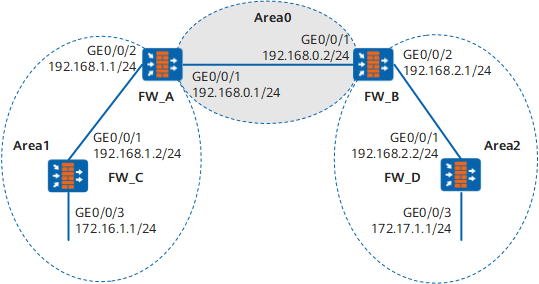
Configuration Roadmap
The configuration roadmap is as follows:
- Enabling OSPF on each FW and specifying the network segment in different area
- Checking the routing list and database information
Data Preparation
To complete the configuration, you need the following data:
- The router ID of the FW_A is 1.1.1.1. The OSPF process number is 1. Network segment 192.168.0.0/24 is specified in Area 0, and network segment 192.168.1.0/24 is specified in Area 1.
- The router ID of the FW_B is 2.2.2.2. The OSPF process number is 1. Network segment 192.168.0.0/24 is specified in Area 0, and network segment 192.168.2.0/24 is specified in Area 2.
- The router ID of the FW_C is 3.3.3.3. The OSPF process number is 1. Network segment 192.168.1.0/24 and 172.16.1.0/24 are specified in Area 1.
- The router ID of the FW_D is 4.4.4.4. The OSPF process number is 1. Network segment 192.168.2.0/24 and 172.17.1.0/24 are specified in Area 2.
Procedure
- Set the IP addresses for the interfaces, add the interfaces to security zones, and configure the security policy.
# Configure FW_A.
<FW> system-view
[FW] sysname FW_A
[FW_A] interface GigabitEthernet 0/0/1
[FW_A-GigabitEthernet0/0/1] ip address 192.168.0.1 24
[FW_A-GigabitEthernet0/0/1] quit
[FW_A] interface GigabitEthernet 0/0/2
[FW_A-GigabitEthernet0/0/2] ip address 192.168.1.1 24
[FW_A-GigabitEthernet0/0/2] quit
[FW_A] firewall zone trust
[FW_A-zone-trust] add interface GigabitEthernet 0/0/1
[FW_A-zone-trust] add interface GigabitEthernet 0/0/2
[FW_A-zone-trust] quit
[FW_A] security-policy
[FW_A-policy-security] rule name policy_sec_1
[FW_A-policy-security-rule-policy_sec_1] source-zone trust local
[FW_A-policy-security-rule-policy_sec_1] destination-zone local trust
[FW_A-policy-security-rule-policy_sec_1] action permit
[FW_A-policy-security-rule-policy_sec_1] quit
# Configure FW_B.
<FW> system-view
[FW] sysname FW_B
[FW_B] interface GigabitEthernet 0/0/1
[FW_B-GigabitEthernet0/0/1] ip address 192.168.0.2 24
[FW_B-GigabitEthernet0/0/1] quit
[FW_B] interface GigabitEthernet 0/0/2
[FW_B-GigabitEthernet0/0/2] ip address 192.168.2.1 24
[FW_B-GigabitEthernet0/0/2] quit
[FW_B] firewall zone trust
[FW_B-zone-trust] add interface GigabitEthernet 0/0/1
[FW_B-zone-trust] add interface GigabitEthernet 0/0/2
[FW_B-zone-trust] quit
[FW_B] security-policy
[FW_B-policy-security] rule name policy_sec_1
[FW_B-policy-security-rule-policy_sec_1] source-zone trust local
[FW_B-policy-security-rule-policy_sec_1] destination-zone local trust
[FW_B-policy-security-rule-policy_sec_1] action permit
[FW_B-policy-security-rule-policy_sec_1] quit
# Configure FW_C.
<FW> system-view
[FW] sysname FW_C
[FW_C] interface GigabitEthernet 0/0/1
[FW_C-GigabitEthernet0/0/1] ip address 192.168.1.2 24
[FW_C-GigabitEthernet0/0/1] quit
[FW_C] interface GigabitEthernet 0/0/3
[FW_C-GigabitEthernet0/0/3] ip address 172.16.1.1 24
[FW_C-GigabitEthernet0/0/3] quit
[FW_C] firewall zone trust
[FW_C-zone-trust] add interface GigabitEthernet 0/0/1
[FW_C-zone-trust] add interface GigabitEthernet 0/0/3
[FW_C-zone-trust] quit
[FW_C] security-policy
[FW_C-policy-security] rule name policy_sec_1
[FW_C-policy-security-rule-policy_sec_1] source-zone trust local
[FW_C-policy-security-rule-policy_sec_1] destination-zone local trust
[FW_C-policy-security-rule-policy_sec_1] action permit
[FW_C-policy-security-rule-policy_sec_1] quit
# Configure FW_D.
<FW> system-view
[FW] sysname FW_D
[FW_D] interface GigabitEthernet 0/0/1
[FW_D-GigabitEthernet0/0/1] ip address 192.168.2.2 24
[FW_D-GigabitEthernet0/0/1] quit
[FW_D] interface GigabitEthernet 0/0/3
[FW_D-GigabitEthernet0/0/3] ip address 172.17.1.1 24
[FW_D-GigabitEthernet0/0/3] quit
[FW_D] firewall zone trust
[FW_D-zone-trust] add interface GigabitEthernet 0/0/1
[FW_D-zone-trust] add interface GigabitEthernet 0/0/3
[FW_D-zone-trust] quit
[FW_D] security-policy
[FW_D-policy-security] rule name policy_sec_1
[FW_D-policy-security-rule-policy_sec_1] source-zone trust local
[FW_D-policy-security-rule-policy_sec_1] destination-zone local trust
[FW_D-policy-security-rule-policy_sec_1] action permit
[FW_D-policy-security-rule-policy_sec_1] quit
- Configure basic OSPF functions on the FW_A.
# Set the router ID for the FW_A to 1.1.1.1.
[FW_A] router id 1.1.1.1# Enable OSPF on the FW_A.
[FW_A] ospf# Set the area where network segment 192.168.0.0 resides as area 0.
[FW_A-ospf-1] area 0
[FW_A-ospf-1-area-0.0.0.0] network 192.168.0.0 0.0.0.255
# Return to the OSPF view.
[FW_A-ospf-1-area-0.0.0.0] quit# Set the area where network segment 192.168.1.0 resides as area 1.
[FW_A-ospf-1] area 1
[FW_A-ospf-1-area-0.0.0.1] network 192.168.1.0 0.0.0.255
# Return to the OSPF view.
[FW_A-ospf-1-area-0.0.0.1] quit - Configure basic OSPF functions on the FW_B.
# Set the router ID for the FW_B to 2.2.2.2.
[FW_B] router id 2.2.2.2# Enable OSPF on the FW_B.
[FW_B] ospf# Set the area where network segment 192.168.0.0 resides as area 0.
[FW_B-ospf-1] area 0
[FW_B-ospf-1-area-0.0.0.0] network 192.168.0.0 0.0.0.255
# Return to the OSPF view.
[FW_B-ospf-1-area-0.0.0.0] quit# Set the area where network segment 192.168.2.0 resides as area 2.
[FW_B-ospf-1] area 2
[FW_B-ospf-1-area-0.0.0.2] network 192.168.2.0 0.0.0.255
# Return to the OSPF view.
[FW_B-ospf-1-area-0.0.0.2] quit - Configure basic OSPF functions on the FW_C.
# Set the router ID for the FW_C to 3.3.3.3.
[FW_C] router id 3.3.3.3# Enable OSPF on the FW_C.
[FW_C] ospf# Set the area where network segment192.168.1.0 and 172.16.1.0 reside as area 1.
[FW_C-ospf-1] area 1
[FW_C-ospf-1-area-0.0.0.1] network 192.168.1.0 0.0.0.255
[FW_C-ospf-1-area-0.0.0.1] network 172.16.1.0 0.0.0.255# Return to the OSPF view.
[FW_C-ospf-1-area-0.0.0.1] quit - Configure basic OSPF functions on the FW_D.
# Set the route ID for the FW_D to 4.4.4.4.
[FW_D] router id 4.4.4.4# Enable OSPF on the FW_D.
[FW_D] ospf# Set the area where network segment 192.168.2.0 and 172.17.1.0 reside as area 2.
[FW_D-ospf-1] area 2
[FW_D-ospf-1-area-0.0.0.2] network 192.168.2.0 0.0.0.255
[FW_D-ospf-1-area-0.0.0.2] network 172.17.1.0 0.0.0.255
# Return to the OSPF view.
[FW_D-ospf-1-area-0.0.0.2] quit - Verify the configuration.
# Display OSPF neighbors of the FW_A.
[FW_A] display ospf peer

          OSPF Process 1 with Router ID 1.1.1.1
                  Neighbors

 Area 0.0.0.0 interface 192.168.0.1(GigabitEthernet0/0/1)'s neighbors
 Router ID: 2.2.2.2      Address: 192.168.0.2      GR State: Normal
   State: Full  Mode:Nbr is  Master  Priority: 1
   DR: None   BDR: None   MTU: 0
   Dead timer due in 36  sec
   Neighbor is up for 00:15:04
   Authentication Sequence: [ 0 ]

                  Neighbors

 Area 0.0.0.1 interface 192.168.1.1(GigabitEthernet0/0/2)'s neighbors
 Router ID: 3.3.3.3       Address: 192.168.1.2      GR State: Normal
   State: Full  Mode:Nbr is  Slave  Priority: 1
   DR: None   BDR: None   MTU: 0
   Dead timer due in 39  sec
   Neighbor is up for 00:07:32
   Authentication Sequence: [ 0 ]
# Display the OSPF routing information of the FW_A.
[FW_A] display ospf routing

          OSPF Process 1 with Router ID 1.1.1.1
                   Routing Tables

 Routing for Network
 Destination        Cost  Type       NextHop         AdvRouter       Area
 172.16.1.0/24      2  Stub       192.168.1.2     3.3.3.3      0.0.0.1
 172.17.1.0/24      3  Inter-area 192.168.0.2     2.2.2.2     0.0.0.0
 192.168.1.0/24     1  Transit    192.168.1.1     1.1.1.1     0.0.0.1
 192.168.2.0/24     2  Inter-area 192.168.0.2     2.2.2.2     0.0.0.0
 192.168.0.0/24     1  Transit    192.168.0.1     1.1.1.1     0.0.0.0

 Total Nets: 5
 Intra Area: 3  Inter Area: 2  ASE: 0  NSSA: 0
# Display LSDB of the FW_A.
[FW_A] display ospf lsdb

          OSPF Process 1 with Router ID 1.1.1.1
                  Link State Data Base

                          Area: 0.0.0.0
 Type      LinkState ID    AdvRouter          Age  Len   Sequence   Metric
 Router    2.2.2.2         2.2.2.2            317  48    80000003    1
 Router    1.1.1.1         1.1.1.1            316  48    80000003    1
 Sum-Net   172.16.1.0      1.1.1.1            250  28    80000002    2
 Sum-Net   172.17.1.0      2.2.2.2            203  28    80000002    2
 Sum-Net   192.168.2.0     2.2.2.2            237  28    80000003    1
 Sum-Net   192.168.1.0     1.1.1.1            295  28    80000003    1

                          Area: 0.0.0.1
Type      LinkState ID    AdvRouter          Age  Len   Sequence   Metric
 Router    3.3.3.3         3.3.3.3            217  60    80000006    1
 Router    1.1.1.1         1.1.1.1            289  48    80000003    1
 Sum-Net   172.17.1.0      1.1.1.1            202  28    80000002    3
 Sum-Net   192.168.2.0     1.1.1.1            242  28    80000002    2
 Sum-Net   192.168.0.0     1.1.1.1            300  28    80000002    1
# Display the routing table of the FW_D and test the connectivity by using the ping command.
[FW_D] display ospf routing OSPF Process 1 with Router ID 4.4.4.4 Routing Tables Routing for Network Destination Cost Type NextHop AdvRouter Area 172.16.1.0/24 4 Inter-area 192.168.2.1 2.2.2.2 0.0.0.2 172.17.1.0/24 1 Stub 172.17.1.1 4.4.4.4 0.0.0.2 192.168.0.0/24 2 Inter-area 192.168.2.1 2.2.2.2 0.0.0.2 192.168.1.0/24 3 Inter-area 192.168.2.1 2.2.2.2 0.0.0.2 192.168.2.0/24 1 Transit 192.168.2.2 4.4.4.4 0.0.0.2 Total Nets: 5 Intra Area: 2 Inter Area: 3 ASE: 0 NSSA: 0[FW_D] ping 172.16.1.1 PING 172.16.1.1: 56 data bytes, press CTRL_C to break Reply from 172.16.1.1: bytes=56 Sequence=1 ttl=253 time=62 ms Reply from 172.16.1.1: bytes=56 Sequence=2 ttl=253 time=16 ms Reply from 172.16.1.1: bytes=56 Sequence=3 ttl=253 time=62 ms Reply from 172.16.1.1: bytes=56 Sequence=4 ttl=253 time=94 ms Reply from 172.16.1.1: bytes=56 Sequence=5 ttl=253 time=63 ms --- 172.16.1.1 ping statistics --- 5 packet(s) transmitted 5 packet(s) received 0.00% packet loss round-trip min/avg/max = 16/59/94 ms
Configuration Script
Configuration script of FW_A
 sysname FW_A
#
router id 1.1.1.1
#
interface GigabitEthernet0/0/1
 undo shutdown
 ip address 192.168.0.1 255.255.255.0
#
firewall zone trust
add interface GigabitEthernet 0/0/1
#
interface GigabitEthernet0/0/2
 undo shutdown
 ip address 192.168.1.1 255.255.255.0
#
firewall zone trust
add interface GigabitEthernet 0/0/2
#
security-policy
  rule name policy_sec_1
    source-zone local
    source-zone trust
    destination-zone local
    destination-zone trust
    action permit
#
ospf 1
 area 0.0.0.0
  network 192.168.0.0 0.0.0.255
 area 0.0.0.1
  network 192.168.1.0 0.0.0.255
#
return
Configuration script of FW_B
#
 sysname FW_B
#
router id 2.2.2.2
#
interface GigabitEthernet0/0/1
 undo shutdown
 ip address 192.168.0.2 255.255.255.0
#
firewall zone trust
add interface GigabitEthernet 0/0/1
#
interface GigabitEthernet0/0/2
 undo shutdown
 ip address 192.168.2.1 255.255.255.0
#
firewall zone trust
add interface GigabitEthernet 0/0/2
#
security-policy
  rule name policy_sec_1
    source-zone local
    source-zone trust
    destination-zone local
    destination-zone trust
    action permit
#
ospf 1
 area 0.0.0.0
  network 192.168.0.0 0.0.0.255
 area 0.0.0.2
  network 192.168.2.0 0.0.0.255
#
return
Configuration script of FW_C
#
 sysname FW_C
#
router id 3.3.3.3
#
interface GigabitEthernet0/0/1
 undo shutdown
 ip address 192.168.1.2 255.255.255.0
#
firewall zone trust
add interface GigabitEthernet 0/0/1
#
interface GigabitEthernet0/0/3
 undo shutdown
 ip address 172.16.1.1 255.255.255.0
#
firewall zone trust
add interface GigabitEthernet 0/0/3
#
security-policy
  rule name policy_sec_1
    source-zone local
    source-zone trust
    destination-zone local
    destination-zone trust
    action permit
#
ospf 1
 area 0.0.0.1
  network 172.16.1.0 0.0.0.255
  network 192.168.1.0 0.0.0.255
#
return
Configuration script of FW_D
#
 sysname FW_D
#
router id 4.4.4.4
#
interface GigabitEthernet0/0/1
 undo shutdown
 ip address 192.168.2.2 255.255.255.0
#
firewall zone trust
add interface GigabitEthernet 0/0/1
#
interface GigabitEthernet0/0/3
 undo shutdown
 ip address 172.17.1.1 255.255.255.0
#
firewall zone trust
add interface GigabitEthernet 0/0/3
#
security-policy
  rule name policy_sec_1
    source-zone local
    source-zone trust
    destination-zone local
    destination-zone trust
    action permit
#
ospf 1
 area 0.0.0.2
  network 172.17.1.0 0.0.0.255
  network 192.168.2.0 0.0.0.255
#
return