CLI Example for Configuring OSPF Load Balancing
When there are several paths of the same cost to one destination, you can configure the load balancing of equal-cost routes. In this way, load balancing is implemented on these links, thus improving the link usage.
Networking Requirements
As shown in Figure 1:
- FW_A, FW_B, FW_C, FW_D, and FW_E are interconnected to each other through OSPF
- FW_A, FW_B, FW_C, FW_D, and FW_E belong to Area 0.
- Load balancing is required to transmit the traffic of FW_A to FW_E through FW_C and FW_D.
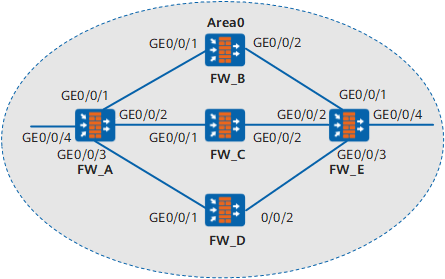
Device |
Interface |
IP Address |
Device |
Interface |
IP Address |
|---|---|---|---|---|---|
FW_A |
GE0/0/1 |
10.1.1.1/24 |
FW_C |
GE0/0/1 |
10.1.2.2/24 |
GE0/0/2 |
10.1.2.1/24 |
GE0/0/2 |
192.168.1.1/24 |
||
GE0/0/3 |
10.1.3.1/24 |
FW_D |
GE0/0/1 |
10.1.3.2/24 |
|
GE0/0/4 |
172.16.1.1./24 |
GE0/0/2 |
192.168.2.1/24 |
||
FW_B |
GE0/0/0 |
10.1.1.2/24 |
FW_E |
GE0/0/1 |
192.168.0.2/24 |
GE0/0/10 |
192.168.0.1/24 |
GE0/0/2 |
192.168.1.2/24 |
||
GE0/0/3 |
192.168.2.2/24 |
||||
GE0/0/4 |
172.17.1.1/24 |
Configuration Roadmap
The configuration roadmap is as follows:
- Enable basic OSPF functions on each FW.
- Configure load balancing on FW_A.
- Configure the priority for equal-cost routes on FW_A.
Data Preparation
To complete the configuration, you need the following data:
- For FW_A, the router ID is 1.1.1.1, the OSPF process number is 1, and the network segment of Area 0 is 10.1.1.0/24, 10.1.2.0/24, 10.1.3.0/24, and 172.16.1.0/24.
- For FW_B, the router ID is 2.2.2.2, the OSPF process number is 1, and the network segment of Area 0 is 10.1.1.0/8 and 192.168.0.0/8.
- For FW_C, the router ID is 3.3.3.3, the OSPF process number is 1, and the network segment of Area 0 is 10.1.2.0/8 and 192.168.1.0/8.
- For FW_D, the router ID is 4.4.4.4, the OSPF process number is 1, and the network segment of Area 0 is 10.1.3.0/8 and 192.168.2.0/8.
- For FW_E, the router ID is 5.5.5.5, the OSPF process number is 1, and the network segment of Area 0 is 192.168.0.0/24, 192.168.1.0/24, 192.168.2.0/24, and 172.17.1.0/24.
- The number of load balancing paths on FW_A is 2.
- The weight values of the next hop routes from FW_A to FW_B, FW_C, and FW_D are 2, 1, and 1 respectively.
Procedure
- Set the IP addresses for the interfaces, add the interfaces to security zones, and configure the interzone security policy.
# Configure FW_A.
<FW> system-view
[FW] sysname FW_A
[FW_A] interface GigabitEthernet 0/0/1
[FW_A-GigabitEthernet0/0/1] ip address 10.1.1.1 24
[FW_A-GigabitEthernet0/0/1] quit
[FW_A] interface GigabitEthernet 0/0/2
[FW_A-GigabitEthernet0/0/2] ip address 10.1.2.1 24
[FW_A-GigabitEthernet0/0/2] quit
[FW_A]GigabitEthernet 0/0/3
[FW_A-GigabitEthernet0/0/3] ip address 10.1.3.1 24
[FW_A-GigabitEthernet0/0/3] quit
[FW_A] interface GigabitEthernet 0/0/4
[FW_A-GigabitEthernet0/0/4] ip address 172.16.1.1 24
[FW_A-GigabitEthernet0/0/4] quit
[FW_A] firewall zone trust
[FW_A-zone-trust] add interface GigabitEthernet 0/0/1
[FW_A-zone-trust] add interface GigabitEthernet 0/0/2
[FW_A-zone-trust] add interface GigabitEthernet 0/0/3
[FW_A-zone-trust] add interface GigabitEthernet 0/0/4
[FW_A-zone-trust] quit
[FW_A] security-policy
[FW_A-policy-security] rule name policy_sec_1
[FW_A-policy-security-rule-policy_sec_1] source-zone trust local
[FW_A-policy-security-rule-policy_sec_1] destination-zone local trust
[FW_A-policy-security-rule-policy_sec_1] action permit
[FW_A-policy-security-rule-policy_sec_1] quit
# Configure FW_B.
<FW> system-view
[FW] sysname FW_B
[FW_B] interface GigabitEthernet 0/0/1
[FW_B-GigabitEthernet0/0/1] ip address 10.1.1.2 24
[FW_B-GigabitEthernet0/0/1] quit
[FW_B] interface GigabitEthernet 0/0/2
[FW_B-GigabitEthernet0/0/2] ip address 192.168.0.1 24
[FW_B-GigabitEthernet0/0/2] quit
[FW_B] firewall zone trust
[FW_B-zone-trust] add interface GigabitEthernet 0/0/1
[FW_B-zone-trust] add interface GigabitEthernet 0/0/2
[FW_B-zone-trust] quit
[FW_B] security-policy
[FW_B-policy-security] rule name policy_sec_1
[FW_B-policy-security-rule-policy_sec_1] source-zone trust local
[FW_B-policy-security-rule-policy_sec_1] destination-zone local trust
[FW_B-policy-security-rule-policy_sec_1] action permit
[FW_B-policy-security-rule-policy_sec_1] quit
# Configure FW_C.
<FW> system-view
[FW] sysname FW_C
[FW_C] interface GigabitEthernet 0/0/1
[FW_C-GigabitEthernet0/0/1] ip address 10.1.2.2 24
[FW_C-GigabitEthernet0/0/1] quit
[FW_C] interface GigabitEthernet 0/0/2
[FW_C-GigabitEthernet0/0/2] ip address 192.168.1.1 24
[FW_C-GigabitEthernet0/0/2] quit
[FW_C] firewall zone trust
[FW_C-zone-trust] add interface GigabitEthernet 0/0/1
[FW_C-zone-trust] add interface GigabitEthernet 0/0/2
[FW_C-zone-trust] quit
[FW_C] security-policy
[FW_C-policy-security] rule name policy_sec_1
[FW_C-policy-security-rule-policy_sec_1] source-zone trust local
[FW_C-policy-security-rule-policy_sec_1] destination-zone local trust
[FW_C-policy-security-rule-policy_sec_1] action permit
[FW_C-policy-security-rule-policy_sec_1] quit
# Configure FW_D.
<FW> system-view
[FW] sysname FW_D
[FW_D] interface GigabitEthernet 0/0/1
[FW_D-GigabitEthernet0/0/1] ip address 10.1.3.2 24
[FW_D-GigabitEthernet0/0/1] quit
[FW_D] interface GigabitEthernet 0/0/2
[FW_D-GigabitEthernet0/0/2] ip address 192.168.2.1 24
[FW_D-GigabitEthernet0/0/2] quit
[FW_D] firewall zone trust
[FW_D-zone-trust] add interface GigabitEthernet 0/0/1
[FW_D-zone-trust] add interface GigabitEthernet 0/0/2
[FW_D-zone-trust] quit
[FW_D] security-policy
[FW_D-policy-security] rule name policy_sec_1
[FW_D-policy-security-rule-policy_sec_1] source-zone trust local
[FW_D-policy-security-rule-policy_sec_1] destination-zone local trust
[FW_D-policy-security-rule-policy_sec_1] action permit
[FW_D-policy-security-rule-policy_sec_1] quit
# Configure FW_E.
<FW> system-view
[FW] sysname FW_E
[FW_E] interface GigabitEthernet 0/0/1
[FW_E-GigabitEthernet0/0/1] ip address 192.168.0.2 24
[FW_E-GigabitEthernet0/0/1] quit
[FW_E] interface GigabitEthernet 0/0/2
[FW_E-GigabitEthernet0/0/2] ip address 192.168.1.2 24
[FW_E-GigabitEthernet0/0/2] quit
[FW_E] interface GigabitEthernet 0/0/3
[FW_E-GigabitEthernet0/0/3] ip address 192.168.2.2 24
[FW_E-GigabitEthernet0/0/3] quit
[FW_E] interface GigabitEthernet 0/0/4
[FW_E-GigabitEthernet0/0/4] ip address 172.17.1.1 24
[FW_E-GigabitEthernet0/0/4] quit
[FW_E] firewall zone trust
[FW_E-zone-trust] add interface GigabitEthernet 0/0/1
[FW_E-zone-trust] add interface GigabitEthernet 0/0/2
[FW_E-zone-trust] add interface GigabitEthernet 0/0/3
[FW_E-zone-trust] add interface GigabitEthernet 0/0/4
[FW_E-zone-trust] quit
[FW_E] security-policy
[FW_E-policy-security] rule name policy_sec_1
[FW_E-policy-security-rule-policy_sec_1] source-zone trust local
[FW_E-policy-security-rule-policy_sec_1] destination-zone local trust
[FW_E-policy-security-rule-policy_sec_1] action permit
[FW_E-policy-security-rule-policy_sec_1] quit
- Configure OSPF.
# Enable OSPF on the FW_A and set the router ID for the FW_A to 1.1.1.1.
[FW_A] ospf 1 router-id 1.1.1.1# Configure network segment 10.1.1.0,10.1.2.0,10.1.3.0 and 172.16.1.0 as Area 0.
[FW_A-ospf-1] area 0
[FW_A-ospf-1-area-0.0.0.0] network 10.1.1.0 0.0.0.255
[FW_A-ospf-1-area-0.0.0.0] network 10.1.2.0 0.0.0.255
[FW_A-ospf-1-area-0.0.0.0] network 10.1.3.0 0.0.0.255
[FW_A-ospf-1-area-0.0.0.0] network 172.16.1.0 0.0.0.255
# Enable OSPF on the FW_B and set the router ID for the FW_B to 2.2.2.2.
[FW_B] ospf 1 router-id 2.2.2.2# Configure network segment 10.1.1.0 and 192.168.0.0 as Area 0.
[FW_B-ospf-1] area 0
[FW_B-ospf-1-area-0.0.0.0] network 10.1.1.0 0.255.255.255
[FW_B-ospf-1-area-0.0.0.0] network 192.168.0.0 0.255.255.255
# Enable OSPF on the FW_C and set the router ID for the FW_C to 3.3.3.3.
[FW_C] ospf 1 router-id 3.3.3.3# Configure network segment 10.1.2.0 and 192.168.1.0 as Area 0.
[FW_C-ospf-1] area 0
[FW_C-ospf-1-area-0.0.0.0] network 10.1.2.0 0.255.255.255
[FW_C-ospf-1-area-0.0.0.0] network 192.168.1.0 0.255.255.255
# Enable OSPF on the FW_D and set the router ID for the FW_D to 4.4.4.4.
[FW_D] ospf 1 router-id 4.4.4.4# Configure network segment 10.1.3.0 and 192.168.2.0 as Area 0.
[FW_D-ospf-1] area 0
[FW_D-ospf-1-area-0.0.0.0] network 10.1.3.0 0.255.255.255
[FW_D-ospf-1-area-0.0.0.0] network 192.168.2.0 0.255.255.255
# Enable OSPF on the FW_E and set the router ID for the FW_E to 5.5.5.5.
[FW_E] ospf 1 router-id 5.5.5.5# Configure network segment 192.168.0.0,192.168.1.0,192.168.2.0 and 172.17.1.0 as Area 0.
[FW_E-ospf-1] area 0
[FW_E-ospf-1-area-0.0.0.0] network 192.168.0.0 0.0.0.255
[FW_E-ospf-1-area-0.0.0.0] network 192.168.1.0 0.0.0.255
[FW_E-ospf-1-area-0.0.0.0] network 192.168.2.0 0.0.0.255
[FW_E-ospf-1-area-0.0.0.0] network 172.17.1.0 0.0.0.255
- View the routing table of FW_A.
As displayed in the routing table, FW_A has three valid next hops: 10.1.1.2 (FW_B), 10.1.2.2 (FW_C), and 10.1.3.2 (FW_D). This is because the default maximum number of equal-cost routes is 6.
<FW_A> display ip routing-table
Route Flags: R - relay, D - download to fib
----------------------------------------------------------------------------
Routing Tables: Public
         Destinations : 12       Routes : 14
Destination/Mask    Proto  Pre  Cost  Flags     NextHop         Interface

       10.1.1.0/24  Direct 0    0       D        10.1.1.1         GigabitEthernet 0/0/1
       10.1.1.2/32  Direct 0    0       D        10.1.1.2         GigabitEthernet 0/0/1
       10.1.2.0/24  Direct 0    0       D        10.1.2.1         GigabitEthernet 0/0/2
       10.1.2.2/32  Direct 0    0       D        10.1.2.2         GigabitEthernet 0/0/2
       10.1.3.0/24  Direct 0    0       D        10.1.2.1         GigabitEthernet 0/0/3
       10.1.3.2/32  Direct 0    0       D        10.1.2.2         GigabitEthernet 0/0/3
    192.168.0.0/24  OSPF   10   2       D        10.1.1.2         GigabitEthernet 0/0/1
    192.168.1.0/24  OSPF   10   2       D        10.1.2.2         GigabitEthernet 0/0/2
    192.168.2.0/24  OSPF   10   2       D        10.1.2.2         GigabitEthernet 0/0/3
     172.17.1.0/24  OSPF   10   3       D        10.1.1.2         GigabitEthernet 0/0/1
                    OSPF   10   3       D        10.1.2.2         GigabitEthernet 0/0/2
                    OSPF   10   3       D        10.1.3.2         GigabitEthernet 0/0/3
    127.0.0.0/8     Direct 0    0       D        127.0.0.1        InLoopBack0
    127.0.0.1/32    Direct 0    0       D        127.0.0.1        InLoopBack0

The maximum number of equal-cost routes varies with products and protocols.
- Configure a maximum of two routes on FW_A to perform load balancing.
[FW_A] ospf 1
[FW_A-ospf-1] maximum load-balancing 2
[FW_A-ospf-1] quit# View the routing table of FW_A. As shown in the routing table, FW_A has only two valid next hops, 10.1.1.2 (FW_B) and 10.1.2.2 (FW_C). This is because the maximum number of equal-cost routes is set to 2.
[FW_A] display ip routing-table
Route Flags: R - relay, D - download to fib
----------------------------------------------------------------------------
Routing Tables: Public
         Destinations : 12       Routes : 13

Destination/Mask    Proto  Pre  Cost  Flags     NextHop         Interface

       10.1.1.0/24  Direct 0    0       D        10.1.1.1         GigabitEthernet 0/0/1
       10.1.1.2/32  Direct 0    0       D        10.1.1.2         GigabitEthernet 0/0/1
       10.1.2.0/24  Direct 0    0       D        10.1.2.1         GigabitEthernet 0/0/2
       10.1.2.2/32  Direct 0    0       D        10.1.2.2         GigabitEthernet 0/0/2
       10.1.3.0/24  Direct 0    0       D        10.1.2.1         GigabitEthernet 0/0/3
       10.1.3.2/32  Direct 0    0       D        10.1.2.2         GigabitEthernet 0/0/3
    192.168.0.0/24  OSPF   10   2       D        10.1.1.2         GigabitEthernet 0/0/1
    192.168.1.0/24  OSPF   10   2       D        10.1.2.2         GigabitEthernet 0/0/2
    192.168.2.0/24  OSPF   10   2       D        10.1.2.2         GigabitEthernet 0/0/3
     172.17.1.0/24  OSPF   10   3       D        10.1.1.2         GigabitEthernet 0/0/1
                    OSPF   10   3       D        10.1.2.2         GigabitEthernet 0/0/2
    127.0.0.0/8     Direct 0    0       D        127.0.0.1        InLoopBack0
    127.0.0.1/32    Direct 0    0       D        127.0.0.1        InLoopBack0
- Configure the priority for equal-cost routes on FW_A.
[FW_A] ospf 1
[FW_A-ospf-1] nexthop 10.1.1.2 weight 2
[FW_A-ospf-1] nexthop 10.1.2.2 weight 1
[FW_A-ospf-1] nexthop 10.1.3.2 weight 1
[FW_A-ospf-1] quit
# View the OSPF routing table of FW_A.
[FW_A] display ip routing-table
Route Flags: R - relay, D - download to fi
----------------------------------------------------------------------------
Routing Tables: Public
         Destinations : 12       Routes : 13

Destination/Mask    Proto  Pre  Cost  Flags     NextHop         Interface

       10.1.1.0/24  Direct 0    0       D        10.1.1.1         GigabitEthernet 0/0/1
       10.1.1.2/32  Direct 0    0       D        10.1.1.2         GigabitEthernet 0/0/1
       10.1.2.0/24  Direct 0    0       D        10.1.2.1         GigabitEthernet 0/0/2
       10.1.2.2/32  Direct 0    0       D        10.1.2.2         GigabitEthernet 0/0/2
       10.1.3.0/24  Direct 0    0       D        10.1.2.1         GigabitEthernet 0/0/3
       10.1.3.2/32  Direct 0    0       D        10.1.2.2         GigabitEthernet 0/0/3
    192.168.0.0/24  OSPF   10   2       D        10.1.1.2         GigabitEthernet 0/0/1
    192.168.1.0/24  OSPF   10   2       D        10.1.2.2         GigabitEthernet 0/0/2
    192.168.2.0/24  OSPF   10   2       D        10.1.2.2         GigabitEthernet 0/0/3
     172.17.1.0/24  OSPF   10   3       D        10.1.2.2         GigabitEthernet 0/0/2
                    OSPF   10   3       D        10.1.3.2         GigabitEthernet 0/0/3
    127.0.0.0/8     Direct 0    0       D        127.0.0.1        InLoopBack0
    127.0.0.1/32    Direct 0    0       D        127.0.0.1        InLoopBack0
As shown in the display, the priority of the route with the next hops being 10.1.2.2 and 10.1.3.2 is higher than that of the route with the next hop being 10.1.1.2. Thus, FW_A has only two valid next hops, 10.1.2.2 (FW_C) and 10.1.3.2 (FW_D).
Configuration Scripts
Configuration script of FW_A
#
  sysname FW_A
#
interface GigabitEthernet 0/0/1
 undo shutdown
 ip address 10.1.1.1 255.255.255.0
#
interface GigabitEthernet 0/0/2
 undo shutdown
 ip address 10.1.2.1 255.255.255.0
#
interface GigabitEthernet0/0/3
 undo shutdown
 ip address 10.1.3.1 255.255.255.0
#
interface GGigabitEthernet0/0/4
 undo shutdown
 ip address 172.16.1.1 255.255.255.0
#
firewall zone trust
add interface GigabitEthernet 0/0/1
add interface GigabitEthernet 0/0/2
add interface GigabitEthernet0/0/3
add interface GigabitEthernet0/0/4
#
security-policy
  rule name policy_sec_1
    source-zone local
    source-zone trust
    destination-zone local
    destination-zone trust
    action permit
#
ospf 1 router-id 1.1.1.1
 maximum load-balancing 2
 nexthop 10.1.1.2 weight 2
 nexthop 10.1.2.2 weight 1
 nexthop 10.1.3.2 weight 1
 area 0.0.0.0
  network 10.1.1.0 0.0.0.255
  network 10.1.2.0 0.0.0.255
  network 10.1.3.0 0.0.0.255
  network 172.16.1.0 0.0.0.255
#
return
Configuration script of FW_B
#
  sysname FW_B
#
interface GigabitEthernet 0/0/1
 undo shutdown
 ip address 10.1.1.2 255.255.255.0
#
interface GigabitEthernet 0/0/2
 undo shutdown
 ip address 192.168.0.1 255.255.255.0
#
firewall zone trust
add interface GigabitEthernet 0/0/1
add interface GigabitEthernet 0/0/2
#
security-policy
  rule name policy_sec_1
    source-zone local
    source-zone trust
    destination-zone local
    destination-zone trust
    action permit
 #
ospf 1 router-id 2.2.2.2
 area 0.0.0.0
  network 10.1.1.0 0.255.255.255
  network 192.168.0.0 0.255.255.255
#
return
Configuration script of FW_C
#
  sysname FW_C
#
interface GigabitEthernet 0/0/1
 undo shutdown
 ip address 10.1.2.2 255.255.255.0
#
interface GigabitEthernet 0/0/2
 undo shutdown
 ip address 192.168.1.1 255.255.255.0
#
firewall zone trust
add interface GigabitEthernet 0/0/1
add interface GigabitEthernet 0/0/2
#
security-policy
  rule name policy_sec_1
    source-zone local
    source-zone trust
    destination-zone local
    destination-zone trust
    action permit
#
ospf 1 router-id 3.3.3.3
 area 0.0.0.0
  network 10.1.2.0 0.255.255.255
  network 192.168.1.0 0.255.255.255
#
return
Configuration script of FW_D
#
  sysname FW_D
#
interface GigabitEthernet 0/0/1
 undo shutdown
 ip address 10.1.3.2 255.255.255.0
#
interface GigabitEthernet 0/0/2
 undo shutdown
 ip address 192.168.2.1 255.255.255.0
#
firewall zone trust
add interface GigabitEthernet 0/0/1
add interface GigabitEthernet 0/0/2
#
security-policy
  rule name policy_sec_1
    source-zone local
    source-zone trust
    destination-zone local
    destination-zone trust
    action permit
#
ospf 1 router-id 4.4.4.4
 area 0.0.0.0
  network 10.1.3.0 0.255.255.255
  network 192.168.2.0 0.255.255.255
#
return
Configuration script of FW_E
#
  sysname FW_E
#
interface GigabitEthernet 0/0/1
 undo shutdown
 ip address 192.168.0.2 255.255.255.0
#
interface GigabitEthernet 0/0/2
 undo shutdown
 ip address 192.168.1.2 255.255.255.0
#
interface GigabitEthernet 0/0/3
 undo shutdown
 ip address 192.168.2.2 255.255.255.0
#
interface GigabitEthernet 0/0/4
 undo shutdown
 ip address 172.17.1.1 255.255.255.0
#
firewall zone trust
add interface GigabitEthernet 0/0/1
add interface GigabitEthernet 0/0/2
add interface GigabitEthernet 0/0/3
add interface GigabitEthernet 0/0/4
#
security-policy
  rule name policy_sec_1
    source-zone local
    source-zone trust
    destination-zone local
    destination-zone trust
    action permit
#
ospf 1 router-id 5.5.5.5
 area 0.0.0.0
  network 192.168.0.0 0.0.0.255
  network 192.168.1.0 0.0.0.255
  network 192.168.2.0 0.0.0.255
  network 172.17.1.0 0.0.0.255
#
return