CLI Example for Configuring DR Election of OSPF
On both broadcast and non-broadcast networks, you can configure the DR priorities of OSPF interfaces to impact the DR/BDR election. In common cases, the router with high performance and reliability is selected as the DR/BDR.
Networking Requirements
As shown in Figure 1, with the highest priority 100 in the network, the FW_A is elected as DR. With the second highest priority, the FW_C is elected as BDR. The priority of the FW_B is 0, so the FW_B cannot be elected as DR. The priority of the FW_D is not configured and its default value is 1.
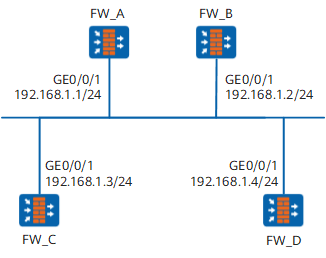
Configuration Roadmap
The configuration roadmap is as follows:
- Configuring the router ID on each FW and enabling OSPF on the specified network segment
- Checking the DR/BDR state of each FW when the default priority is used
- Configuring the DR priority on the interface and checking the DR/BDR state
Data Preparation
To complete the configuration, you need the following data:
- The router ID of the FW_A is 1.1.1.1 and the DR priority is 100.
- The router ID of the FW_B is 2.2.2.2 and the DR priority is 0.
- The router ID of the FW_C is 3.3.3.3 and the DR priority is 2.
- The router ID of the FW_D is 4.4.4.4 and the DR priority is 1.
Procedure
- Set the IP addresses for the interfaces, add the interfaces
to security zones, and configure the interzone security policy.
# Configure the FW_A.
<FW> system-view
[FW] sysname FW_A
[FW_A] interface GigabitEthernet 0/0/1
[FW_A-GigabitEthernet0/0/1] ip address 192.168.1.1 24
[FW_A-GigabitEthernet0/0/1] quit
[FW_A] firewall zone trust
[FW_A-zone-trust] add interface GigabitEthernet 0/0/1
[FW_A-zone-trust] quit
[FW_A] security-policy
[FW_A-policy-security] rule name policy_sec_1
[FW_A-policy-security-rule-policy_sec_1] source-zone trust local
[FW_A-policy-security-rule-policy_sec_1] destination-zone local trust
[FW_A-policy-security-rule-policy_sec_1] action permit
[FW_A-policy-security-rule-policy_sec_1] quit
# Configure the FW_B.
<FW> system-view
[FW] sysname FW_B
[FW_B] interface GigabitEthernet 0/0/1
[FW_B-GigabitEthernet0/0/1] ip address 192.168.1.2 24
[FW_B-GigabitEthernet0/0/1] quit
[FW_B] firewall zone trust
[FW_B-zone-trust] add interface GigabitEthernet 0/0/1
[FW_B-zone-trust] quit
[FW_B] security-policy
[FW_B-policy-security] rule name policy_sec_1
[FW_B-policy-security-rule-policy_sec_1] source-zone trust local
[FW_B-policy-security-rule-policy_sec_1] destination-zone local trust
[FW_B-policy-security-rule-policy_sec_1] action permit
[FW_B-policy-security-rule-policy_sec_1] quit
# Configure the FW_C.
<FW> system-view
[FW] sysname FW_C
[FW_C] interface GigabitEthernet 0/0/1
[FW_C-GigabitEthernet0/0/1] ip address 192.168.1.3 24
[FW_C-GigabitEthernet0/0/1] quit
[FW_C] firewall zone trust
[FW_C-zone-trust] add interface GigabitEthernet 0/0/1
[FW_C-zone-trust] quit
[FW_C] security-policy
[FW_C-policy-security] rule name policy_sec_1
[FW_C-policy-security-rule-policy_sec_1] source-zone trust local
[FW_C-policy-security-rule-policy_sec_1] destination-zone local trust
[FW_C-policy-security-rule-policy_sec_1] action permit
[FW_C-policy-security-rule-policy_sec_1] quit
# Configure the FW_D.
<FW> system-view
[FW] sysname FW_D
[FW_D] interface GigabitEthernet 0/0/1
[FW_D-GigabitEthernet0/0/1] ip address 192.168.1.4 24
[FW_D-GigabitEthernet0/0/1] quit
[FW_D] firewall zone trust
[FW_D-zone-trust] add interface GigabitEthernet 0/0/1
[FW_D-zone-trust] quit
[FW_D] security-policy
[FW_D-policy-security] rule name policy_sec_1
[FW_D-policy-security-rule-policy_sec_1] source-zone trust local
[FW_D-policy-security-rule-policy_sec_1] destination-zone local trust
[FW_D-policy-security-rule-policy_sec_1] action permit
[FW_D-policy-security-rule-policy_sec_1] quit
- Enable OSPF.
# Enable OSPF on the FW_A and set the router ID for the FW_A to 1.1.1.1.
[FW_A] ospf 1 router-id 1.1.1.1# Configure network segment 192.168.1.0 as Area 0.
[FW_A-ospf-1] area 0
[FW_A-ospf-1-area-0.0.0.0] network 192.168.1.0 0.0.0.255
# Enable OSPF on the FW_B and set the router ID for the FW_B to 2.2.2.2.
[FW_B] ospf 1 router-id 2.2.2.2# Configure network segment 192.168.1.0 as Area 0.
[FW_B-ospf-1] area 0
[FW_B-ospf-1-area-0.0.0.0] network 192.168.1.0 0.0.0.255
# Enable OSPF on the FW_C and set the router ID for the FW_C to 3.3.3.3.
[FW_C] ospf 1 router-id 3.3.3.3# Configure network segment 192.168.1.0 as Area 0.
[FW_C-ospf-1] area 0
[FW_C-ospf-1-area-0.0.0.0] network 192.168.1.0 0.0.0.255
# Enable OSPF on the FW_D and set the router ID for the FW_D to 4.4.4.4.
[FW_D] ospf 1 router-id 4.4.4.4# Configure network segment 192.168.1.0 as Area 0.
[FW_D-ospf-1] area 0
[FW_D-ospf-1-area-0.0.0.0] network 192.168.1.0 0.0.0.255
# Display the state of DR/BDR.
[FW_A] display ospf peer
          OSPF Process 1 with Router ID 1.1.1.1
                  Neighbors

 Area 0.0.0.0 interface 192.168.1.1(GigabitEthernet0/0/1)'s neighbors
 Router ID: 2.2.2.2      Address: 192.168.1.2      GR State: Normal
   State: 2-Way  Mode:Nbr is  Master  Priority: 1
   DR: 192.168.1.4  BDR: 192.168.1.3  MTU: 0
   Dead timer due in 32  sec
   Neighbor is up for 00:04:21
   Authentication Sequence: [ 0 ]

 Router ID: 3.3.3.3      Address: 192.168.1.3      GR State: Normal
   State: Full  Mode:Nbr is  Master  Priority: 1
   DR: 192.168.1.4  BDR: 192.168.1.3  MTU: 0
   Dead timer due in 37  sec
   Neighbor is up for 00:04:06
   Authentication Sequence: [ 0 ]

 Router ID: 4.4.4.4      Address: 192.168.1.4      GR State: Normal
   State: Full  Mode:Nbr is  Master  Priority: 1
   DR: 192.168.1.4  BDR: 192.168.1.3  MTU: 0
   Dead timer due in 37  sec
   Neighbor is up for 00:03:53
   Authentication Sequence: [ 0 ]
# Check the neighbor information of the FW_A, you will find the priority of DR and the neighbor status. Now the FW_D is DR, and the FW_C is BDR.
- Configure DR priorities on the interfaces.
# Configure the FW_A and enter the system view.
<FW_A> system-view# Enter the interface view.
[FW_A] interface GigabitEthernet 0/0/1
# Set the priority of GE0/0/0 to 100 when electing the DR.
[FW_A-GigabitEthernet0/0/1] ospf dr-priority 100
[FW_A-GigabitEthernet0/0/1] quit
# Configure the FW_B and enter the system view.
<FW_B> system-view# Enter the interface view.
[FW_B] interface GigabitEthernet 0/0/1
# Set the priority of GE0/0/0 to 0 when electing the DR.
[FW_B-GigabitEthernet0/0/1] ospf dr-priority 0
[FW_B-GigabitEthernet0/0/1] quit
# Configure the FW_C and enter the system view.
<FW_C> system-view# Enter the interface view.
[FW_C] interface GigabitEthernet 0/0/1
# Set the priority of GE0/0/0 to 2 when electing the DR.
[FW_C-GigabitEthernet0/0/1] ospf dr-priority 2
[FW_C-GigabitEthernet0/0/1] quit
# Display the states of DR and BDR.
<FW_D> display ospf peer

          OSPF Process 1 with Router ID 4.4.4.4
                  Neighbors

 Area 0.0.0.0 interface 192.168.1.4(GigabitEthernet0/0/1)'s neighbors
 Router ID: 1.1.1.1      Address: 192.168.1.1      GR State: Normal
   State: Full  Mode:Nbr is  Slave  Priority: 100
   DR: 192.168.1.4  BDR: 192.168.1.3  MTU: 0
   Dead timer due in 31  sec
   Neighbor is up for 00:11:17
   Authentication Sequence: [ 0 ]

 Router ID: 2.2.2.2      Address: 192.168.1.2      GR State: Normal
   State: Full  Mode:Nbr is  Slave  Priority: 0
   DR: 192.168.1.4  BDR: 192.168.1.3  MTU: 0
   Dead timer due in 35  sec
   Neighbor is up for 00:11:19
   Authentication Sequence: [ 0 ]

 Router ID: 3.3.3.3      Address: 192.168.1.3      GR State: Normal
   State: Full  Mode:Nbr is  Slave  Priority: 2
   DR: 192.168.1.4  BDR: 192.168.1.3  MTU: 0
   Dead timer due in 33  sec
   Neighbor is up for 00:11:15
   Authentication Sequence: [ 0 ]

The DR priorities configured on the interfaces do not take effect instantly.
- Restart OSPF processes.
In the user view of each FW, run the reset ospf 1 process command to restart the OSPF process.
- Verify the configuration.
# Display the states of OSPF neighbors.
<FW_D> display ospf peer

          OSPF Process 1 with Router ID 4.4.4.4
                  Neighbors

 Area 0.0.0.0 interface 192.168.1.4(GigabitEthernet0/0/1)'s neighbors
 Router ID: 1.1.1.1      Address: 192.168.1.1      GR State: Normal
   State: Full  Mode:Nbr is  Slave  Priority: 100
   DR: 192.168.1.1  BDR: 192.168.1.3  MTU: 0
   Dead timer due in 35  sec
   Neighbor is up for 00:07:19
   Authentication Sequence: [ 0 ]

 Router ID: 2.2.2.2      Address: 192.168.1.2      GR State: Normal
   State: 2-Way  Mode:Nbr is  Master  Priority: 0
   DR: 192.168.1.1  BDR: 192.168.1.3  MTU: 0
   Dead timer due in 35  sec
   Neighbor is up for 00:07:19
   Authentication Sequence: [ 0 ]

 Router ID: 3.3.3.3      Address: 192.168.1.3      GR State: Normal
   State: Full  Mode:Nbr is  Slave  Priority: 2
   DR: 192.168.1.1  BDR: 192.168.1.3  MTU: 0
   Dead timer due in 37  sec
   Neighbor is up for 00:07:17
   Authentication Sequence: [ 0 ]
# Display the state of the OSPF interface.
<FW_A> display ospf interface

          OSPF Process 1 with Router ID 1.1.1.1
                  Interfaces

 Area: 0.0.0.0
 IP Address      Type         State    Cost  Pri   DR              BDR
 192.168.1.1     Broadcast    DR       1     100   192.168.1.1     192.168.1.3
# Display the state of the OSPF interface.
<FW_B> display ospf interface

          OSPF Process 1 with Router ID 2.2.2.2
                  Interfaces

 Area: 0.0.0.0
 IP Address      Type         State    Cost  Pri   DR              BDR
 192.168.1.2     Broadcast    DROther  1     0     192.168.1.1     192.168.1.3
If all neighbors are in Full state, it indicates that the FW_A forms neighboring relationships with all its neighbors. If the neighbor stays "2-Way", it indicates neither of them are DR or BDR. Thus, they need not to exchange LSAs.
All other neighbors are DR Others. This indicates that they are neither DR nor BDR.
Configuration Script
Configuration script of FW_A
#
 sysname FW_A
#
interface GigabitEthernet0/0/1
 ip address 192.168.1.1 255.255.255.0
 ospf dr-priority 100
#
firewall zone trust
 set priority 85
 add interface GigabitEthernet0/0/1
#
security-policy
  rule name policy_sec_1
    source-zone local
    source-zone trust
    destination-zone local
    destination-zone trust
    action permit
#
ospf 1 router-id 1.1.1.1
 area 0.0.0.0
  network 192.168.1.0 0.0.0.255
#
return
Configuration script of FW_B
#
 sysname FW_B
#
interface GigabitEthernet0/0/1
 ip address 192.168.1.2 255.255.255.0
 ospf dr-priority 0
#
firewall zone trust
 set priority 85
 add interface GigabitEthernet0/0/1
#
security-policy
  rule name policy_sec_1
    source-zone local
    source-zone trust
    destination-zone local
    destination-zone trust
    action permit
#
ospf 1 router-id 2.2.2.2
 area 0.0.0.0
  network 192.168.1.0 0.0.0.255
#
return
Configuration script of FW_C
#
 sysname FW_C
#
interface GigabitEthernet0/0/1
 ip address 192.168.1.3 255.255.255.0
 ospf dr-priority 2
#
firewall zone trust
 set priority 85
 add interface GigabitEthernet0/0/1
#
security-policy
  rule name policy_sec_1
    source-zone local
    source-zone trust
    destination-zone local
    destination-zone trust
    action permit
#
ospf 1 router-id 3.3.3.3
 area 0.0.0.0
  network 192.168.1.0 0.0.0.255
#
return
Configuration script of FW_D
#
 sysname FW_D
#
interface GigabitEthernet0/0/1
 ip address 192.168.1.4 255.255.255.0
#
firewall zone trust
 set priority 85
 add interface GigabitEthernet0/0/1
#
security-policy
  rule name policy_sec_1
    source-zone local
    source-zone trust
    destination-zone local
    destination-zone trust
    action permit
#
ospf 1 router-id 4.4.4.4
 area 0.0.0.0
  network 192.168.1.0 0.0.0.255
#
return