Web: Example for Configuring Basic RIP Functions
RIP-2 can be configured on a small IP network for device communication.
Networking Requirements
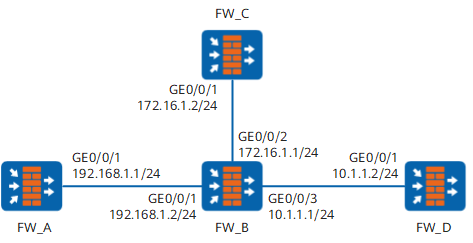
On the network shown in Figure 1, it is required that RIP be enabled on all interfaces of FW_A, FW_B, FW_C, and FW_D and that the devices communicate through RIP-2.
Configuration Roadmap
The configuration roadmap is as follows:
- Configure IP addresses for interfaces to ensure that neighboring nodes are reachable at the network layer
- Enable RIP and configure basic RIP functions on each FW.
- Configure RIP-2 on each FW and check subnet masks.
Data Planning
To implement the configuration, you need to collect the following data:
- RIP network segment (192.168.1.0) on FW_A
- RIP network segments (192.168.1.0, 172.16.0.0, and 10.0.0.0) on FW_B
- RIP network segment 172.16.0.0 on FW_C
- RIP network segment (10.0.0.0) on FW_D
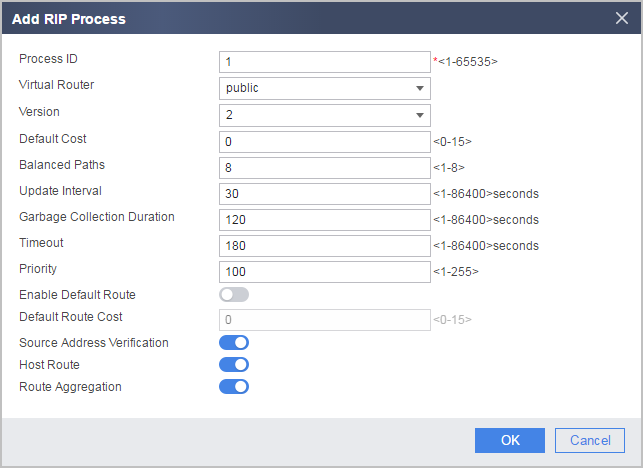
- RIP-2 on FW_A, FW_B, FW_C, and FW_D
Procedure
- On FW_A, set IP addresses for interfaces, assign interfaces to security zones, and configure an interzone security policy.
- Click
 of GE0/0/1 and set required parameters.
Zone
Trust
IP Address
192.168.1.1/24
- Click
- Configure basic RIP functions on FW_A.
- Choose .
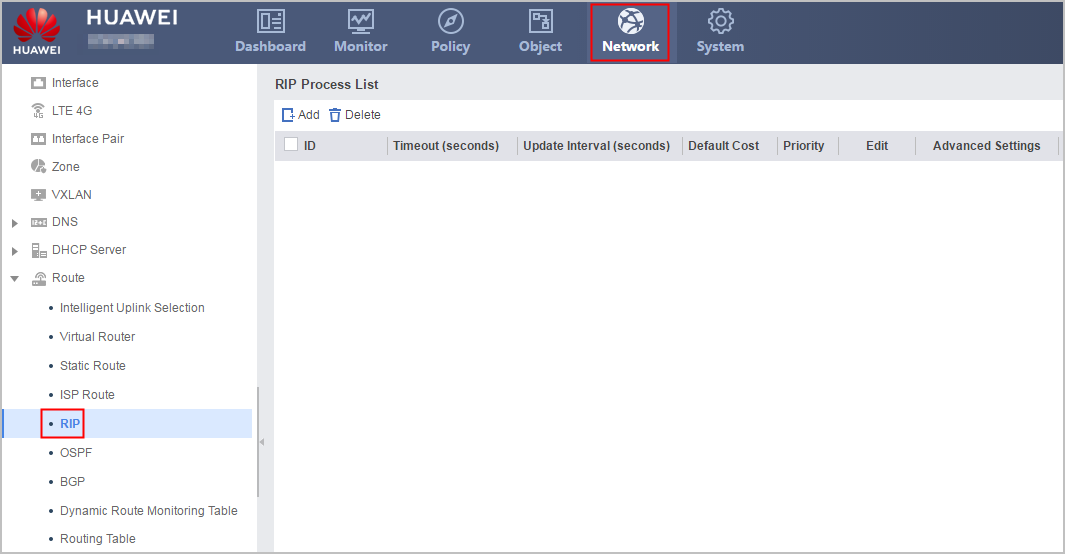
- Click Add to create a RIP process and configure RIP-2.
- Configure RIP network segment 192.168.1.0.
- Click
 of the created RIP process.
 - In the RIP Process ID:1 navigation tree, choose .
- Click Add to configure network segment 192.168.1.0.
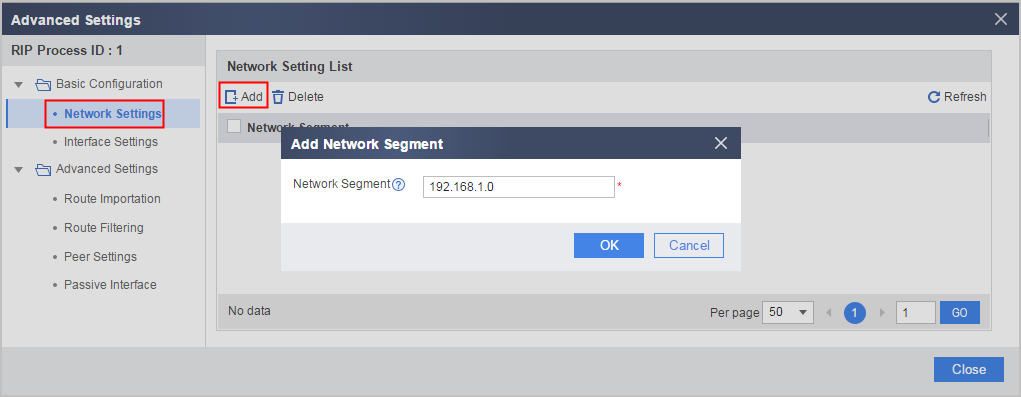
- Click OK.
- Click
- Choose .
- By referring to Step 1 and Step 2, configure FW_B.
Configure interface IP addresses and security zones.
Interface Name
GE0/0/1
GE0/0/2
GE0/0/3
Zone
Trust
Trust
Trust
IP Address
192.168.1.2/24
172.16.1.1/24
10.1.1.1/24
Configure a security policy.
Name
policy_sec_1
Source Zone
Trust and Local
Destination Zone
Local and Trust
Action
permit
Configure basic RIP functions.
Version
2
Network Segment
192.168.1.0
172.16.0.0
10.0.0.0
- By referring to Step 1 and Step 2, configure FW_C.
Configure interface IP addresses and security zones.
Interface Name
GE0/0/1
Zone
Trust
IP Address
172.16.1.2/24
Configure a security policy.
Name
policy_sec_1
Source Zone
Trust and Local
Destination Zone
Local and Trust
Action
permit
Configure basic RIP functions.
Version
2
Network Segment
172.16.0.0
- By referring to Step 1 and Step 2, configure FW_D.
Configure interface IP addresses and security zones.
Interface Name
GE0/0/1
Zone
Trust
IP Address
10.1.1.2/24
Configure a security policy.
Name
policy_sec_1
Source Zone
Trust and Local
Destination Zone
Local and Trust
Action
permit
Configure basic RIP functions.
Version
2
Network Segment
10.0.0.0
Verification
# Check the RIP routing table of FW_A.
[FW_A] display rip 1 route
  Route Flags: R - RIP
              A - Aging, S - Suppressed, G - Garbage-collect
-------------------------------------------------------------------------
 Peer 192.168.1.2  on GigabitEthernet0/0/1
      Destination/Mask         Nexthop        Cost   Tag     Flags   Sec
        10.1.1.0/24       192.168.1.2      1    0        RA      32
      172.16.1.0/24       192.168.1.2      1    0        RA      32
     192.168.1.0/24       192.168.1.2      1    0        RA      14
Route aggregation does not take effect because split horizon is enabled on Ethernet interfaces by default. The preceding command output shows that the routes advertised by RIP-2 contain accurate subnet masks.
Configuration Scripts
Configuration script of FW_A
#
 sysname FW_A
#
interface GigabitEthernet0/0/1
 undo shutdown
 ip address 192.168.1.1 255.255.255.0
#
firewall zone trust
 set priority 85
 add interface GigabitEthernet0/0/1
#
security-policy
  rule name policy_sec_1
    source-zone trust
    source-zone local
    destination-zone local
    destination-zone trust
    action permit
#
rip 1
 version 2
 network 192.168.1.0
#
return
Configuration script of FW_B
#
 sysname FW_B
#
interface GigabitEthernet0/0/1
 undo shutdown
 ip address 192.168.1.2 255.255.255.0
#
interface GigabitEthernet0/0/2
 undo shutdown
 ip address 172.16.1.1 255.255.255.0
#
interface GigabitEthernet0/0/3
 undo shutdown
 ip address 10.1.1.1 255.255.255.0
#
firewall zone trust
 set priority 85
 add interface GigabitEthernet0/0/1
 add interface GigabitEthernet0/0/2
 add interface GigabitEthernet0/0/3
#
security-policy
  rule name policy_sec_1
    source-zone trust
    source-zone local
    destination-zone local
    destination-zone trust
    action permit
#
rip 1
 version 2
 network 192.168.1.0
 network 172.16.0.0
 network 10.0.0.0
#
return
Configuration script of FW_C
#
 sysname FW_C
#
interface GigabitEthernet0/0/1
 undo shutdown
 ip address 172.16.1.2 255.255.255.0
#
firewall zone trust
 set priority 85
 add interface GigabitEthernet0/0/1
#
security-policy
  rule name policy_sec_1
    source-zone trust
    source-zone local
    destination-zone local
    destination-zone trust
    action permit
#
rip 1
 version 2
 network 172.16.0.0
#
return
Configuration script of FW_D
#
 sysname FW_D
#
interface GigabitEthernet0/0/3
 undo shutdown
 ip address 10.1.1.2 255.255.255.0
#
firewall zone trust
 set priority 85
 add interface GigabitEthernet0/0/3
#
security-policy
  rule name policy_sec_1
    source-zone trust
    source-zone local
    destination-zone local
    destination-zone trust
    action permit
#
rip 1
 version 2
 network 10.0.0.0
#
return