Composition of Security Policies
This section describes the composition of security policies, including matching conditions, processing actions, and other additional functions.
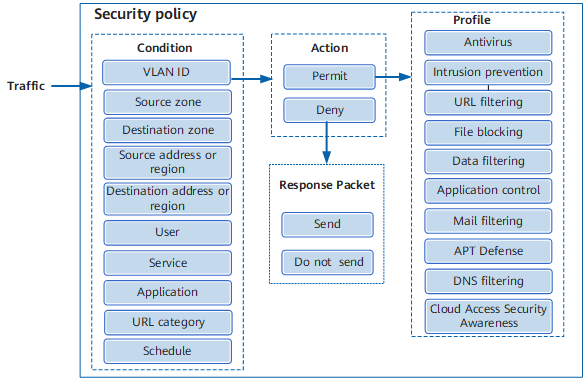
The following describes the matching conditions, processing actions, and other additional functions of security policies.
Matching Conditions of Security Policies
Matching Condition |
Function |
Example |
|---|---|---|
Source Zone/Destination Zone |
Specifies the source or destination zone of the traffic. To apply a security policy rule to a specific source or destination zone, you can use the source or destination zone as a matching condition when creating the security policy rule. |
Assume that the zone of intranet users is trust and the zone of the Internet is untrust. To control intranet users' access to the Internet, configure a security policy rule and set the source zone to trust and destination zone to untrust. |
Source Address/Region Destination Address/Region |
Specifies the address from or to which the traffic is sent. The value can be an address, address group, domain group, region, or region group. To apply a security policy rule to a specific source address/region or destination address/region, you can use the source address/region or destination address/region as a matching condition when creating the security policy rule. |
Example 1: To allow enterprise employees to access a web server on the Internet, configure a security policy rule and set the source address to the addresses of the enterprise employees and the destination address to any. Example 2: To allow enterprise employees to access only web servers in the enterprise, configure a security policy rule and set the source address to the addresses of the enterprise employees and the destination address to the addresses of the web servers in the enterprise. Example 3: To allow enterprise employees to access only several search websites, add the domain names of these search websites to a domain group. Configure a security policy rule and set the source address to the addresses of the enterprise employees and the destination address to the domain group. Example 4: An enterprise provides a web server for external users to access. For security, access from country A is not allowed. Configure a security policy rule and set the source address to country A and the action to deny. |
User |
A user indicates from whom traffic is originated. The parameter value can be User, User Group, or Security Group. Both the source address/region and user indicate the traffic sender, so you can configure either of them. Generally, the source address/region mode applies to fixed IP addresses or small enterprises. The user mode applies to unfixed IP addresses and large enterprises. |
To allow different enterprise employees of an enterprise to access the Internet with different permissions, the enterprise needs to create users, user groups, or security groups. For example, the enterprise can create three users based on their levels and functions: manager, marketing employee, and R&D employee. The users have different permissions to access the Internet. Then, you can configure security policy rules and specify the users as matching conditions. If users are configured as a matching condition in a security policy, you need to configure user authentication first. |
Access Mode |
Specifies the access authentication type. This parameter is used for policy control for different access authentication types in the single sign-on (SSO) scenario of the Agile Controller. |
For example, if an enterprise allows employees on the portal page to access the Internet only through wired connections, you can configure a security policy rule and set the access mode to wired portal. |
Device |
Specifies the terminal type. You can configure Device to implement network behavior control and network permission assignment based on terminal types. |
For example, if an enterprise allows only employees using PCs to access the Internet, you can configure a security policy rule and set the terminal device to pc. |
Service |
Specifies the protocol type or port number of traffic. To control the traffic of a specific protocol type or port number, you can use the service as a matching condition when creating a security policy rule. |
For example, two service servers are deployed in an enterprise. Server 1 uses TCP port 8888 to provide services, and server 2 uses UDP port 6666 to provide services. To control PCs to access the two servers, configure two user-defined services, add the non-well-known ports of the two servers to the services separately, and configure a security policy to reference the two services. |
Application |
Specifies the application type of traffic. The FW can differentiate applications that use the same protocol and port number, making network management more refined. To control the traffic of different applications, you can use the application as matching conditions when creating security policy rules. |
For example, if a school wants to prohibit students from using web page IM and web game applications, configure security policy rules, set web page IM and web game applications as matching conditions, and set the action to deny. |
URL Categories |
Specifies the URL category of traffic. If you want a specific security policy rule to apply only to a specific type of website, you can use the URL category as the matching condition when creating a security policy rule. In addition to configuring URL categories in security policies, you can also configure URL categories in URL filtering. In some scenarios, configuring URL categories in URL filtering is more complicated than configuring URL categories in security policies. For example, configure a security policy rule to allow user group A to access only URL category A and user group B to access only URL category B. When a new user group C needs to access URL categories A and B, you need to create a new URL filtering profile if URL filtering is configured. If the URL categories are configured in a security policy, you only need to add user group C to the security policy. |
To allow enterprise employees to access only search/engine and education/science websites, configure a security policy rule and set the URL categories to search/engine and education/science. |
Schedule |
Specifies the period for the security policy to take effect. If you want a security policy rule to take effect only in a specified period, set a schedule as a matching condition when creating the security policy rule. |
For example, if an enterprise does not allow employees to access the Internet within the working hours (8:30-12:00 and 13:00-17:30) and allows employees to access the Internet during lunch break (12:00-13:00), configure a security policy rule and specify the schedules. |
VLAN ID |
Specifies the VLAN ID of traffic. To control traffic based on VLANs, set VLAN IDs as the matching conditions when creating security policy rules. |
When the FW works at Layer 2, traffic from different VLANs passes through the FW. To control traffic based on VLANs, configure security policy rules and set VLAN IDs as matching conditions. |
Security Policy Actions
- Permit: If the action is permit, the traffic is processed as follows:
- If content security detection is not configured, the FW allows the traffic to pass through.
- If content security detection is configured, the FW determines whether to permit the traffic based on the content security detection result. Content security detection includes antivirus and intrusion prevention, which are implemented by referencing security profiles in security policies. If one profile blocks the traffic, the FW blocks the traffic. If all profiles permit the traffic, the FW allows the traffic to pass through.
Deny: The FW does not allow the traffic that matches the security policy to pass through.
If the action is deny, the FW discards the packet and can send a corresponding feedback packet based on the packet type.After the client/server receives the blocking packets from the FW, the application layer rapidly terminates sessions and lets users sense that their requests have been blocked.- Reset client: The FW sends TCP reset packets to the TCP client.
- Reset server: The FW sends TCP reset packets to the TCP server.
ICMP unreachable: The FW sends ICMP unreachable packets to the packet client.
Other Additional Functions
Log Function
The following logs can be recorded:- Traffic logs: When traffic matches a security policy with the permit action, a session is generated. When the session ages, the FW generates a traffic log if the traffic log function is enabled.
- Policy matching logs: When traffic matches a security policy with the permit or deny action, the FW generates a policy matching log if the policy matching log function is enabled.
- Session logs: When a session is created or ages on the FW, the FW generates a session log if the session log function is enabled.
Session Aging Time
The created session entry needs to be matched by packets constantly. If no packet matches for a long time, it indicates that the connection between both communications parties is interrupted, and the session entry is unnecessary. To save system resources, the system deletes the entry that is not matched for a continuous period of time; that is, the session entry ages. You can set the session aging time as required based on security policies.
User-Defined Persistent Connection
Generally, the default aging time on the device can meet the forwarding requirements. You can also fine-tune the aging time as needed. However, for some services, the idle time between two packets can be very long. For example:
- When a user downloads large files using FTP, the idle time between control packets along the control channel can be very long.
- A user may query a database server now and then, and the time between query operations may be greater than the aging time of the TCP session.
To remedy this, you can set the aging time to a larger value. However, the aging time applies to all protocol sessions, resulting in performance degradation.
Therefore, the aging time setting must be more precise. The persistent connection function allows you to set the session aging time for specific flows, so that session information about the flows does not age in a long period, ensuring the normal running of the services. However, the FW supports persistent connection only for TCP.

Section Configuring Session Aging describes how to configure service set-based aging time. The priorities of different types of aging time are as follows:
User-defined policy-based persistent connection > Policy-based aging time > Service set-based aging time