Security Policy Matching Process
This section describes the matching rules, filtering mechanism, and pending policies of security policies.
Generally, the basic design principle of the FW is to by default deny packets that are not explicitly permitted. With this principle, the FW can protect a network once it connects to the network. To allow traffic to pass through, you can create security policies. Generally, multiple security policies are configured for different service traffic. The following describes the matching sequence and matching rules of the security policies.
Security Policy Matching Rules
Figure 1 shows the matching rules of security policies. Each security policy contains multiple matching conditions. The relationship between the matching conditions is AND. The FW considers that a packet matches a security policy only when the attributes of the packet match all conditions of the security policy. If multiple values are configured for a matching condition, the relationship between the values is OR. When a packet matches any value, the packet is considered to match the condition.
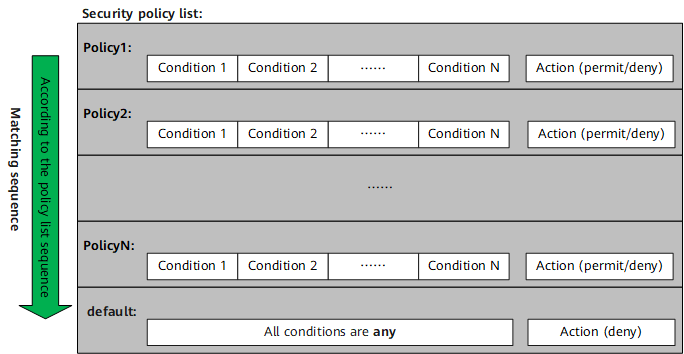
When multiple security policy rules are configured, the security policy list is arranged according to the configuration sequence. An earlier configured policy has a higher priority. The security policies are matched according to their configuration sequence. That is, the policies are matched one by one from the top of the policy list. If a packet matches a security policy, it will no longer match the following policies. Therefore, the configuration sequence of security policies is important. You need to configure policies with precise conditions and then policies with loose conditions. If a specific security policy is placed after a general security policy, it may never be matched. For example:
The IP address of the FTP server of an enterprise is 10.1.1.1. The office area whose IP address segment is 10.2.1.0/24 is allowed to access the FTP server. Two temporary PCs (10.2.1.1 and 10.2.1.2) are not allowed to access the FTP server. Configure security policies in the following sequence:
No. |
Name |
Source IP Address |
Destination IP Address |
Action |
|---|---|---|---|---|
1 |
policy1 |
10.2.1.1 10.2.1.2 |
10.1.1.1 |
Deny |
2 |
policy2 |
10.2.1.0/24 |
10.1.1.1 |
Permit |
Compare the two security policies. Conditions of policy 1 are specific, and conditions in policy 2 are broad. If the security policies are not configured in the preceding sequence, policy 1 will never be matched. As a result, the two temporary PCs (10.2.1.1 and 10.2.1.2) can access the FTP server.
Generally, there are general rules before exception rules. During initial planning, you can list general rules and exception rules as much as possible and configure them in the correct sequence. However, exception rules may be added during maintenance. Therefore, you need to adjust the sequence after configuration.
In addition, the system has a default security policy. The default security policy is located at the bottom of the policy list and has the lowest priority. All matching conditions of the default security policy are any and the default action is deny. If all the configured policies are not matched, the default security policy is used.
The default security policy controls interzone traffic, including but not limited to the traffic sent from and received by the FW and traffic exchanged between security zones.
Traffic exchanged within one security zone is not controlled by the default security policy, and the default action is permit. To apply the default security policy to the traffic exchanged within one zone, enable the function for the default security policy to control the traffic in the same security zone. After this function is enabled, the default security policy takes effect on the traffic in the same security zone, including the action of the default security policy and the log function.
The default action and log function (including policy matching logs, session logs, and traffic logs) of the default security policy can be modified.
Filtering Mechanism of Security Policies
For a data flow, you only need to configure a security policy in the direction where the access is initiated, and no security policy is needed for the reverse traffic. That is, the first packet matches the security policy, and a session is established. The subsequent packets directly match the session instead of matching the security policy. This improves the service processing efficiency. The following uses a client PC accessing a web server as an example to describe the filtering mechanism of security policies:
As shown in Figure 2, the client PC accesses the web server. When the traffic reaches the FW, the FW matches the first packet with security policies. After the first packet matches a security policy, the FW permits the packet to pass through and sets up a session. The session contains information about the packet sent by the PC, such as the source/destination address, source/destination port number, and application protocol. When the packet replied by the web server to the PC arrives at the FW, the FW compares the packet information with session information. If the packet matches a session and complies with the subsequent packet definition in the related protocol, the FW considers the packet as the reply packet from the web server to the PC and directly permits the packet.
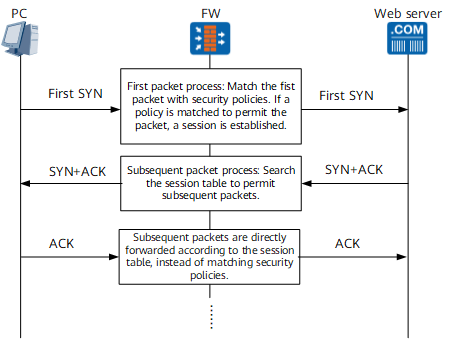

Only when an application or URL category is configured in the security policy, the device re-matches the security policy for subsequent packets. For details about the matching process, see Pending Policy
Pending Policy
If an application or URL category is configured in a security policy, the traffic needs to be sent to the content security engine for application identification or URL category query. If the application identification or URL category query is not complete, the matched security policy is not determined, and the policy is in the pending state. An application or URL category can be identified only after multiple packets are obtained. The FW matches the first packet with security policies based on 5-tuples of the packet (the application or URL category is pending) and sets up a session (the application or URL category information is empty). After the application identification or URL category query is complete, the FW matches the packet with security policies again and updates session information.
For example, the security policy list is as follows:
Rule |
Source IP Address |
Destination IP Address |
Application or URL Category |
Action |
|---|---|---|---|---|
policy1 |
Intranet PC 10.2.1.0/24 |
Web server 10.1.1.1 |
Education/Science websites |
Permit |
policy2 |
any |
any |
Game |
Deny |
policy3 |
Intranet PC 10.2.1.0/24 |
any |
any |
Permit |
Stage |
Matching Process |
Matching Result |
|---|---|---|
1 |
Match the first packet with policie1 based on 5-tuples of the packet (the matching condition application or URL category is pending) and set up a session. |
The application identification or URL category query is not complete, a temporary session is established by default to permit and continue to detect traffic. |
2 |
The content security engine can identify the application or URL category after several subsequent packets are received. The subsequent packets match the session established in stage 1. |
- |
3 |
After several subsequent packets, the content security engine identifies the application or URL category. The subsequent packets are matched with security policies again, and session information is updated. |
Policy 1 is matched. Intranet users are allowed to access education/science websites. |