Mechanism for Sending and Receiving Email
This section describes the mechanism for sending and receiving email.
Mails are sent through Simple Mail Transfer Protocol (SMTP). Figure 1 shows the procedure for sending and receiving email.
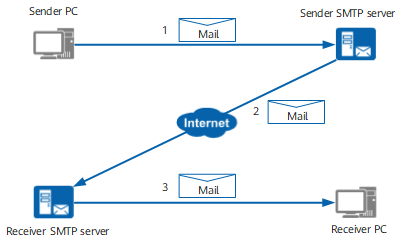
As shown in Figure 1, the transmission of an email goes through the following steps:
- The sender sends the email to the specified SMTP server.
- The SMTP server at the sender side encapsulates the email into SMTP messages and forwards the encapsulated messages to the SMTP server at the receiver side.
- Then the receiver downloads the email.
Sending and Receiving Email Through SMTP, POP3, and IMAP
SMTP defines how PCs send email to the SMTP server and how the SMTP servers forward the received email.
Post Office Protocol 3 (POP3) and Internet Mail Access Protocol (IMAP) define how PCs manage the email on the mail server and download them.

The SMTP server, POP3 server, and IMAP are management software programs and must be installed on physical servers.
The major difference between IMAP and POP3 is that POP3 downloads and then deletes the email messages from the server, to your client without keep a copy on the server, whereas IMAP allows you to manage your email directly on the server.
In this case, administrators must install the SMTP service and the POP3 or IMAP service on the mail server. End users must install mail client software, such as Microsoft Outlook. Figure 2 shows how email is sent and received.
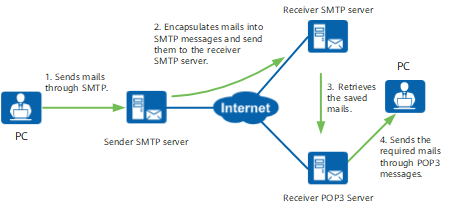
As shown in the preceding figure, an email must go through the following process before it reaches the destination:
- The PC encapsulates the email in SMTP messages and sends the messages to the SMTP server.
- The sender SMTP server encapsulates the email in SMTP messages and forwards them to the receiver SMTP server, which restores the received message.
- Upon receiving requests from a user, the POP3 server retrieves the email stored on the SMTP server.
- Then the POP3 server encapsulates the email in POP3 messages and forwards them to the receiver PC.