Anti-Spam
Anti-spam can be implemented by checking the source IP address of the sender's SMTP server or by filtering fields in the MIME header.
Context
Junk mails are unsolicited mails sent to the inboxes of users. Massive junk mails bring about problems as follows:
- Congests the mail server and lowers the performance of the entire network.
- Consumes the sender's email storage capacity and is annoying and wasteful for receivers.
- Causes the mail server that forwards massive junk mails to be blacklisted by the supervisor ISP. The blacklisted mail server cannot forward any email to other countries.
When the FW functions as a security gateway, all external mails need to be forwarded by the FW. The FW effectively filters out junk mails by checking the IP address of the sender's SMTP server or by filtering fields in the MIME header.
Authentication of the IP address of the sender's SMTP server
According to Mechanism for Sending and Receiving Email, no authentication is required during mail transmission between the PC and the mail server or between the mail servers at both end. Therefore, attackers can use any mail server available on the Internet to send junk mails.
To filter out as many junk mails as possible, the FW performs the legitimacy check on the IP addresses of the sender SMTP servers, as shown in Figure 1.
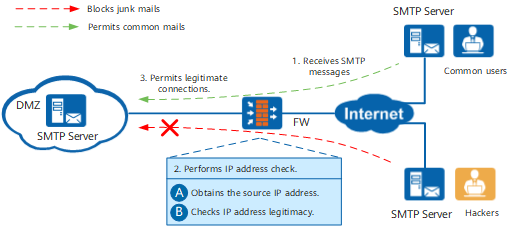
- The FW receives an SMTP message from an SMTP server.
The FW authenticates the IP address of the sender's SMTP server as follows:
- Resolves the received SMTP message and retrieves the IP address of the sender's SMTP server.
- Checks the legitimacy of the source IP address. The FW checks whether the retrieved IP address is blacklisted or whitelisted. If the IP address matches the local whitelist, the mail is considered legitimate; if not, the FW searches the local blacklist for a match. If a match is found, the mail is considered a junk mail; if not, the FW searches the RBL Query Mechanism. If a match is found in the specified RBL, the email is considered illegitimate.
- Legitimate mails are allowed through, whereas the illegitimate ones are blocked.
RBL Query Mechanism
The RBL is a large online database maintained by an anti-spam organization. The database lists the IP address of the SMTP servers that frequently forward junk mails.
Figure 2 shows the RBL query mechanism.
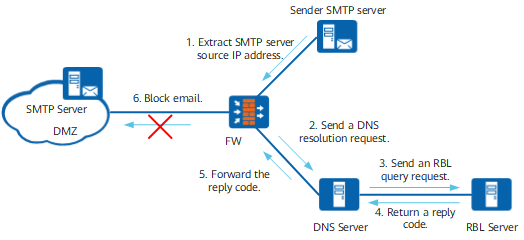
- After receiving SMTP messages, the FW retrieves the IP address of the sender SMTP server.
- The FW sends the DNS server a message containing the retrieved IP address and the RBL server name specified by a third-party RBL server. For example, if the sender's IP address is 10.2.3.4, and the RBL service name is sbl.spamhaus.org, the FW sends 4.3.2.10.sbl.spamhaus.org to the DNS server as a resolution request.
- Upon receiving the message from the FW, the DNS server retrieves the RBL service name, resolve the name to the corresponding IP address, and then forwards a query request to the RBL server.
- After receiving the request forwarded by the DNS server, the RBL server returns an IP address as a reply code to the DNS server. The reply code is an IP address to mark whether the RBL server returns any result for the query.
- The DNS server relays the reply code to the FW.
- The FW determines whether the mail is a junk mail based on the reply code.
- If the reply code is the same as that configured on the FW, the mail is considered a junk mail.
- Otherwise, the mail is allowed through.
To use RBL blacklist, the administrator must configure the DNS server, RBL service name, and reply code on the FW. For details on the configuration, see Configuring Anti-Spam Based on the IP Address of the SMTP Server.
Filtering Fields in the MIME Header
Multipurpose Internet Mail Extensions (MIME) represents universal mail technology specifications for Internet email. The basic information, format information, and coding mode of an MIME mail are recorded in the fields of the MIME header. MIME defines a large number of fields that store various mail-related information. For example, the sender's name and mail address are stored in the From field, the recipient's mail address is stored in the To field, and the mail subject is stored in the Subject field.
Generally, a junk mail is sent using a non-standard client. Compared with a mail sent by a standard client, fields in the MIME header of a junk mail often contain certain characteristics. Therefore, filtering fields in the MIME header can implement anti-spam. The basic principle is as follows: After receiving a mail sent or forwarded by the client, the FW parses and extracts field names and values in the MIME header, and matches the extracted field names and values with the field filtering rules of the MIME header configured by the user. If the field names and values match the rules, the FW considers the mail as a junk mail and processes the mail according to the action configured by the user. For the configuration procedure, see Configuring Anti-Spam Based on MIME Headers.