Mail Content Filtering
Anonymous mail checks, mail address checks, and email attachment control filter out illegitimate email based on email content. They check the mail addresses of the sender and receiver, the attachment size, and the number of attachments.
Mail Content Filtering Mechanism
The FW can serve as the security gateway to filter all data passing through it.
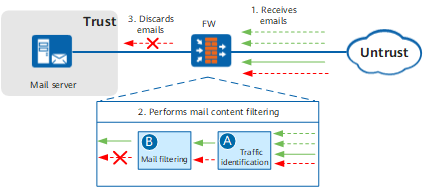
Figure 1 shows the procedure for the FW to filter out junk email from the Internet. The procedure for the FW to filter out illegitimate email from the intranet is similar.
- Email arrives at the FW.
- The FW performs mail content filtering as follows:
- Identifies the traffic. The FW identifies the traffic that requires mail filtering based on the specified matching conditions, such as the source security zone, destination security zone, source address, and destination address.
- Filters out junk email. The FW identifies and filters out junk email by checking the mail content, mail addresses, and attachment size.
- The FW discards the email containing illegitimate information.
Mail filtering profiles generated in Configuring Anonymous Email Check, Configuring Email Address Checks, and Configuring Email Attachment Control define how the FW filters out junk mails.
Configuring a Security Policy Using the Web UI defines the conditions for traffic identification and the method to reference the mail filtering profile.
Detection Direction
Mail content filtering can be implemented in both the directions for sending and receiving email.
Sending direction
If the email is encapsulated in SMTP messages, the FW performs the checks in the sending direction.
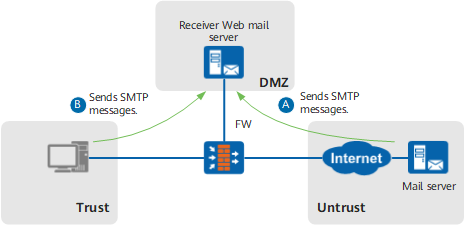
Figure 2 shows the application scenarios for the checks in the direction for sending email.
- The mail server on the Internet sends the email to the mail server in the dmz. The FW detects the SMTP messages from the untrust zone to the dmz.
- An intranet user uses a mail client, such as Microsoft Outlook, to send email to the mail server in the dmz. The FW detects the SMTP messages from the trust zone to the dmz.
Receiving direction
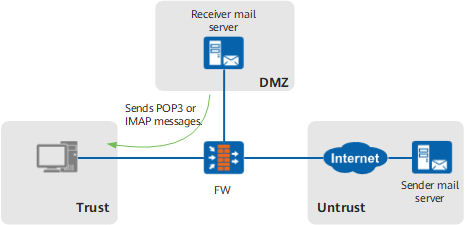
If the email is encapsulated in POP3 or IMAP messages and sent from the dmz to the trust zone, the FW performs mail content filtering in the receiving direction.
Figure 3 shows an application scenario for detection in the receiving direction.

If illegitimate POP3 messages or IMAPmessages are detected, the FW generates alarms or blocks the email.