Configuring Email Address Checks
An email address is the address registered to a user for sending and receiving email. The mail address check determines whether email message can be sent to or received from a specific email address.
Context
The mail address check function controls the permission for intranet users to send or receive email. The configuration items are:
Detection direction, including the sending and receiving directions.
- If the email encapsulated in SMTP messages is detected, the FW performs the mail address checks in the sending direction.
- If the mail encapsulated in POP3 or IMAP messages is detected, the FW performs the mail address checks in the receiving direction.
- Matching conditions help filter out email according to the sender or receiver mail addresses specified in the conditions.
The combination of the networking, detection direction, and matching condition controls the permissions for sending and receiving email.
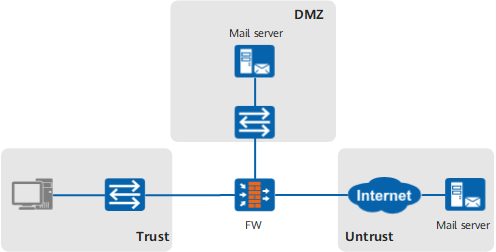
If the mail server is deployed on the intranet, you can configure the mail address check by referring to Figure 1 for help.
Table 1 Configuring mail address checks function for the mail server on the intranet Requirement
Configuration
Specify the email addresses from which intranet users, such as John and Jane, are allowed to receive email.
For example, you can specify the email addresses of John and Jane as the addresses from which the intranet users are allowed to receive email.
Enable mail address checks in the sending direction between the untrust zone and dmz, and set the sender's email address as the matching condition.
Enable mail address checks in the receiving direction between the trust zone and dmz, and set the sender mail address as the matching condition.
Specify the intranet users who are permitted to download email.
For example, you can grant John and Jane the permission to download email.
Enable mail address checks in the sending direction between the untrust zone and dmz and set the receiver's mail address as the matching condition.
Enable mail address checks in the receiving direction between the trust zone and dmz and set the receiver mail address as the matching condition.
Specify the intranet users who are permitted to send outgoing email.
For example, you can grant John and Jane the permission to send outgoing email.
Enable mail address checks in the sending direction between the trust zone and dmz and set the sender mail address as the matching condition.
Specify the Internet users to whom the intranet users can send email.
For example, you can specify John and Jane as the Internet users to whom the intranet users can send email.
Enable mail address checks in the sending direction between the trust zone and dmz and set the receiver mail address as the matching condition.
If the mail server is deployed on the Internet, you can configure the mail address checks by referring to Figure 2 for help.
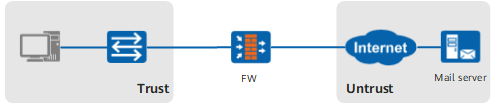
Requirement |
Configuration |
|---|---|
Specify the intranet users who are permitted to send outgoing email. For example, you can grant John and Jane the permission to send outgoing email. |
Enable mail address checks in the sending direction between the trust zone and the untrust zone and set the sender mail address as the matching condition. |
Specify the Internet users to whom the intranet users can send email. For example, you can specify John and Jane as the Internet users to whom the intranet users can send email. |
Enable mail address checks in the sending direction between the trust zone and the untrust zone and set the receiver's mail address as the matching condition. |
Specify the intranet users who are permitted to download email. For example, you can grant John and Jane the permission to download email. |
Enable mail address checks in the receiving direction between the trust zone and the untrust zone and set the receiver mail address as the matching condition. |
Specify the mail addresses from which intranet users, such as John and Jane, are allowed to receive email. For example, you can specify the email addresses of John and Jane as the addresses from which the intranet users are allowed to receive email. |
Enable mail address checks in the receiving direction between the trust zone and the untrust zone and set the sender mail address as the matching condition. |
Procedure
- Choose .
- Choose Email Content Filtering tab.
- Click Add.
- Set the name and description of the mail content filtering profile.
Parameter
Description
Name
Name of the mail content filtering profile. The name, which must be unique, is displayed in the parameter list of mail filtering during the configuration of security policies.
Description
Description of the mail content filtering profile. The description must clearly indicate the function of the profile to make profiles easy to find and maintain. Example of the profile description: The mail filtering policies for the trust -> dmz interzone.
- Configure the mail address check in the sending direction.
- Click
 corresponding to the receiver's and sender's address in Send Email.
 - Select the mail address group and specify the mail addresses as the matching condition for mail address checks.

When a mail address group has many mail addresses, if a mail being detected matches one of the addresses, the mail matches the mail address group.
You can reference an existing mail address group as follows:
- Click
 to add the mail address group to Selected. For details on how to create a mail address group, see Configuring a Mail Address Group.
 - Click OK.
- Click
- Click
- Configure mail address checks in the receiving direction.
- Click corresponding to the receiver's and sender's address in Receive Email.
- Select the mail address group and specify the mail addresses as the matching condition for the mail address check.
When a mail address group has many mail addresses, if a mail being detected matches one of the addresses, the mail matches the mail address group.
You can reference an existing mail address group as follows:
- Click to add the mail address group to Selected. For details on how to create a mail address group, see Configuring a Mail Address Group.
- Click OK.
- Click
- Click
- Click OK.
To implement anonymous mail check and email attachment control, continue to perform Configuring Anonymous Email Check and Configuring Email Attachment Control. Then save the profile and reference it in the security policies.
- Reference the mail filtering profile in the security policy. For details on how to configure security policies, see Configuring a Security Policy Using the Web UI.
- Click Submit.
The configuration does not take effect immediately after you create or modify the configuration file. You must click Submit on the upper right corner of the current page to activate the configuration. To save time, you can submit the configuration after all the operations on the profile are complete.