Configuring a Security Policy Using the Web UI
This section describes the procedure for configuring a security policy on the web UI.
Context
The system has a default security policy (all conditions are any, and the action is deny). The default security policy cannot be deleted, but the action and log recording function can be modified.

If the action of the default security policy is set to permit, all packets are allowed to pass through, which may bring security risks. Therefore, you are advised to retain the default action for the default security policy. That is, prohibit any traffic from passing through.
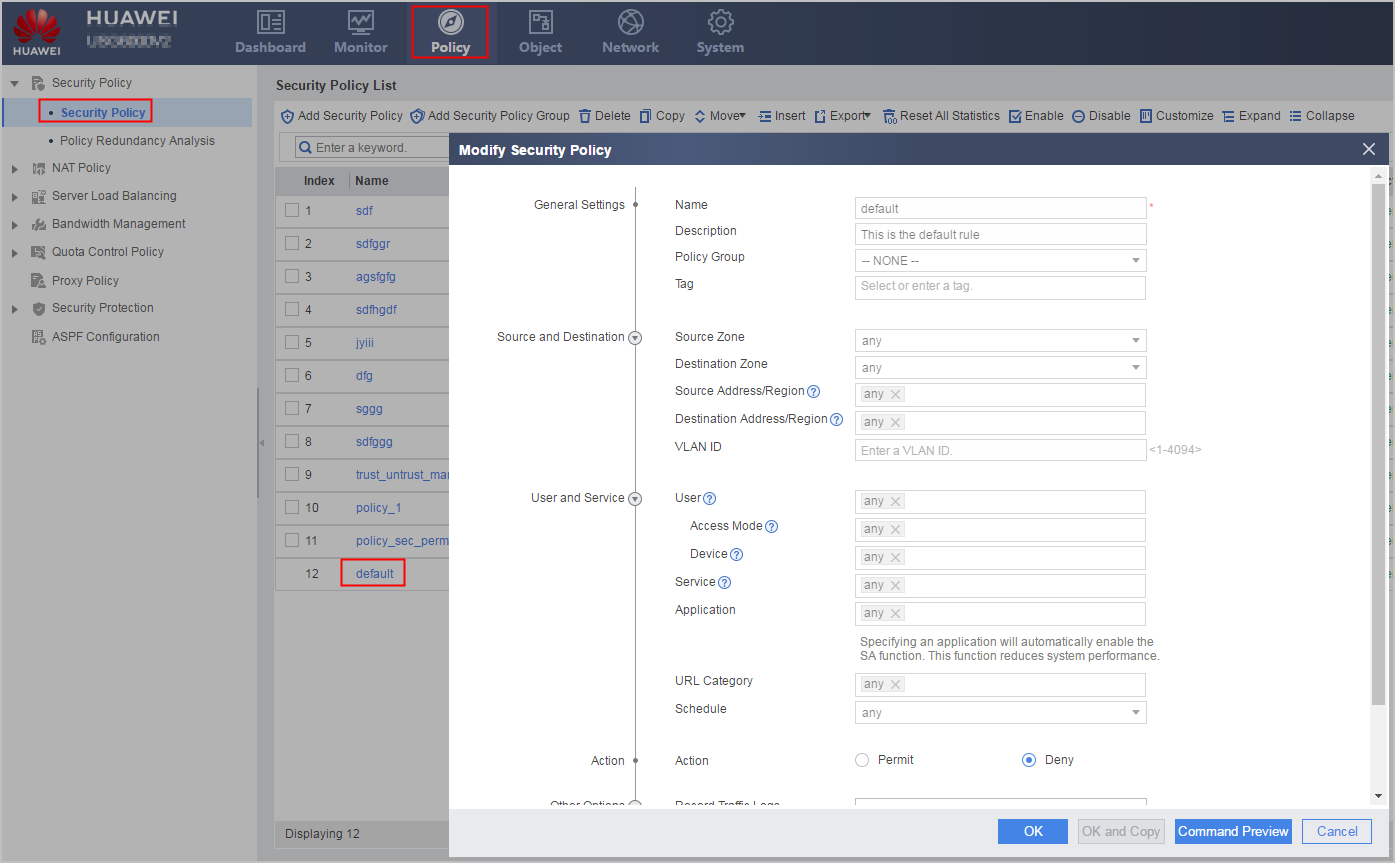
The default security policy controls interzone traffic, including but not limited to the traffic sent from and received by the FW and traffic exchanged between security zones.
For intrazone traffic, if the function of controlling intrazone traffic is disabled, the intrazone traffic is not controlled by the default security policy, and the default forwarding action is permit. If you need to control the forwarding of intrazone traffic, configure specific security policies. If the function of controlling intrazone traffic is enabled, the default security policy takes effect on the intrazone traffic, including the action of the default security policy and the log function.
Choose , click default in the security policy list to access the default security policy configuration page, and select Enable of Match Intrazone Traffic to enable the default security policy to control intrazone traffic.
Procedure
- Choose .
Choose in some device models.
- Click Add Security Policy.
- Configure the name and description of the security policy.
Parameter
Description
Name
Security policy name. The value must be unique.
Description
Description of the security policy. The description must clearly indicate the function of each security policy to make them easy to find and maintain.
The web UI provides the [Add Security Policy] link for certain features. You can click this link to directly open the Add Security Policy configuration page and rapidly create corresponding security policies for configured data flows. The security policies in the security policy list created in this mode can be distinguished by the descriptions automatically generated by the system. The descriptions automatically generated by the system are in the format of This is for XX policy: XX. For example: This is for Nat policy: abc indicates that the description is created by NAT policy abc.
- Define the match conditions of the security policy.
Parameter
Description
VLAN ID
The VLAN ID in a packet.
By default, the FW parses the outer VLAN tags of QinQ packets. If you need to filter traffic based on inner VLAN tags, run the firewall transparent inside-vlan inspect enable command to enable the detection of inner VLAN tags.
Source Zone
The security zone from which traffic is originated. Security zones can be default zones and user-defined zones. For details on how to configure a security zone, see Security Zones.
Destination Zone
The security zone to which traffic is destined. Security zones can be default zones and user-defined zones. For details on how to configure a security zone, see Security Zones.
Source Address/Region
The source address, source address group, source domain group, source region, or source region group of traffic. If the attribute of a packet matches one of the previous values, the packet meets this condition. If you have specified the user in a policy, you do not need to specify Source Address/Region.
NOTE:Do not reference only empty address objects, address groups, region groups, or domain groups. Otherwise, the matching condition cannot be matched.
Address and address group: You can specify a separate IP/MAC address, an IP address range, or an address group that covers a set of IP/MAC addresses. For details, see Address Object and Address Group.
NOTE:To exclude an address or address group (source address or source addresses of traffic) from policy matching, select the address or address group from the available address area, select it in the selected address area and click Invert, and then click OK.
- Domain group: You can specify a domain group to set the IP addresses of some specific domain names as the policy matching conditions. For details, see Domain Group.NOTE:
When an IP address corresponds to multiple domain names, an IP address can be used to search for a maximum of 16 domain names. If the domain name to be searched is not in the policy rule, the policy cannot be matched. You are advised to configure multiple domain names with the same IP address in the same policy rule.
- Region and region group: You can specify a region or region group as a match condition of a policy. For details, see Region and Region Group.
You can manually enter IP/MAC addresses or select an existing address object from the drop-down list.
The icons in the drop-down list are described as follows:
 represents an address.
 represents an address group.
 represents a domain group.
 or national flags represent a country or region. User-defined regions are displayed on top of predefined regions. Region is a group of addresses classified by region.
 represents a region group.
When there are multiple available options, you can select Address or Region from the drop-down list, improving the configuration efficiency. When only Address is selected, the drop-down list displays all optional addresses, address groups, and domain groups. When only Region is selected, the drop-down list displays all optional regions and region groups.
Destination Address/Region
The destination address, destination address group, destination domain group, destination region, or destination region group of traffic. If the attribute of a packet matches one of the previous values, the packet meets this condition. Destination addresses and regions define the hosts and servers that can be accessed.
NOTE:When an IP address corresponds to multiple domain names, an IP address can be used to search for a maximum of 16 domain names. If the domain name to be searched is not in the policy rule, the policy cannot be matched. You are advised to configure multiple domain names with the same IP address in the same policy rule.
The destination configuration is similar to source configuration.
When there are multiple available options, you can select Address or Region from the drop-down list, improving the configuration efficiency. When only Address is selected, the drop-down list displays all optional addresses, address groups, and domain groups. When only Region is selected, the drop-down list displays all optional regions and region groups.
NOTE:- Do not reference only empty address objects, address groups, region groups, or domain groups. Otherwise, the matching condition cannot be matched.
- To exclude an address or address group (destination address or destination addresses) from policy matching, select the address or address group from the available address area, select it in the selected address area and click Invert, and then click OK.
User
A user indicates from whom traffic is originated. The parameter value can be User, User Group, or Security Group.
Users and user groups reflect the vertical organizational structure. Users and security groups reflect the horizontal organization structure. You can configure users and user groups based on company departments or add users from different departments to one security group for management. For details, see User and User Authentication.
NOTE:If security policy control needs to be implemented for users who use redirected authentication and packets exchanged between the users and DNS server are forwarded by the FW, a security policy that permits DNS packets needs to be configured on the FW. Otherwise, redirected authentication fails because HTTP requests of users cannot be redirected to the authentication page.
You can reference local users, user groups, or security groups or create new ones.
If the server has a great number of users, user groups, or security groups and only some of them need to be imported to the FW to implement policy control, select Server Import from the matching conditions of User, online query and import the desired users, user groups, or security groups, and then reference them in policies.NOTE:Only the AD and AD LDAP servers support online query and import of users, user groups, or security groups.
Before that, you need to configure a server import policy in the New User Authentication Options and associate an authentication domain with the configured server import policy.
The server import policy determines the target groups, online query path, and filtering parameter. However, the import type configured in the server import policy does not take effect in this function.
The user name (cn value) on the server is suggested to be the same as the login name (sAMAccountName value).
A policy can reference a maximum of 64 users, user groups, or security groups.
Select Import from Server from the matching conditions of User. If Type is set to User, the device will imports only the names of users, not the user groups or security groups to which the users belong.
Access Mode
You can set Access Mode to implement policy control for different types of access authentication in Agile Controller SSO scenarios. Currently, the FW supports policy control for the following types of access authentication:
- Wired-802.1x: client access mode that supports 802.1X authentication in case of a wired connection
- wireless-802.1x: client access mode that supports 802.1X authentication in case of a wireless connection
- Wired-Portal: Portal access in case of a wired connection
- Wireless-Portal: Portal access in case of a wireless connection
Device
In Agile Controller SSO scenarios, the FW imports the types of devices that Agile Controller SSO users access from the Agile Controller server and assign them to specific predefined device groups. You can also define device groups and import devices to these groups.
You can set Device to implement device type-based online behavior control and network permission assignment.
Service
The protocol type of the traffic. Services can be predefined or user-defined.
Predefined services are well-known services, such as HTTP, FTP, and Telnet.
You can also define services as needed. User-defined services are configured by specifying information such as port number. User-defined services fall into three types and the configuration methods are described as follows:
- For TCP/UDP/SCTP packets, you must specify the source and destination ports.
- For ICMP packets, you must specify the ICMP message type and code.
- For IP packets, you must specify the protocol number in the IP header.
You can also create a service group and add predefined and user-defined services to the group.
For details, see Service and Service Group.
NOTE:To exclude a service or service group (service or service group of traffic) from policy matching, select the service or service group from the available service area, select it in the selected service area and click Invert, and then click OK.
Application
Application of the traffic. A service may be used by multiple applications. Therefore, applications are more fine-grained than services in security control. Applications can be predefined or user-defined.
Predefined applications are well-known applications, such as BT.
You can also define applications based on their features if the applications are not included in predefined applications.
You can also create an application group and add predefined and user-defined applications to the group.
In addition, you can reference an application label to control traffic that matches the label or reference software to control traffic that matches this type of software.
For details on applications, application groups, application labels, and software see Application and Application Group.
If the policy has application identification configured, the performance of the FW may be affected. Configure this as required.
URL Categories
Select or create a URL category.
URL categories are classified into predefined and user-defined ones. You can use predefined categories or create user-defined categories based on Configuring User-defined URL Categories.
Schedule
The time range during which a security policy is applied. The schedule can be a repeating schedule (for example, 19:00 to 22:00 from Monday through Friday) or one-time schedule (for example, 19:00 2012/5/1 to 19:00 2012/5/2). For details, see Schedule.
- Configure the action of the security policy.
The action of a security policy can be:
Permit: If the action is permit, the device will check whether the policy references a profile. If no profile is referenced, the device permits the traffic. If a profile is referenced, the device will perform content security check based on the profile and permit or deny the traffic based on the inspection results.
- If all profiles permit the traffic, the FW allows the traffic to pass through.
- If any profile blocks the traffic, the FW blocks the traffic.
- Deny: Discards the traffic.
In the security policy list, click default. On the default security policy configuration page, you can change the action of the default security policy rule.
- Configure the sending of feedback packets.If the action of the security policy matched by packets is deny, feedback packets can be sent based on the packet type. For TCP packets, reset packets are sent. For UDP/ICMP packets, ICMP unreachable packets are sent. After the client/server receives the blocking packets from the FW, the application layer rapidly terminates sessions and lets users sense that their requests have been blocked.
- Reset client: The FW sends TCP reset packets to the TCP client.
- Reset server: The FW sends TCP reset packets to the TCP server.
ICMP unreachable: The FW sends ICMP unreachable packets to the packet client.
When working at Layer 2, the FW cannot send IGMP unreachable packets.
When the FW serves as a bypass detection device, an interference interface needs to be configured to send reset packets. For details, see Interference packets for bypass detection.
If cross-virtual system packets, packets processed by NAT64, VPN encapsulated packets, or TCP proxy packets are blocked, the FW does not send feedback packets.
- Configure the profiles.
You can select and edit existing profiles or create new profiles. The functions of the profiles are described as follows:
Performing content security check (including intrusion prevention, antivirus or application identification) on traffic affects the performance of the FW. Therefore, configure security policies to reference only desired content security profiles.
Profile
Description
Antivirus profile detects and processes viruses for files transmitted on the network, preventing viruses from compromising the data and system and securing the intranet.
Intrusion prevention profile compares traffic with intrusion prevention signatures to prevent application-layer attacks, such as cache overflow, Trojan horses, backdoors, and worms.
URL filtering profile permits or denies access to URLs to control the online behavior of users.
File blocking profile blocks the transmission of specified types of files to prevent downloads of files infected by malware and viruses or uploads of sensitive files to the Internet.
Data filtering profile blocks traffic that contains specified keywords to prevent transmission of sensitive data.
Application behavior control profile controls FTP and HTTP operations, such as web browsing, posting, using a proxy, downloading, and uploading.
Cloud access security awareness profile controls operations of cloud computing related applications, such as file uploading and downloading, login, and email sending, receiving, and browsing.
Mail filtering profile controls email sending and receiving to prevent spam and anonymous mails and data leaks.
APT defense can detect APT attacks that exploit zero-day vulnerabilities and combinations of multiple techniques, such as advanced evasion techniques. This function protects your networks against damages and prevents internal information theft.
DNS filtering permits or denies access to domain names to control the online behavior of users.
The artificial intelligence engine can analyze and evaluate traffic, identify unknown threats and attacks on the network, and send logs and generate reports based on the analysis result for further processing.
- Optional: Click Command Preview to view the command lines delivered by the configured security policies.
Before clicking OK to deliver the security policy configuration, you can click Command Preview to view the command lines delivered by a new or modified security policy. This helps you check the security policy configuration.
- Click OK to complete the application of the security policy.
- Click Save on the upper-right corner and click OK on the dialog box that is displayed.
- Optional: Click Submit on the upper-right corner and click OK on the dialog box that is displayed.
When implementing create, change, and delete operations on the configuration profiles of the following security services, click the Submit button to make the operation and referenced security policies take effect.
Before committing configurations, ensure that the IAE is available. Otherwise the configurations do not take effect.
- Antivirus (AV)Configuration (Central AP)
- Intrusion Prevention (IPS)Configuration (Central AP)
- URL Filtering (Central AP)
- File Blocking
- Data Filtering
- Application Behavior Control
- Cloud Access Security Awareness
- Mail Filtering
- DNS Filtering