Web: Example for Configuring Mail Filtering by Email Address or Attachment
This section provides an example for configuring mail filtering by mail address or attachment on the FW that serves as the security gateway on the intranet.
Networking Requirements
An enterprise has about 200 employees who work for two departments: sales and R&D. In addition, the enterprise has a domain name of its own and deploys a mail server on the intranet.
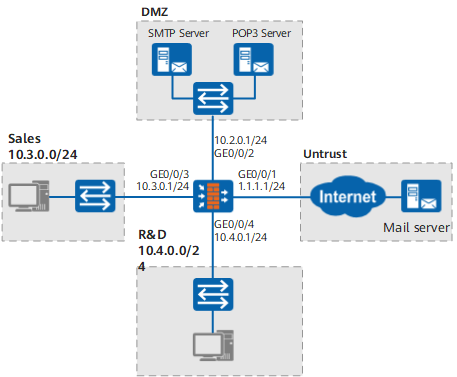
Restricts the mail transmission permissions to prevent confidential information from being leaked. To be more specific,
- In the R&D department, only a few employees can send and receive mails, and the others can receive but cannot send mails.
- In the sales department, all employees can send and receive mails, but the maximum size of attachments cannot exceed 10 MB.
Configuration Roadmap
Construct the intranet for the enterprise and deploy the FW as the security gateway.
- Add the mail server to the dmz.
- Add all the employees in the sales department to the user-defined sale security zone.
- Add all the employees in the R&D department to the user-defined research security zone.
- Add the Internet to the untrust zone.
-
The mail filtering profile is zone-specific. Plan the mail filtering policies for the security zones.
Purpose
Configuration Roadmap
Grants John and Jane the permission to send and receive mails, and other employees in the R&D department only the permission to receive mails.
Enable mail address checks in the sending direction between the research zone and the dmz to filter out mails based on the sender addresses. Only John and Jane are permitted to send mails.
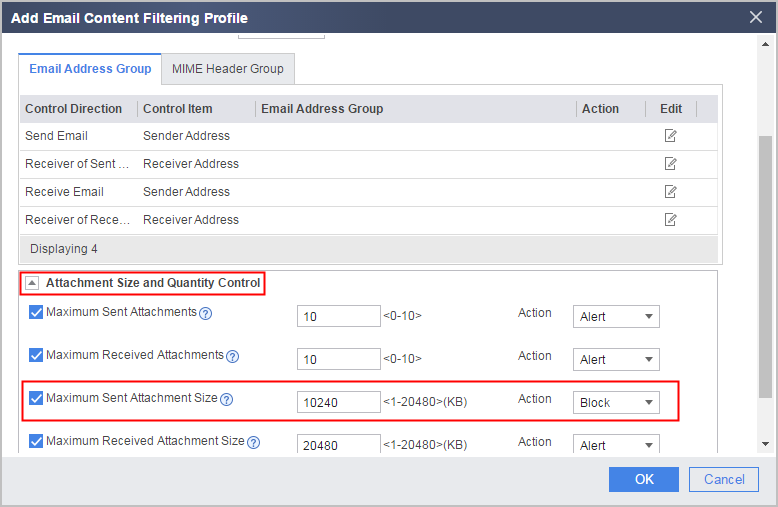
Grants all employees in the sales department the permission to send and receive email, but restricts the attachment size per mail to a maximum of 10 MB.
Enable the mail attachment control in the sending direction between the sale zone and the dmz to restrict the maximum attachment size to 10 MB.
Procedure
- Set the interface IP address and add the interface to a security zone.
- Add GE0/0/1 to the untrust zone.
- Choose .
- Click
 for GE0/0/1 and set the parameters as follows: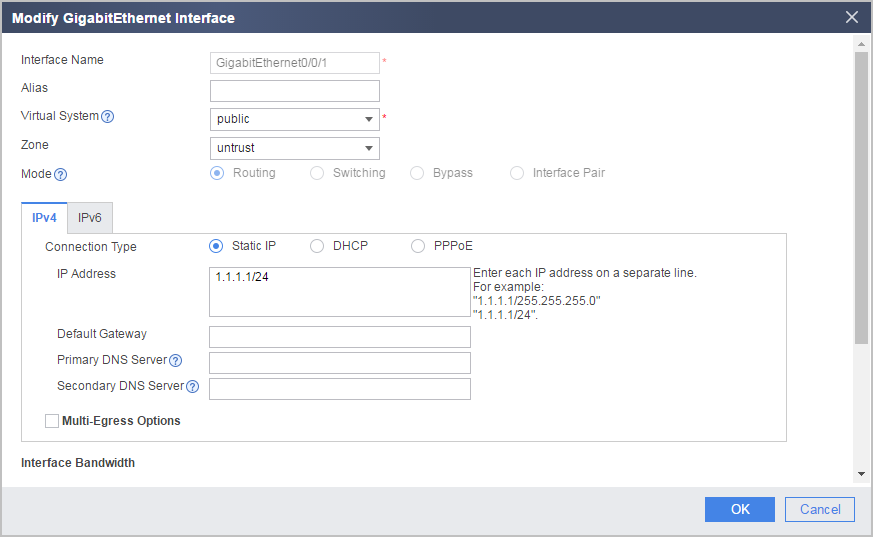
Zone
untrust
IP Address
1.1.1.1/24
- Click OK.
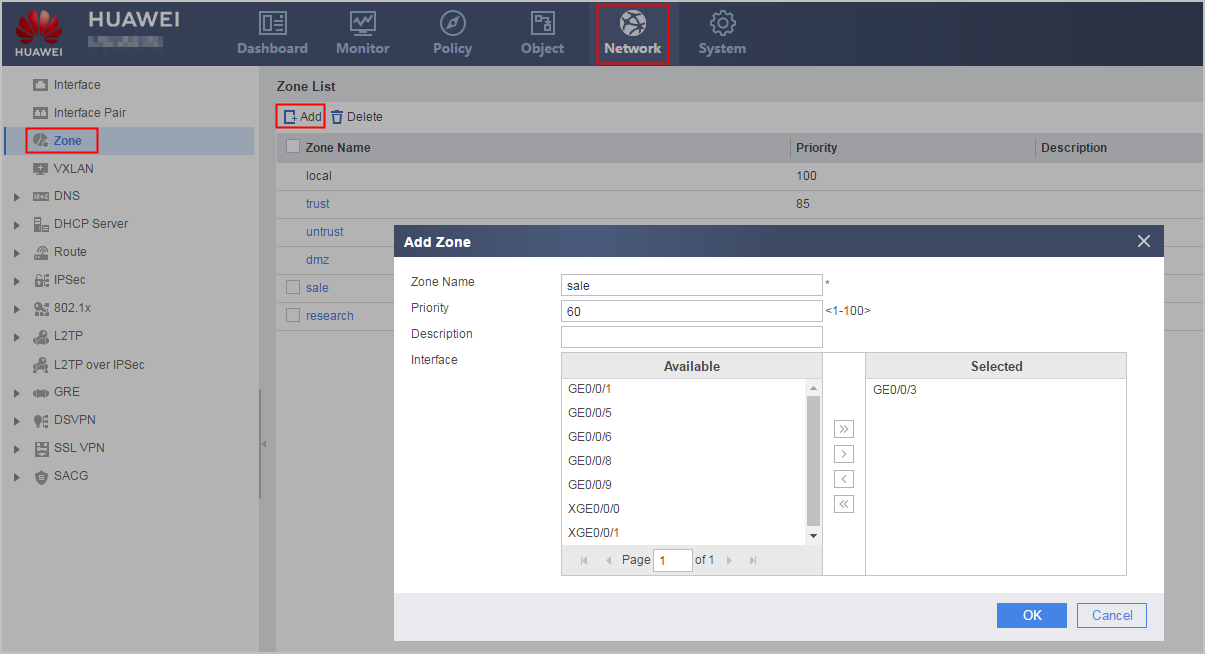
- Create security zone sale and add GE0/0/3 to the sale zone.
- Add GE0/0/1 to the untrust zone.
- Enable the mail attachment control in the sending direction between the sale zone and the dmz to restrict the maximum attachment size to 10 MB.
- Set the Name and Description of the mail filtering policy.
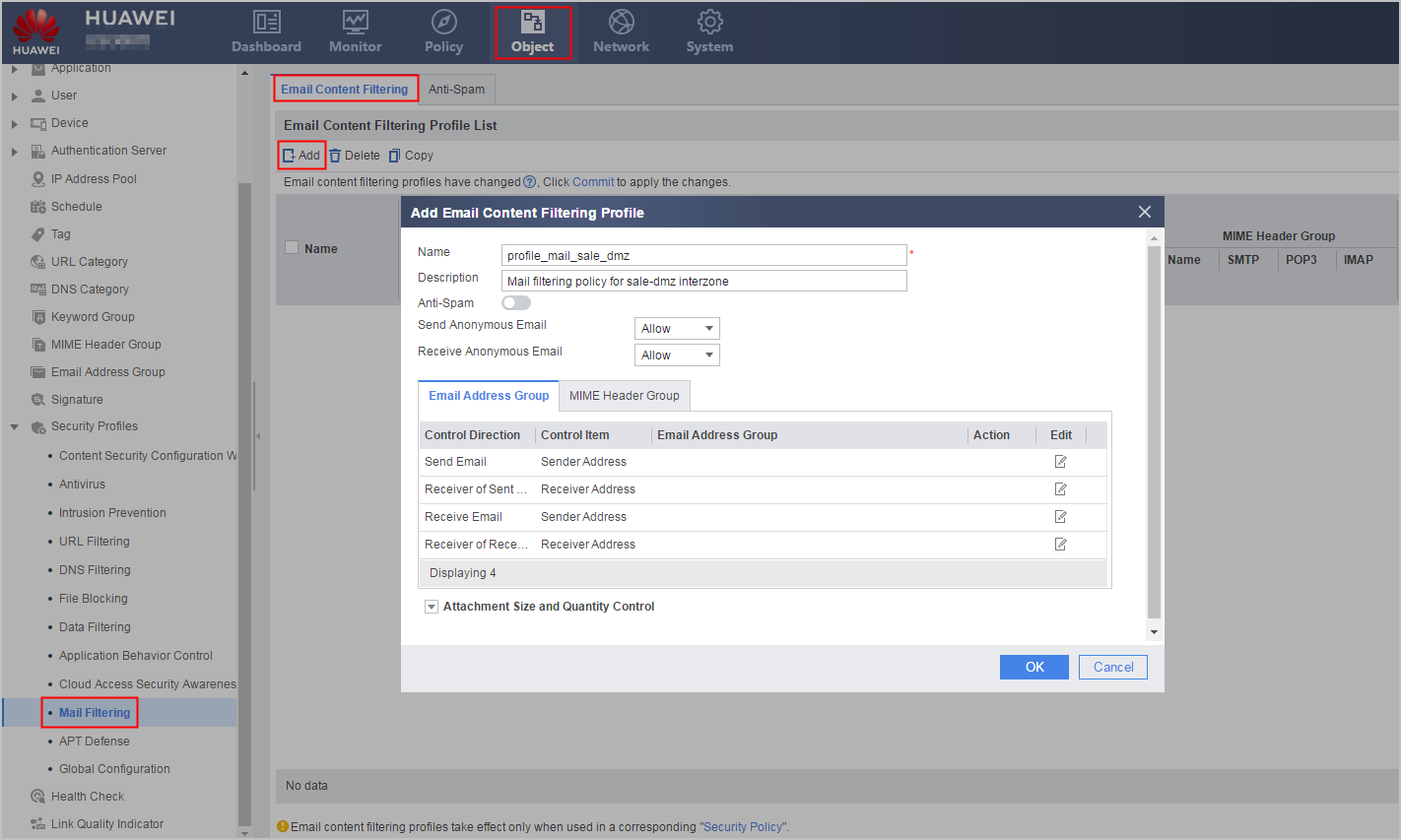
Name
profile_mail_sale_dmz
Description
Mail filtering policy for sale-dmz interzone
- Click Attachment Size and Quantity Control.
- Configure the security policy for the sale-dmz interzone.
- Choose .
- Click Add Security Policy and set the parameters of the security policy for the sale -> dmz interzone as follows:
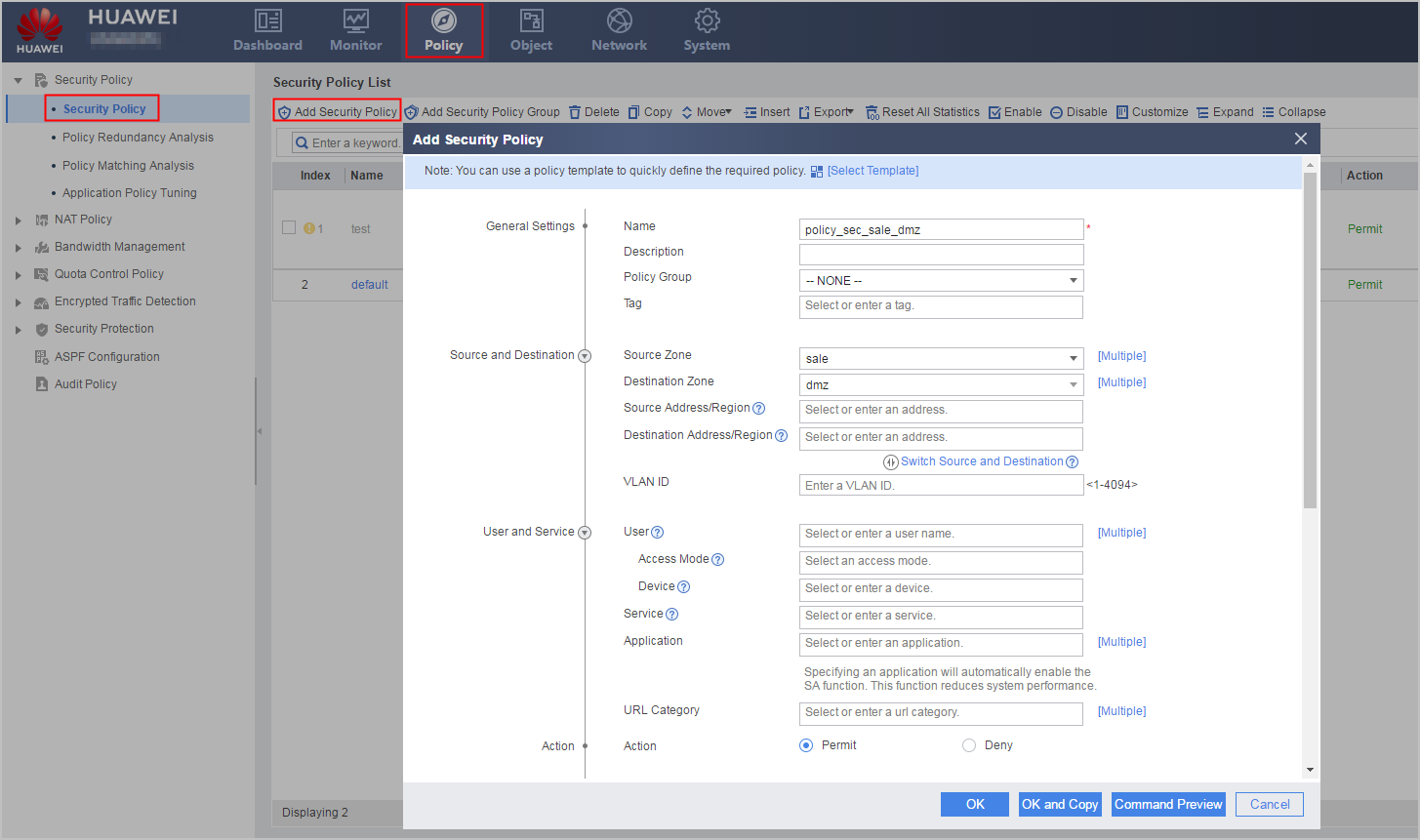
Name
policy_sec_sale_dmz
Source Zone
sale
Destination Zone
dmz
Action
Permit
Content Security
Email Filter
profile_mail_sale_dmz
- Click OK.
- Set the Name and Description of the mail filtering policy.
- Enable mail address checks in the sending direction between the research zone and the dmz to filter out mails based on sender addresses. Only John and Jane are permitted to send mails.
- Set the Name and Description of the mail filtering policy.
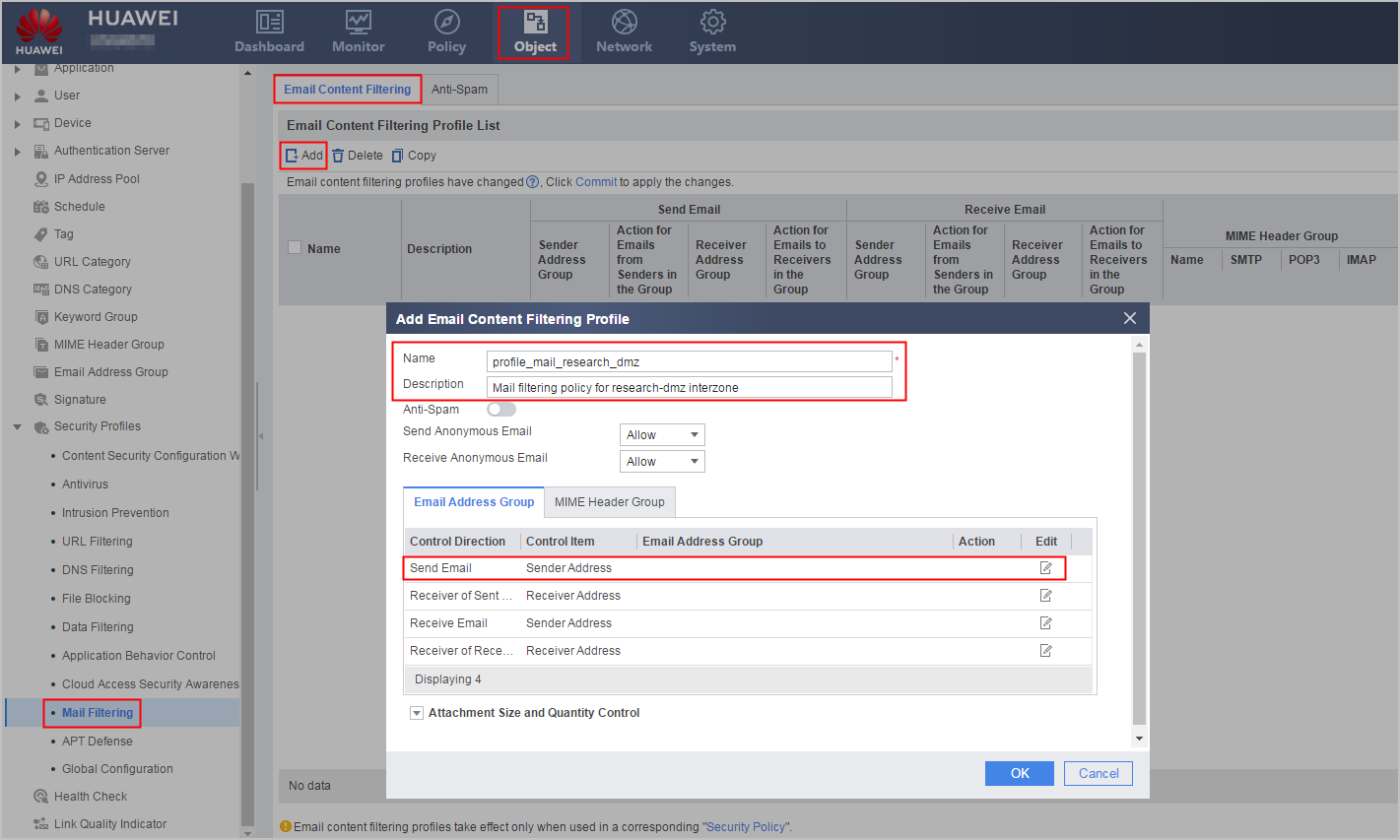
Name
profile_mail_research_dmz
Description
Mail filtering policy for research-dmz interzone
- Click corresponding to the sender address in Send Email.
- Set the action to Allow.
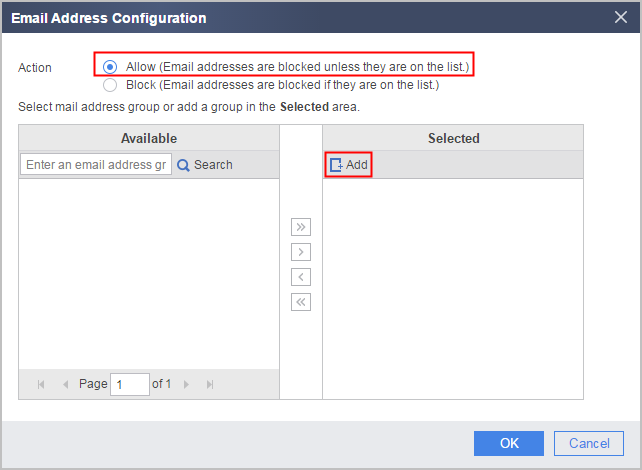
- Set the mail address group as follows:
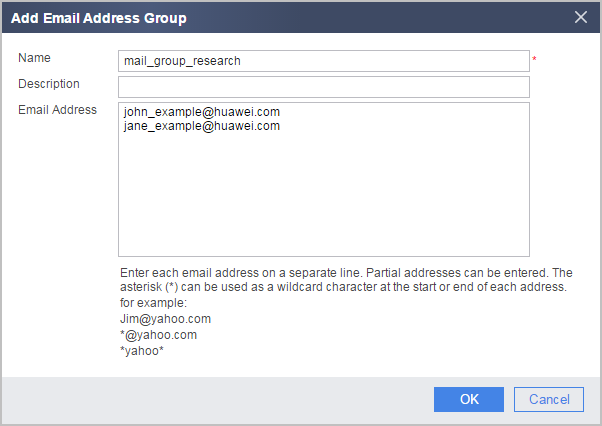
Name
mail_group_research
Email Address
- john_example@huawei.com
- jane_example@huawei.com
- Configure the security policy for the research -> dmz interzone.
- Choose .
- Click Add Security Policy and set the parameters of the security policy for the research -> dmz interzone as follows:
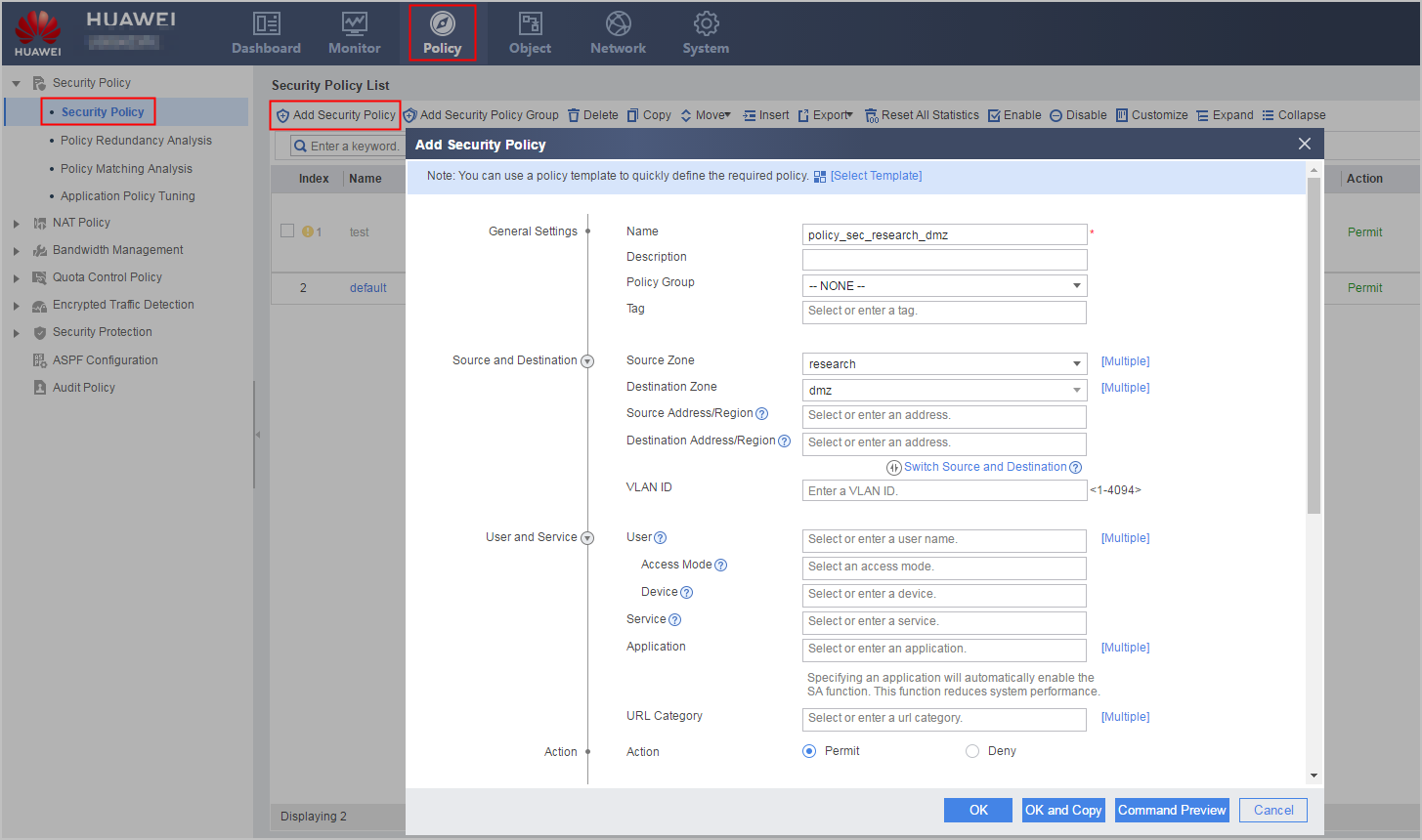
Name
policy_sec_research_dmz
Source Zone
research
Destination Zone
dmz
Action
Permit
Content Security
Email Filter
profile_mail_research_dmz
- Click OK.
- Set the Name and Description of the mail filtering policy.
- Click Submit.

Configuration Script
#
sysname FW
#
interface GigabitEthernet0/0/1
 undo shutdown
 ip address 1.1.1.1 255.255.255.0
#
interface GigabitEthernet0/0/2
 undo shutdown
 ip address 10.2.0.1 255.255.255.0
#
interface GigabitEthernet0/0/3
 undo shutdown
 ip address 10.3.0.1 255.255.255.0
#
interface GigabitEthernet0/0/4
 undo shutdown
 ip address 10.4.0.1 255.255.255.0
#
firewall zone untrust
 add interface GigabitEthernet0/0/1
#
firewall zone dmz
 add interface GigabitEthernet0/0/2
#
firewall zone name sale id 4
 set priority 60
 add interface GigabitEthernet0/0/3
#
firewall zone name research id 5
 set priority 70
 add interface GigabitEthernet0/0/4
#
mail-address-group name mail_group_research
 pattern exact john_example@huawei.com
 pattern exact jane_example@huawei.com
#
profile type mail-filter name profile_mail_research_dmz
 description Mail filtering policy for research-dmz interzone
 send-mail sender filter-mode allow
 send-mail sender group name mail_group_research
#
profile type mail-filter name profile_mail_sale_dmz
 description Mail filtering policy for sale-dmz interzone
 send-mail attachment max-size 10240 action block
#
security-policy
 rule name policy_sec_sale_dmz
  source-zone sale
  destination-zone dmz
  profile mail-filter profile_mail_sale_dmz
  action permit
 rule name policy_sec_research_dmz
  source-zone research
  destination-zone dmz
  profile mail-filter profile_mail_research_dmz
  action permit