Service Health Check
The service health check function checks whether services on a server are available to prevent traffic from being distributed to a server that does not function properly, which causes service interruption.
To deal with the increasing user access traffic and data amount, enterprises use SLB to overcome performance deficiency of a single server. Though SLB improves service quality and reliability, the following issues arise:
- If a server is faulty, how does the FW detect the fault and adjust traffic distribution?
- How does the FW determine the message credibility upon being informed of the server fault, even if a mechanism is available to avoid misjudgment?
- When the faulty server is restored, how does the FW immediately involve the server in SLB?
The FW provides the service health check function to tackle these issues. This function checks the operating status of servers. If a server is faulty, the FW modifies the server status at once. The load balancing algorithm detects the server status change and ensures that user requests are not transmitted to the faulty server.
The FW periodically sends probe packets to servers to know the server status. The protocol types of probe packets vary according to service types. The FW supports TCP, ICMP, HTTP, DNS, and RADIUS probe packets. If a server does not provide these types of services, use ICMP probe packets to check server reachability.
A check result is returned for each probe packet, indicating whether the server is functioning properly. The FW uses a result confirmation mechanism to avoid misjudgment. If a check result indicates a server fault, the FW continues sending probe packets and starts counting consecutive faults. When the number of consecutive faults reaches the upper limit, the FW determines that the server is faulty. The load balancing algorithm changes the load balancing result after learning the check result, and the server does not participate in traffic distribution.
The administrator can decide whether to continue the health check on the faulty server. The FW continues sending probe packets to the faulty server, unless you configure the faulty server to work in inactive state.
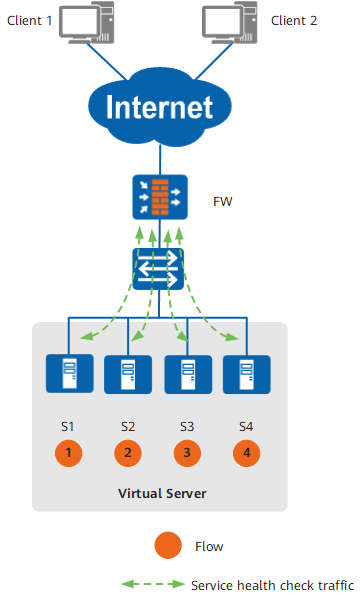
Figure 1 shows an example networking. The FW uses the round robin algorithm and distributes client traffic to the four servers. The FW periodically sends probe packets to the servers to monitor the server status.
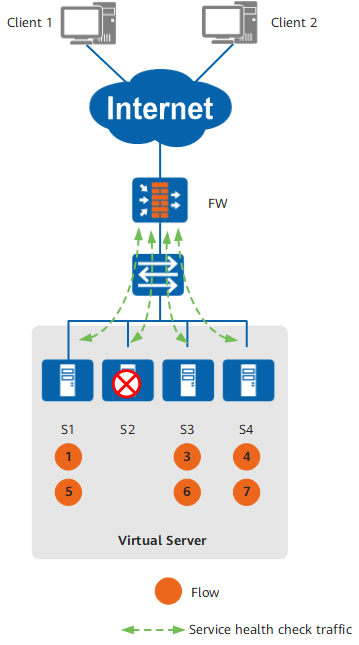
As shown in Figure 2, when S2 is faulty, the FW immediately stops distributing traffic to it but keeps sending probe packets to it.
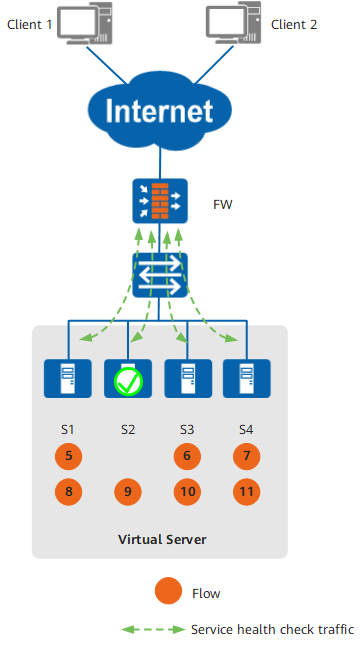
As shown in Figure 3, when S2 is restored, the FW modifies its health status at once to enable it to join traffic distribution.