Sticky Session
The sticky session function enables the FW to allocate the traffic from one client to the same real server within a specific period of time.
The sticky session function applies to two scenarios. 1. A client needs to interact with a server for multiple times to fulfill a task. 2. A server stores service information about a client, so it is better to let the server process all requests from the client.
In these scenarios, service traffic from one client must be allocated to the same server. If the server is changed during interaction, the client cannot complete the operation and has to re-initiate a request. For example, a user adds a good to the cart on a shopping website. To let the website save the shopping information, the user must log in. During the login, a server authenticates the user and saves the authentication and shopping information about the user. After the user selects "Automatic login" or a similar option, the user directly uses the authentication information saved on the server, instead of being authenticated again. Another example is the online training or exam system on a campus network. After a user starts an online operation, the process must be continuous. Therefore, all requests of the user must be processed by the same server.
The FW supports the following sticky session methods: source IP address-based sticky session, SSL session ID-based sticky session, and HTTP cookie-based sticky session. The HTTP cookie-based sticky session includes cookie-insert, cookie-passive, and cookie-rewrite. Matching between the sticky session algorithms and the virtual service protocols is as follows:
| Protocol Configuration of the Virtual Server | any | http | https | ssl | tcp | udp | esp | |
|---|---|---|---|---|---|---|---|---|
| Sticky Session Configuration of the Real Server Group | source-ip | √ | √ | √ | √ | √ | √ | √ |
| session-id | × | × | × | √ | × | × | × | |
| cookie | × | √ | √ | × | × | × | × | |
√: not conflict ×: conflict |
||||||||
If the aging time expires or the real server fails, the sticky session entry will be deleted. When the client accesses the server again, the FW allocates the request to a server based on the load balancing algorithm and creates a sticky session entry.
Source IP Address-based Sticky Session
For the source IP address-based sticky session, the FW implements load balancing based on the source IP address requested. Load balancing for all access requests from the same IP address is retained on the same server.
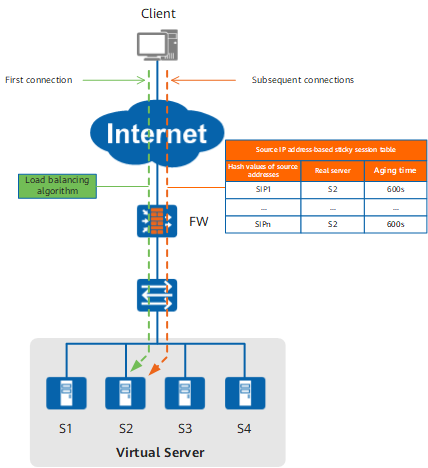
As shown in Figure 1, when the client accesses the server, the FW sends the first packet to S2 based on the load balancing algorithm and records the mapping between the client source IP address and the real server in the source IP address-based sticky session table. After receiving subsequent connection requests from the client, the FW searches the sticky session table based on the client source IP address and finds S2. Then, the FW sends the subsequent requests to S2. At the same time, the FW restores the aging time of the sticky session entry to the initial value.
If the aging time expires or the real server fails, the sticky session entry will be deleted. When the client accesses the server again, the FW allocates the request to a server based on the load balancing algorithm and creates a sticky session entry.
HTTP Cookie-based Sticky Session
For the HTTP cookie-based sticky session, the FW implements load balancing based on the cookie in the session. Load balancing for all access requests carrying the same cookie is retained on the same server. The HTTP cookie-based sticky session includes cookie-insert, cookie-passive, and cookie-rewrite. The HTTP cookie-based sticky session includes cookie-insert, cookie-passive, and cookie-rewrite. If you select the cookie-passive or cookie-rewrite algorithm, the cookie field needs to be set on the server. If you select cookie-insert algorithm, no configuration is required on the server. The cookie field setting varies according the server model. For example, if you select the cookie-rewrite algorithm on the Apache server, the following information will be added to the httpd.conf file on the server: Header add Set-Cookie:"SLBServerpool=0000000; expires=Sat, 19-Aug-201619:35:45 GMT; path=/"If you select the cookie-passive algorithm, the following information will be added to the httpd.conf file to Apache server: Header add Set-Cookie:"SLBServerpool=base64(IP:PORT); expires=Sat, 19-Aug-201619:35:45 GMT; path=/"
As shown in Figure 2, the FW parses an HTTP request packet from the client and checks whether the packet carries a cookie inserted by the firewall itself. If the packet does not carry the cookie, the FW allocates the HTTP request packet to a server based on the load balancing algorithm and inserts its cookie to the reply packet sent from the server. The inserted cookie contains the IP address of the real server. When the FWreceives subsequent HTTP request packets from the client, it obtains the IP address of the real server from the cookie carried in the packets and still allocates the request packets to the real server.
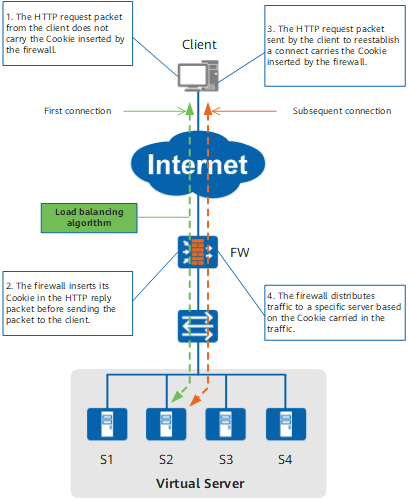
As shown in Figure 3, the FW parses an HTTP request packet from the client and checks whether the packet carries a cookie inserted by the firewall itself. If the packet does not carry the cookie, the FW allocates the HTTP request to a server based on the load balancing algorithm. The real server responds to the request packet and inserts its cookie to the reply packet. The inserted cookie contains the IP address of the real server. When the FWreceives subsequent HTTP request packets from the client, it obtains the IP address of the real server from the cookie carried in the packets and still allocates the request packets to the real server. At the same time, the FW restores the aging time of the sticky session entry to the initial value.
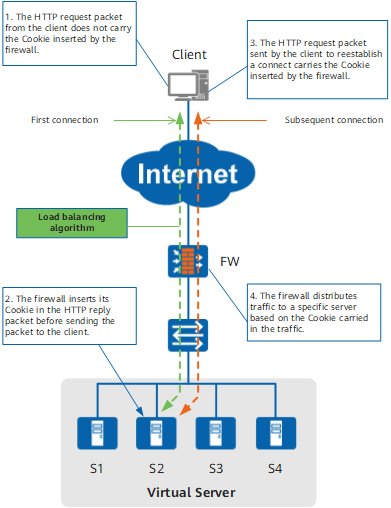
As shown in Figure 4, the FW parses an HTTP request packet from the client and checks whether the packet carries a cookie inserted by the firewall itself. If the packet does not carry the cookie, the FW allocates the HTTP request to a server based on the load balancing algorithm. The server responds to the request packet and inserts a blank cookie to the reply packet. When the FWreceives the reply packet from the server, the rewritten inserted cookie contains the IP address of the real server. When the FWreceives subsequent HTTP request packets from the client, it obtains the IP address of the real server from the cookie carried in the packets and still allocates the request packets to the real server.
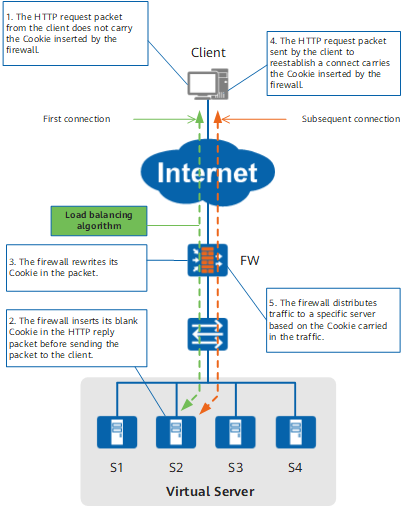
SSL Session ID-based Sticky Session
For the SSL session ID-based sticky session, the FW implements load balancing based on the session ID. Load balancing for all access requests carrying the same session ID is retained on the same server.
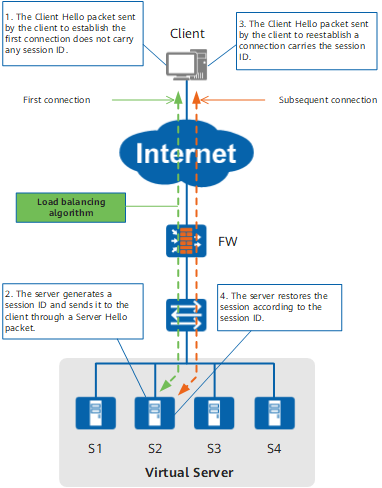
As shown in Figure 5, the FW parses SSL packets sent from the client. If a Client Hello packet is identified, the FW checks whether the packet carries a session ID. If not, the FW selects a real server based on the load balancing algorithm. The real server generates a session ID for this session, inserts the session ID into the Server Hello packet, and sends the packet to the client. After receiving the Server Hello packet, the FW obtains the session ID and creates a sticky session entry to record the mapping between the session ID and real server. When the client re-initiates a connection to the server, the Client Hello packet carries the session ID. After receiving the packet, the FW obtains the session ID carried in the packet, finds the real server in the sticky session table based on the session ID, and sends the packet to the real server.