Configuring SNMP Using the Web UI
This section describes how to use the Web UI to configure SNMP. After you configure SNMP, the network management station (NMS) can monitor and manage the managed devices.
- Choose .
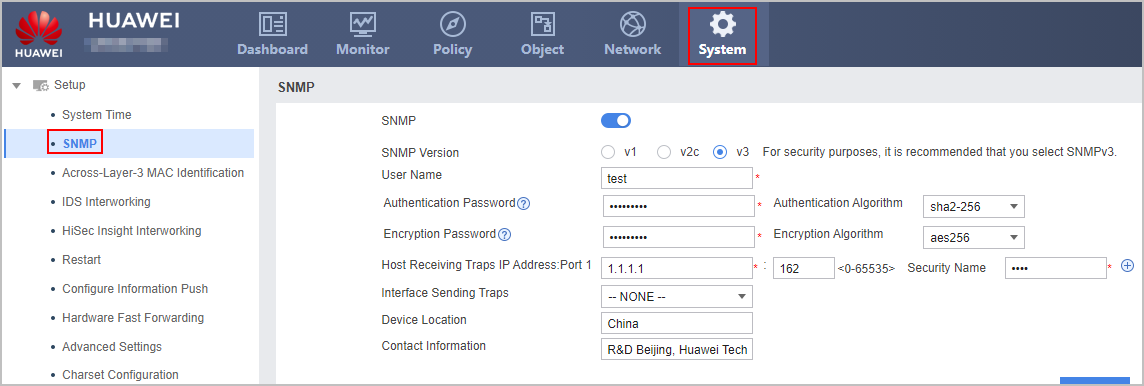
- Enable the SNMP.
- Set the parameters listed in Table 1 and Table 2 for connecting managed devices to the NMS.
- Click Apply.
Table 1 Parameters for configuring SNMPv1 or SNMPv2c Parameter
Description
Value
SNMP Version
Version of SNMP. For security purposes, it is recommended that you select SNMPv3.
The value is negotiated with the peer NMS.
SNMP Read-Only Community Name
Community name used by an NMS user to authenticate the managed device.
If you configure access permissions on all function modules on the managed devices and an NMS user uses the read-only community name for authentication, the user can only view the statuses of the function modules.
The read-only community name on the NMS must be the same as that on the managed devices. Otherwise, the NMS fails to access the managed devices.
To enhance security, the read-only community name is suggested to contain a minimum of eight characters, including at least two types of characters from the following four groups: uppercase letters (A to Z), lowercase letters (a to z), digits (0 to 9), and special characters, such as exclamation points (!), at signs (@), number signs (#), dollar signs ($), and percent (%).
SNMP Read-Write Community Name
Community name used by an NMS user to authenticate the managed device.
If you configure access permissions on all function modules on the managed devices and an NMS user uses read-write community name for authentication, the user can modify the statuses of the function modules. That is, the user can configure the device.
The read-write community name on the NMS must be the same as that on the managed devices. Otherwise, the NMS fails to access the managed devices.
To enhance security, the read-write community name is suggested to contain a minimum of eight characters, including at least two types of characters from the following four groups: uppercase letters (A to Z), lowercase letters (a to z), digits (0 to 9), and special characters, such as exclamation points (!), at signs (@), number signs (#), dollar signs ($), and percent (%).
Trap Receiving Host: Port: Security Name
Trap Receiving Host: IP address of the host that receives trap packets.
Port: port on the managed device for sending trap packets to a destination host. Specify this parameter when you need to use a non-default port, for example, port 162 is in use.
Security Name: the same as the name of the NMS server.
To specify a VPN instance name, run the snmp-agent target-host trap command with the vpn-instance parameter.
By default, the UDP port number is 162.
Source Address of Trap Packets
IP address of the source interface for sending trap messages. When multiple routes destined for the NMS server exist, specifying a source interface can ensure that trap messages carry the IP address of a fixed source interface. This helps administrators identify trap senders on the NMS server.
-
Device Location
Location of the site where managed devices reside. This helps administrators locate faulty devices quickly.
-
Contact Information
Contact information of a maintenance engineer for the managed devices, such as a telephone number.
-
Table 2 Parameters for configuring SNMPv3 Parameter
Description
Value
SNMP Version
Version of SNMP.
The value is negotiated with the peer NMS.
User Name
User name used by an NMS user to access the managed device.
The user name on the NMS must be the same as that on the managed devices.
Authentication Password
Password used to authenticate administrators.
The authentication ensures that only administrators that have access permissions can access the managed devices. The authentication function applies to networks that are secure but have multiple administrators who perform operations on the device frequently.
The authentication password on the NMS must be the same as that on the managed devices.
To enhance security, the authentication password is suggested to contain a minimum of eight characters, including at least two types of characters from the following four groups: uppercase letters (A to Z), lowercase letters (a to z), digits (0 to 9), and special characters, such as exclamation points (!), at signs (@), number signs (#), dollar signs ($), and percent (%).
NOTE:If the NMS or the managed devices are on an insecure network (for example, the network is vulnerable to attacks), you are advised to enable data authentication and encryption, and configure the different authentication and encryption password.
Encryption Password
Password used to encrypt data.
The encryption function encrypts data into cipher text to prevent data eavesdropping and key data leaks.
The encryption password on the NMS must be the same as that on the managed devices.
To enhance security, the encryption password is suggested to contain a minimum of eight characters, including at least two types of characters from the following four groups: uppercase letters (A to Z), lowercase letters (a to z), digits (0 to 9), and special characters, such as exclamation points (!), at signs (@), number signs (#), dollar signs ($), and percent (%).
Trap Receiving Host: Port: Security Name
Trap Receiving Host: IP address of the host that receives trap packets.
Port: port on the managed device for sending trap packets to a destination host. Specify this parameter when you need to use a non-default port, for example, port 162 is in use.
Security Name: the same as the name of the NMS server.
By default, the UDP port number is 162.
Source Address of Trap Packets
IP address of the source interface for sending trap packets. When multiple routes destined for the NMS server exist, specifying a source interface can ensure that trap messages carry the IP address of a fixed source interface. This helps administrators identify trap senders on the NMS server.
-
Device Location
Location of the site where managed devices reside. This helps administrators locate faulty devices quickly.
-
Contact Information
Contact information of a maintenance engineer for the managed devices, such as a telephone number.
-