Role-based Authorization
Roles
The FW performs access authorization and control based on roles. Users of the same role have the same permission. Roles determine users' permission control measures, such as accessible resources, host check policies, and allowed login time ranges. You can add users with the same permission to a role and associate the role with accessible service resources and host check policies.
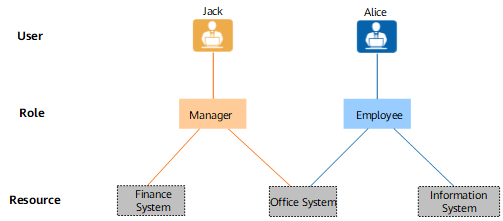
As shown in Figure 1, an enterprise has two roles: Manager and employee. Jack is a manager. He can access the financial and office systems. Alice is a common employee. She can access the office and personal information systems. The access permission control is implemented on virtual gateways. A virtual gateway determines accessible resources of a user based on the role. A resource can be accessed by multiple roles, and a user can play multiple roles.
Authorization
Authorization is a process in which the virtual gateway checks the role of a user to determine the user's resource access permission. For example, when Jack logs in to the virtual gateway, the virtual gateway authenticates Jack first. After the authentication succeeds, the virtual gateway finds that the role of Jack is manager, and pushes the accessible resource links associated with the role to Jack.
The authorization can be local authorization or server authorization.
- Local authorization: The role of a user is determined based on the user information stored on the local FW.
- Server authorization: The role of a user is determined based on the user information stored on a third-party server. The FW sends user information to the server. The server determines the user group to which the user belongs based on the stored user information, sends the user group information to the FW, which authorizes the user based on the role of the user group.
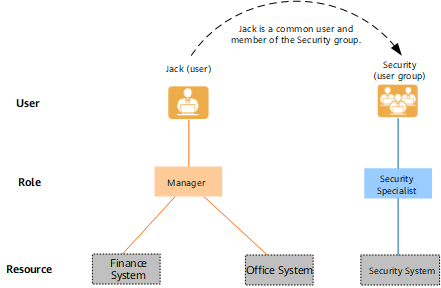
As shown in Figure 2, if different roles are assigned to a user, the user accesses the resources associated with all the roles. For example, if Jack is a manager, he has the manager permission. He is also a security specialist and therefore has the security specialist permission.

When server authorization is used, pay attention to a special situation. For example, user a belongs to user group A on the local FW and to user group A1 on the server. Due to factors such as network delay, the user group information on the FW is different from that on the server. If roleA is bound to user group A and roleA1 to user group A1 on the FW, roleA1 takes effect. This is because when the server authorization is used, the authorization on a virtual gateway is based on the user group queried on the server instead of the local user group.