Authentication
The FW provides three authentication methods for remote users.
- Local authentication: The identity information such as user names and passwords of remote users is stored locally on the FW, and the FW authenticates users.
- Server authentication: The identity information such as user names and passwords of remote users is stored on the authentication server, and the authentication server authenticates users. The authentication server types include: RADIUS, HWTACACS, AD, and LDAP servers.
In addition, the FW can work with a RADIUS server to implement RADIUS two-factor authentication. In two-factor authentication, two identity factors need to be provided during login to a virtual gateway. One factor is the user name and static PIN, and the other factor is a dynamic Verifying the Configuration code.
- Certificate authentication: A certificate is used to log in to the virtual gateway.
Virtual gateways support two certificate authentication modes: Certificate-anonymous authentication and certificate-challenge authentication.
- In certificate-anonymous mode, the virtual gateway checks only the validity of the certificate (for example, whether the certificate expires or whether the certificate is issued by a valid CA) and does not check the identity information, such as the login password.
- In certificate-challenge mode, the virtual gateway checks whether the user certificate is a trusted certificate, whether the certificate is valid, and whether the user login password is correct. You can select local authentication or server authentication if you need to check the user login password.
Local Authentication
Figure 1 shows the local authentication process on the FW.

- The remote user enters the user name and password on the login page of the SSL VPN virtual gateway, and the information is sent to the virtual gateway.
- The virtual gateway sends the identity information to the authentication domain for authentication.
If an authentication domain is specified on the virtual gateway, user information is sent to the specified authentication domain for authentication. If no authentication domain is specified on the virtual gateway, the virtual gateway determines the authentication domain based on the character string following the at sign (@) in the user name. If the user name does not contain @, the default authentication domain is used.
The authentication domain stores user identity information and information about the group to which the user belongs. The user identity information includes user name, password, and description. In addition, the identity authentication mode is specified in the authentication domain. The authentication domain determines whether to use local authentication or server authentication based on the specified authentication mode. Local authentication is used as an example.
- The authentication domain returns the authentication result to the virtual gateway.
If the authentication succeeded, the process moves to the next step. If the authentication fails, the Authentication failed message is displayed on the virtual gateway login page.
- The virtual gateway pushes the resource page to the remote user.
The virtual gateway searches the role authorization list for the role of the user and pushes the resource links associated with the role to the user.
Server Authentication
Figure 2 shows the server authentication process used by the FW.
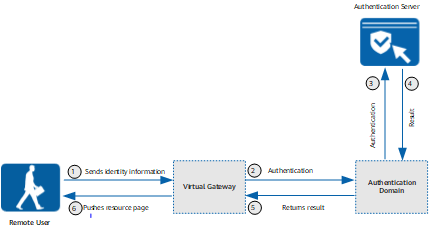
- The remote user enters the user name and password on the login page of the SSL VPN virtual gateway, and the information is sent to the virtual gateway.
- The virtual gateway sends the identity information to the authentication domain for authentication.
If an authentication domain is specified on the virtual gateway, user information is sent to the specified authentication domain for authentication. If no authentication domain is specified on the virtual gateway, the virtual gateway determines the authentication domain based on the character string following the at sign (@) in the user name. If the user name does not contain @, the default authentication domain is used.
- When the authentication domain is set to server authentication, the authentication domain forwards user identity information to the authentication server.
- The authentication server returns the authentication result to the authentication domain.
If the authentication succeeds, the process moves to the next step. If the authentication fails, the Authentication failed message is displayed on the virtual gateway login page.
- The authentication domain module returns the authentication result to the virtual gateway.
- The virtual gateway pushes the resource page to the remote user.
The virtual gateway searches the role authorization list for the role of the user and pushes the resource links associated with the role to the user. The virtual gateway searches for the role information of the user on the local device. Therefore, you need to import the user information from the authentication server to the authentication domain in advance. The user information is used for authorization, not for authentication.
RADIUS Two-Factor Authentication
Figure 3 shows the RADIUS two-factor authentication process used by the FW.
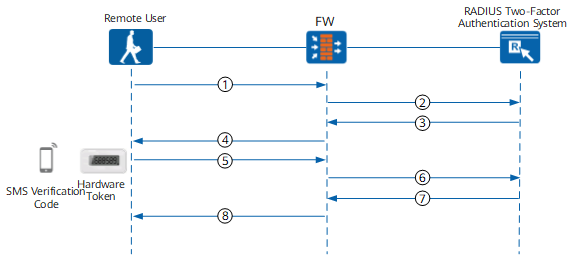
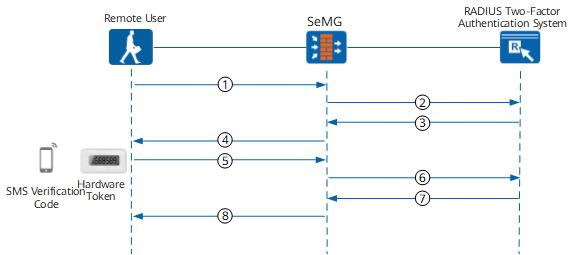
- The user enters the user name and PIN on the login page of the SSL VPN gateway, and the user name and PIN are sent to the FW.
- The FW sends the user name and password to the RADIUS server.
- The RADIUS server verifies the user name and PIN against its database and returns the Verifying the Configuration result to the FW.
- If the user name or PIN is incorrect, the RADIUS server sends an authentication failure message to the FW.
- If both the user name and PIN are correct, the RADIUS server sends a Challenge message to the FW to request a dynamic Verifying the Configuration code.
- The FW sends the user name and password Verifying the Configuration result to the client.
- If the user name or password is incorrect, the Invalid user, incorrect password or the user is locked message is displayed on the client. The authentication process is terminated, and the login attempt of the SSL VPN user fails.
- If the user name and password are correct, the page for entering the dynamic Verifying the Configuration code is displayed on the client. The process moves to 5 to start verifying the dynamic Verifying the Configuration code.
- The user enters the dynamic Verifying the Configuration code.
The dynamic Verifying the Configuration code is generated by an SMS Verifying the Configuration code device or a hardware token.
- The FW sends the dynamic Verifying the Configuration code to the RADIUS server.
- The RADIUS server verifies the dynamic Verifying the Configuration code and sends the Verifying the Configuration result to the FW.
- If the dynamic Verifying the Configuration code is correct, the RADIUS server sends an authentication success message to the FW.
- If the dynamic Verifying the Configuration code is incorrect, the RADIUS server sends an authentication failure message to the FW.
- The FW sends the authentication result to the client.
- If the dynamic Verifying the Configuration code is correct, the SSL VPN resource page is displayed on the client, and the user can use the SSL VPN service.
- If the dynamic Verifying the Configuration code is incorrect, the login page of the SSL VPN gateway is displayed and the "Authentication failed" message is displayed.
Certificate-Anonymous Authentication
Figure 4 shows the certificate-anonymous authentication process used by the FW.
The administrator of the FW needs to request the CA certificate and client certificate from the CA for the two parties (the remote user and the FW) that use the certificate authentication mode. After approving the request, the CA issues the CA certificate and client certificate to the administrator of the FW. The administrator imports the obtained CA certificate to the FW. The CA certificate is used to verify the validity of the client certificate of the remote user. The administrator also delivers the client certificate to the remote user. The remote user imports the client certificate to the host of the remote user as an identity credential.
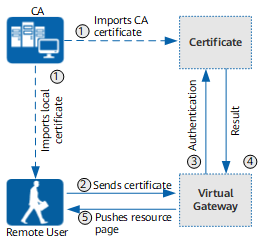
- The client certificate is imported to the host of the remote user and the CA certificate to the FW.
- The remote user selects the imported client certificate on the login page of the SSL VPN virtual gateway. The certificate is sent to the virtual gateway.
- The virtual gateway sends the client certificate to the certificate module for authentication.
The certificate module verifies whether the client certificate provided by the user is trusted based on the CA certificate referenced by the virtual gateway.
- If the client certificate is trusted (that is, the client certificate is issued by the CA from which the CA certificate is issued) and is within the validity period, the identity authentication succeeds, and the process moves to the next step.
- If the client certificate is not trusted or is not within the validity period, the identity authentication fails and the authentication failure message is displayed on the login page of the virtual gateway.
- The certificate module returns the authentication result to the virtual gateway.
- The virtual gateway pushes the resource page to the remote user.
The virtual gateway extracts the user name from the client certificate, searches the role authorization list for the role information of the user, and pushes the resource link associated with the role to the user.
Certificate-Challenge Authentication
Figure 5 shows the certificate-challenge authentication process used by the FW.
The two parties (the remote user and the FW) need to obtain their certificates from the CA. Remote users need to apply for a client certificate from the CA as an identity credential. The CA will issue client certificate after approving the application. The applicant then imports the obtained client certificate to the host of the applicant. The FW's administrator needs to obtain the CA certificate from the CA and import the obtained CA certificate to the FW. The CA certificate is used to verify the validity of the client certificate.
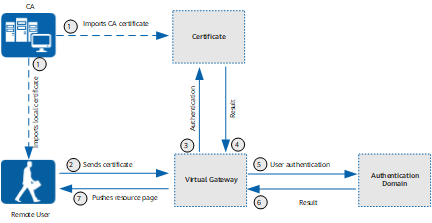
- The client certificate is imported to the host of the remote user and the CA certificate to the FW.
- The remote user selects the imported client certificate and enters the password on the login page of the SSL VPN virtual gateway. The certificate is sent to the virtual gateway.
- The virtual gateway sends the client certificate to the certificate module for authentication.
The certificate module verifies whether the client certificate provided by the user is trusted based on the CA certificate referenced by the virtual gateway.
- The certificate module returns the authentication result.
- If the client certificate is trusted (that is, the client certificate is issued by the CA from which the CA certificate is issued) and is within the validity period, the identity authentication succeeds, and the process moves to the next step.
- If the client certificate is not trusted or is not within the validity period, the identity authentication fails and the authentication failure message is displayed on the login page of the virtual gateway.
- The virtual gateway sends the user name and password to the authentication domain for identity authentication.
The virtual gateway extracts the user name from the client certificate based on the settings of the user filtering field. The password is the password entered when the user logs in to the virtual gateway.
If an authentication domain is specified on the virtual gateway, user information is sent to the specified authentication domain for authentication. If no authentication domain is specified on the virtual gateway, the virtual gateway determines the authentication domain based on the character string following the at sign (@) in the user name. If the user name does not contain @, the default authentication domain is used.
- The authentication domain returns the authentication result.
- The virtual gateway pushes the resource page to the remote user.
The virtual gateway extracts the user name from the client certificate, searches the role authorization list for the role information of the user, and pushes the resource link associated with the role to the user.