Virtual Gateway
The FW provides SSL VPN access services for remote users through virtual gateways. Multiple virtual gateways can be created on one FW. These virtual gateways are independent of each other. Each virtual gateway is independently managed and has its own users and resources. Virtual gateways do not have independent administrators. The system administrator of the FW creates, configures, modifies, and deletes virtual gateways.
Figure 1shows the process for a remote user to log in to an SSL VPN virtual gateway and access intranet resources. The system administrator creates SSL VPN virtual gateways on the FW and the virtual gateways provide SSL VPN access services.
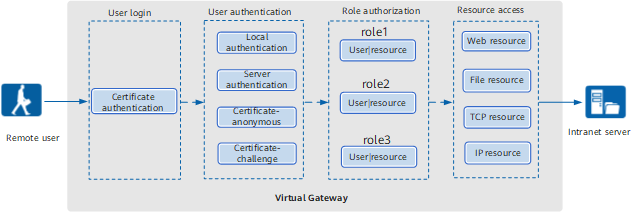
The process is described as follows:
- Login
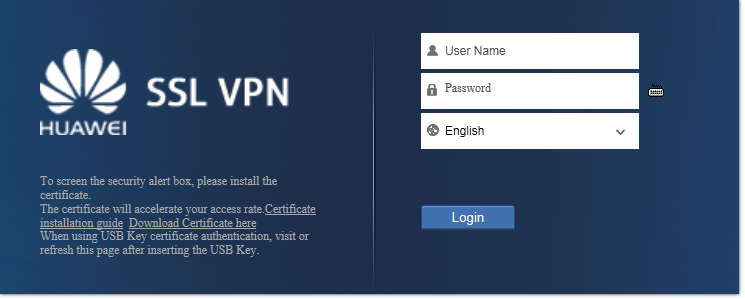
A remote user enters the IP address or domain name of the SSL VPN virtual gateway in the address bar of a browser to request for establishing an SSL connection. The virtual gateway sends its local certificate to the remote user so that the user can authenticate the gateway. After the authentication succeeds, the remote user sets up an SSL connection with the virtual gateway, and the virtual gateway login page is displayed.
- User Authentication
User name and password need to be supplied on the login page for user authentication.
The authentication methods include local, server, certificate-anonymous, and certificate-challenge authentication. For details, see Authentication.
- Role-based Authorization
After the user authentication succeeds, the virtual gateway checks the role of the user and pushes the resource links accessible to the role. A role represents the resource access permission of a type of users. For example, the resource access permission of a general manager role in an enterprise is different from that of a common employee role. For details, see Role-based Authorization.
- Resource Access
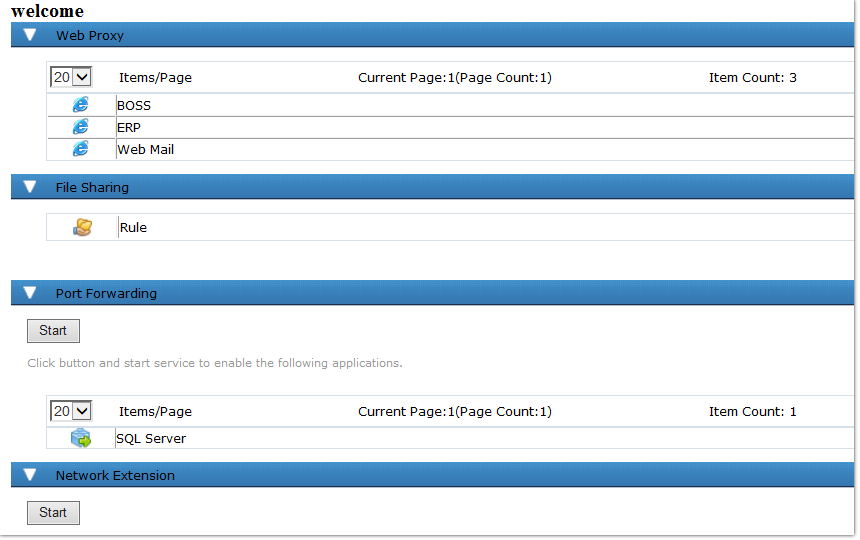
The user can click a link in the virtual gateway resource list to access the corresponding resource.