Understanding File Sharing
Concept
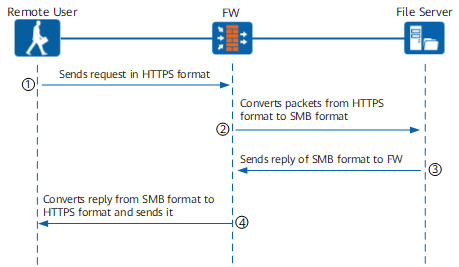
The file sharing service converts file sharing protocols, such as Server Message Block (SMB) and Network File System (NFS), to SSL-based Hypertext Transfer Protocol Secure (HTTPS) to enable web access to intranet file servers. Remote users can use the file sharing service to upload and download files, delete files and directories, rename files and directories, and create directories in the shared directory on the file server. This service is as convenient and secure as operating on a local file system. The intranet file server can run the Windows operating system based on the SMB protocol or the Linux operating system based on the NFS protocol.
Service Interaction Process
The FW converts between protocol in the file sharing service. A Windows file server on an intranet is used as an example. Figure 1 shows the implementation process.
Security Policy
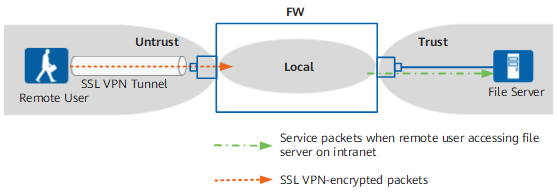
Figure 2 shows the FW security zones that packets pass through.
When a remote user accesses an intranet server, the packets that pass through the FW are classified into two types, and the corresponding security policies are as follows:
- Encrypted SSL VPN packets between the remote user and the FW.
The encrypted SSL VPN packets pass through the Untrust zone to the Local zone.
- Service packets involved when the remote user accesses the enterprise file server.
The decrypted service packets pass through the Local zone to the Trust zone.