Configuring Certificate Filtering
Prerequisites
The task of Configuring SSL VPN Using the Configuration Wizard has been completed, and certificate-anonymous authentication or certificate-challenge authentication has been configured.
Context
After certificate-anonymous or certificate-challenge authentication is selected, users need to select an appropriate certificate to log in to the SSL VPN gateway. If there are many certificates on a user's computer, it is difficult for the user to quickly select the right certificate. In this case, you can configure the certificate filtering function to filter out unneeded certificates so that users can quickly find the right certificate.
Procedure
- Choose .
- Click
 for an SSL VPN gateway.
 - Click the Certificate Filter tab.
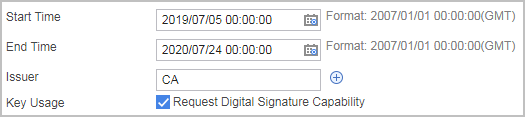
- Set the following basic parameters for certificate filtering. as listed in the following table:
Parameter
Description
Start Time
Start Greenwich Mean Time (GMT) of a time range, in the format of YYYY/MM/DD.
Start Time and End Time constitute a time range. Only the certificates that take effect within the time range are displayed in the certificate list.
End Time
End GMT time of a time range, in the format of YYYY/MM/DD.
End Time and Start Time constitute a time range. Only the certificates that take effect within the time range are displayed in the certificate list.
End Time must be later than Start Time.
Issuer
Only the certificates issued by the specified issuer are displayed in the certificate list.
Click
 to add issuers. A maximum of three issuers are allowed.
Key Usage
If Request Digital Signature Capability is selected, only certificates that have the digital signature capability are displayed in the certificate list.
- Optional: Configure the certificate field filtering rule used for authentication.

The certificate field filtering rule applies to only certificate-anonymous authentication, not to certificate-challenge authentication.
- Select a filtering type.
- Allow All Certificate Users to Access: Indicates authentication without certificate field filtering.
- Allow Following Certificate Users to Access: Indicates that the access is permitted only when the certificate matches the filtering rule in the certificate field filtering rule policy list.
- Prohibit Following Certificate Users to Access: Indicates that the access is denied when the certificate matches the filtering rule in certificate field filtering rule policy list.
- In the certificate field filtering rule policy list, click Add to configure the certificate field to be filtered out.
If Primary Field is Issuer or Subject, you need to configure Secondary Field. In other cases, you need to configure the primary field.
- Select a filtering type.
- Click Apply.
Example
As shown in Figure 1, configure the certificate filtering function so that only the certificates that meet filter criteria are displayed in the certificate list when users attempt to log in to the SSL VPN gateway.