Customizing Virtual Gateway Page
Context
Customized pages include:
- Current login page.
- Current home page. After the user logs in virtual gateway, showing the page.
- External web page. If you have specified the external web page, the page displayed after the user logs in to the virtual gateway is redirected to the specified external web page.
Predefined templates for the login page and home page are available. After downloading the templates, customize and then import them to the virtual gateway.

If the administrator does not customize files according to the downloaded login template, the customized page must contain the form of login information (including the user name, password, and selected language) and the Login button. The submission type and destination URL of the form are post and ./login.html respectively. Other information can be customized.
The size of all the customization files of a virtual gateway cannot exceed 4 MB, and the size of all the customization files of the entire device cannot exceed 32 MB. Otherwise, file uploading fails.
Procedure
- Choose .
- Click
 for an SSL VPN gateway.
 - Choose .
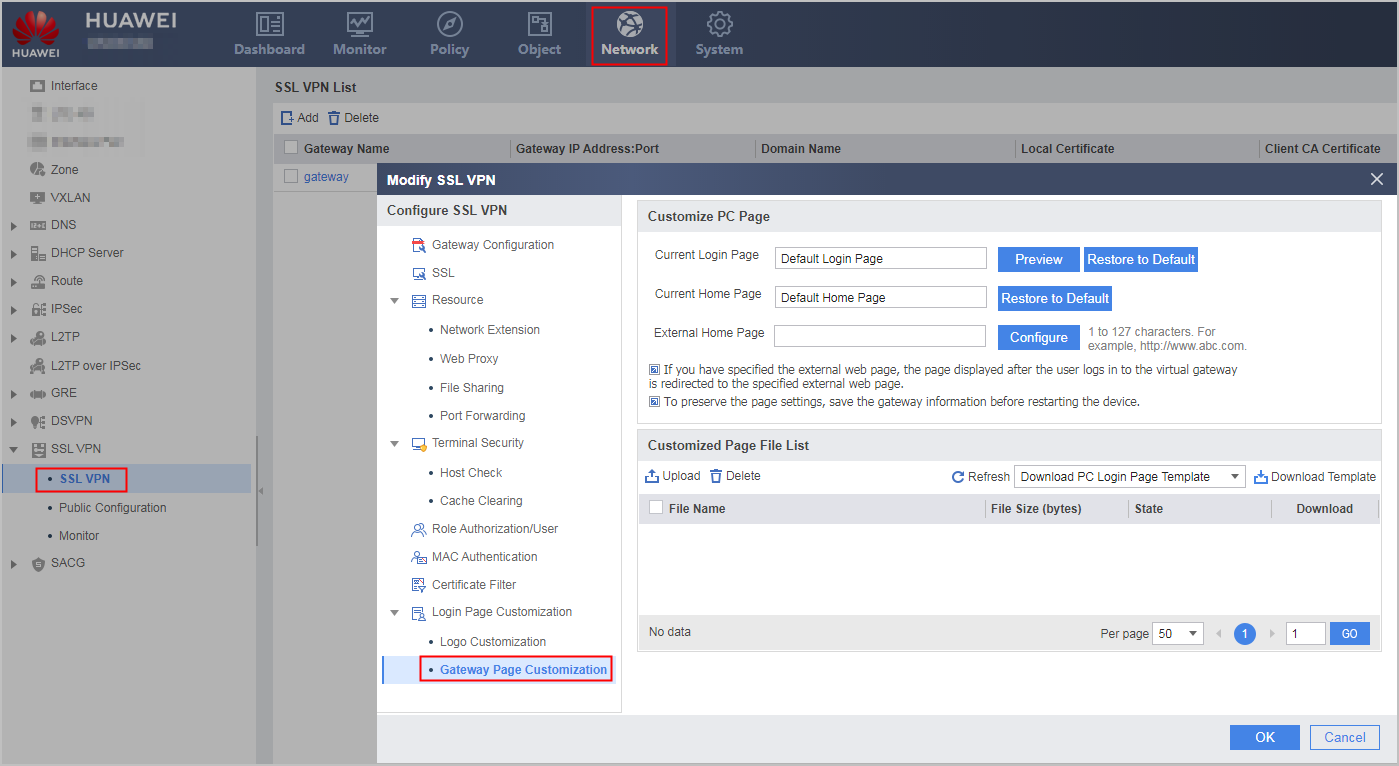
- Upload the customized page.
- Click Download PC Login Page Template, Download PC Home Page Template or Download GPS Orientation Page Template.
- Save the page.
- In the Customized Page File List box, click Upload.
- Select the page file to be set as the login page, and click Do not configure. Select the file type in the page that is displayed.
- Click OK.