CLI: Example for Enabling Remote Users to Access the Headquarters through SSL VPN (RADIUS Authentication + RADIUS Authorization)
Networking Requirements
As shown in Figure 1, remote users access resources at the Headquarters through the network extension service of SSL VPN. The Headquarters uses a RADIUS server to authenticate users.
The enterprise needs to allocate different subnets to remote users of different departments to facilitate user management.
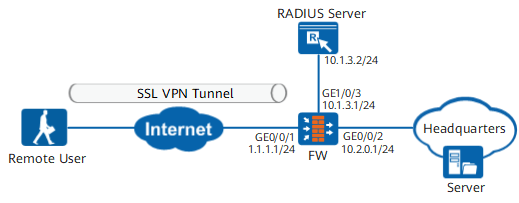
Data Planning
Item |
Data |
|---|---|
Interface |
Interface number: GigabitEthernet 0/0/1 IP address: 1.1.1.1/24 Security zone: untrust |
Interface number: GigabitEthernet 0/0/2 IP address: 10.2.0.1/24 Security zone: trust |
|
Interface number: GigabitEthernet 0/0/3 IP address: 10.1.3.1/24 Security zone: trust |
|
Remote user account |
User name: user0001 Password: Admin@123 User group: /default/group1 |
User name: user0002 Password: Admin@123 User group: /default/group2 |
|
Virtual gateway |
Name: gateway Gateway IP address: 1.1.1.1 Network extension address pool 1: 172.16.1.1 to 172.16.1.100 The address pool is used to assign IP addresses to users in /default/group1. Network extension address pool 2: 172.16.2.1 to 172.16.2.100. The address pool is used to assign IP addresses to users in /default/group2. |
RADIUS server |
IP address: 10.1.3.2/24 Port number: 1812 Pre-shared key: Admin@1234 NOTE:
The pre-shared keys configured on the FW and that on the RADIUS server must be the same. |
Procedure
- Set an IP address for each interface, assign interfaces to security zones, and complete basic parameter settings.
# Set IP addresses of interfaces.
<FW> system-view
[FW] interface GigabitEthernet 0/0/1
[FW-GigabitEthernet 0/0/1] ip address 1.1.1.1 24
[FW-GigabitEthernet 0/0/1] quit
[FW] interface GigabitEthernet 0/0/2
[FW-GigabitEthernet 0/0/2] ip address 10.2.0.1 24
[FW-GigabitEthernet 0/0/2] quit
[FW] interface GigabitEthernet 0/0/3
[FW-GigabitEthernet 0/0/3] ip address 10.1.3.1 24
[FW-GigabitEthernet 0/0/3] quit
# Assign the interfaces to security zones.
[FW] firewall zone untrust
[FW-zone-untrust] add interface GigabitEthernet 0/0/1
[FW-zone-untrust] quit
[FW] firewall zone trust
[FW-zone-trust] add interface GigabitEthernet 0/0/2
[FW-zone-trust] add interface GigabitEthernet 0/0/3
[FW-zone-trust] quit
- Set parameters for interconnecting with the RADIUS server.
[FW] radius-server template radius
[FW-radius-radius] radius-server shared-key cipher Admin@123
[FW-radius-radius] radius-server authentication 10.1.3.2 1812
[FW-radius-radius] quit
- Configure the authentication scheme and authorization scheme.
[FW] aaa
[FW-aaa] authentication-scheme radius
[FW-aaa-authen-radius] authentication-mode radius
[FW-aaa-authen-radius] quit
[FW-aaa] authorization-scheme radius
[FW-aaa-author-radius] authorization-mode radius
[FW-aaa-author-radius] quit
- Configure the user groups and access authentication mode.
# Configure the authentication domain.
[FW-aaa] domain default
[FW-aaa-domain-default] authentication-scheme radius
[FW-aaa-domain-default] authorization-scheme radius
[FW-aaa-domain-default] service-type ssl-vpn
[FW-aaa-domain-default] quit
[FW-aaa] quit
# Create a user group.
[FW]user-manage group /default/group1
[FW-usergroup-/default/group1]quit
[FW]user-manage group /default/group2
[FW-usergroup-/default/group2]quit
- Configure the SSL VPN gateway.
- Create SSL VPN virtual gateway gateway.
[FW] v-gateway gateway interface GigabitEthernet 0/0/1 private
[FW] v-gateway gateway udp-port 443
[FW] v-gateway gateway authentication-domain default
- Configure the network extension service.
[FW-gateway] service
[FW-gateway-service] network-extension enable
[FW-gateway-service] network-extension keep-alive enable
[FW-gateway-service] network-extension keep-alive interval 120
[FW-gateway-service] network-extension mode manual
[FW-gateway-service] network-extension netpool 172.16.1.1 172.16.1.100 255.255.255.0
[FW-gateway-service] network-extension netpool 172.16.2.1 172.16.2.100 255.255.255.0
[FW-gateway-service] netpool 172.16.1.1 default
[FW-gateway-service] network-extension manual-route 10.2.0.0 255.255.255.0
[FW-gateway-service] quit
- Bind the user group with a role.
[FW-gateway] vpndb
[FW-gateway-vpndb] group /default/group1 network-extension netpool 172.16.1.1
[FW-gateway-vpndb] group /default/group2 network-extension netpool 172.16.2.1
[FW-gateway-vpndb] quit
[FW-gateway] role
[FW-gateway-role] role default network-extension enable
[FW-gateway-role] quit
- Create SSL VPN virtual gateway gateway.
- Configure a route to the Internet. In the example, the next-hop IP address from the FW to the Internet is 1.1.1.2.
[FW] ip route-static 0.0.0.0 0.0.0.0 1.1.1.2 - Configure security policies to allow mobile employees to access the resources at the Headquarters.
[FW] security-policy
[FW-policy-security] rule name policy01
[FW-policy-security-rule-policy01] source-zone untrust
[FW-policy-security-rule-policy01] destination-zone local
[FW-policy-security-rule-policy01] service https
[FW-policy-security-rule-policy01] destination-address 1.1.1.1 32
[FW-policy-security-rule-policy01] action permit
[FW-policy-security-rule-policy01] quit
[FW-policy-security] rule name policy02
[FW-policy-security-rule-policy02] source-zone untrust
[FW-policy-security-rule-policy02] destination-zone trust
[FW-policy-security-rule-policy02] source-address 172.16.1.0 24
[FW-policy-security-rule-policy02] source-address 172.16.2.0 24
[FW-policy-security-rule-policy02] destination-address 10.2.0.0 24
[FW-policy-security-rule-policy02] action permit
[FW-policy-security-rule-policy02] quit
[FW-policy-security] rule name policy03
[FW-policy-security-rule-policy03] source-zone trust
[FW-policy-security-rule-policy03] destination-zone untrust
[FW-policy-security-rule-policy03] source-address 10.2.0.0 24
[FW-policy-security-rule-policy03] destination-address 172.16.1.0 24
[FW-policy-security-rule-policy03] destination-address 172.16.2.0 24
[FW-policy-security-rule-policy03] action permit
[FW-policy-security-rule-policy03] quit
- Configure the RADIUS server. For details about how to configure the RADIUS server, see the related documents.
Verifying the Configuration
- Remote users user0001 and user0002 log in to the SSL VPN virtual gateway using browsers and enable the network extension service.
- The network administrator logs in to the FW and run the display user-manage online-user verbose command, and can see that user0001 and user0002 have logged in and obtained IP addresses from their respective subnets.
[FW]display user-manage online-user verbose 2018-07-14 13:42:41.310 +09:00 DST Current Total Number: 2 -------------------------------------------------------------------------------- IP Address: 172.16.1.3 Login Time: 2018-07-14 13:07:21 Online Time: 00:35:20 State: Active TTL: 00:30:00 Access Type: ssl vpn Authentication Mode: Password (RADIUS) Access Device Type: unknown Downlink Packets: 0 Bytes: 0 Uplink Packets: 0 Bytes: 0 Build ID: 0 User Name: user0001 Parent User Group: /default/group1 -------------------------------------------------------------------------------- IP Address: 172.16.2.3 Login Time: 2018-07-14 13:07:21 Online Time: 00:40:20 State: Active TTL: 00:30:00 Access Type: ssl vpn Authentication Mode: Password (RADIUS) Access Device Type: unknown Downlink Packets: 0 Bytes: 0 Uplink Packets: 0 Bytes: 0 Build ID: 0 User Name: user0002 Parent User Group: /default/group2 -------------------------------------------------------------------------------- - Remote users can access the resources on the enterprise intranet.
Configuration Script
#
radius-server template radius
 radius-server shared-key cipher %^%#w^'{5q[IZ9B5l.Oxwf;Om+|]6x$VN(2L;$PHvRK'%^%#
 radius-server authentication 10.1.3.2 1812 weight 100
 radius-server group-filter class
#
aaa
 authentication-scheme radius
  authentication-mode radius
 authorization-scheme radius
  authorization-mode radius
 domain default
  authentication-scheme radius
  authorization-scheme radius
  radius-server radius
  service-type internetaccess ssl-vpn
  internet-access mode password
  reference user current-domain
#
interface GigabitEthernet 0/0/1
 ip address 1.1.1.1 255.255.255.0
#
interface GigabitEthernet 0/0/2
 ip address 10.2.0.1 255.255.0.0
#
interface GigabitEthernet 0/0/3
 ip address 10.1.3.1 255.255.0.0
#
firewall zone trust
 set priority 85
 add interface GigabitEthernet 0/0/2
 add interface GigabitEthernet1/0/3
#
firewall zone untrust
 set priority 5
 add interface GigabitEthernet 0/0/1
#
ip route-static 0.0.0.0 0.0.0.0 1.1.1.2
#
 v-gateway public ssl version tlsv11 tlsv12
 v-gateway public ssl ciphersuit custom aes256-sha aes128-sha
 v-gateway gateway interface GigabitEthernet 0/0/1 private
#
v-gateway gateway
 basic
  ssl version tlsv10 tlsv11 tlsv12
  ssl timeout 5
  ssl lifecycle 1440
  ssl ciphersuit custom aes256-sha aes128-sha
 service
  web-proxy enable
  web-proxy web-link enable
  network-extension enable
  network-extension keep-alive enable
  network-extension keep-alive interval 120
  network-extension netpool 172.16.1.1 172.16.1.100 255.255.255.0
  network-extension netpool 172.16.2.1 172.16.2.100 255.255.255.0
  netpool 172.16.1.1 default
  network-extension mode manual
  network-extension manual-route 10.2.0.0 255.255.255.0
 security
  policy-default-action permit vt-src-ip
  certification cert-anonymous cert-field user-filter subject cn group-filter subject cn
  certification cert-anonymous filter-policy permit-all
  certification cert-challenge cert-field user-filter subject cn
  certification user-cert-filter key-usage any
  undo public-user enable
 hostchecker
 cachecleaner
 role
 role default
  role default condition all
  role default network-extension enable
#
security-policy
 rule name policy01
  source-zone untrust
  destination-zone local
  destination-address 1.1.1.1 32
  service https
  action permit
 rule name policy02
  source-zone untrust
  destination-zone trust
  source-address 172.16.1.0 24
  source-address 172.16.2.0 24
  destination-address 10.2.0.0 24
  action permit
 rule name policy03
  source-zone trust
  destination-zone untrust
  source-address 10.2.0.0 24
  destination-address 172.16.1.0 24
  destination-address 172.16.2.0 24
  action permit
# The following configurations are saved in the database and are not displayed in the configuration file.  v-gateway gateway
  vpndb
 group /default/group1 network-extension netpool 172.16.1.1
 group /default/group2 network-extension netpool 172.16.2.1