Configuring a Tag Using the Web UI
This section describes how to use the web UI to configure a tag.
Creating a Tag
Choose .
Click .
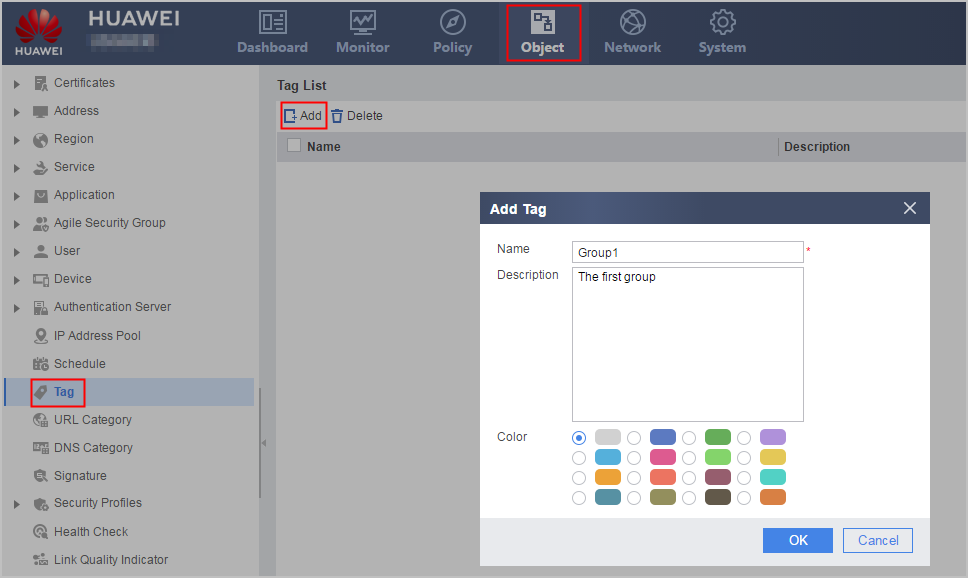
- Configure the name, description and color of the tag.
Parameter Description Name Name of the tag.
Description Description of the tag.
Color Color of the tag.
- Click .
Viewing or Removing the Reference Relationship Between a Policy and a Tag
After creating a tag, reference it in a policy so that the tag can identify the policy.
In , click View of a tag and view or remove tag reference relationships in References.
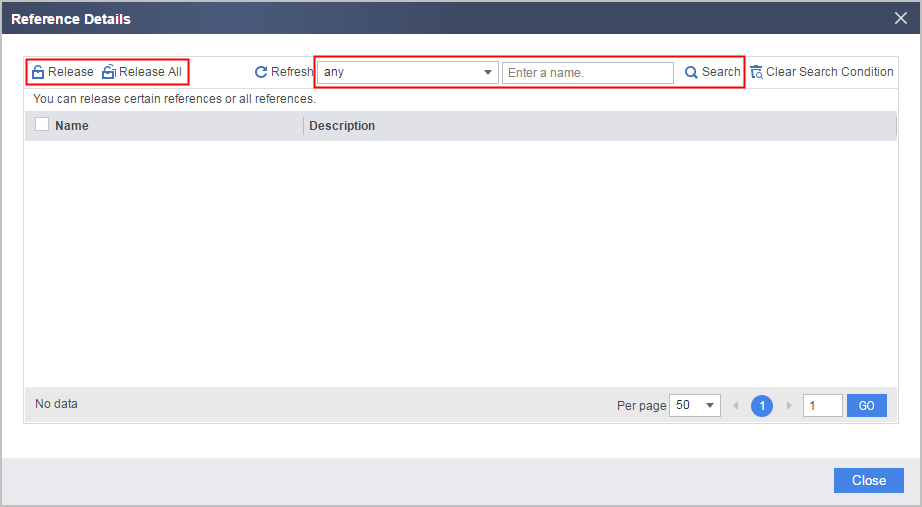
- You can click Search to view policies that
reference the tag.
If a large number of policies reference the tag, view these policies by policy type or enter a policy name to view a specific policy.
- Click Release to remove the reference relationships between the tag and a specific or multiple policies.
- Click Release All to remove the reference
relationships between the tag and all policies.
 The current administrator may have different configuration permissions on the policies referencing a tag (the system administrator sets configuration permissions in ):
- If the administrator has the read and write permissions on a policy, he or she can remove the reference relationship.
- If the administrator has the read-only permission on a policy, he or she can view the policy in Reference but cannot remove the reference relationship.
- If the administrator has no permission on a policy, he or she cannot view the policy in Reference or remove the reference relationship, but the reference is counted in References of Tag List.