< Home

Configuring a Schedule Using the Web UI

This section describes how to use the Web UI to configure a schedule.

Procedure

  1. Choose Object > Schedule.
  2. Click Add.

  3. In Name, enter the name of a schedule list.
  4. Create a schedule member.

    You can repeat the preceding steps to create multiple schedules members.

    1. In Member List, click Add.
    2. Configure parameters for a schedule member.

      Parameter

      Description

      Type

      • Periodic: a fixed schedule within in a week. A periodical schedule occurs periodically every week.
      • One Time: determined by a specified start and end time. A one-time schedule cannot occur periodically.

      Start Time (Periodic)

      Start time of a time range in a periodic schedule

      You need to set this parameter when a periodic schedule is used.

      End Time (Periodic)

      End time of a time range in a periodic schedule

      You need to set this parameter when a periodic schedule is used.

      Start Time (One Time)

      Start time on a day when a time range takes effect

      You need to set this parameter when a one-time schedule is used.

      End Time (One Time)

      End time on a day when a time range expires

      This parameter needs to be set when a one-time schedule is used.

      Weekly Validity Time

      Day in a week on which a time range takes effect

      This parameter needs to be set when a periodical schedule is used.
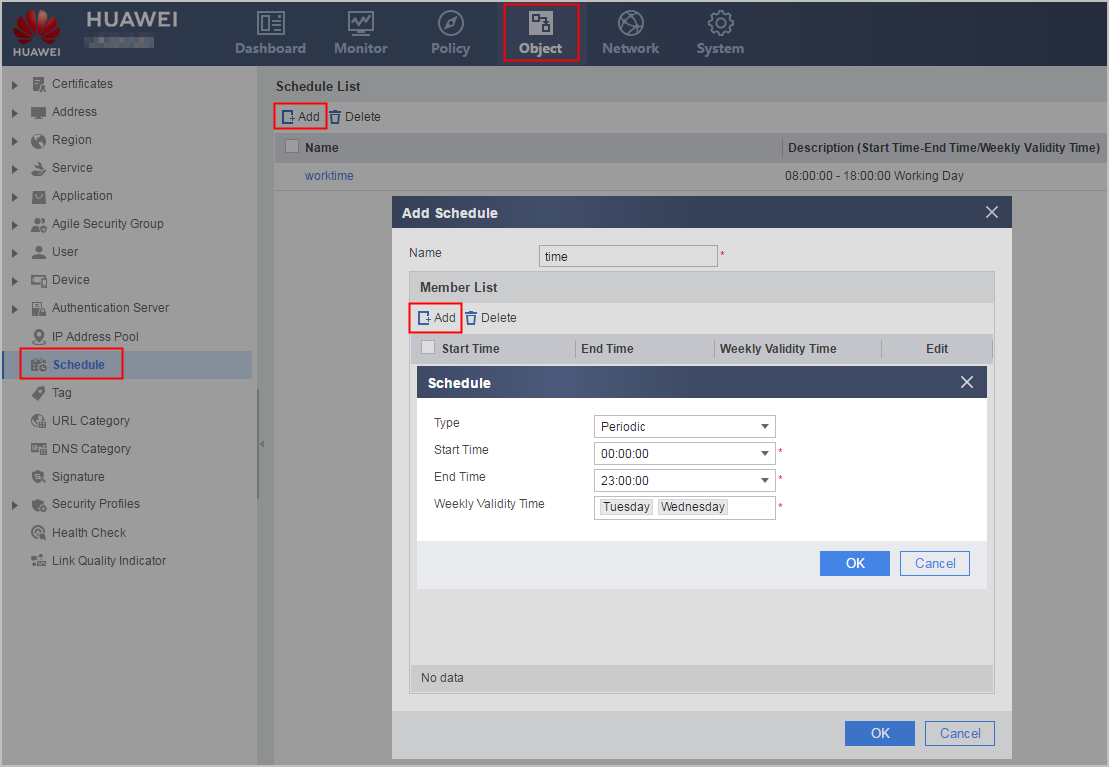
    3. Click OK.
  5. Click OK.
Copyright © Huawei Technologies Co., Ltd.
< Previous topic Next topic >
