Introduction to the Working Principle of the SACG
The working principle of the SACG helps you understand the subsequent configurations for SACG.
The FW serves as the SACG in the SACG interworking solution, and mainly controls network access permissions. In the SACG interworking solution, access control policies for various users are configured by the SACG interworking system accordingly and automatically delivered to the FW, instead of being created manually.
The terminal adopts the SACG in the following modes to request authentication:
SACG Agent authentication
The SACG Agent is a component of the Agile Controller, and serves the Agile Controller client installed on the terminal. The SACG Agent implements identity authentication on users and security check on terminals, and automatically interacts with the SACG interworking background server. After the SACG Agent is installed, the entire process of SACG is completed by the SACG Agent automatically, which is transparent to user.
Web-based non-Agent authentication
If SACG Agent software cannot be installed on the terminal, for example, the operating system of the terminal is UNIX, and the user accesses Web resources without being authenticated, the web page is forcibly directed to a web page for authentication. The user adopts the web page to initiate the authentication request. Web-based non-Agent authentication cannot realize all the functions of the SACG interworking solution. Therefore, it is not recommended.
The principle for the Agile Controller to deliver the access control policy to the SACG is as follows:
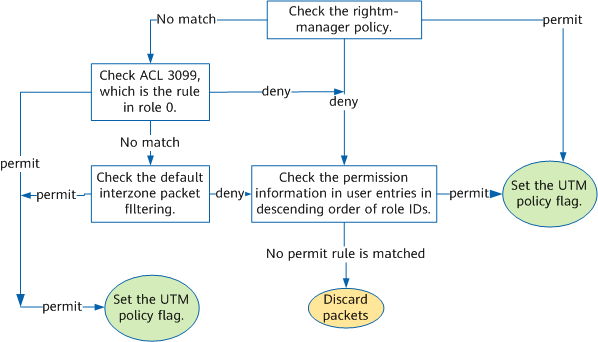
As SACG is configured on the SACG, ACLs 3099 to 3999 on the SACG serve as the container of bearing the control policies delivered by the Agile Controller. The 901 ACLs correspond to 901 roles from 0 to 900. Each role corresponds to a controlled domain in the SACG interworking system. ACL 3099 corresponds to role 0, which is the default role of the access user, and permits the unauthenticated user to access the pre-authentication domain. ACLs 3100 to 3999 correspond to role 1 to 900, which are common roles delivered by the Agile Controller system.
After the default acl 3099 command is executed to specify the default ACL, the original rules of ACL 3099 are cleared, and ACL 3099 cannot be configured manually.
After the right-manager server-group enable command is executed to enable the connection to the Agile Controller, ACLs 3100 to 3999 cannot be configured manually. Before the connection is enabled, if these ACLs contain rules or are used by other functions, you must clear the rules and cancel the usage. In this way, the connection to the Agile Controller can be enabled.
After accessing the network, the terminal adopts the SACG to initiate the authentication request to the Agile Controller. After the terminal passes authentication, the Agile Controller sends the information about the IP address and role of the terminal to the SACG.
According to the information of the ACLs delivered by the Agile Controller server, the SACG creates a source IP address monitoring table, and records the relations among the IP addresses, roles, role permissions, and available resources.
After receiving a packet from the terminal, the SACG implements interzone packet filtering according to the flow shown in the following figure.