Deployment Modes of the SACG
The SACG is mainly deployed in in-line mode or off-line mode. Few differences exist between the configurations of the device in different deployment modes. This mainly describes the differences in the principles and configurations of two deployment modes.
Off-line Mode
Generally, the internal network already exists when you use the SACG interworking function. The terminal user and service system are connected through a core forwarding device (such as a Layer-3 switch or a router). If you replace the forwarding device with the SACG for deploying the SACG interworking system, the internal network needs to be re-constructed and routes need to be re-learned. To avoid the previous problems, you can deploy the SACG in off-line mode. In addition, the off-line mode prevents the failure of the SACG from causing network interruptions.
Figure 1 shows the typical networking diagram of the SACG deployed in off-line mode.
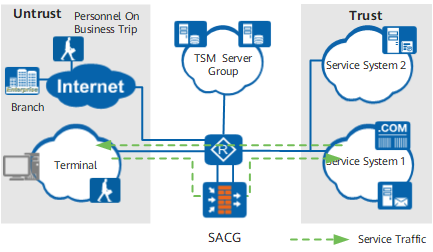
In this networking, the router connecting the Trust and Untrust zones can be replaced by a switch. The redirection or policy-based routing is configured on the router or switch to forward the traffic from the terminal in the Untrust zone to the service system in the Trust zone to the SACG for processing. The SACG interacts with the Agile Controller server to identify the permission for the user of the traffic, and then processes the traffic. After the traffic is allowed through the SACG, the router or switch directly forwards the traffic returned by the service system to the Untrust zone.
This networking directly adds the SACG and Agile Controller server group on the original network without changing the original network structure. As the traffic passing the SACG is in only one direction, the requirement on the load balancing of the SACG is low. It is recommended that you deploy the SACG interworking system in this mode.
As shown in Figure 1, personnel on business trip and branches, which adopt the Internet for access and thus are regarded as untrustworthy, are added to the Untrust zone of the SACG. In certain scenarios, the Internet is also a resource that requires authentication for access, and needs to be added to the post-authentication domain for protection. In this case, you can adopt the multi-SACG networking for the SACG interworking system, as shown in Figure 2.
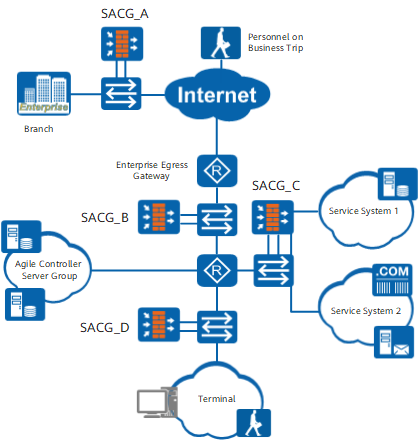
In this networking, the main functions of SACGs are as follows:
SACG_A
SACG_A, serving as the SACG of the branch, is deployed at the egress of the branch to control the behavior of the branch for accessing the Internet and the internal network of the enterprise. If the branch does not need to be controlled independently, the SACG is not required.
SACG_B
SACG_B, serving as the SACG of the headquarters, is deployed at the egress of the enterprise to control the behavior of internal users for accessing the Internet. If the behavior of accessing the Internet does not need to be controlled, that is, the Internet is not added to the post-authentication domain, the SACG is not required.
SACG_C
SACG_C, serving as the SACG in the service system of the headquarters, is deployed at the egress of the service system to control the behavior of all terminals for accessing the service system.
SACG_D
SACG_D, serving as the SACG of internal network users, is deployed beside the convergence switch of internal users to control the behavior of internal users for accessing each other. If the SACG is not deployed, internal users access each other through the switch without being controlled.
In-line Mode
In in-line mode, the device is directly connected to the original network of the user in serial mode. Figure 3 shows the typical networking diagram.
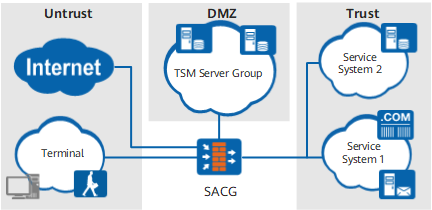
In in-line mode, two methods are available.
Adopting Layer-2 interfaces to connect the Untrust zone, Trust zone, and DMZ
This method is applied to the scenario where a switch resides in the location of the SACG before the SACG interworking function is used. That is, the FW adopts Layer-2 interfaces to replace the original switch.
Layer-2 interfaces here are Layer-3 interfaces that switched to the Layer-2 mode.
Adopting Layer-3 interfaces to connect the Untrust zone, Trust zone, and DMZ
This method is applied to the scenario where a router resides in the location of the SACG before the SACG interworking function is used. That is, the FW adopts Layer-3 interfaces to replace the original router. In this method, the route to the internal network needs to be correctly configured on the SACG.
Differences in the Configurations of Two Deployment Modes
Item |
Off-line Mode |
In-line Mode |
|---|---|---|
Interfaces |
The SACG adopts two Layer-3 interfaces to connect to the switch. You can adopt the interfaces on the Layer-3 interface card as Layer-3 interfaces, or virtualize the interfaces on the Layer-2 interface card into Layer-3 interfaces through the VLAN and the VLANIF interface. The interfaces on the switch need to be added to different VLANs, and the VLANIF interface is adopted to communicate with the SACG. |
|
Security zones |
The SACG interface connected to the terminal through the switch is added to the Untrust zone, and that connected to the service system through the switch to the Trust zone. |
The SACG interface connected to the terminal is added to the Untrust zone, that connected to the service system to the Trust zone, and that connected to the Agile Controller server to the DMZ. |
Redirection and route configurations |
The port redirection function needs to be configured on the switch or router that is connected to the SACG to forward all traffic received by the terminal to the SACG. A default route to the switch or router needs to be configured on the SACG, so that the detected traffic can be injected to the switch or router and be forwarded to the service system. |
The routing protocol needs to be configured on the SACG to ensure the connection of the internal network. If deploying the SACG causes the change in the IP address allocation and route of the original network, you should modify corresponding routing entries on the router connected to the SACG, thus ensuring the connection of the internal network. |
Other security functions |
In off-line mode, the traffic passing the SACG is in only one direction. Therefore, the status detection function of the SACG needs to be disabled. Status inspection-based functions of the FW are unavailable in off-line mode. |
In in-line mode, most security functions of the FW are available. As the traffic in both directions passes the device for detection, and the traffic is heavy for the device, you should consider device performance when enabling other security functions. |