Internet Access Users Access Internet or Intranet Resources
This section describes user management and authentication mechanisms when Internet access users access Internet resources or intranet resources.
A FW serves as the egress gateway of an enterprise, providing intranet users with access to Internet resources or intranet resources. Complete the following tasks to implement user-based access control:
Save user information on a FW to ensure that the information can be referenced by security policies, policy-based routing, traffic policies, quota control policies, proxy policies, and audit policies.
Configure the FW to authenticate users and obtain the mappings between users and IP addresses.
This example describes how the two tasks are performed in both local authentication and server authentication.
Built-in Portal Authentication of the FW
The FW serves as an egress gateway of an enterprise intranet and has a built-in Portal authentication page for user authentication. After receiving an authentication request for a user, the FW forwards the request to the local database and authentication server. The FW and authentication server authenticates the user together.
- Local authentication
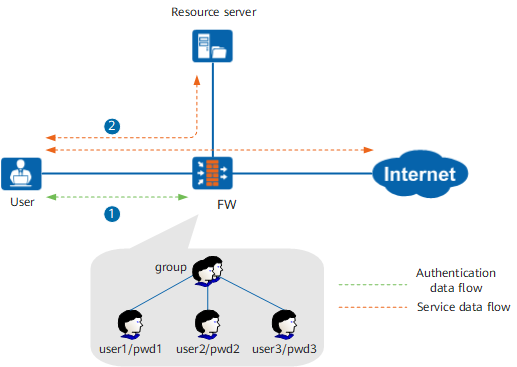
An administrator creates users and user groups and configures passwords on a FW according to the organizational structure of the enterprise. The FW authenticates users by verifying users and their passwords.
As shown in Figure 1, the FW provides a built-in Portal authentication page. Users proactively access the authentication page, or the HTTP requests of users are redirected by the FW to the authentication page. The FW completes user authentication.
After the authentication succeeds, the FW records the mappings between the users and IP addresses. The FW controls user permissions and behaviors according to the policies for users or user groups.
- Server authentication
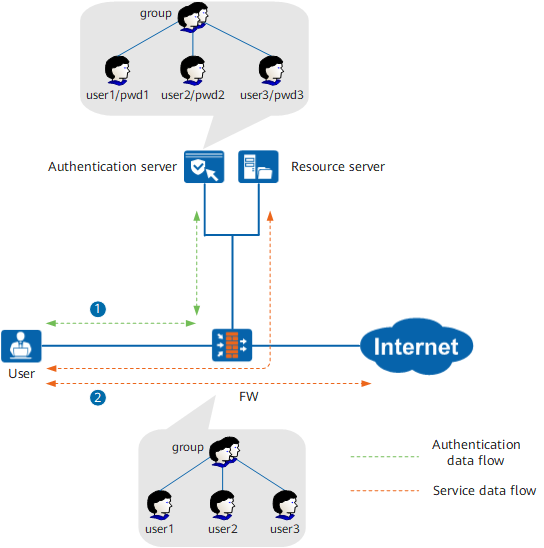
The enterprise has deployed a RADIUS, HWTACACS, AD, LDAP authentication server, and the authentication server stores users, user groups, and passwords. If a RADIUS, HWTACACS authentication server is deployed, the administrator must create users and user groups on the FW according to the organizational structure. If an AD or LDAP server is deployed, the administrator can import users stored on the AD or LDAP server to the FW, so administrator can control the permissions and behaviors of users/user groups on the FW according to the specified policies.
As shown in Figure 2, the FW provides a built-in Portal authentication page. Users proactively access the authentication page, or the HTTP requests of users are redirected by the FW to the authentication page. The FW serves as the proxy client of the authentication server and sends user names and passwords to the authentication server for authentication.
After the authentication succeeds, the FW records the mappings between the users and IP addresses. The FW controls user permissions and behaviors according to the policies for users or user groups.

The following example describes an authentication server, which is deployed on the network that provides the requested resources.
User-defined Portal Authentication
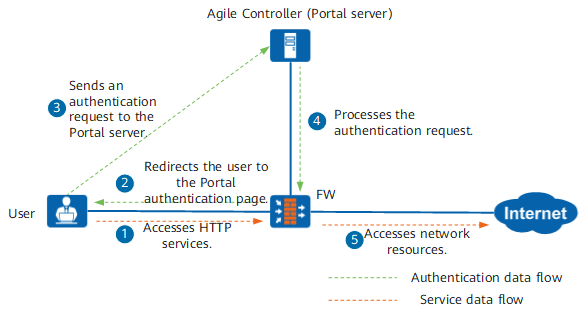
An enterprise deploys an external Portal server that interworks with the FW for user authentication. For example, the Agile Controller is deployed as an external Portal server to participate in user authentication.
As shown in Figure 3, the FW redirects the HTTP request from a user to the Portal authentication page of the Agile Controller. The Agile Controller processes the authentication request.
After the authentication succeeds, the user can access network resources.
No Authentication
Top executives expect to access network resources without entering user names and passwords. The authentication exemption mode can meet this requirement. An administrator can create a top executive user on the FW and bidirectionally bind the user with an IP address, a MAC address, or an IP/MAC address pair. When a top executive accesses a network resource, the FW checks whether he/she is an IP/MAC binding user. Exempted users can access network resources only using specific IP/MAC addresses.
AD SSO
The enterprise has deployed the Active Directory (AD) identity authentication mechanism, and an AD server stores users, user groups, and passwords. An administrator can import the organizational structure and account information on the AD server to a FW. After that, information about new users on the AD server can be imported at a specified interval, so administrator can control the permissions and behaviors of users/user groups on the FW according to the specified policies.
The AD server authenticates users and sends authentication information to the FW so that the FW obtains the mappings between users and IP addresses. Users can access Internet resources or intranet resources after being authenticated by the AD server, without having to be authenticated by the FW. This authentication mode is called AD SSO.
As shown in Figure 4, the AD server stores users, user groups, and passwords, and the FW stores only users and user groups. The AD server authenticates intranet users based on their AD domain accounts and sends the AD domain accounts and IP addresses to the FW. The FW then records the mappings between users and IP addresses and controls user permissions and behaviors according to the policies specified for users or user groups.
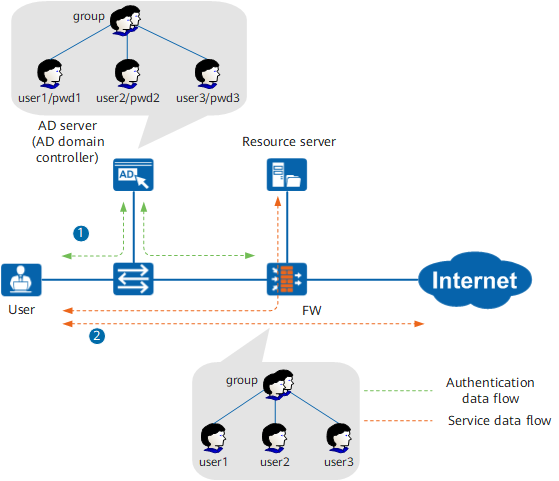
The following example describes an AD server, which is deployed on the same network as intranet users. If the AD server is deployed on the network that provides the requested resources, security policies on the FW must be configured to permit authentication packets between the users and the AD server and authentication policies must be configured to exempt these packets from authentication.
Agile Controller SSO
The enterprise has deployed the Terminal Security Management (Agile Controller) identity authentication mechanism, and a Agile Controller server stores users, user groups, and passwords. An administrator can import the organizational structure and account information on the Agile Controller server to a FW, so administrator can control the permissions and behaviors of users/user groups on the FW according to the specified policies.
The Agile Controller server authenticates users and sends authentication information to the FW so that the FW obtains the mappings between users and IP addresses. Users can access Internet resources or intranet resources after being authenticated by the Agile Controller server, without having to be authenticated by the FW. This authentication mode is called Agile Controller Single Sign-On (SSO).
As shown in Figure 5, the Agile Controller server stores users, user groups, and passwords, and the FW stores only users and user groups. The Agile Controller server authenticates intranet users based on their Agile Controller accounts and sends the Agile Controller accounts and IP addresses to the FW. The FW then records the mappings between users and IP addresses and controls user permissions and behaviors according to the policies specified for users or user groups.
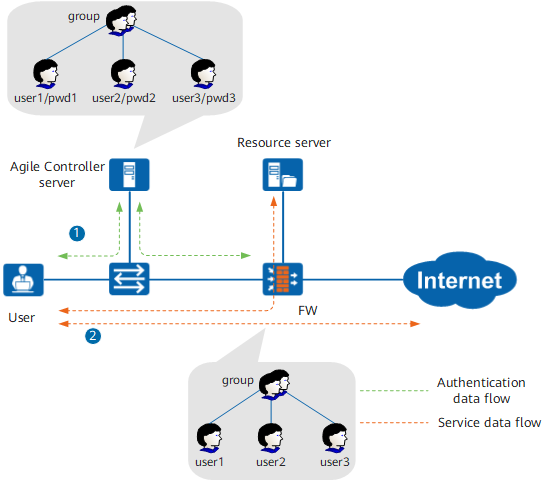
The FW supports interworking with Huawei Agile Controller (Policy Center or Agile Controller).
The following example describes a Agile Controller server, which is deployed on the same network as intranet users. If the Agile Controller server is deployed on the network that provides the requested resources, security policies on the FW must be configured to permit authentication packets between the users and the Agile Controller server and authentication policies must be configured to exempt these packets from authentication.
RADIUS SSO
The enterprise has deployed RADIUS identity authentication mechanism, and a RADIUS server stores users, user groups, and passwords. An administrator can create users and user groups on the FW according to the organizational structure, so administrator can control the permissions and behaviors of users/user groups on the FW according to the specified policies.
During user authentication, the NAS functions as the proxy client of the RADIUS server and sends the user name and password to the RADIUS server for authentication. After the user is authenticated by the RADIUS server, the NAS starts to exchange accounting packets with the RADIUS server. The FW analyzes the accounting packets passing through to obtain the user-IP address mapping. In this scenario, after being authenticated by the RADIUS server, the user can access network resources directly without being authenticated again by the FW. This authentication mode is called RADIUS SSO.
As shown in Figure 6, the RADIUS server stores users, user groups, and passwords, and the FW stores only users and user groups. Users on the intranet access the network through the NAS. Before accessing network resources, the users must be authenticated by the RADIUS server. The FW resolves the accounting packets exchanged between the NAS and RADIUS server, records the mapping between the user names and IP addresses, and controls user permissions and behaviors according to the policies specified for users or user groups.
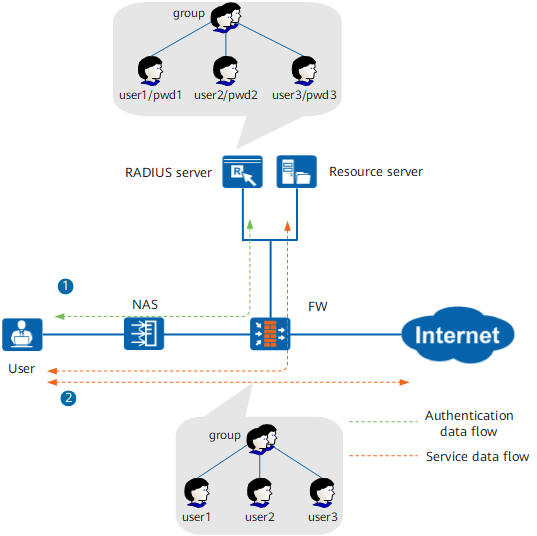
The following example describes a RADIUS server is deployed on the network that provides the requested resources, security policies on the FW must be configured to permit authentication packets between the user and RADIUS server and between the NAS and RADIUS server, and authentication policies must be configured to exempt these packets from authentication.
If the accounting packets exchanged between the NAS and RADIUS server do not pass through the FW, you must mirror the account packets to the FW, such as using switch mirroring, to implement RADIUS SSO.
NTLM Authentication
NT LAN Manager (NTLM) is a Windows security protocol used to authenticate users. If a user in the AD domain wants to access the Internet, the FW serves as NTLM authentication proxy to trigger and forward NTLM authentication packets exchanged between the browser and AD server and obtain the user identity in the authentication process. In this scenario, users do not need to enter user names or passwords. Instead, their identity information used for logging in to the AD domain is directly used.
As shown in Figure 7, a user logs in to the AD domain and accesses the Internet using a browser. After receiving the access request, the FW asks the browser to perform NTLM authentication. Acting as the NTLM proxy, the FW sends the authentication request to the AD server. The user passes authentication on the FW after the AD server permits NTLM authentication.
This scenario requires that the browser support NTLM authentication. After a user logs in to the AD domain, the user identity is automatically sent to the AD server through the browser.
You can import the organization structure and account information from the AD server to the FW, so that the FW uses policies to control the online behavior of users and user groups.
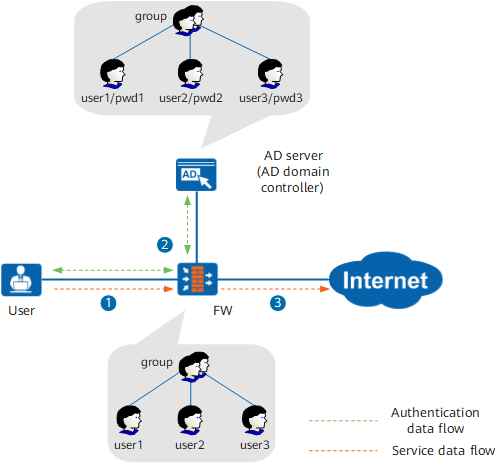
This scenario is similar to the AD SSO scenario. After users log in to the AD domain, they can access the Internet without being authenticated by the FW for the second time. The advantage of NTLM authentication is easy to deploy. No extra program is needed. The restriction is that the browser must support NTLM authentication if users want to use the browser to access the Internet.