Remote Access Users Access Intranet Resources Using SSL VPN
This section describes user management and authentication mechanisms when remote access users connect to a FW using SSL VPN to access intranet resources.
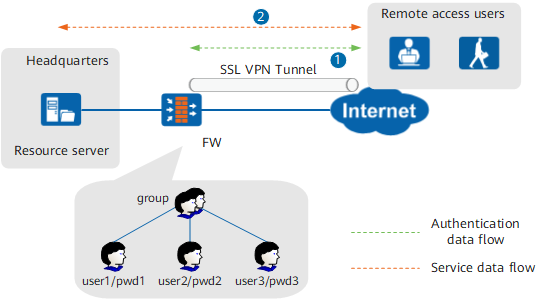
A FW serves as the VPN access gateway of an enterprise. Remote access users connect to the FW using SSL VPN and access intranet resources. The entire process involves the following phases:
Connection phase
The user logs in to the SSL VPN authentication page, the FW verifies the user identity, and an SSL VPN tunnel is established.
Resource access phase
After an SSL VPN tunnel is established, the user accesses intranet resources using the Web proxy, file sharing, port forwarding, or network extension service. The FW controls the permissions on service resources in different modes:- Web proxy, file sharing, and port forwarding services: The FW relays the user access to network resources, and user permissions are assigned by the role module of the SSL VPN virtual gateway. For details, see the SSL VPN section.
- Network extension service: The FW assigns private IP addresses to users so that users can access the network resources as if they reside on the intranet. To control users' access permissions, configure user-specific policies.
Complete the following tasks to enable users to access intranet resources using the network extension service and implement access control on them:
Save user and user group information on a FW to ensure that the information can be referenced by security policies, policy-based routing, traffic policies, quota control policies, proxy policies, audit policies, and SSL VPNs.
Configure user authentication for the connection phase to prevent unauthorized access. Configure the FW to obtain the mappings between users and IP addresses when users employ the network extension service to access network resources.

The following provides an example of local authentication in which users and user groups are created and passwords are specified on a FW, and the FW verifies user identities. The implementation of server authentication is the same except that users are authenticated by an authentication server instead of the FW.
As shown in Figure 1, employees on a business trip or branch office employees must be authenticated by the FW. The FW then assigns private IP addresses to the users who are using the network extension service and records the mappings between the users and private IP addresses.
The FW has recorded the mappings between the users and private IP addresses during the resource access phase. Therefore, FW controls user permissions and behaviors based on the policies specified for users or user groups, and second authentication of users is not required.