Overall Authentication Flow
This section describes the overall authentication flow.
The authentication flow on a FW is a series of operations that vary in sequence by user type. You can choose one of user authentication schemes shown in Figure 1 and Table 1 based on the deployment mode and network environment.
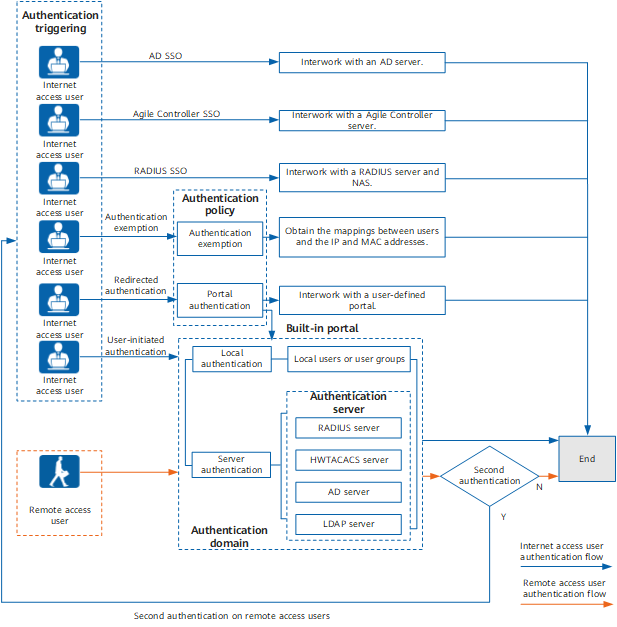
Category |
Description |
Authentication Mode |
|---|---|---|
SSO of Internet access users |
Users authenticated by other authentication systems do not need to be authenticated again by the FW. The FW can obtain the mapping between the authenticated users and IP addresses to implement user-specific policy management. This method applies to scenarios where an authentication system has been deployed before user authentication is deployed on the FW. |
|
Built-in portal authentication for Internet access users |
The FW provides a built-in portal authentication page (https://Interface IP address:8887 by default) to authenticate users. The FW forwards the authentication request to the local user database or authentication server. This method applies to scenarios where the FW authenticates users. |
|
User-defined portal authentication |
The FW interworks with a user-defined portal server to authenticate users. For example, the Agile Controller can serve as an external portal server to authenticate users. Currently, there are two types of user-defined Portal authentication. For details, see User-defined Portal Authentication. |
When a user accesses the HTTP service, the FW pushes the user-defined portal authentication page to the user to trigger user authentication. |
Authentication exemption for Internet access users |
Users can be authenticated and access network resources without entering user names and passwords. Authentication exemption does not mean that users are not authenticated. In authentication exemption, users do not need to enter users names or passwords, and the FW can obtain the mapping between the users and IP addresses to implement user-specific policy management. |
User names are bidirectionally bound with IP/MAC addresses. The FW identifies the bindings to automatically authenticate users. This method applies to top executives. |
Remote access user authentication |
The FW authenticates VPN access users during the connection. To authenticate the VPN access users before they access network resources, you can configure secondary authentication. |
Local authentication and server authentication |