Portal Authentication on Internet Access Users
In portal authentication, the FW or a third-party server provides a portal authentication page to authenticate users.
FW Built-in Portal Authentication
You can trigger built-in portal authentication using the following methods:
Redirected authentication
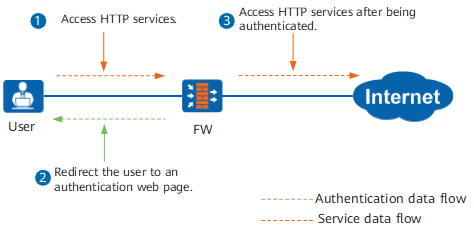
If users use only the HTTP/HTTPS service to access network resources, you can configure redirected authentication. Redirected authentication implements authentication on Internet access users when they attempt to access HTTP/HTTPS services. The users can access network resources after being authenticated. By default, the FW pushes an authentication page for HTTP request packets whose destination port number is 80. You can configure the FW to push an authentication page for HTTPS request packets whose destination port number is 443. The FW discards other request packets, including those identified as HTTP/HTTPS packets using port mapping.

If a user accesses the HTTP service using a URL, DNS service packets must be exchanged between the user and the DNS server to resolve the URL. If a FW is deployed between the user and the DNS server, you must configure a security policy to allow the exchanged DNS packets to pass through the FW.
As shown in Figure 1, after receiving HTTP packets whose destination port is 80 from an Internet access user, a FW redirects the user to an authentication web page and triggers identity authentication. The user can access network resources after being authenticated.
FW authentication modes include local authentication, proxy authentication by forwarding authentication requests to an authentication server. Local authentication and proxy authentication use the portal page that requires the user name and password.
User-initiated authentication
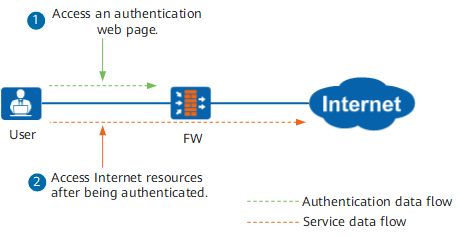
If users need to use multiple services to access network resources, configure the FW to trigger user-initiated authentication. User-initiated authentication indicates that Internet access users proactively access web pages for identity authentication before accessing network resources. The users can access network resources after being authenticated.
As shown in Figure 2, an Internet access user initiates an authentication request on the authentication web page of a FW. After receiving the authentication request, the FW implements identity authentication on the user. The user can access Internet resources after being authenticated.
FW authentication modes include local authentication, proxy authentication by forwarding authentication requests to an authentication server. Local authentication and proxy authentication use the portal page that requires the user name and password.
User-defined Portal Authentication
The FW supports user-defined portal authentication. Currently, there are two types of user-defined portal authentication.
To use the two types of user-defined portal authentication, an enterprise needs to deploy an external Portal server independently. For example, the Agile Controller can serve as a portal server.
- Method 1: The FW does not participate in user authentication (Agile Controller SSO).
When this type of portal authentication is used, the portal server completes user authentication independently.
For details, see Method 2: Users access HTTP services to trigger Agile Controller SSO.
The HTTP requests of users are redirected to the portal authentication page of the Agile Controller. The Agile Controller authenticates users and notifies the FW of mappings between users and IP addresses.
- Method 2: The FW participates in user authentication.
When this type of Portal authentication is used, the portal server and FW work together to complete user authentication.
After receiving an HTTP service data flow from a user, the FW redirects an HTTP request to the portal authentication page of the Agile Controller.
After receiving a user authentication request, the portal server forwards the request to the FW. The FW requests the RADIUS server to authenticate the user. After the authentication succeeds, the user goes online from the FW, as shown in Figure 3.
The portal server and RADIUS server are two components of the Agile Controller. The two components can be installed on one or two servers. Currently, only the RADIUS server can serve as an authentication server.
In this scenario, the portal server and FW use Portal2.0 for communication. Portal2.0 is the portal standards V2.01 for broadband products of Huawei.
The Agile Controller can deliver security groups of users to the FW so that the FW can implement policy control on users by security group.
Users can go offline from the portal server. The portal server notifies the FW of users' logout.
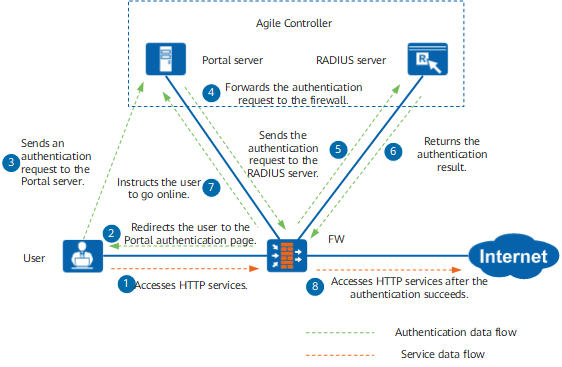
User-defined portal authentication depends on the user-defined portal authentication template referenced in the authentication policy. The user-defined Portal address is specified in the user-defined Portal authentication template.
In scenarios where users log in to the FW for the first time and user device IP addresses frequently change, users may be prompted for re-authentication when the FW receives access requests. In this case, use Method 2: The FW participates in user authentication combined with MAC address-prioritized portal authentication.
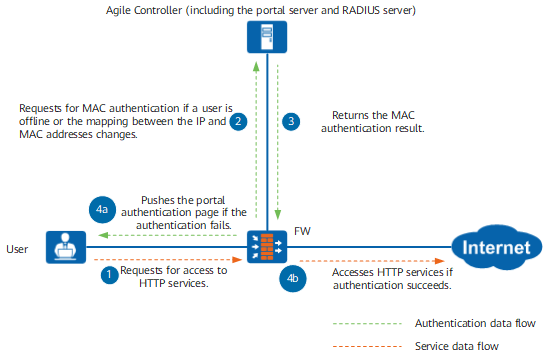
In this combined authentication mode, if user device IP addresses change after users pass Method 2: The FW participates in user authentication, the FW performs MAC authentication on the users within a given time range (MAC address validity period configured on the Agile Controller). During MAC authentication, users are not required to enter authentication information and therefore are unaware of the authentication, facilitating their access to services.
Figure 4 shows the specific procedure for the FW to process user requests. If the FW receives the HTTP service data flows of the users and the users are offline or the mappings between their IP addresses and MAC addresses change, the FW sends MAC authentication requests to the Agile Controller.
If MAC authentication succeeds, users can directly access services.
If the Agile Controller fails to respond or MAC authentication fails within a given time range, the FW pushes the portal authentication page to the users and the users enter the authentication process as shown in Figure 3. After the users are authenticated, they can properly access services.
Authentication Exemption
If users need to directly access network resources without entering any user names or passwords, you can configure authentication exemption on the FW.
The local user names are bidirectionally bound with IP addresses, MAC addresses, or IP/MAC address pairs. The FW identifies the Internet access users according to the bound IP and MAC addresses. The Internet access users who are exempted from authentication must use the bound IP and MAC addresses to access network resources.
NTLM Authentication
If a user in the AD domain wants to access the Internet, the FW serves as NTLM authentication proxy to trigger and forward NTLM authentication packets exchanged between the browser and AD server and obtain the user identity in the authentication process. NTLM authentication is a portal authentication mode in which the user is unaware of entering the user name and password. Figure 5 shows the detailed mechanism.
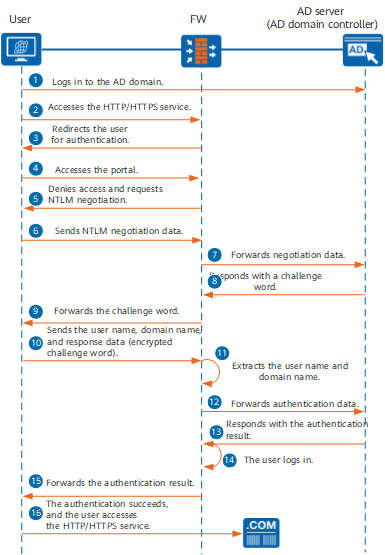
- A user logs in to the AD domain.
- The user accesses the HTTP/HTTPS service through a browser.
- The FW discovers that the traffic is not authenticated, and the traffic matches the NTLM authentication policy. The FW redirects the user for authentication.
- The user accesses the portal page redirected by the FW. In this process, the browser and FW interact internally without prompting the user to enter the user name or password.
- The FW denies the access through the browser and requires the browser perform NTLM authentication.
- The browser sends an NTLM negotiation request.
- The FW forwards the negotiation request to the AD server.
- The AD server generates a random number, uses it as the challenge word, and sends it to the browser.
- The FW forwards the challenge word to the browser.
The browser sends NTLM negotiation data again, including the user name, domain name, and response data.
The response value is obtained by encrypting the challenge word with the hash value of the password. This prevents the password from being transmitted over the network, securing the password.
The browser must support NTLM authentication. Otherwise, the browser cannot automatically provide user login information.
- The FW extracts the user name.
- The FW forwards the NTLM negotiation data to the AD server.
The AD server responds with the authentication result.
The AD server searches locally for the password hash value corresponding to the user name, uses this hash value to encrypt the challenge word, and compares the encryption result with the response value sent from the browser. If the two values are the same, the user passes the authentication.
- If the authentication succeeds, the FW enables the user to log in on the FW.
- The FW forwards the authentication result to the browser.
- If the authentication succeeds, the user successfully accesses the HTTP service.
After the user logs in on the FW, the FW logs out the user based on the timeout period.