SSO on Internet Access Users
SSO refers to that the FW obtains user login information from other authentication systems instead of authenticating users so that users can go online from the FW.
AD SSO
If users need to directly access network resources after being authenticated by an AD server, you can configure AD SSO to trigger authentication.
For AD SSO, the FW supports many methods for obtaining user authentication success messages. Table 1 lists the methods supported by the FW.
Comparison Item |
Installing the SSO Service Program to Receive Messages from PCs |
Installing the SSO Service Program to Query AD Server Security Logs |
FW Monitoring AD Authentication Packets |
|---|---|---|---|
Installation and deployment |
The deployment is complex. An independent SSO service program needs to be installed, and the login/logout scripts need to be set on the AD server and delivered to PCs. |
An independent SSO service program needs to be installed. No scripts need to be set. |
No additional program needs to be installed. The FW must be able to obtain the packets exchanged between users and the AD server. |
Client (login PC) compatibility |
Only the Windows system is supported, because other OSs cannot execute scripts. |
Any type of OS can be used. |
Any type of OS can be used. |
Obtaining login messages |
Login messages after device startup, restart, and logout. |
Login messages after device startup, restart, logout, and screen locking. |
Login messages after device startup restart, and logout. |
Obtaining logout messages |
Device shutdown, restart, and logout messages. |
Not supported. |
Not supported. |
Multiple AD servers |
When multiple AD servers in a domain can synchronize data, you can deploy an SSO program a set of login and logout scripts. When multiple domain groups form a domain forest and different domains establish trust relationships, you can deploy one SSO program but need to deploy a set of login and logout scripts for each domain. |
The service program can obtain messages from a maximum of 16 servers. When multiple AD servers are deployed to form a domain forest, the service program can obtain messages from multiple AD servers simultaneously. |
The FW can obtain messages from a maximum of 32 servers. When multiple AD servers are deployed to form a domain forest, the FW can obtain messages from multiple AD servers simultaneously. |
Security |
The messages exchanged between the SSO server and the FW are encrypted using shared keys. |
The messages exchanged between the SSO server and the FW are encrypted using shared keys. |
The FW directly parses authentication packets, causing the risks of authentication packet tampering and user identity theft. |

There is only one AD SSO service program that supports two setting modes: receiving PC messages and querying AD server security logs.
Mode 1: Install the SSO service program to receive messages from PCs.
You need to deploy AD SSO service on the AD monitor (AD domain controller or other devices in the AD domain), configure login and logout scripts on the AD server (AD domain controller), and set AD SSO parameters on the FW to receive the user login and logout information from the AD SSO service.
- The user logs in to the AD domain. Then the AD server returns a login success message and delivers a login script to the user.
- The user's PC executes the login script and sends the user login information to the AD monitor.
- The AD monitor connects to the AD server to query information about the user. If the user's information is displayed, the user login information is forwarded to the FW.
- The FW extracts the user-IP address mapping from the user login information and adds the mapping to the online user list.
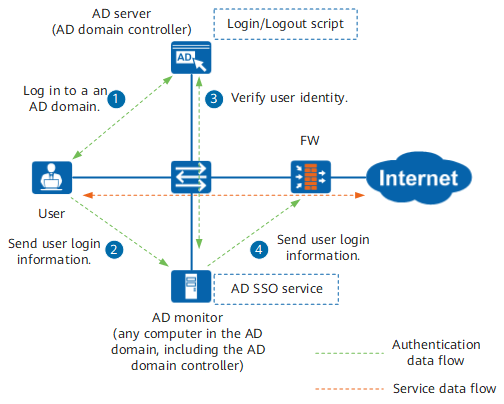
The logout process is the same as the login process.
If the packets exchanged between the user and the AD server, between the user and the AD monitor, and between the AD monitor and the AD server need to pass the FW, ensure that the authentication policies do not authenticate the packets and the security policies allow the packets through.
Mode 2: Install the SSO service program to query AD server security logs.
You need to deploy AD SSO service on the AD monitor (AD domain controller or other devices in the AD domain), set AD SSO parameters on the FW to receive the user login and logout information from the AD SSO service.
Figure 2 shows the login process of an Internet access user.
- A user logs in to the AD domain. The AD server records user login information into a security log.
The AD monitor connects to the AD server through the Windows Management Instrumentation (WMI) interface provides by the AD server to query security logs in order to obtain the user login message.
The AD monitor regularly queries security logs generated by the AD server from the time when the AD SSO is enabled.
- The AD monitor forwards the user login message to the FW. The user goes online from the FW.
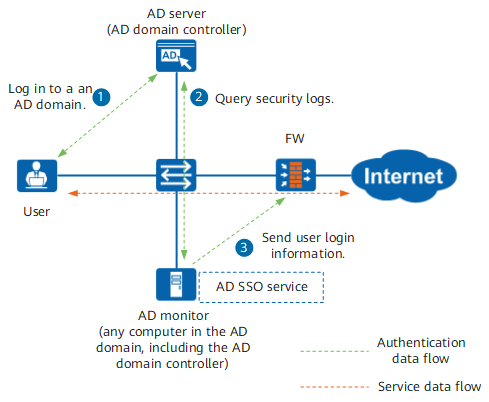
In this mode, the FW cannot obtain user logout messages. Users go offline only when their connections time out.
Mode 3: The FW monitors AD authentication packets.
In this mode, the FW cannot obtain user logout messages. Users go offline only when their connections time out.
This mode may cause authentication packet tampering and user ID forgery. Exercise caution when you use this mode.
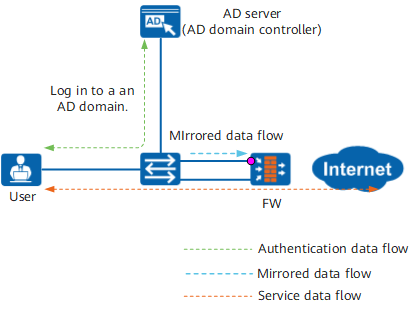
The FW must use an independent Layer-2 port to receive mirrored authentication packets. This port cannot be used for other services. Management port (MEth 0/0/0 or GigabitEthernet 0/0/0) cannot receive mirroring packets.
In this mode, the program does not need to be installed on the AD server. The FW listens to the authentication packets sent by users who log in to the AD server (AD domain controller) to obtain authentication results. If a user is authenticated, the FW adds the mapping between the user name and the user's IP address to the online user list.
When the FW is deployed between users and the AD server, the FW can obtain authentication packets. If the authentication packets do not pass through the FW (as shown in Figure 3), the messages carrying authentication results from the AD server must be mirrored to the FW.
Agile Controller SSO
If users need to directly access network resources after being authenticated by a Agile Controller server, you can configure Agile Controller SSO to trigger authentication.
To trigger Agile Controller SSO, set parameters for the Agile Controller server to communicate with the FW and ensure that the Agile Controller server can send information about user logins to the FW. Set Agile Controller server and SSO parameters on the FW and configure the FW to receive the user login and logout information from the Agile Controller.
If the FW is deployed between Internet access users and the Agile Controller server, configure security policies to ensure that the authentication packets can pass through the FW and are exempted from authentication.
The FW can communicate with multiple Agile Controller servers. The following example describes only one Agile Controller server.
Agile Controller SSO provides two authentication triggering modes:
Mode 1: Users proactively access the Agile Controller authentication page.
Figure 4 shows the login process of an Internet access user. The user logs in to the Agile Controller from a Agile Controller client or from the portal authentication page before accessing services, and then the Agile Controller server sends login information (including the user name and IP address) to the FW.
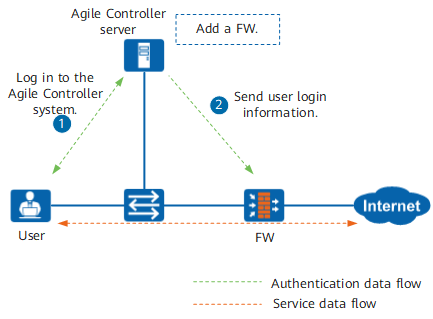
After the user logs out of the Agile Controller system, the Agile Controller server sends logout information to the FW.
Mode 2: The user accesses HTTP service to trigger Agile Controller SSO.
As shown in Figure 5, after receiving HTTP packets whose destination port is 80 from an Internet access user, a FW redirects the user to a portal authentication page of Agile Controller and triggers identity authentication. After the user is authenticated, the Agile Controller server sends login information (including the user name and IP address) to the FW. The user then can continue to access the HTTP packets whose destination port is 80 service and other services.
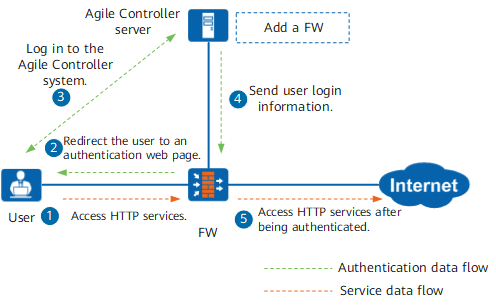
After the user logs out of the Agile Controller system, the Agile Controller server sends logout information to the FW.
Online user synchronization between the FW and a Agile Controller server
In the Agile Controller SSO scenario, the online users on the FW must be consistent with those on the Agile Controller server so that user permissions can be better controlled. The online users on the FW and Agile Controller server are inconsistent in the following situations:
- After a user is authenticated by the Agile Controller server, the user login message sent by the Agile Controller server the FW is lost. As a result, the user cannot go online on the FW to access the network.
- The FW has the online user aging mechanism. If no traffic of an online user passes through the FW within a specific period, the FW will log out the user. As a result, the user does not go offline on the Agile Controller server but goes offline on the FW.
- The user goes offline on the Agile Controller server, but the user logout message sent by the Agile Controller server to the FW is lost. As a result, the user is still online on the FW, causing a risk of user spoofing.
Therefore, when a user goes online on the FW or ages, the FW proactively queries online users from the Agile Controller server to ensure online user synchronization.
When the traffic that passes through the FW has no matching online user entry, the FW proactively queries the online user to which the source IP address of the traffic corresponds from the Agile Controller server. If the Agile Controller server has such an online user, the Agile Controller server sends the login information of the user to the FW.
The mechanism solves the first problem.
To prevent the FW from querying online user information from the Agile Controller server in the non-Agile Controller-SSO scenario, you can specify a source IP address range on the FW so that only traffic with an IP address in the range triggers the FW to send a query packet to the Agile Controller server.
When an online user on the FW is to age (the remaining online time is 1/4 of the aging time), the FW sends a query packet to the Agile Controller server. If the user is online on the Agile Controller server, the FW sets the remaining online time of the user to the maximum value. If the user is offline on the Agile Controller server, the user normally ages on the FW.
This mechanism solves the second problem. The online user on the FW does not go offline prior to the online user on the Agile Controller server. The online user aging mechanism on the FW solves the third problem. If no traffic of an online user passes through the FW within a specific period, the FW will log out the user.
When the FW obtains multiple IP addresses of a user, ensure that the user is allowed to log in through multiple computers (IP addresses) at the same time. Otherwise, one user cannot go online with multiple IP addresses.
Online user information of IPv6 addresses cannot be synchronized between FWs, but can be synchronized between the FW and Agile Controller server.
RADIUS SSO
If users need to directly access network resources after being authenticated by a RADIUS server, you can configure RADIUS SSO to trigger authentication.
To implement RADIUS SSO, the FW needs to analyze the RADIUS accounting packets between the Network Access Server (NAS) and the RADIUS server to obtain the mapping between users and IP addresses. Figure 6, Figure 7 and Figure 8show that the FW obtains RADIUS accounting packets in different ways based on the FW location in deployment.
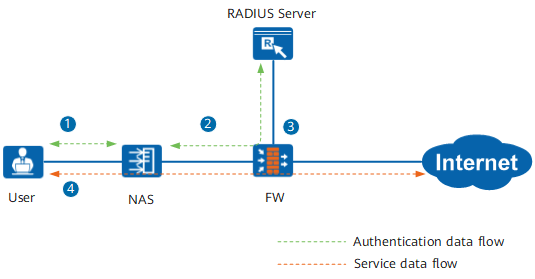
If the packets exchanged between the user and the NAS and between the NAS and the RADIUS server need to pass the FW, ensure that the authentication policies do not authenticate the packets and the security policies allow the packets through.
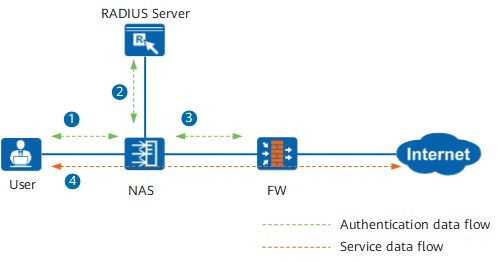
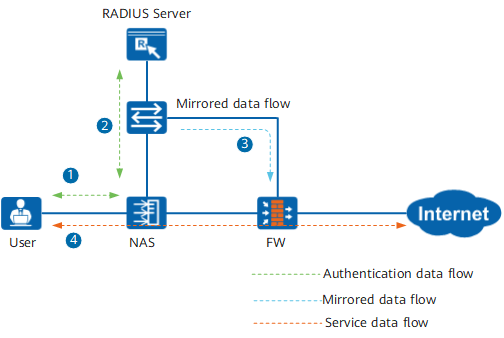
- The Internet access user initiates an authentication request to the NAS.
- The NAS sends the authentication request to the RADIUS server. The RADIUS server verifies the user name and password and sends the verification result to the NAS. The NAS sends an accounting start request packet to the RADIUS server to identify that the user goes online.
The FW resolves the accounting start request packet, obtains the mapping between the user and IP address, and generates the online user information locally. The way for obtaining the accounting start packet varies depending on the place of the FW in deployment:
- In-line mode: The FW resolves received RADIUS accounting start packets directly.
Off-line mode: The NAS sends the accounting start packet to both the RADIUS server and the FW, and the FW resolves the packet and replies to the NAS.
In this mode, the NAS needs to be able to send accounting start packets to the FW.
- Mirroring mode: The accounting start packet exchanged between the NAS and the RADIUS server does not pass the FW. A copy of the accounting start packet needs to be mirrored by a switch or split by an optical splitter to the FW which then resolves and discards the packet.
When the user logs out, the NAS sends an accounting stop packet to the RADIUS server to inform the logout event. The FW receives and resolves the accounting stop message, obtains the mapping between the user and IP address, and deletes the online user information saved locally.
Besides, when the user is online, the NAS regularly sends accounting update packets to the RADIUS server to keep the accounting status. After receiving these packets, the FW updates the remaining online time of the online user.
When the FW parses out multiple IP addresses from RADIUS accounting packets, ensure that the user is configured to be able to concurrently log in to multiple PCs (with multiple IP addresses). Otherwise a user is not allowed to go online using multiple IP addresses.
Online user information of IPv6 addresses cannot be synchronized between different FW.
When a user is authenticated by the RADIUS server but has not obtained an IP address, the accounting start packet sent by the NAS to the RADIUS server does not contain the user's IP address. In this case, the FW does not allow the user to go online after obtaining the accounting start packet. After the user obtains an IP address through the DHCP server, the accounting update packet sent by the NAS to the RADIUS server contains the user's IP address. In this case, the FW enables the user to go online after obtaining the accounting update packet.