Overview of VPN Client Upgrade
This section provides basic concepts of the VPN client and SSL VPN client patch.
VPN Client
After the administrator uploads the latest SecoClient version to the FW, mobile users can download the latest SecoClient software from the virtual gateway page when they access the FW virtual gateway.
SSL VPN Client Patch
Two methods are available for mobile users to access the enterprise network over SSL VPN tunnels. One is to use the SecoClient software, and the other is to use a browser. The SSL VPN client is a browser. If a browser is used for the access, the installation package of the management program and the certificate filtering plug-in of the browser may expose some vulnerabilities as time eclipses. To fix the vulnerabilities and improve access security, you need to patch the plug-ins.
This section describes how to load the SSL VPN client patch on the FW to upgrade browser plug-ins. When a mobile user accesses the virtual gateway from a browser, the virtual gateway automatically upgrades the plug-ins installed on the browser. Loading the new SSL VPN client patch file automatically uninstalls the existing patch file.
The name of the SSL VPN client patch file must be clientpatchmain. If an SSL VPN client patch file with the same name already exists on the FW, the existing file is automatically deleted.
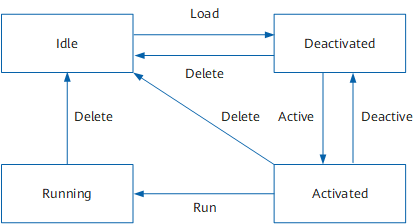
SSL VPN client patches have four states: Idle, Activated, Deactivated, and Running. Patches in activated state are rolled back to the deactivated state after system restart, whereas patches in running state recover after system reset and still take effect.
Figure 1 shows the patch status change diagram.