Virtual System and Administrator
This section describes the concepts of public system, virtual system, and administrator.
Virtual System
The FW has two types of virtual systems: public system (public) and virtual system (VSYS).
Public system (public)
The public system is a special virtual system on the FW and is available even if the virtual system function is disabled. After the virtual system function is enabled on the FW, the public system inherits all the configurations of the FW.
The public system manages other virtual systems and forwards data between them.
Virtual system (VSYS)
Virtual systems are independent logical systems created on a FW.
Figure 1 shows the logical structure of the public system and virtual systems.
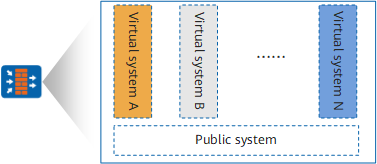
To forward, isolate, and independently manage traffic of different virtual systems, the FW implements virtualization in the following aspects:
- Resources: Each virtual system has dedicated resources, including interfaces, VLANs, policies, and sessions. The resources are assigned by public system administrators and managed by virtual system administrators.
- Configuration: Each virtual system has its own configuration interface and administrators and cannot be accessed by administrators of other virtual systems.
- Security function virtualization: Each virtual system has independent security policies and other security functions which apply only to packets of the virtual system.
- Route virtualization: Each virtual system maintains separate routing tables, independent and isolated from each other. Currently, only static routes are supported.
With the preceding virtualization techniques, each virtual system can function as a dedicated firewall that is exclusively managed by its administrator.
Virtual System and VPN Instance
Besides virtual systems, the FW also supports VPN instances. Virtual systems can isolate services and static routes, whereas VPN instances isolate only routes. For the functions that cannot be virtualized, such as dynamic routing, multicast, you can use VPN multi-instance to implement virtualization.
The FW provides two types of VPN instances:
VPN instances automatically generated when virtual systems are created
When you create a virtual system on the FW, the FW automatically generates a VPN instance with the same name.
VPN instances manually created
You can run the ip vpn-instance command to create VPN instances. Such instances are mainly used to isolate routes in MPLS scenarios. Usually, the VPN instances used for route isolation refer to those manually created ones.
The FW provides both types of VPN instances. You can use either type of VPN instances based on the scenario.
Administrator
Administrators are classified into public system administrators and virtual system administrators. Figure 2 illustrates the permissions of the two types of administrators.
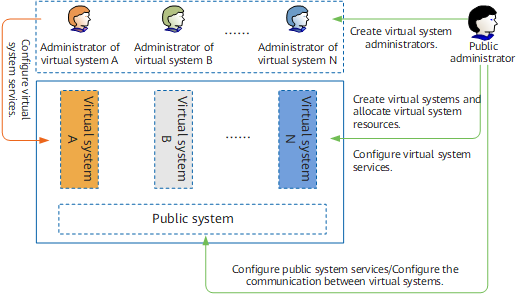
Public system administrator
After the virtual system function is enabled, the administrators of the FW will become administrators of the public system. Public system administrators can manage the FW and the public system, using the same login and authentication methods and with the same permissions.
A public system administrator can configure virtual systems, such as creating or deleting virtual systems, and allocating resources to virtual systems, only when virtual system management permission is assigned to the public system administrator. Public system administrators thereafter all have virtual system management permission unless otherwise specified.
Virtual system administrator
Each virtual system has one or multiple administrators. A virtual system administrator can manage only the virtual system on which the administrator is created.
To relate administrators with virtual systems, virtual system administrator accounts are named in the format of administrator name@@virtual system name.