Virtual System Resource Allocation
This section describes the virtual system resource allocation mechanism. Limiting the amount of resources of each virtual system prevents a virtual system from preempting too much resources from other virtual systems.
- Quota allocation: Resources that support quota allocation are automatically allocated based on the system specifications and cannot be manually allocated.
- Manual allocation: Resources that support manual allocation are allocated by users through the CLI or on the web UI.
Resource Allocation
Table 1 lists the resources that are automatically and manually assigned.
Resource Name |
Allocation Method |
Description |
|---|---|---|
Interface |
Manually assigned |
The interfaces that can be assigned to virtual systems include Layer-3 Ethernet interfaces, Layer-3 Ethernet subinterfaces, Layer-3 Eth-Trunk interfaces, Layer-3 Eth-Trunk subinterfaces, Tunnel interfaces, WAN interfaces, and Virtual-Template interfaces. Layer-2 interfaces can not be directly assigned to virtual systems. Instead, you can run the assign vlan command to assign a VLAN to a virtual system. Layer-2 interfaces are assigned to the virtual systems with the VLAN. A Trunk or Hybrid Layer-2 interface can be assigned to multiple virtual systems with a VLAN. Each virtual system administrator can configure the interface, for example, adding the interface to a security zone. VLANIF interfaces cannot be directly assigned to virtual systems. When the assign vlan command is used to assign a VLAN to a virtual system, the corresponding VLANIF interface will also be assigned to the virtual system. Vbdif interfaces cannot be directly assigned to virtual systems. When the assign vni command is used to assign a VNI to a virtual system, the corresponding Vbdif interface will also be assigned to the virtual system. The management interface cannot be assigned to virtual system. |
VLAN |
Manually assigned |
VLANs assigned to one virtual system cannot be assigned to other virtual systems. |
VXLAN |
Manually assigned |
VXLANs assigned to one virtual system cannot be assigned to other virtual systems. |
Public IP |
Manually assigned |
Source NAT, NAT Server or NAT64 configured in virtual systems require public IP addresses. In such cases, run the assign global-ip command in the root system to assign public IP addresses to virtual systems. |
L2TP Resource |
Manually assigned |
Total number of L2TP resources (LNS and LAC L2TP resources) available in a virtual system, that is, the maximum number of VT interfaces that can be bound to the virtual system A maximum of 10 VT interfaces can be bound to a virtual system. If this item is not specified, the default value is 0. That is, no VT interface is bound to the virtual system. |
IPv4 Sessions |
Manually assigned |
- |
IPv6 Sessions |
Manually assigned |
- |
New IPv4 Session Rate |
Manually assigned |
The new IPv4 session rate indicates the number of new IPv4 sessions a virtual system can create in one second. |
New IPv6 Session Rate |
Manually assigned |
The new IPv6 session rate indicates the number of new IPv6 sessions a virtual system can create in one second. |
Online Users |
Manually assigned |
- |
SSL VPN Concurrent Users |
Manually assigned |
- |
Users |
Manually assigned |
- |
User Groups |
Manually assigned |
- |
Security Groups |
Manually assigned |
- |
Policies |
Manually assigned |
Specifies the maximum total number of all policies, including security, NAT, bandwidth, authentication, audit, and routing policies. |
Traffic Policy |
Manually assigned |
Specifies the maximum number of traffic policies that can be configured for a bound virtual system. If the guaranteed number of policies has been configured, the maximum number of traffic policies cannot exceed this guaranteed value. Traffic policy quantity resources can be preempted between virtual systems. If the number of traffic policies for the device has reached the upper limit, the virtual system can no longer have new traffic policies added, even if the maximum number of traffic policies for the virtual system is configured. |
IPSec Tunnel |
Manually assigned |
- |
L2TP Tunnel |
Manually assigned |
- |
Bandwidth |
Manually assigned |
Specifies the guaranteed bandwidth for the upstream, downstream, or both directions of a virtual system. |
Antivirus |
Manually assigned |
You can only configure usage permissions of this function for the virtual system but not allocate specific resources. |
Intrusion Prevention |
Manually assigned |
You can only configure usage permissions of this function for the virtual system but not allocate specific resources. |
URL Filtering |
Manually assigned |
You can only configure usage permissions of this function for the virtual system but not allocate specific resources. After you configure usage permissions of the URL filtering function for the virtual system, the virtual system can also obtain the permissions for using the DNS filtering function. |
Log Buffer |
Manually assigned |
The log buffer of a virtual system stores the logs (including system logs and service logs) generated by the virtual system. It is independent of the log buffer on the public system. All virtual systems on the device share and preempt system log buffer resources of the virtual system. You can specify the guaranteed value of the log cache for system logs and service logs on a virtual system (the value takes effect for both system logs and service logs). |
SSL VPN Gateways |
Automatically assigned |
The maximum number of virtual gateways that can be created in the root system is subject to the device specifications. Each virtual system supports a maximum of four virtual gateways. The number of virtual gateways created by virtual systems and the root system cannot exceed the device specifications. |
Security Zones |
Automatically assigned |
The root system and virtual system have the same security zone specification. Both the root system and virtual system have 4 default security zones (Local, Trust, DMZ, and Untrust), which cannot be deleted or modified. |
5-Tuple Packet Capture Queues |
Automatically assigned |
The root system has four packet capture queues. Each virtual system has two packet capture queues, and the total number of packet capture queues of all virtual systems are restricted by the device specification. When the number of used packet capture queues in the virtual system exceeds the upper limit of the device specification, you can no longer configure 5-tuple packet capture in the virtual system. |
Before allocates resources to virtual systems, the administrator must configure resource classes, specify the guaranteed value and maximum value of each resource item in the resource classes, and bind the resource classes with the virtual systems. The number of resources that a virtual system can use is subject to the guaranteed value and maximum value of each resource item in the resource classes.
- Guaranteed value: specifies the amount of a resource committed to a virtual system and cannot be preempted by other virtual systems.
- Maximum value: specifies the maximum allowed amount of resource that a virtual system can have. Whether the virtual system can achieve the maximum value depends on available resources and competition between virtual systems.
For example, 10 virtual systems are configured on the FW and the total number of sessions available for the FW is 500,000. If virtual system A is configured with a guaranteed number of 10,000 sessions and a maximum number of 50,000 sessions, then virtual system A can establish 10,000 sessions without preemption. However, whether virtual system A can establish 50,000 sessions depends on the competition of other nine virtual systems and the public system. If the total number of sessions established by the other nine virtual systems and the public system is less than 450,000, then virtual system A can establish a maximum number of 50,000 sessions.
Public system administrators can assign resources to virtual systems based on their purpose. For example, virtual system 1 connects to the zone where the enterprise servers reside to protect the servers and virtual system 2 connects to the zone created for a department of 20 employees to control Internet access. In this case, the two virtual systems have different needs for resources. Virtual system 1 needs more sessions than virtual system 2, but does not need any users, whereas virtual system 2 needs a quota of 20 users but needs fewer sessions than virtual system 1.
If a virtual system is not bound to any resource class, the virtual system has no restriction on the use of resources. The virtual system preempts the remaining resources of the device with the root system and other virtual systems that are not bound to any resource class.
If no maximum value and guaranteed value is specified for some resource items of the resource class bound to the virtual system, the virtual system has no restriction on the use of these resource items. The virtual system preempts the remaining resources of the device with the root system and other virtual systems that have no restriction on the use of the resource items.
Bandwidth Limiting and Public Interfaces
Bandwidth resources are classified into inbound bandwidth, outbound bandwidth, and entire bandwidth. The bandwidth limit on a data flow is related to the inbound and outbound interfaces of the flow.
As shown in Figure 1, virtual system A has two public interfaces and two private interfaces. The inbound bandwidth, outbound bandwidth, and entire bandwidth of virtual system A are as follows:
- Inbound traffic: traffic from a public interface to a private interface. It is subject to inbound bandwidth limiting.
- Outbound traffic: traffic from a private interface to a public interface. It is subject to outbound bandwidth limiting.
- Entire traffic: includes inbound traffic, outbound traffic, traffic from a private interface to another private interface, and traffic from a public interface to another public interface. It is subject to entire bandwidth limiting.
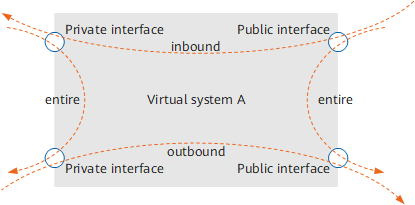

The public interface does not refer to the interface connecting the FW to the Internet. Instead, it is the interface specified in the set public-interface command. The private interface refers to the interface where the set public-interface command is not run.
In inter-virtual system forwarding scenarios, the Virtual-IF interface is a public interface by default.
Resource Preemption
The following resources are preempted by all virtual systems:
- Address and address group
- Region and region group
- User-defined service and service group
- User-defined application and application group
- NAT address pool
- Certificate
- Schedule
- Traffic profile
- Static route
- Various types of tables, including the server-map, IP-MAC binding, ARP, and MAC address table