CLI: Example for Configuring Maximum and Guaranteed Bandwidth for Bandwidth Management on Enterprise Networks
This section provides an example for setting overall maximum bandwidth to restrict non-key service traffic on an enterprise network and setting overall guaranteed bandwidth to ensure proper forwarding of key service traffic during peak hours.
Networking Requirements
As shown in Figure 1, an enterprise purchases 100 Mbit/s bandwidth from an ISP. On office networks, email and ERP traffic is key service traffic, and P2P and online video traffic is non-key service traffic. However, P2P and online video traffic exhausts the limited bandwidth resources on the enterprise network, and key service traffic, such as email and ERP traffic, is not properly forwarded. As a result, emails fail to be sent, and web pages fail to be displayed, which greatly affects the daily operation of the enterprise.
To prevent the preceding symptoms, the enterprise requires to enable the bandwidth management function on the FW to meet the following requirements:
- Restrict P2P and online video traffic within 30 Mbit/s at any time. Restrict P2P and online video connections within 10,000.
- Assign a minimum of 60 Mbit/s bandwidth for applications, such as email and ERP.
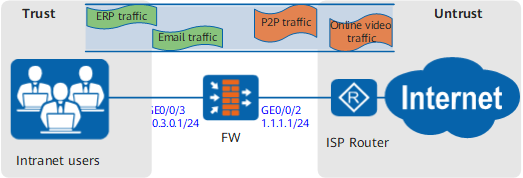
Configuration Roadmap
- Set interface IP addresses and assign the interfaces to security zones.
- Configure a traffic policy for P2P and online video applications and reference the traffic profile in which the overall maximum bandwidth is 30 Mbit/s and overall maximum number of connections is 10,000.
- Configure a traffic policy for email and ERP applications and reference the traffic profile in which the overall guaranteed bandwidth is 60 Mbit/s.

- Upstream and downstream depend on the direction of FW bandwidth policy. For simplicity, upstream refers to the direction from Trust to Untrust, and downstream refers to Untrust to DMZ in this section.
- Assuming that the security zones, routers, and security policies have been configured, this section introduces only how to configure bandwidth management.
Procedure
- Set interface IP addresses and assign the interfaces to
security zones.
- Configure a schedule.
[FW] time-range work_time
[FW-time-range-work_time] period-range 09:00:00 to 18:00:00 working-day
[FW-time-range-work_time] quit
- Configure a traffic profile for P2P and online video services.
[FW] traffic-policy
[FW-policy-traffic] profile profile_p2p
[FW-policy-traffic-profile-profile_p2p] bandwidth maximum-bandwidth whole both 30000
[FW-policy-traffic-profile-profile_p2p] bandwidth connection-limit whole both 10000
[FW-policy-traffic-profile-profile_p2p] quit
- Configure a traffic policy for P2P and online video services.
The following example describes the bandwidth management configuration for BitTorrent (BT) and eDonkey/eMule P2P services. You can specify other P2P services as required.
[FW-policy-traffic] rule name policy_p2p
[FW-policy-traffic-rule-policy_p2p] source-zone trust
[FW-policy-traffic-rule-policy_p2p] destination-zone untrust
[FW-policy-traffic-rule-policy_p2p] application app BT YouKu
[FW-policy-traffic-rule-policy_p2p] action qos profile profile_p2p
[FW-policy-traffic-rule-policy_p2p] quit
- Configure a traffic profile for
email and ERP services.
[FW-policy-traffic] profile profile_email
[FW-policy-traffic-profile-profile_email] bandwidth guaranteed-bandwidth whole both 60000
[FW-policy-traffic-profile-profile_email] quit
- Configure a traffic policy for email and ERP services.
The following example describes the bandwidth management configuration for Outlook Web Access and LotusNotes. You can specify other P2P services as required.
[FW-policy-traffic] rule name policy_email
[FW-policy-traffic-rule-policy_email] source-zone trust
[FW-policy-traffic-rule-policy_email] destination-zone untrust
[FW-policy-traffic-rule-policy_email] application app LotusNotes OWA
[FW-policy-traffic-rule-policy_email] time-range work_time
[FW-policy-traffic-rule-policy_email] action qos profile profile_email
[FW-policy-traffic-rule-policy_email] quit
Configuration Scripts
This section provides only the script related to the example.
#
sysname FW
#
 time-range work_time
  period-range 09:00:00 to 18:00:00 working-day
#
interface GigabitEthernet0/0/2
 undo shutdown
 ip address 1.1.1.1 255.255.255.0
#
interface GigabitEthernet0/0/3
 undo shutdown
 ip address 10.3.0.1 255.255.255.0
#
firewall zone trust
 set priority 85
 add interface GigabitEthernet0/0/3
#
firewall zone untrust
 set priority 5
 add interface GigabitEthernet0/0/2
#
traffic-policy
 profile profile_p2p
  bandwidth maximum-bandwidth whole both 30000
  bandwidth connection-limit whole both 10000
 profile profile_email
  bandwidth guaranteed-bandwidth whole both 60000
 rule name policy_p2p
  source-zone trust
  destination-zone untrust
  application app BT
  application app YouKu
  action qos profile profile_p2p
 rule name policy_email
  source-zone trust
  destination-zone untrust
  application app LotusNotes
  application app OWA
  time-range work_time
  action qos profile profile_email