Web: Example for Configuring Quota Management for Enterprise Employees
This section describes how to implement quota management when the FW functions as a security gateway on the intranet border.
Networking Requirements
As shown in Figure 1, an enterprise deploys the FW on the intranet boarder as an egress gateway and purchases a monthly traffic package of 500 GB targeted at small- and medium-sized enterprises from a carrier to enable intranet users to access the Internet. However, the part exceeding the package requires independent settlement. To reduce costs, enterprise managers consider assigning a fixed traffic quota to each employee. In addition, they intend to control employees' Internet access duration to boost productivity.
In a word, the managers hope to use the quota control policy function of the FW to meet the following requirements:
- There are altogether 40 employees, including 10 managers and 30 common employees. Each manager is assigned a monthly traffic quota of 20 GB, and each common employee a monthly traffic quota of 10 GB.
- For common employees, the daily Internet access duration cannot exceed four hours, and the daily traffic cannot exceed 500 MB.
- Once one of these thresholds is exceeded, all of their Internet access requirements are blocked. For managers, once the threshold is exceeded, their maximum bandwidth is limited at 800 Kbit/s.
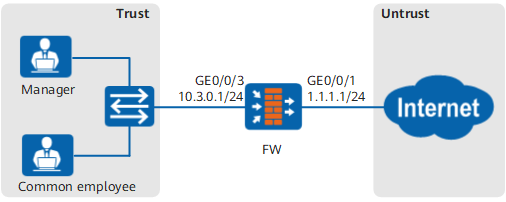
Data Planning

Quota Data |
Manager |
Common Employee |
|---|---|---|
Daily traffic quota |
- |
500 MB |
Daily Internet access duration |
- |
240 minutes |
Monthly traffic quota |
20480 MB |
10240 MB |
Start date for monthly traffic statistics collection (Reset Date) |
First day of each month |
First day of each month |
Maximum bandwidth limit after the quota is exceeded |
800 Kbit/s |
0 |
Procedure
- Set interface IP addresses and assign the interfaces to security zones.
- Click
 for GE0/0/3 and set the parameters as follows:
Zone trust IPv4 IP Address 10.3.0.1/24
- Click
- Choose .
- Manage the quota of common employees.
- Manage the quota of managers.
Verification
For common employees, their network activities are blocked once any of the following requirements is met:
- The daily Internet access traffic exceeds 500 MB.
- The daily Internet access duration exceeds 240 minutes.
- The monthly Internet access traffic exceeds 10 GB.
For managers, after their monthly Internet access traffic exceeds 20 GB, their maximum bandwidth is limited at 800 Kbit/s.
Configuration Scripts
#
 sysname FW
#
interface GigabitEthernet0/0/1
 ip address 1.1.1.1 255.255.255.0
#
interface GigabitEthernet0/0/3
 ip address 10.3.0.1 255.255.255.0
#
firewall zone trust
 set priority 85
 add interface GigabitEthernet0/0/3
#
firewall zone untrust
 set priority 5
 add interface GigabitEthernet0/0/1
#
quota-policy
 profile quota_employee
  stream-monthly 10240
  stream-daily 500
  time-daily 240
 profile quota_manager
  stream-monthly 20480
  limit-bandwidth 800
 rule name quota_employee
  user user-group /default/employee
  action quota profile quota_employee
 rule name quota_manager
  user user-group /default/manager
  action quota profile quota_manager
#
return