CLI: Example for Applying PCP in a NAT444 Scenario
This section provides an example for applying PCP in a NAT444 scenario.
Networking Requirements
As shown in Figure 1, the FW serves as a CGN in a NAT444 scenario. PCP is required on the FW for P2P service transmission between users to improve user experience in P2P services.
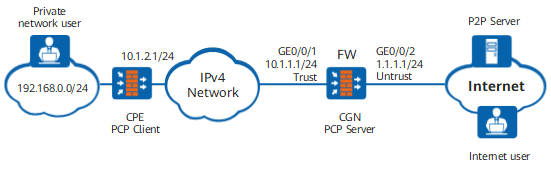
Data Planning
Item |
Data |
Description |
|
|---|---|---|---|
GigabitEthernet 0/0/1 |
IP address: 10.1.1.1/24 Security zone: Trust |
FW interface connected to the MAN |
|
GigabitEthernet 0/0/2 |
IP address: 1.1.1.1/24 Security zone: Untrust |
FW interface connected to the Internet |
|
NAT address pool |
1.1.1.10 to 1.1.1.15 |
The FW uses the NAT address pool to assign public IP addresses to private network users. |
|
IP address of the CPE |
10.1.2.1 |
The CPU uses the IP address to communicate with the FW. |
|
Configuration Roadmap
- Set interface IP addresses and assign the interfaces to security zones.
- Configure a security policy to allow PCP negotiation packets to reach the FW and allow the traffic from private network users to pass through the FW.
- Configure a PCP policy so that intranet users can access the Internet.

In this example, only the configuration of the FW serving as the PCP server is described. For configuration details on the PCP client, see the product documents of the CPE.
Procedure
- Assign IP addresses to interfaces, add the interfaces to security zones, and configure network connectivity.
# Assign an IP address to GigabitEthernet 0/0/1.
<FW> system-view
[FW] interface GigabitEthernet 0/0/1
[FW-GigabitEthernet 0/0/1] ip address 10.1.1.1 24
[FW-GigabitEthernet 0/0/1] quit
# Assign an IP address to GigabitEthernet 0/0/2.
[FW] interface GigabitEthernet 0/0/2
[FW-GigabitEthernet 0/0/2] ip address 1.1.1.1 24
[FW-GigabitEthernet 0/0/2] quit
# Add GigabitEthernet 0/0/1 to the Trust zone.
[FW] firewall zone trust
[FW-zone-trust] add interface GigabitEthernet 0/0/1
[FW-zone-trust] quit
# Add GigabitEthernet 0/0/2 to the Untrust zone.
[FW] firewall zone untrust
[FW-zone-untrust] add interface GigabitEthernet 0/0/2
[FW-zone-untrust] quit
- Configure security policies.
# Configure user-defined services and specify destination port 5351 for UDP.
[FW] ip service-set udp5351 type object
[FW-object-service-set-udp5351] service protocol udp destination-port 5351
[FW-object-service-set-udp5351] quit
# Configure a security policy to permit PCP negotiation packets.
[FW] security-policy
[FW-policy-security] rule name policy1
[FW-policy-security-rule-policy1] source-zone trust
[FW-policy-security-rule-policy1] destination-zone local
[FW-policy-security-rule-policy1] source-address 10.1.2.1 32
[FW-policy-security-rule-policy1] destination-address 10.1.1.1 32
[FW-policy-security-rule-policy1] service udp5351
[FW-policy-security-rule-policy1] action permit
[FW-policy-security-rule-policy1] quit
Configure a security policy to allow private network users to access the Internet.
[FW-policy-security] rule name policy2
[FW-policy-security-rule-policy2] source-zone trust
[FW-policy-security-rule-policy2] destination-zone untrust
[FW-policy-security-rule-policy2] action permit
[FW-policy-security-rule-policy2] quit
[FW-policy-security] quit
- Configure a NAT address pool.
[FW] nat address-group addressgroup1
[FW-address-group-addressgroup1] mode pcp
[FW-address-group-addressgroup1] section 0 1.1.1.10 1.1.1.15
[FW-address-group-addressgroup1] route enable
[FW-address-group-addressgroup1] quit
- Configure a PCP policy and a rule for the policy. Specify the source address to the IP address (10.1.2.1) of the CPE in the rule.
[FW] pcp-policy
[FW-policy-pcp] rule name policy_pcp1
[FW-policy-pcp-rule-policy_pcp1] source-zone trust
[FW-policy-pcp-rule-policy_pcp1] source-address 10.1.2.1 32
[FW-policy-pcp-rule-policy_pcp1] action nat address-group addressgroup1
[FW-policy-pcp-rule-policy_pcp1] quit
[FW-policy-pcp] quit
- Configure a default route with next-hop IP address 1.1.1.254.
[FW] ip route-static 0.0.0.0 0.0.0.0 1.1.1.254 - (Optional) Enable endpoint-independent filtering function. By default, the function is enabled. If the function is disabled, configure a security policy for traffic from the public network to the private network.
[FW] firewall endpoint-independent filter enable - Configure the CPE to perform PCP negotiations in map mode.
Verification
After enabling P2P software, the private network user can obtain a public IP address and a public port number. In addition, the Internet user can proactively communicate with the private network user using the public IP address and public port number to download files. You can view the PCP mapping table on the FW.
Configuration Scripts
Configuration script for the FW:
#
 sysname FW
#
interface GigabitEthernet0/0/1
 ip address 10.1.1.1 255.255.255.0
#
interface GigabitEthernet0/0/2
 ip address 1.1.1.1 255.255.255.0
#
interface NULL0
#
firewall zone trust
 set priority 85
 add interface GigabitEthernet0/0/1
#
firewall zone untrust
 set priority 5
 add interface GigabitEthernet0/0/2
#
 ip route-static 0.0.0.0 0.0.0.0 1.1.1.254
#
 nat address-group addressgroup1 0
 mode pcp
 route enable
 section 0 1.1.1.10 1.1.1.15
#
security-policy
  rule name policy1
    source-zone trust
    destination-zone local
    source-address 10.1.2.1 32
    destination-address 10.1.1.1 32
    service udp5351
    action permit
  rule name policy2
    source-zone trust
    destination-zone untrust
    action permit
#
pcp-policy
  rule name policy_pcp1
    source-zone trust
    source-address 10.1.2.1 32
    action nat address-group addressgroup1
#
return