< Home

CLI: Example for Configuring Static Mapping

This section provides an example for configuring static mapping through the CLI.

Networking Requirements

Because of a fault, the NMS on the carrier A's network fails to deliver commands to the CGN.

Carrier A requires to configure static mapping on the CGN through the CLI to properly plan public addresses, private addresses, and port ranges and implement address translation. In this way, users on private networks can access the Internet. Figure 1 shows the network planning:
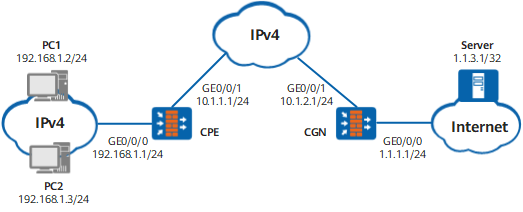
Figure 1 Networking diagram of static mapping

Data planning

Item Data Remarks

CPE

GE0/0/0 Trust

Private IPv4 address: 192.168.1.1/24

The CPE is used to connect private IPv4 address users.

GigabitEthernet 0/0/1 Untrust

Private IPv4 address of the carrier: 10.1.1.1/24

GigabitEthernet 0/0/1 is used to connect to the MAN of the carrier. Assume that the next-hop address of the path to the MAN is 10.1.1.2.

Address pool

The address of the GigabitEthernet 0/0/1 interface is used as the translated address.

The address pool is used to translate IPv4 addresses of the user's private network to the IPv4 address of the carrier's private network.

CGN

GE0/0/0 Untrust

Public IPv4 address: 1.1.1.1/24

GE0/0/0 is connected to the IPv4 Internet. Assume that the next-hop address is 1.1.1.2/24.

GigabitEthernet 0/0/1 Trust

IPv4 address of the carrier's private network: 10.1.2.1/24

GigabitEthernet 0/0/1 is used to connect to the MAN of the carrier. Assume that the next-hop address of the path to the MAN is 10.1.2.2.

Static mapping1

Private address pool: 10.1.1.1 to 10.1.1.10

Public address pool: 1.1.2.6 to 1.1.2.10

Port range: 2048 to 4096

Size of the port range: 256

Static mapping mode: 3-tuple-based NAT

The address pool is used to translate the private IPv4 addresses of the carrier to public IPv4 addresses.

Static mapping2

Private address pool: 10.1.1.11 to 10.1.1.20

Public address pool: 1.1.2.11 to 1.1.2.15

Port range: 2048 to 4096

Size of the port range: 256

Static mapping mode: 3-tuple-based NAT

The address pool is used to translate the private IPv4 addresses of the carrier to public IPv4 addresses.

PC1

Private IPv4 address: 192.168.1.2/24

-

PC2

Private IPv4 address: 192.168.1.3/24

-

Internet Server

Public IPv4 address: 1.1.3.1/32

-

Procedure

  • Configure the CPE
    1. Configure interface addresses and add the interfaces to security zones.

      # Configure an IP address for GE0/0/0.

      <FW> system-view
      [FW] sysname CPE
      [CPE] interface GigabitEthernet 0/0/0
      [CPE-GigabitEthernet0/0/0] ip address 192.168.1.1 255.255.255.0
      [CPE-GigabitEthernet0/0/0] quit
      [CPE] firewall zone trust
      [CPE-zone-trust] add interface GigabitEthernet 0/0/0
      [CPE-zone-trust] quit

      # Configure an IP address for GigabitEthernet 0/0/1.

      [CPE] interface GigabitEthernet 0/0/1
      [CPE-GigabitEthernet 0/0/1] ip address 10.1.1.1 255.255.255.0
      [CPE-GigabitEthernet 0/0/1] quit
      [CPE] firewall zone untrust
      [CPE-zone-untrust] add interface GigabitEthernet 0/0/1
      [CPE-zone-untrust] quit

    2. Configure a security policy.

      [CPE] security-policy
      [CPE-policy-security] rule name policy_sec_1
      [CPE-policy-security-rule-policy_sec_1] source-zone trust
      [CPE-policy-security-rule-policy_sec_1] destination-zone untrust
      [CPE-policy-security-rule-policy_sec_1] source-address 192.168.1.0 24
      [CPE-policy-security-rule-policy_sec_1] action permit
      [CPE-policy-security-rule-policy_sec_1] quit
      [CPE-policy-security] quit

    3. Configure an outgoing-interface based source NAT policy to translate a private user address to the CPE GigabitEthernet 0/0/1 address.

      [CPE] nat-policy
      [CPE-policy-nat] rule name policy_nat_1
      [CPE-policy-nat-rule-policy_nat_1] source-zone trust
      [CPE-policy-nat-rule-policy_nat_1] destination-zone untrust
      [CPE-policy-nat-rule-policy_nat_1] source-address 192.168.1.0 24
      [CPE-policy-nat-rule-policy_nat_1] action source-nat easy-ip
      [CPE-policy-nat-rule-policy_nat_1] quit
      [CPE-policy-nat] quit

    4. Configure a static IPv4 route.

      Configure a static IPv4 route to the CGN and set the next-hop address to 10.1.1.2.

      [CPE] ip route-static 10.1.2.0 255.255.255.0 10.1.1.2

  • Configure the CGN.
    1. Configure the hash-based CPU selection mode to be oriented to source IP address.

      <FW> system-view
      [FW] sysname CGN
      [CGN] firewall hash-mode source-only

      The modified hash mode takes effect only after the device is restarted.

    2. Configure IP addresses for interfaces on the CGN, add the interfaces to security zones.

      # Configure an IP address for GE0/0/0.

      [CGN] interface GigabitEthernet 0/0/0
      [CGN-GigabitEthernet0/0/0] ip address 1.1.1.1 255.255.255.0
      [CGN-GigabitEthernet0/0/0] quit
      [CGN] firewall zone untrust
      [CGN-zone-untrust] add interface GigabitEthernet 0/0/0
      [CGN-zone-untrust] quit

      # Configure an IP address for GigabitEthernet 0/0/1.

      [CGN] interface GigabitEthernet 0/0/1
      [CGN-GigabitEthernet 0/0/1] ip address 10.1.2.1 255.255.255.0
      [CGN-GigabitEthernet 0/0/1] quit
      [CGN] firewall zone trust
      [CGN-zone-trust] add interface GigabitEthernet 0/0/1
      [CGN-zone-trust] quit

      # Configure a security policy.

      [CGN] security-policy
      [CGN-policy-security] rule name policy_sec_1
      [CGN-policy-security-rule-policy_sec_1] source-zone trust
      [CGN-policy-security-rule-policy_sec_1] destination-zone untrust
      [CGN-policy-security-rule-policy_sec_1] source-address 10.1.1.0 24
      [CGN-policy-security-rule-policy_sec_1] action permit
      [CGN-policy-security-rule-policy_sec_1] quit
      [CGN-policy-security] quit

    3. Configure static mappings to translate the carrier's private IPv4 addresses to public IPv4 addresses.

      # Create a static mapping and access its view.

      [CGN] nat static-mapping

      # Configure a private address pool.

      [CGN-nat-static] inside-ipv4-pool 1
      [CGN-nat-static-inside-ipv4-pool-1] section 1 10.1.1.1 10.1.1.10
      [CGN-nat-static-inside-ipv4-pool-1] quit
      [CGN-nat-static] inside-ipv4-pool 2
      [CGN-nat-static-inside-ipv4-pool-2] section 2 10.1.1.11 10.1.1.20
      [CGN-nat-static-inside-ipv4-pool-2] quit

      # Configure a public address pool.

      [CGN-nat-static] global-pool 1
      [CGN-nat-static-global-pool-1] section 1 1.1.2.6 1.1.2.10
      [CGN-nat-static-global-pool-1] route enable
      [CGN-nat-static-global-pool-1] quit
      [CGN-nat-static] global-pool 2
      [CGN-nat-static-global-pool-2] section 2 1.1.2.11 1.1.2.15
      [CGN-nat-static-global-pool-2] route enable
      [CGN-nat-static-global-pool-2] quit

      # Configure a static mapping.

      [CGN-nat-static] static-mapping 1 inside-ipv4-pool 1 global-pool 1 port-range 2048 4095 port-block-size 256 ip-first
      [CGN-nat-static] static-mapping 2 inside-ipv4-pool 2 global-pool 2 port-range 2048 4095 port-block-size 256 ip-first
      [CGN-nat-static] quit

      # Apply static mapping to the NAT policy.

      [CGN] nat-policy
      [CGN-policy-nat] rule name policy_nat_1
      [CGN-policy-nat-rule-policy_nat_1] source-address range 10.1.1.1 10.1.1.10
      [CGN-policy-nat-rule-policy_nat_1] source-zone trust
      [CGN-policy-nat-rule-policy_nat_1] destination-zone untrust
      [CGN-policy-nat-rule-policy_nat_1] action source-nat static-mapping 1
      [CGN-policy-nat-rule-policy_nat_1] quit
      [CGN-policy-nat] rule name policy_nat_2
      [CGN-policy-nat-rule-policy_nat_2] source-address range 10.1.1.11 10.1.1.20
      [CGN-policy-nat-rule-policy_nat_2] source-zone trust
      [CGN-policy-nat-rule-policy_nat_2] destination-zone untrust
      [CGN-policy-nat-rule-policy_nat_2] action source-nat static-mapping 2
      [CGN-policy-nat-rule-policy_nat_2] quit
      [CGN-policy-nat] quit

    4. Configure a static IPv4 route.

      # Configure a static IPv4 route to the CPE and set the next-hop address to 10.1.2.2.

      [CGN] ip route-static 10.1.1.0 255.255.255.0 10.1.2.2

      Configure a static IPv4 route to the server on the Internet and set the next-hop address to 1.1.1.2.

      [CGN] ip route-static 1.1.3.1 255.255.255.255 1.1.1.2

  • Configure the Internet server.

    In common cases, the ISP configures servers. This section describes only the following key points for the server configuration:

    • Set the IP address to 1.1.3.1/32 for the server.
    • The server must maintain a route to an address in the address pool on the CGN.

  • Configure PC1 and PC2 on the intranet.

    Configure the gateway address to 192.168.1.1 for PC1 and PC2.

Verification

# After you complete the preceding configurations, configure PC1 to ping the IP address of the server.

C:\Documents and Settings\Administrator>ping 1.1.3.1

Pinging 1.1.3.1 with 32 bytes of data:

Reply from 1.1.3.1: bytes=32 time=9ms TTL=253
Reply from 1.1.3.1: bytes=32 time<1ms TTL=253

Ping statistics for 1.1.3.1:
    Packets: Sent = 4, Received = 4, Lost = 0 (0% loss),
Approximate round trip times in milli-seconds:
    Minimum = 0ms, Maximum = 9ms, Average = 2ms

Run the display cpe-user information cpe-ipv4 10.1.1.1 command in any view of the CGN to check the details about the CPE user at 10.1.1.1.

[CGN] display cpe-user information cpe-ipv4 10.1.1.1 slot 6 cpu 0 
 This operation will take a few minutes. Press 'Ctrl+C' to break ...                                                                
 UserTbl item(s) on slot 6 cpu 0                                                                                                  
 --------------------------------------------------------------------                                                               
 Scene: NAT444  DstZone: untrust  CPEIP: 10.1.1.1                                                                              
 TTL: 40   LeftTime: 37 Increase Count: 0  VPN: public                                                                                           
 StaticMapping ID: 1 PublicIP: 1.1.2.6  StartPort: 2048                                                                           
 PortNumber: 256  PortTotal: 256  Used Port Number: 0                                                                               

As shown in the preceding output, the address of the CPE user, 10.1.1.1, is translated into 1.1.2.6 through the static mapping. The start port of the specified port range, namely, 2048 is used.

Run the display nat static-mapping 1 inside-ipv4 10.1.1.1 command in any view of the CGN to check the static mapping configuration.

[CGN] display nat static-mapping 1 inside-ipv4 10.1.1.1
slot: 2  cpu: 0  static-mapping id: 1
mapping: 10.1.1.1 -> 1.1.2.6 [ 2048 2303 ]

As shown in the preceding command output, the address of the CPE user, 10.1.1.1, is translated into public address 1.1.2.6 through the static mapping. The port range is from 2048 to 2303, containing 256 ports.

Configure PC2 to ping the IP address of the server. Run the display cpe-user information cpe-ipv4 10.1.1.1 and display nat static-mapping 1 inside-ipv4 10.1.1.1 commands in any view of the CGN to check the details about the CPE user at 10.1.1.1 and static mapping configuration. The translated addresses and used port range in the command output remain unchanged.

Configuration Scripts

  • The CPE configuration script is as follows:

    #                                                                               
     sysname CPE                                      
    #                                                                               
    interface GigabitEthernet0/0/0                                                  
     ip address 192.168.1.1 255.255.255.0                                               
    #                                                                               
    interface GigabitEthernet 0/0/1                                                  
     ip address 10.1.1.1 255.255.255.0                                              
    #                                                                               
    firewall zone trust                                                             
     set priority 85                                                                
     add interface GigabitEthernet0/0/0                                             
    #                                                                               
    firewall zone untrust                                                           
     set priority 5                                                                 
     add interface GigabitEthernet 0/0/1                                             
    #                                                                                
     ip route-static 10.1.2.0 255.255.255.0 10.1.1.2                                       
    #                                                                               
    security-policy                                                                 
      rule name policy_sec_1                                                        
        source-zone trust                                                           
        destination-zone untrust                                                    
        source-address 192.168.1.0 24                                                  
        action permit                                                               
    #                                                                                
    nat-policy                                                                      
      rule name policy_nat_1                                                        
        source-zone trust                                                           
        destination-zone untrust                                                    
        source-address 192.168.1.0 24                                                
        action source-nat easy-ip                                           
    #                                                                                
    return
  • The CGN configuration script is as follows:

    #                                                                               
     sysname CGN                                      
    #                                                                            
    firewall hash-mode source-only
    #                                                                               
    interface GigabitEthernet0/0/0                                                  
     ip address 1.1.1.1 255.255.255.0                                               
    #                                                                               
    interface GigabitEthernet 0/0/1                                                  
     ip address 10.1.2.1 255.255.255.0                                              
    #                                                                               
    firewall zone trust                                                             
     set priority 85                                                                
     add interface GigabitEthernet 0/0/1                                             
    #                                                                               
    firewall zone untrust                                                           
     set priority 5                                                                 
     add interface GigabitEthernet0/0/0                                             
    #                                                                                
     ip route-static 10.1.1.0 255.255.255.0 10.1.2.2                                   
     ip route-static 1 1.3.1.255.255.255.255 1.1.1.2
    #                                                                                  
    nat static-mapping                                                                 
     inside-ipv4-pool 1                                                                
      section 1 10.1.1.1 10.1.1.10                                                 
     global-pool 1                                                                     
      section 1 1.1.2.6 1.1.2.10  
      route enable                                                 
     static-mapping 1 inside-ipv4-pool 1 global-pool 1 port-range 2048 4095 port-block-size 256 ip-first
     inside-ipv4-pool 2                                                                
      section 2 10.1.1.11 10.1.1.20                                                
     global-pool 2                                                                     
      section 2 1.1.2.11 1.1.2.15
      route enable                                                 
     static-mapping 2 inside-ipv4-pool 2 global-pool 2 port-range 2048 4095 port-block-size 256 ip-first
    #                                                                               
    security-policy                                                                 
      rule name policy_sec_1                                                        
        source-zone trust                                                           
        destination-zone untrust                                                    
        source-address 10.1.1.0 24                                                  
        action permit                                                               
    #                                                                                
    nat-policy                                                                      
      rule name policy_nat_1 
        source-address range 10.1.1.1 10.1.1.10                                                       
        source-zone trust                                                           
        destination-zone untrust                                                    
        action source-nat static-mapping 1    
      rule name policy_nat_2 
        source-address range 10.1.1.11 10.1.1.20                                                       
        source-zone trust                                                           
        destination-zone untrust                                                    
        action source-nat static-mapping 2                                               
    #                                                                                
    return
Copyright © Huawei Technologies Co., Ltd.
< Previous topic Next topic >