< Home

CLI: Example for Enabling an IPv4 Internet User to Traverse the IPv6 Network for Accessing an Intranet Server

This section provides an example for configuring the DS-Lite NAT server.

Networking Requirements

As shown in Figure 1, the CPE and the CGN are connected through an IPv6 network. Public network user PC1 (2.1.3.1/32) on the Internet need to access the FTP server (192.168.1.2/24) on the intranet over the IPv6 network.

To meet the preceding requirements, both the CPE and the CGN need to support the dual stacks, and a DS-Lite tunnel need to be established between them to ensure that the IPv4 packets can be transmitted over the IPv6 network. To enable access from public IP addresses to private IP addresses, you also need to configure the NAT server function in the DS-Lite scenario on the CGN.
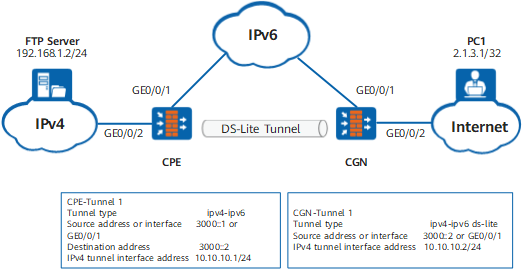
Figure 1 Networking diagram of the DS-Lite NAT server

Data Planning

Item

Data

Remarks

CPE

GE0/0/2 Trust

IPv4 address: 192.168.1.1/24

Interface that is connected to the IPv4 network

GigabitEthernet 0/0/1 Untrust

IPv6 address: 3000::1/64

Interface that is connected to the IPv6 network

Tunnel1 Untrust

Tunnel type: ipv4-ipv6

Source address: 3000::1

Destination address: 3000::2

IPv4 address of the tunnel interface: 10.10.10.1/24

Interface that is used to establish a DS-Lite tunnel to the CGN

CGN

GE0/0/2 Untrust

IPv4 address: 2.1.1.1/24

Interface that is connected to the Internet. Assume that the next-hop address of this address is 2.1.1.2/24.

GigabitEthernet 0/0/1 Trust

IPv6 address: 3000::2/64

Interface that is connected to the IPv6 network

Tunnel1 Trust

Tunnel type: ipv4-ipv6 ds-lite

Source address: 3000::2

IPv4 address of the tunnel interface: 10.10.10.2/24

Interface that is used to establish a DS-Lite tunnel to the CPE

The global address of the NAT server is 2.1.2.12.

The inside address of the NAT server is 192.168.1.2.

The CPE address of the NAT server is 3000::1.

The tunnel interface of the NAT server is Tunnel1.

-

-

PC1

Public IPv4 address: 2.1.3.1/32

-

FTP Server

Private IPv4 address: 192.168.1.2/24

-

Configuration Roadmap

The procedure for configuring an interzone NAT policy in the DS-Lite scenario is as follows:

  1. Establish a DS-Lite tunnel between the CPE and the CGN. The IPv4 over IPv6 tunnel connects the CPE and CGN and uses IPv6 headers to encapsulate IPv4 packets for forwarding in the single-stack IPv6 network.
  2. Configure the DS-lite NAT server function on the CGN to map intranet FTP servers.

Procedure

  • Configure the CPE.
    1. Enable IPv6 packet forwarding.

      <sysname> system-view
      [sysname] sysname CPE
      [CPE] ipv6

    2. Configure an interface address and add the interface to the security zone.

      # Configure an IP address for GigabitEthernet 0/0/2.

      [CPE] interface GigabitEthernet 0/0/2
      [CPE-GigabitEthernet0/0/2] ip address 192.168.1.1 255.255.255.0
      [CPE-GigabitEthernet0/0/2] quit

      # Configure an IP address for GigabitEthernet 0/0/1.

      [CPE] interface GigabitEthernet 0/0/1
      [CPE-GigabitEthernet 0/0/1] ipv6 enable
      [CPE-GigabitEthernet 0/0/1] ipv6 address 3000::1/64
      [CPE-GigabitEthernet 0/0/1] quit

      # Configure IPv4 over IPv6 tunnel interface Tunnel1.

      [CPE] interface Tunnel 1
      [CPE-Tunnel1] tunnel-protocol ipv4-ipv6
      [CPE-Tunnel1] source 3000::1
      [CPE-Tunnel1] destination  3000::2
      [CPE-Tunnel1] ip address 10.10.10.1 255.255.255.0
      [CPE-Tunnel1] quit

      # Assign GigabitEthernet 0/0/1 and Tunnel1 to the Untrust zone.

      [CPE] firewall zone untrust
      [CPE-zone-untrust] add interface GigabitEthernet 0/0/1
      [CPE-zone-untrust] add interface Tunnel 1
      [CPE-zone-untrust] quit

      # Assign GigabitEthernet 0/0/2 to the Trust zone.

      [CPE] firewall zone trust
      [CPE-zone-trust] add interface GigabitEthernet 0/0/2
      [CPE-zone-trust] quit

    3. Configure a security policy.

      [CPE] security-policy
      [CPE-policy-security] rule name policy_sec_1
      [CPE-policy-security-rule-policy_sec_1] source-zone untrust
      [CPE-policy-security-rule-policy_sec_1] destination-zone trust
      [CPE-policy-security-rule-policy_sec_1] destination-address 192.168.1.0 24
      [CPE-policy-security-rule-policy_sec_1] action permit
      [CPE-policy-security-rule-policy_sec_1] quit
      [CPE-policy-security] quit

    4. Configure the default route for the tunnel.

      [CPE] ip route-static 0.0.0.0 0.0.0.0 Tunnel1

  • Configure CGN.
    1. Enable IPv6 packet forwarding.

      <sysname> system-view
      [sysname] sysname CGN
      [CGN] ipv6

    2. Configure an interface address and add the interface to the security zone.

      # Configure an IP address for GigabitEthernet 0/0/2.

      [CGN] interface GigabitEthernet 0/0/2
      [CGN-GigabitEthernet0/0/2] ip address 2.1.1.1 255.255.255.0
      [CGN-GigabitEthernet0/0/2] quit

      # Configure an IP address for GigabitEthernet 0/0/1.

      [CGN] interface GigabitEthernet 0/0/1
      [CGN-GigabitEthernet 0/0/1] ipv6 enable
      [CGN-GigabitEthernet 0/0/1] ipv6 address 3000::2/64
      [CGN-GigabitEthernet 0/0/1] quit

      # Configure DS-Lite tunnel interface Tunnel1.

      [CGN] interface Tunnel 1
      [CGN-Tunnel1] tunnel-protocol ipv4-ipv6 ds-lite
      [CGN-Tunnel1] source 3000::2
      [CGN-Tunnel1] ip address 10.10.10.2 255.255.255.0
      [CGN-Tunnel1] quit

      # Assign GigabitEthernet 0/0/1 and Tunnel1 to the Trust zone.

      [CGN] firewall zone trust
      [CGN-zone-trust] add interface GigabitEthernet 0/0/1
      [CGN-zone-trust] add interface Tunnel 1
      [CGN-zone-trust] quit

      # Assign GigabitEthernet 0/0/2 to the Untrust zone.

      [CGN] firewall zone untrust
      [CGN-zone-untrust] add interface GigabitEthernet 0/0/2
      [CGN-zone-untrust] quit

    3. Configure a security policy.

      [CGN] security-policy
      [CGN-policy-security] rule name policy_sec_1
      [CGN-policy-security-rule-policy_sec_1] source-zone trust
      [CGN-policy-security-rule-policy_sec_1] destination-zone local
      [CGN-policy-security-rule-policy_sec_1] source-address 3000:: 64
      [CGN-policy-security-rule-policy_sec_1] action permit
      [CGN-policy-security-rule-policy_sec_1] quit
      [CGN-policy-security] rule name policy_sec_2
      [CGN-policy-security-rule-policy_sec_2] source-zone trust
      [CGN-policy-security-rule-policy_sec_2] destination-zone untrust
      [CGN-policy-security-rule-policy_sec_2] source-address 192.168.1.2 0
      [CGN-policy-security-rule-policy_sec_2] destination-address 2.1.2.12 0
      [CGN-policy-security-rule-policy_sec_2] action permit
      [CGN-policy-security-rule-policy_sec_2] quit
      [CGN-policy-security] quit

    4. Configure the DS-Lite NAT server.

      [CGN] nat-dslite server protocol tcp global 2.1.2.12 ftp inside 192.168.1.2 ftp unr-route cpe 3000::1 tunnel 1

    5. Configure a route to the Internet server. Assume the next-hop address for the CGN to connect the Internet is 2.1.1.2.

      [CGN] ip route-static 2.1.3.1 255.255.255.0 2.1.1.2

  • Configure PC1 on the Internet.

    • A route should be configured on PC1 to the global address of the CGN.

  • Configure the FTP server on the intranet.

    Configure the gateway for the FTP server on the intranet to 192.168.1.1.

Verification

# After the configuration, PC1 on the Internet can access the FTP server on the intranet.

C:\Documents and Settings\Administrator>ftp 2.1.2.12
Connected to 2.1.2.12.
220 FTP service ready.
User (2.1.2.12:(none)): admin
331 Password required for admin.
Password:
230 User logged in.
ftp> 

# Run the display firewall server-map command in any view of the CGN to view server map entries.

<CGN> display firewall server-map
 Type: DS-Lite Nat Server , ANY -> 2.1.2.12:21[192.168.1.2:21], Zone:---               
 Protocol: tcp(Appro: ftp), To CPE: 3000::1, Tunnel Id: 1, Left-Time:---                   
                                                                                
 Type: DS-Lite Nat Server Reverse,  192.168.1.2[2.1.2.12] -> ANY, Zone:---       
 Protocol: tcp(Appro: ftp), From CPE: 3000::1, Tunnel Id: 1, Left-Time:---, counter: 3          

Configuration Scripts

  • The CPE configuration script is as follows:

    #                                                                               
     sysname CPE                                      
    #                                                                               
     ipv6
    #                                                                               
    interface GigabitEthernet0/0/2                                                  
     ip address 192.168.1.1 255.255.255.0                                               
    #                                                                               
    interface GigabitEthernet 0/0/1                                                  
     ipv6 enable
     ipv6 address 3000::1/64                                               
    #                                                                     
    interface Tunnel1                                                      
     ip address 10.10.10.1 255.255.255.0                                   
     tunnel-protocol ipv4-ipv6                                             
     source 3000::1                                                        
     destination 3000::2  
    #                                                                               
    firewall zone trust                                                             
     set priority 85                                                                
     add interface GigabitEthernet0/0/2                                             
    #                                                                               
    firewall zone untrust                                                           
     set priority 5                                                                 
     add interface GigabitEthernet 0/0/1                                             
     add interface Tunnel1
    #                                                                                
     ip route-static 0.0.0.0 0.0.0.0 Tunnel1                                       
    #                                                                               
    security-policy                                                                 
      rule name policy_sec_1                                                        
        source-zone untrust                                                           
        destination-zone trust                                                    
        destination-address 192.168.1.0 24                                                  
        action permit                                                               
    #                                                                                
    return
  • The CGN configuration script is as follows:

    #                                                                               
     sysname CGN                                      
    #                                                                               
     ipv6
    #
     firewall hash-mode source-only
    #                                                                               
    interface GigabitEthernet0/0/2                                                  
     ip address 2.1.1.1 255.255.255.0                                               
    #                                                                               
    interface GigabitEthernet 0/0/1                                                  
     ipv6 enable
     ipv6 address 3000::2/64                                              
    #                                                                     
    interface Tunnel1                                                      
     ip address 10.10.10.2 255.255.255.0                                   
     tunnel-protocol ipv4-ipv6 ds-lite                                             
     source 3000::2                                                        
    #                                                                               
    firewall zone trust                                                             
     set priority 85                                                                
     add interface GigabitEthernet 0/0/1                                             
     add interface Tunnel1
    #                                                                               
    firewall zone untrust                                                           
     set priority 5                                                                 
     add interface GigabitEthernet0/0/2                                             
    #                                                                                
     ip route-static 2.1.3.1 255.255.255.0 2.1.1.2                                       
    #                                                                                
     nat-dslite server protocol tcp global 2.1.2.12 ftp inside 192.168.1.2 ftp unr-route cpe 3000::1 tunnel 1
    #                                                                               
    security-policy                                                                 
      rule name policy_sec_1                                                        
        source-zone trust                                                           
        destination-zone local                                                    
        source-address 3000::64                                                  
        action permit                                                               
      rule name policy_sec_2                                                        
        source-zone trust                                                           
        destination-zone untrust                                                    
        source-address 192.168.1.2 0                                                  
        destination-address 2.1.2.12 0                                             
        action permit                                                               
    #                                                                                
    return
Copyright © Huawei Technologies Co., Ltd.
< Previous topic Next topic >