Web: Example for Configuring the SACG in Standalone Off-line Mode
The off-line mode for networking is to directly connect the SACG to the core switch or router on the original network to realize the SACG interworking. In off-line mode, the SACG interworking can be deployed without affecting the original networking and requiring any cutovers.
Networking Requirements
The Agile Controller server group is deployed on an enterprise network, and the FW is deployed in off-line mode at the egress of this network, as shown in Figure 1. The following requirements should be met:
- Different user roles can access different network resources (configured in Agile Controller servers).
- Once user roles change, available network resources should be updated instantly.
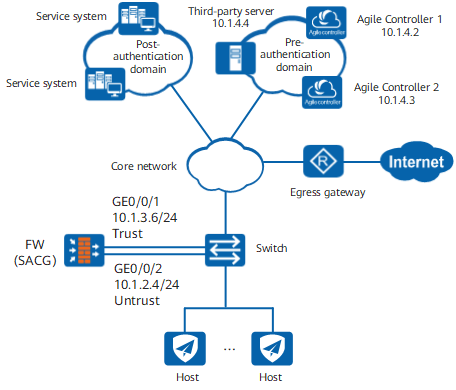
Data Planning
Item |
Data |
Description |
|
|---|---|---|---|
Agile Controller server 1 |
IP Address: 10.1.4.2 Port: 3288 Shared key: TSM_Security |
The port and shared key configured need to be identical with those configured on the Agile Controller server. |
|
Agile Controller server 2 |
IP Address: 10.1.4.3 Port: 3288 Shared key: TSM_Security |
The port and shared key configured need to be identical with those configured on the Agile Controller server. |
|
Third-party server |
IP address: 10.1.4.4 Protocol of packets supported by health check: HTTP Health check destination port: 80 Minimum number of active nodes for health check: 1 |
- |
|
Static route from the FW to the switch |
10.1.3.7 |
- |
|
Minimum number of active servers |
1 |
- |
|
Configuration Roadmap
The configuration roadmap is as follows:
- Disable the session status detection function.
- Configure the basic data of the FW
- Configure the default packet-filtering rule for the interzone.
- Add Agile Controller servers, and configure the authentication URL.
- Enable SACG and the status detection of the server.
- Apply the interworking policy to the interzone.
Procedure
- Configure the Agile Controller server.
Set the IP address of the Agile Controller server.
For details, refer to related configuration manuals of the Agile Controller server.

Configure the static route from the Agent to the Agile Controller server group before performing the following operations. Details are omitted.
- Configure the basic parameters of the interfaces.
- Click the corresponding
 of GigabitEthernet 0/0/1.
The related parameters of GigabitEthernet 0/0/1 are specified as follows and the other parameters use the default values.
Zone
trust
Mode
Route
IPv4
Connection Type
Static IP
IP Address
10.1.3.6/255.255.255.0
- Click of GigabitEthernet 0/0/2.
The related parameters of GigabitEthernet 0/0/2 are specified as follows and the other parameters use the default values.
Zone
untrust
Mode
Route
IPv4
Connection Type
Static IP
IP Address
10.1.2.4/255.255.255.0
- Click the corresponding
- Configure a static route from the FW to the switch.
- Choose .
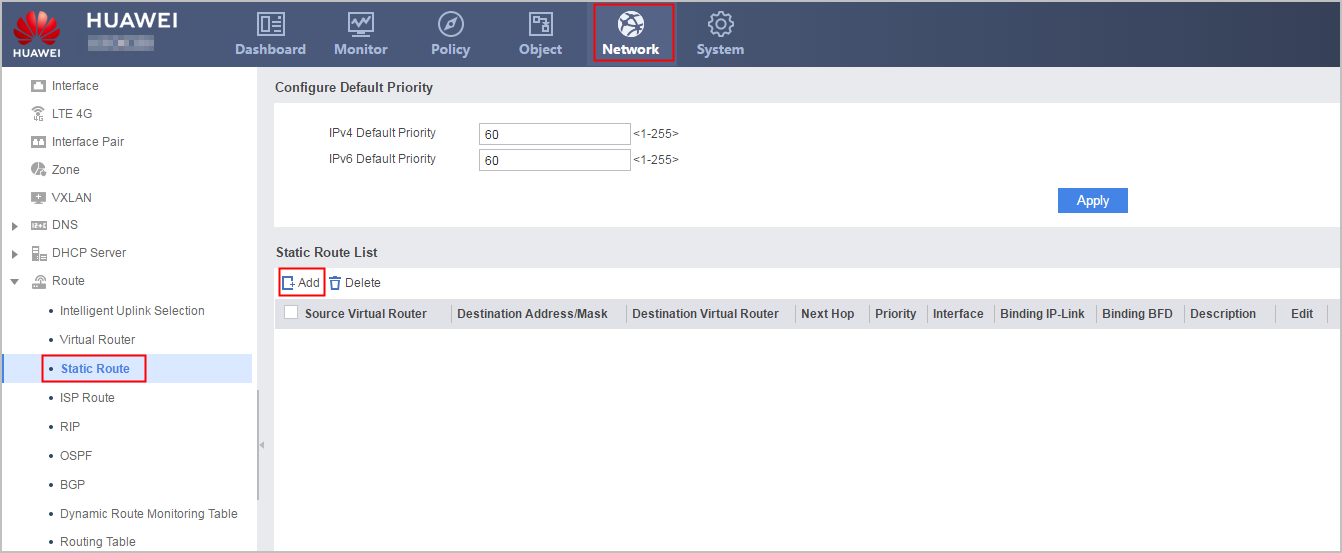
- Choose .
- Create a Agile Controller server.
- Click Add. Configure the parameters for Agile Controller server 1.
Server IP
10.1.4.2
Server Port
3288
Shared Key
TSM_Security
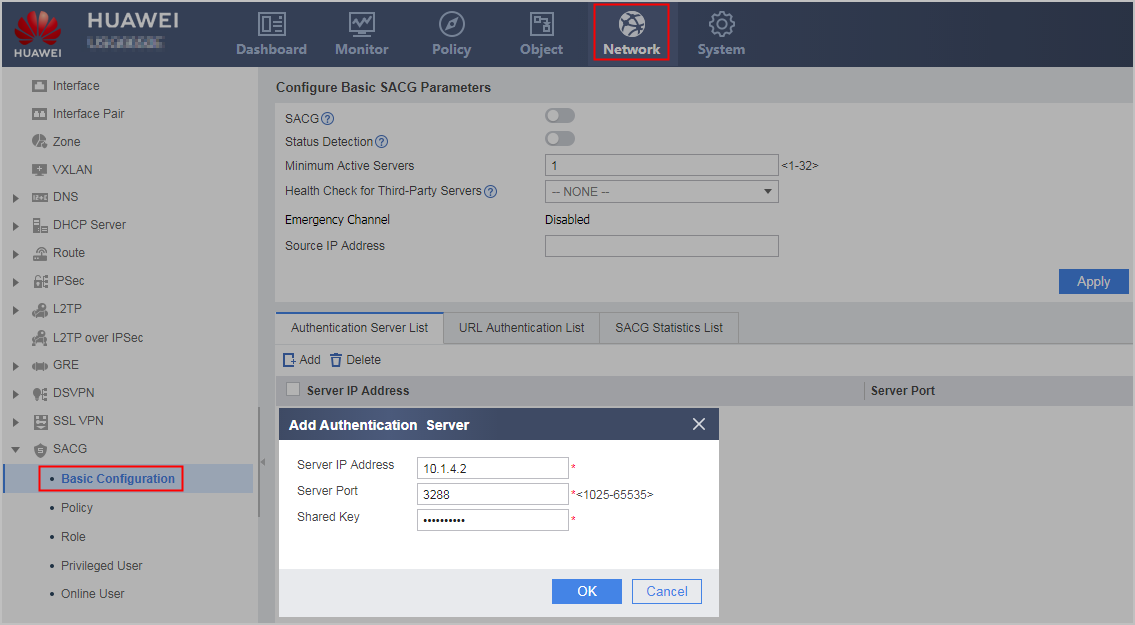
The server port and shared key configured on the FW must be identical with those configured on the Agile Controller server.
- Click Add. Configure the parameters for Agile Controller server 1.
- Configure the authentication URL.
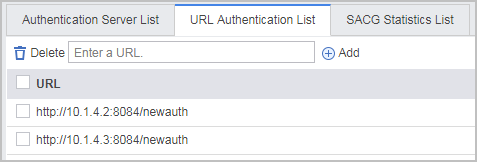
- Enter the URL of the pushed web page, namely, http://IP address of the service controller:8084/newauth.
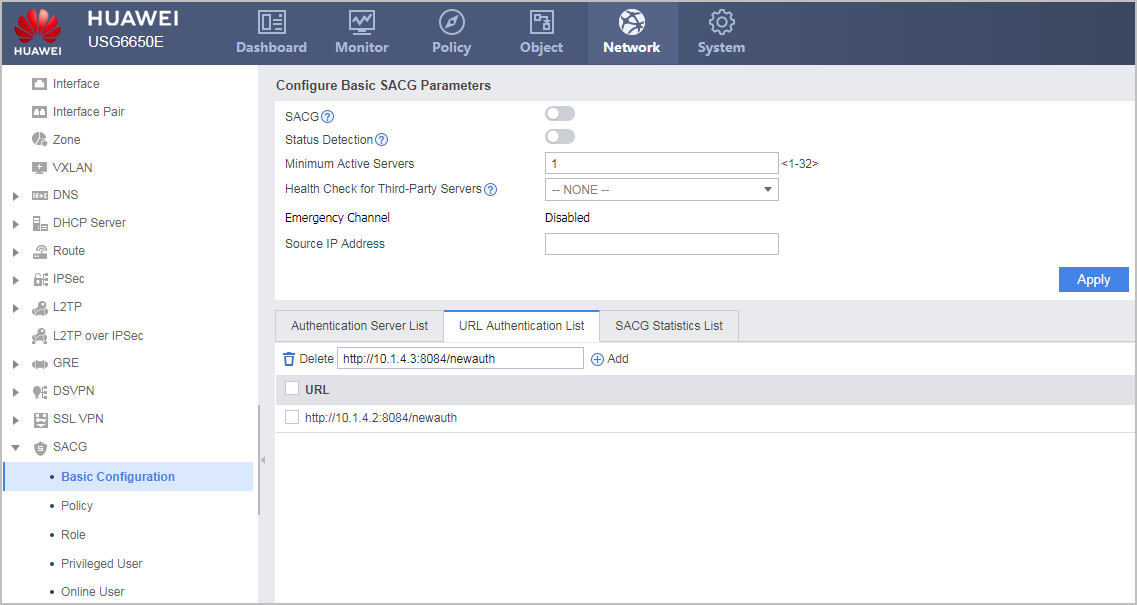
When the TSM device and Policy Center interwork with the FW, the configured URL parameter is http://IP address of the service controller:8080/newauth. When the Agile Controller-Campus (called AC-Campus for short) interworks with the FW, the configured URL parameter is http://IP address of the service controller:8084/newauth.
- Click Add, and the URL address is displayed in the list, as shown in the following figure.
- Enter the URL of the pushed web page, namely, http://IP address of the service controller:8084/newauth.
- Enable SACG, and the FW can send interworking requests to the Agile Controller Server. Set the minimum number of the Agile Controller servers that connect to the FW, and enable server status detection.
Before enabling the SACG function, delete ACL 3099 to ACL 3999 by running commands. Otherwise, the SACG function fails to be enabled.
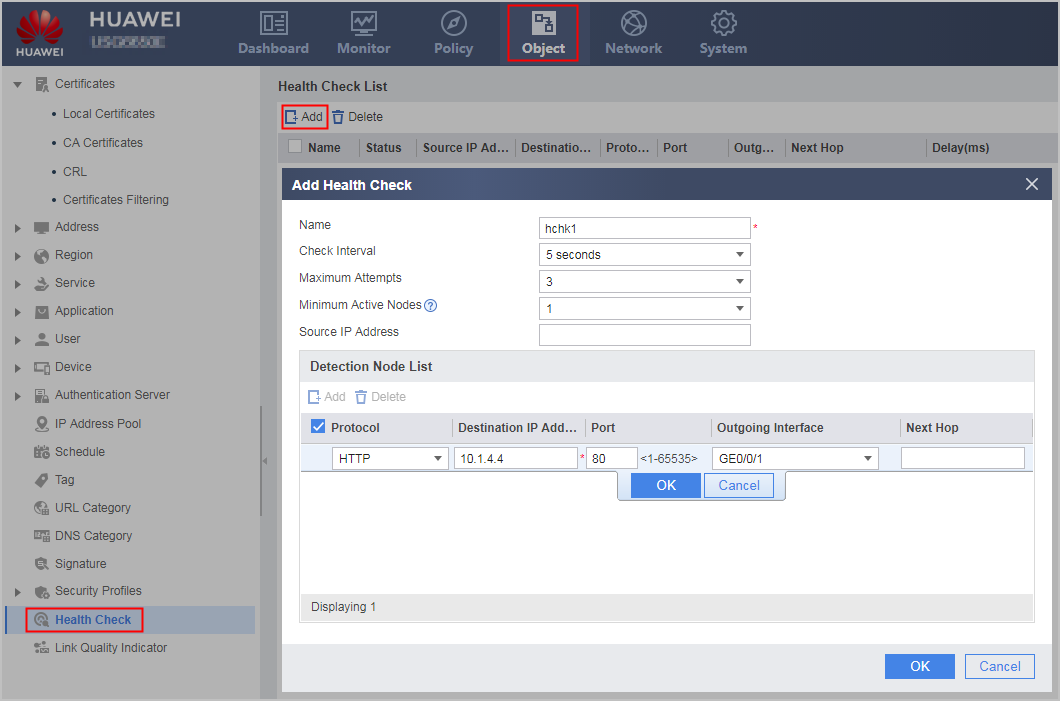
Before configuring the health check function for third-party servers, you must set related parameters and enable the health check function in .
- On the interface, configure the parameters as shown in the following figure.
- On the interface, configure the parameters as shown in the following figure.
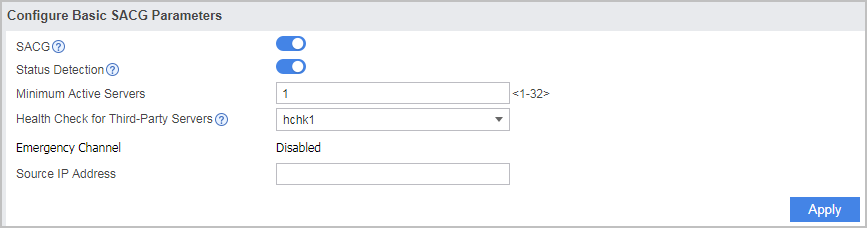
- On the interface, configure the parameters as shown in the following figure.
- Apply the interworking policy between zones. Terminal users are in the Untrust zone and the Agile Controller Server is in the Trust zone. Apply the interworking policy in the outbound direction between the Trust and Untrust zones.
- Choose .
- In Apply Policy to Interzone List, select the Untrust and Trust zones from the drop-down list and click Add to apply the SACG interworking policy in the inbound direction of the Untrust-Trust zone, as shown in the following figure .

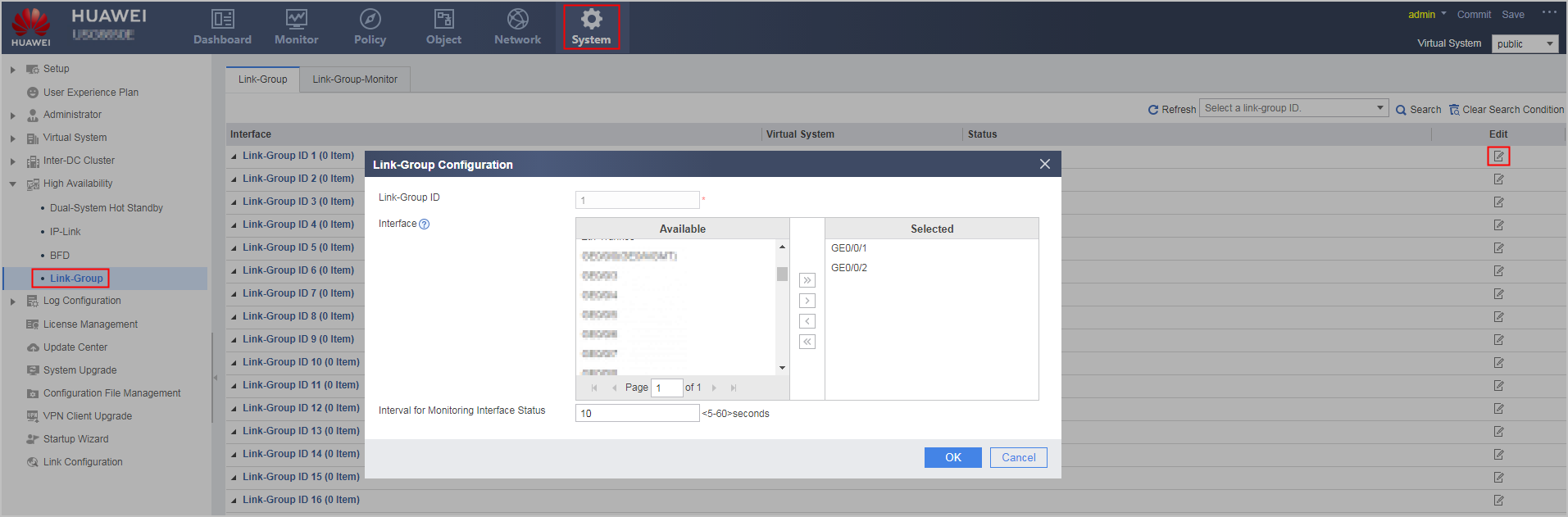
- Optional: Add the uplink interface GigabitEthernet 0/0/1 and downlink interface GigabitEthernet 0/0/2 to the same link-group. After the upstream and downstream interfaces are added to the same link-group, no matter the uplink or downlink fails, the redirection function or the policy-based routing automatically becomes invalid. Traffic is no longer sent to the FW.
- choose
- ClickEdit on the line of Link-Group ID1 configure the parameters as shown in the following figure
- Add the connection parameters of the SACG, configure the pre-authentication and post-authentication domains, and create user information on the Agile Controller Server. For details, refer to the related documents of Agile Controller products.
Verification
After completing the configurations, choose . You can see that the running status of the Agile Controller Server is Connected in Authentication Server List and that the authentication policy configured on the Agile Controller Server is delivered to the FW. This indicates that the configurations succeed.
Configuration Scripts
#
 sysname FW
#
 undo firewall session link-state check
#
interface GigabitEthernet0/0/1
 link-group 1
 ip address 10.1.3.6 255.255.255.0
#
interface GigabitEthernet0/0/2
 link-group 1
 ip address 10.1.2.4 255.255.255.0
#
firewall zone local
 set priority 100
#
firewall zone trust
 set priority 85
 add interface GigabitEthernet0/0/1
#
firewall zone untrust
 set priority 5
 add interface GigabitEthernet0/0/2
#
firewall zone dmz
 set priority 50
#
 ip route-static 0.0.0.0 0.0.0.0 10.1.3.7
#
healthcheck enable
healthcheck name hchk1
least active-linknumber 1
destination 10.1.4.4 interface GigabitEthernet 0/0/1 protocol http destination-port 80
#
right-manager server-group
 healthcheck hchk1
 default acl 3099
 server ip 10.1.4.2 port 3288 shared-key %$%$!g8A4;cd.T(7d@Bdhw#~iI@7%$%$
 server ip 10.1.4.3 port 3288 shared-key %$%$!g8A4;cd.T(7d@Bdhw#~iI@7%$%$
 right-manager server-group enable
 right-manager status-detect enable
 right-manager server-group active-minimun 1
 right-manager authentication url http://10.1.4.2:8084/newauth
 right-manager authentication url http://10.1.4.3:8084/newauth
#
firewall interzone trust untrust
 apply packet-filter right-manager inbound
#
return