Web: Example for Configuring DSVPN in a Shortcut Scenario (OSPF)
Networking Requirements
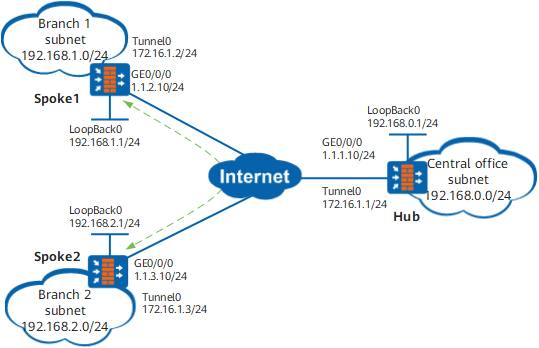
A large enterprise has the headquarters (Hub) and multiple branches (Spoke1, Spoke2, and so on. Only two branches are used in this example), which locate in different places. The branches use dynamic addresses to connect to the Internet. The enterprise requires that the branches establish a VPN tunnel between each other so that their users can communicate directly over the tunnel.
The subnet environments of the headquarters and branches often change, and therefore the enterprise uses OSPF.
Configuration Roadmap
Configure DSVPN to interconnect the branches through VPN tunnels. This is because the branches use dynamic addresses to connect to the Internet and do no know each other's public address.
Use shortcut DSVPN. This is because there are many branches.
Use OSPF to implement communications between the branches and headquarters to simplify network planning. This is because the subnet environments of the headquarters and branches often change.
Procedure
- Set IP addresses for FW interfaces and assign the interfaces to security zones.
In this example, IP addresses are configured for Hub interfaces, and assign the interfaces to security zones. The public interface IP addresses of Spoke1 and Spoke2 are dynamically obtained using DHCP. In this example, the public interface IP addresses of Spoke1 and Spoke2 are 1.1.2.10/24 and 1.1.3.10/24 respectively.
- Choose . Click
 of GE 1/0/0. Set parameters as follows and click OK.
Zone
untrust
IPv4
IP Address
1.1.1.10/24
- Choose . Click
- Configure a public route on each device.
Choose . Click Add. Set parameters as follows and click OK.
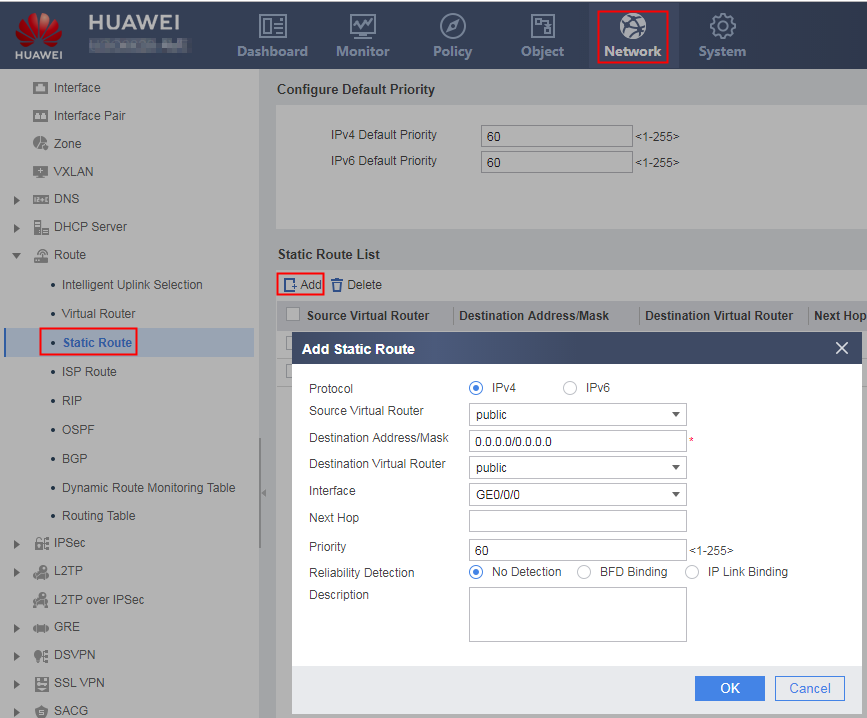
Destination Address/Mask
0.0.0.0/0.0.0.0
Interface
GE0/0/0
- Configure a security policy on each device.
- Set DSVPN parameters for the Spokes.
Spoke1 is used as an example.
Choose . Click Add. Set parameters as follows and click OK.
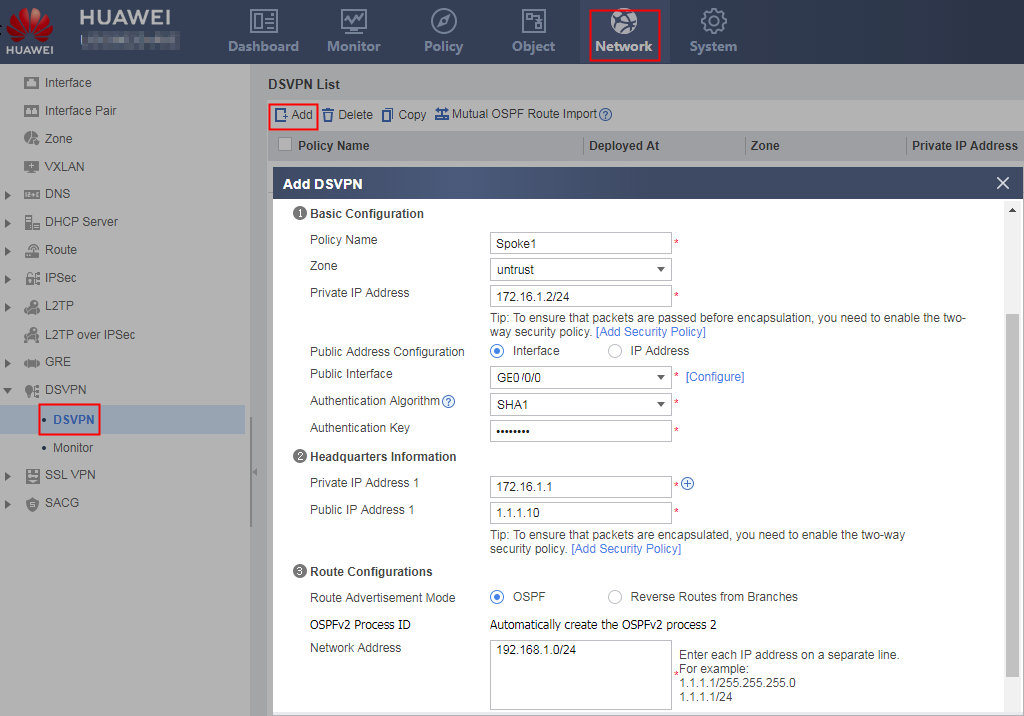
Basic Configuration Deployed At
Branch
Policy Name
Spoke1
Zone
untrust
Private IP Address
172.16.1.2/24
Private IP Address*Public Address Configuration
Interface
Public Interface
GE0/0/0
Authentication Key
Planned by the network administrator. Ensure that the two ends of the tunnel have the same authentication key. In this example, the authentication key is Test!123.
Headquarters Information
Private IP Address
172.16.1.1
Public IP Address
1.1.1.10
Route Configurations
Route Advertisement Mode
OSPF
Network Address
192.168.1.0/24
Route Learning Method
Route Aggregation to HQ
- Set DSVPN parameters for the Hub.
Choose . Click Add. Set parameters as follows and click OK.
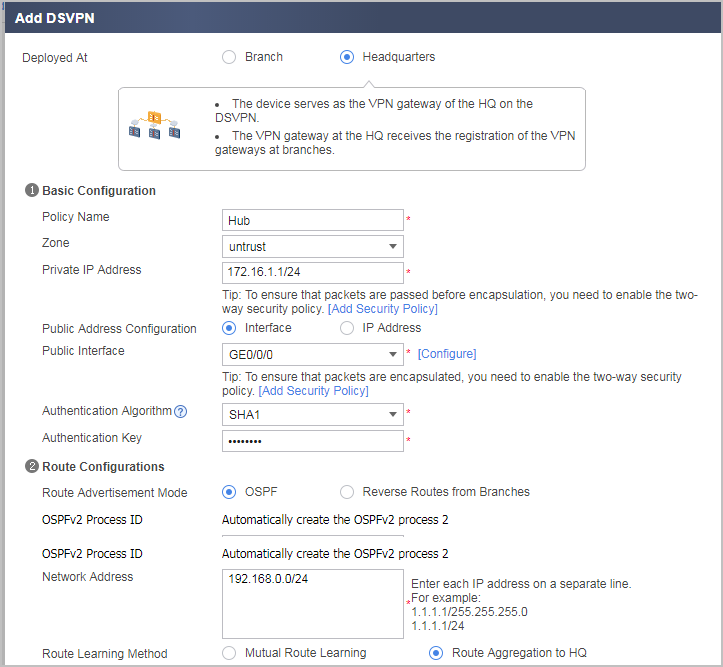
Basic Configuration Deployed At
Headquarters
Policy Name
Hub
Zone
untrust
Private IP Address
172.16.1.1/24
Private IP Address*Public Address Configuration
Interface
Public Interface
GE0/0/0
Authentication Key
Planned by the network administrator. Ensure that the two ends of the tunnel have the same authentication key. In this example, the authentication key is Test!123.
Route Configurations
Route Advertisement Mode
OSPF
Network Address
192.168.0.0/24
Route Learning Method
Route Aggregation to HQ
Verification
- Use a user PC in Spoke1 to access a user PC in Spoke2 or configure the loopback interface of Spoke1 to ping the loopback interface of Spoke2. Trigger the Spokes to establish a dynamic mGRE tunnel.
 To use the ping command for detection, set the ping service of all firewall interfaces to Allow.
 - Choose . You can find that the tunnels established by Spoke1 with the Hub and Spoke2 are in the UP state.
Configuration Scripts
Configuration script of Spoke1
#
 sysname Spoke1
#
interface GigabitEthernet0/0/0
 ip address dhcp-alloc
#
interface LoopBack0
 ip address 192.168.1.1 255.255.255.0
 alias LoopBack0
#
interface Tunnel0
 description spoke
 ip address 172.16.1.2 255.255.255.0
 tunnel-protocol gre p2mp
 source GigabitEthernet0/0/0
 ospf network-type p2mp
 alias Spoke1
 nhrp authentication hash sha1 %^%#$]8@BBRhtL)i)m4/LP,5l$;gMF$xjY)RXoXCca3V%^%#
 nhrp shortcut
 nhrp entry multicast dynamic
 nhrp entry 172.16.1.1 1.1.1.10 register preference 10
#
ospf 1
 area 0.0.0.0
  network 172.16.1.0 0.0.0.255
 area 0.0.0.1
  network 192.168.1.0 0.0.0.255
#
ip route-static 0.0.0.0 0.0.0.0 GigabitEthernet0/0/0
#
firewall zone untrust
 set priority 5
 add interface GigabitEthernet0/0/0
 add interface Tunnel0
#
security-policy
 rule name rule1
  source-zone local
  source-zone untrust
  destination-zone local
  destination-zone untrust
  source-address 192.168.0.0 mask 255.255.0.0
  action permit
 rule name rule2
  source-zone local
  source-zone untrust
  destination-zone local
  destination-zone untrust
  service gre
  action permit
#
return
Configuration script of Spoke2
#
 sysname Spoke2
#
interface GigabitEthernet0/0/0
 ip address dhcp-alloc
#
interface LoopBack0
 ip address 192.168.2.1 255.255.255.0
 alias LoopBack0
#
interface Tunnel0
 description spoke
 ip address 172.16.1.3 255.255.255.0
 tunnel-protocol gre p2mp
 source GigabitEthernet0/0/0
 ospf network-type p2mp
 alias Spoke2
 nhrp authentication hash sha1 %^%#$]8@BBRhtL)i)m4/LP,5l$;gMF$xjY)RXoXCca3V%^%#
 nhrp shortcut
 nhrp entry multicast dynamic
 nhrp entry 172.16.1.1 1.1.1.10 register preference 10
#
ospf 1
 area 0.0.0.0
  network 172.16.1.0 0.0.0.255
 area 0.0.0.1
  network 192.168.2.0 0.0.0.255
#
ip route-static 0.0.0.0 0.0.0.0 GigabitEthernet0/0/0
#
firewall zone untrust
 set priority 5
 add interface GigabitEthernet0/0/0
 add interface Tunnel0
#
security-policy
 rule name rule1
  source-zone local
  source-zone untrust
  destination-zone local
  destination-zone untrust
  source-address 192.168.0.0 mask 255.255.0.0
  action permit
 rule name rule2
  source-zone local
  source-zone untrust
  destination-zone local
  destination-zone untrust
  service gre
  action permit
#
return
Configuration script of the Hub
#
 sysname Hub
#
interface GigabitEthernet0/0/0
 ip address 1.1.1.10 255.255.255.0
#
interface LoopBack0
 ip address 192.168.0.1 255.255.255.0
 alias LoopBack0
#
interface Tunnel0
 description hub
 ip address 172.16.1.1 255.255.255.255
 tunnel-protocol gre p2mp
 source GigabitEthernet0/0/0
 ospf network-type p2mp
 alias Hub
 nhrp authentication hash sha1 %^%#$]8@BBRhtL)i)m4/LP,5l$;gMF$xjY)RXoXCca3V%^%#
 nhrp redirect
 nhrp entry multicast dynamic
 undo nhrp hub reverse-route enable
#
ospf 1
 area 0.0.0.0
  network 172.16.1.1 0.0.0.0
 area 0.0.0.1
  network 192.168.0.0 0.0.0.255
#
ip route-static 0.0.0.0 0.0.0.0 GigabitEthernet0/0/0
#
firewall zone untrust
 set priority 5
 add interface GigabitEthernet0/0/0
 add interface Tunnel0
#
security-policy
 rule name rule1
  source-zone local
  source-zone untrust
  destination-zone local
  destination-zone untrust
  source-address 192.168.0.0 mask 255.255.0.0
  action permit
 rule name rule2
  source-zone local
  source-zone untrust
  destination-zone local
  destination-zone untrust
  service gre
  action permit
#
return