Web: Example for Configuring Static IPv6 Addresses for Devices to Communicate
This section provides an example for configuring a firewall to connect intranet users to the Internet. A firewall is assigned a static IPv6 address to access the Internet and provides Internet access services for intranet users.
Networking Requirements
An enterprise deploys a firewall as a security gateway on the network border and purchases broadband services from a carrier to implement intranet users' Internet access using IPv6 addresses.
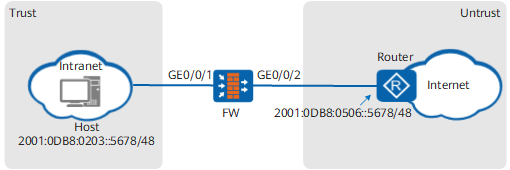
Configuration Roadmap
- Configure IP addresses of interfaces and add the interfaces to security zones.
- Configure a security policy so that intranet hosts can access the Internet.
- Configure a default route on the FW, so that traffic from the intranet can be forwarded to the ISP router.
- Configure the default gateway on each host on the intranet, so that the hosts send traffic to the FW when they access the Internet.
- Configure static routes on the router, so that the router forwards return traffic from the Internet to the FW.
Procedure
- Enable the global IPv6 function to allow the firewall to forward IPv6 packets.
- Choose .
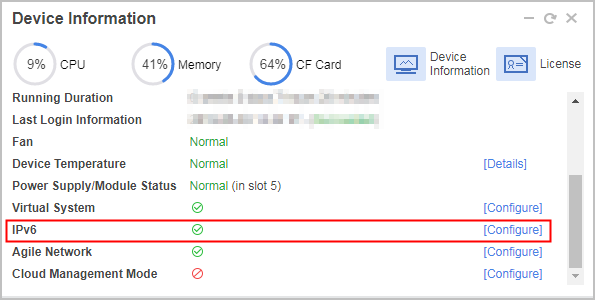
- Select the row where IPv6 is located and click Configure to enable the IPv6 function.
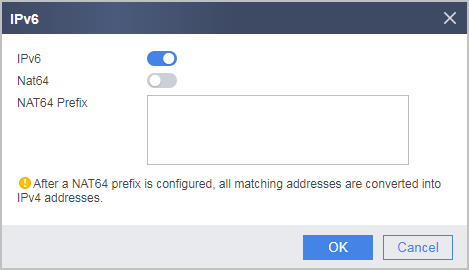
- Choose .
- Configure the IPv6 address for GigabitEthernet 0/0/1.
- In Interface List, click
 corresponding to GigabitEthernet 0/0/1 and set the following parameters.
Zone
trust
Mode
Route
IPv6
Enable the IPv6 protocol
Connection Type
Static IP address
IPv6 Address
2001:0DB8:0203::1234/48
- In Interface List, click
- Configure the IPv6 address for GigabitEthernet 0/0/2.
- In Interface List, click
 corresponding to GigabitEthernet 0/0/2 and set the following parameters.
Zone
untrust
Mode
Route
IPv6
Enable the IPv6 protocol
Connection Type
Static IP address
IPv6 Address
2001:0DB8:0506::1234/48
- In Interface List, click
- Configure a security policy.
- Configure a default route on the FW, so that traffic from the intranet can be forwarded to the ISP router.
- Configure the default gateway on each host on the intranet, so that the hosts send traffic to the FW when they access the Internet.
- Configure static routes on the router, so that the router forwards return traffic from the Internet to the FW.
Contact the ISP network administrator to perform this step.
Configuration Verification
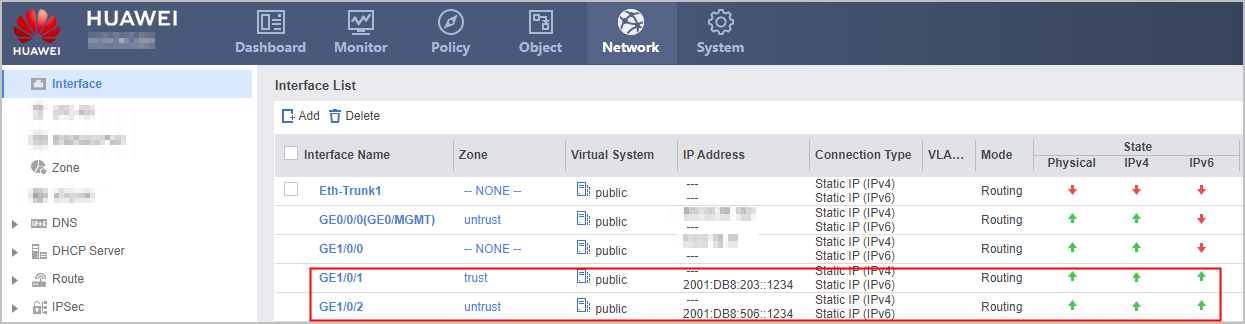
Check the status of GigabitEthernet 0/0/1. The following example uses GigabitEthernet 0/0/1 on FW. If the configuration is successful, the configured global unicast address can be displayed. In addition, the physical status and IPv6 status of the interface is up.
- Check whether intranet hosts can use domain names to access the Internet. If the hosts can access the Internet, the configurations are correct. If the hosts fail to access the Internet, modify the configuration and try again.
Configuration Scripts
Configuration script for FW:
#
 sysname FW
#
 ipv6
#
interface GigabitEthernet0/0/1
 ipv6 enable
 ipv6 address 2001:0DB8:0203::1234 48
#
interface GigabitEthernet0/0/2
 ipv6 enable
 ipv6 address 2001:0DB8:0506::1234 48
#
firewall zone untrust
 set priority 5
 add interface GigabitEthernet0/0/1
#
firewall zone trust
 set priority 85
 add interface GigabitEthernet0/0/2
#
security-policy
  rule name policy_sec_1
    source-zone trust
    destination-zone untrust
    action permit
#
ipv6 route-static 0:0::0:0 0 2001:0DB8:0506::5678
#
return