Web: Example for Configuring Authentication Exemption for Internet Access Users (Bidirectionally Binding Users to IP and MAC Addresses)
This section describes how to configure authentication exemption for top executives and implement user-specific permission management when the FW serves as an egress gateway.
Networking Requirements
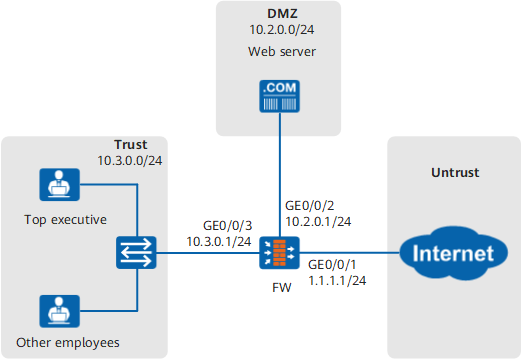
An enterprise has deployed a FW as the egress gateway to connect the intranet to the Internet, as shown in Figure 1.
The user management and authentication mechanisms of the FW must identify IP addresses on the intranet as users to implement user-specific behavior control and permission assignment.
Top executives use the fixed IP address (10.3.0.2). To improve efficiency, top executives are exempted from authentication, but for security considerations, the accounts used by top executives must be bound to IP addresses and MAC addresses. This ensures that top executives can only use the specified IP and MAC addresses to access network resources.
Configuration Roadmap
The configuration roadmap is as follows:
- Create an authentication policy and configure the matching conditions and authentication action (authentication exemption).
- Configure the access control for authentication domain default as online behavior management.
- Create group and user objects for top executives and bidirectionally bind the user objects to IP and MAC addresses.
- Configure security policies.
Data Planning
| Item | Data | Description |
|---|---|---|
Top executive |
Group User |
Add the top executive to the group manager and configure bidirectional binding for the top executive and the IP and MAC addresses. No password is required for the top executive. A FW implements authentication on the top executive based on the bound IP and MAC addresses. You can repeat the operations in this example to configure multiple user accounts. |
Authentication policy |
The top executive who meets matching conditions can access network resources without being authenticated. |
|
Authentication domain |
- |
Procedure
- Choose , set IP addresses for interfaces
and assign the interfaces to security zones.
The following example describes how to configure interface GigabitEthernet 0/0/3. You can configure other interfaces based on the networking diagram.
Zone
trust
IP Address
10.3.0.1/24
- Choose , click Add to configure authentication
policies.
Name
policy_auth_01
Source Zone
Trust
Source Address/Region
10.3.0.2/32
Action
Authentication exemption

If you need to configure an authentication policy for common employees, ensure that the authentication exemption policy for subnet 10.3.0.2/32 is configured prior to that for subnet 10.3.0.2/24. Otherwise, top executives cannot match the authentication exemption policy.
- Choose and
configure authentication exemption.
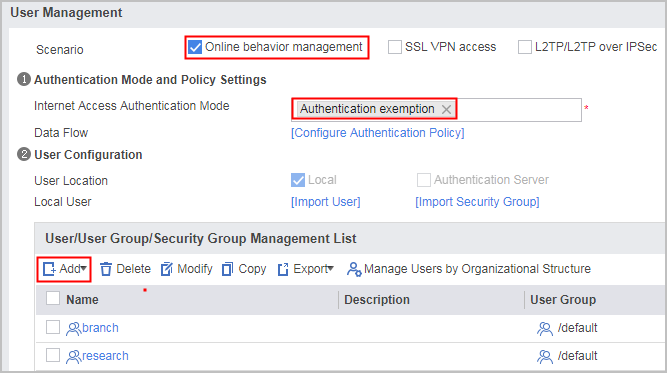
Click Add and create user groups and users.
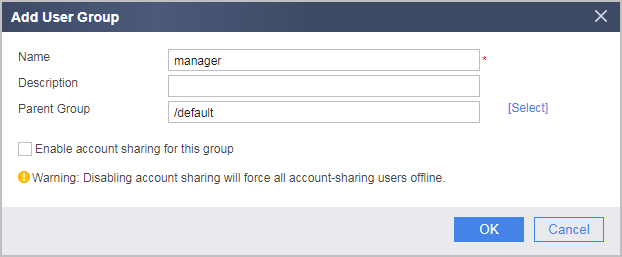
- Choose Add Group, and create
a user group object for a top executive.
- Choose Add a User, and create
a user object for a top executive.
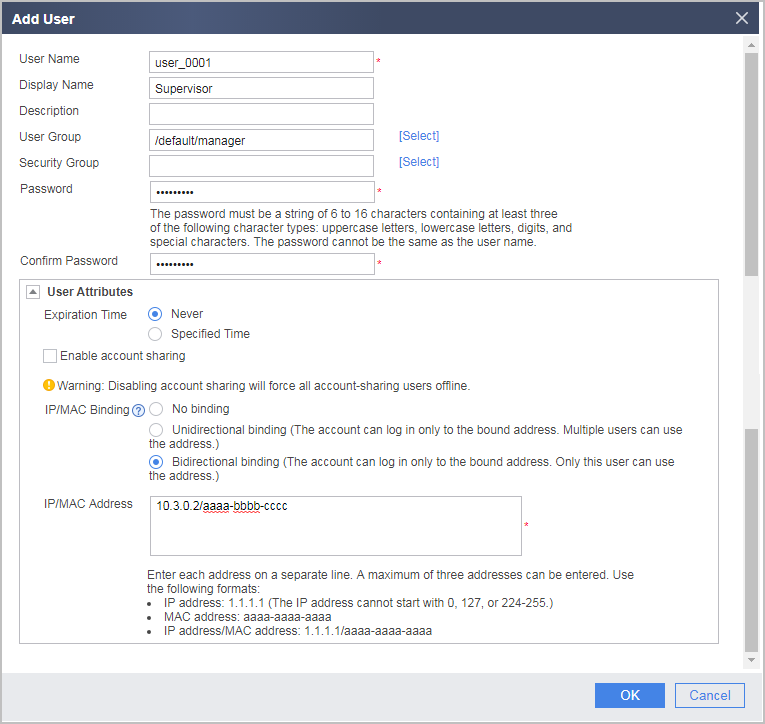
As authentication-exempted users do not use passwords, their passwords can be set to any value.
- Choose Add Group, and create
a user group object for a top executive.
- Choose , click Add to configure security
policies.
- After the configuration is complete, you can configure security policies, PBR policies, bandwidth policies, quota control policies, proxy policies, and audit policies that reference the user and user group objects.
Verification
- The top executive can access network resources without authentication. Other users cannot use the user name of the top executive to access network resources because their IP addresses are not 10.3.0.2 and their MAC addresses are not aaaa-bbbb-cccc.
- On the FW, choose to see information about online users.
Configuration Scripts
#
 sysname FW
#
interface GigabitEthernet0/0/1
 ip address 1.1.1.1 255.255.255.0
#
interface GigabitEthernet0/0/2
 ip address 10.2.0.1 255.255.255.0
#
interface GigabitEthernet0/0/3
 ip address 10.3.0.1 255.255.255.0
#
firewall zone trust
 add interface GigabitEthernet0/0/3
#
firewall zone untrust
 add interface GigabitEthernet0/0/1
#
firewall zone dmz
 add interface GigabitEthernet0/0/2
#
aaa
 #
 domain default
  service-type internetaccess
  internet-access mode auto-online
 #
#
security-policy
 rule name policy_sec_02
  source-zone trust
  source-address 10.3.0.0 24
  destination-zone untrust
  action permit
 rule name policy_sec_03
  source-zone trust
  source-address 10.3.0.0 24
  destination-zone dmz
  action permit
#
auth-policy
 rule name policy_auth_01
  source-zone trust
  source-address 10.3.0.2 32
  action exempt-auth

#The following user/group creation configuration is stored in the database, but not in the configuration profile.
user-manage group /default/manager
user-manage user user_0001
 alias Supervisor
 parent-group /default/manager
 undo multi-ip online enable
 bind mode bidirectional
 bind ipv4 10.3.0.2 mac aaaa-bbbb-cccc