CLI: Example for Configuring Virtual Systems on a Cloud Computing Gateway
This section provides an example for configuring virtual systems to protect a cloud computing data center.
Networking Requirements
Figure 1 shows the networking diagram. A cloud computing data center uses a FW for security protection of the egress gateway to meet the following requirements:
- Customers of the data center can independently manage and access their server resources.
- The FW has only one outside interface but provides sufficient public IP addresses. NAT policies are configured on the FW so that customers have independent public IP addresses to access their own server resources.
- As enterprises A and B have different amount of service traffic, they purchase separate virtual system resources.
Configure virtual systems to meet the preceding requirements.
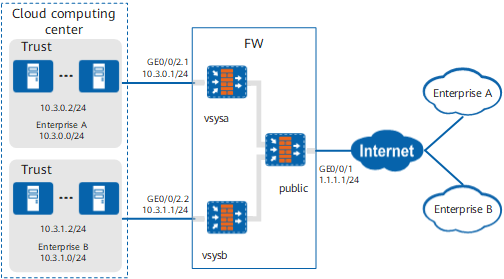
Data Planning
Item |
Data |
Description |
|---|---|---|
public |
|
In this example, all intranet servers provide services to Internet users through the public system's outside interface. |
vsysa |
|
In this example, IP address mapping must be configured so that the server at the private address 10.3.0.2 can use the public address 1.1.1.2 to provide services to users of enterprise A. The public system administrator configures and manages virtual systems, and no virtual system administrator is required. |
vsysb |
|
In this example, IP address mapping must be configured so that the server at the private address 10.3.1.2 can use the public address 1.1.1.3 to provide services to users of enterprise B. The public system administrator configures and manages virtual systems, and no virtual system administrator is required. |
Resource class |
|
In this example, create two resource classes and bind each to a virtual system. |
Configuration Roadmap
- The public system administrator creates virtual systems vsysa and vsysb and allocates resources to them.
- Create subinterfaces GE0/0/2.1 and GE0/0/2.2 on the GE0/0/2 and configure these two subinterfaces as inside interfaces of vsysa and vsysb, respectively.
- The public system administrator configures IP address mapping for vsysa and vsysb.
- The public system administrator configures routes and security policies for vsysa and vsysb.
Procedure
- The public system administrator creates virtual systems vsysa and vsysb and allocates resources to them.
# Use the public system administrator account to log in to the FW.
# Create subinterfaces.
<FW> system-view
[FW] interface GigabitEthernet 0/0/2.1
[FW-GigabitEthernet0/0/2.1] vlan-type dot1q 10
[FW-GigabitEthernet0/0/2.1] quit
[FW] interface GigabitEthernet 0/0/2.2
[FW-GigabitEthernet0/0/2.2] vlan-type dot1q 20
[FW-GigabitEthernet0/0/2.2] quit
# Enable the virtual system function.
[FW] vsys enable# Configure a resource class.
[FW] resource-class r1
[FW-resource-class-r1] resource-item-limit session reserved-number 10000 maximum 50000
[FW-resource-class-r1] resource-item-limit bandwidth 20 entire
[FW-resource-class-r1] quit
[FW] resource-class r2
[FW-resource-class-r2] resource-item-limit session reserved-number 10000 maximum 50000
[FW-resource-class-r2] resource-item-limit bandwidth 30 entire
[FW-resource-class-r2] quit
# Create virtual systems and allocate resources to them.
[FW] vsys name vsysa
[FW-vsys-vsysa] assign resource-class r1
[FW-vsys-vsysa] assign interface GigabitEthernet 0/0/2.1
[FW-vsys-vsysa] quit
[FW] vsys name vsysb
[FW-vsys-vsysb] assign resource-class r2
[FW-vsys-vsysb] assign interface GigabitEthernet 0/0/2.2
[FW-vsys-vsysb] quit
- Configure inside interfaces, outside interfaces, and virtual interfaces on the public system.
# On the public system, set IP addresses for interfaces and add the interfaces to security zones. The IP address of Virtual-if0 can be any value as long as it does not conflict with the IP address on any other interface.
[FW] interface GigabitEthernet 0/0/1
[FW-GigabitEthernet0/0/1] ip address 1.1.1.1 24
[FW-GigabitEthernet0/0/1] quit
[FW] interface Virtual-if 0
[FW-Virtual-if0] ip address 172.16.0.1 24
[FW-Virtual-if0] quit
[FW] firewall zone trust
[FW-zone-trust] add interface Virtual-if 0
[FW-zone-trust] quit
[FW] firewall zone untrust
[FW-zone-untrust] add interface GigabitEthernet 0/0/1
[FW-zone-untrust] quit
# On vsysa, set IP addresses for interfaces and add the interfaces to security zones. The IP address of Virtual-if1 can be any value as long as it does not conflict with the IP address on any other interface.

The ID of a virtual interface is automatically assigned based on existing IDs in the system. Therefore, the actual interface may not be Virtual-if1 or Virtual-if2.
[FW] switch vsys vsysa
<FW-vsysa> system-view
[FW-vsysa] interface GigabitEthernet 0/0/2.1
[FW-vsysa-GigabitEthernet0/0/2.1] ip address 10.3.0.1 24
[FW-vsysa-GigabitEthernet0/0/2.1] quit
[FW-vsysa] interface Virtual-if 1
[FW-vsysa-Virtual-if1] ip address 172.16.1.1 24
[FW-vsysa-Virtual-if1] quit
[FW-vsysa] firewall zone trust
[FW-vsysa-zone-trust] add interface GigabitEthernet 0/0/2.1
[FW-vsysa-zone-trust] quit
[FW-vsysa] firewall zone untrust
[FW-vsysa-zone-untrust] add interface Virtual-if 1
[FW-vsysa-zone-untrust] quit
[FW-vsysa] quit
<FW-vsysa> quit
# On vsysb, set IP addresses for interfaces and add the interfaces to security zones. The procedure is similar to that on vsysa.
- Configure routes, security policies, and NAT policies on the public system.
# Create a default route with the next hop being 1.1.1.254.
[FW] ip route-static 0.0.0.0 0.0.0.0 1.1.1.254# Configure a static route. This static route is used to divert to vsysa the server traffic requested by users of enterprise A.
[FW] ip route-static 10.3.0.0 24 vpn-instance vsysa# Configure a static route. This static route is used to divert to vsysb the server traffic requested by users of enterprise B.
[FW] ip route-static 10.3.1.0 24 vpn-instance vsysb# Configure a security policy. This security policy allows intranet users to access servers on the intranet.
[FW] security-policy
[FW-policy-security] rule name internet_to_server
[FW-policy-security-rule-internet_to_server] source-zone untrust
[FW-policy-security-rule-internet_to_server] destination-zone trust
[FW-policy-security-rule-internet_to_server] destination-address 10.3.0.0 16
[FW-policy-security-rule-internet_to_server] action permit
[FW-policy-security-rule-internet_to_server] quit
[FW-policy-security] quit
# Configure server mappings.
[FW] nat server publicserver_vsysa protocol tcp global 1.1.1.2 8080 inside 10.3.0.2 www no-reverse
[FW] nat server publicserver_vsysb protocol tcp global 1.1.1.3 8080 inside 10.3.1.2 www no-reverse
- Configure routes and security policies on vsysa.
# Configure a static route. This static route is used to divert to the public system the server traffic requested by users of enterprise A.
[FW] switch vsys vsysa
<FW-vsysa> system-view
[FW-vsysa] ip route-static 0.0.0.0 0.0.0.0 public
# Configure a security policy. This security policy allows intranet users to access servers on the intranet.
[FW-vsysa] security-policy
[FW-vsysa-policy-security] rule name internet_to_server
[FW-vsysa-policy-security-rule-internet_to_server] source-zone untrust
[FW-vsysa-policy-security-rule-internet_to_server] destination-zone trust
[FW-vsysa-policy-security-rule-internet_to_server] destination-address 10.3.0.0 24
[FW-vsysa-policy-security-rule-internet_to_server] action permit
[FW-vsysa-policy-security-rule-internet_to_server] quit
[FW-vsysa-policy-security] quit
[FW-vsysa] quit
<FW-vsysa> quit
- Configure routes and security policies on vsysb.
The details are omitted because the configurations are the same as those of vsysa, except the IP addresses.
Verification
- Access http://1.1.1.2:8080 from enterprise A. If the access succeeds, IP address mapping and security policies are correctly configured.
- Access http://1.1.1.3:8080 from enterprise B. If the access succeeds, IP address mapping and security policies are correctly configured.
Configuration Scripts
Configuration script of the public system
#
 sysname FW
#
 vsys enable
#
 nat server publicserver_vsysa 0 protocol tcp global 1.1.1.2 8080 inside 10.3.0.2 www no-reverse
 nat server publicserver_vsysb 1 protocol tcp global 1.1.1.3 8080 inside 10.3.1.2 www no-reverse
#
resource-class r1
 resource-item-limit session reserved-number 10000 maximum 50000
 resource-item-limit bandwidth 20 entire
#
resource-class r2
 resource-item-limit session reserved-number 10000 maximum 50000
 resource-item-limit bandwidth 30 entire
#
vsys name vsysa 1
 assign resource-class r1
 assign interface GigabitEthernet0/0/2.1
#
vsys name vsysb 2
 assign resource-class r2
 assign interface GigabitEthernet0/0/2.2
#
interface GigabitEthernet0/0/1
 ip address 1.1.1.1 255.255.255.0
#
interface GigabitEthernet0/0/2.1
 vlan-type dot1q 10
 ip binding vpn-instance vsysa
#
interface GigabitEthernet0/0/2.2
 vlan-type dot1q 20
 ip binding vpn-instance vsysb
#
interface Virtual-if0
 ip address 172.16.0.1 255.255.255.0
#
firewall zone trust
 set priority 85
 add interface Virtual-if0
#
firewall zone untrust
 set priority 5
 add interface GigabitEthernet0/0/1
#
 ip route-static 0.0.0.0 0.0.0.0 1.1.1.254
 ip route-static 10.3.0.0 255.255.255.0 vpn-instance vsysa
 ip route-static 10.3.1.0 255.255.255.0 vpn-instance vsysb
#
security-policy
 rule name internet_to_server
  source-zone untrust
  destination-zone trust
  destination-address 10.3.0.0 16
  action permit
#
return
Configuration script of vsysa
#
interface GigabitEthernet0/0/2.1
 vlan-type dot1q 10
 ip address 10.3.0.1 255.255.255.0
 ip binding vpn-instance vsysa
#
interface Virtual-if1
 ip address 172.16.1.1 255.255.255.0
#
firewall zone trust
 set priority 85
 add interface GigabitEthernet0/0/2.1
#
firewall zone untrust
 set priority 5
 add interface Virtual-if1
#
 ip route-static 0.0.0.0 0.0.0.0 public
#
security-policy
 rule name internet_to_server
  source-zone untrust
  destination-zone trust
  destination-address 10.3.0.0 24
  action permit
#
return
Configuration script of vsysb
#
interface GigabitEthernet0/0/2.2
 vlan-type dot1q 20
 ip address 10.3.1.1 255.255.255.0
 ip binding vpn-instance vsysb
#
interface Virtual-if2
 ip address 172.16.2.1 255.255.255.0
#
firewall zone trust
 set priority 85
 add interface GigabitEthernet0/0/2.2
#
firewall zone untrust
 set priority 5
 add interface Virtual-if2
#
 ip route-static 0.0.0.0 0.0.0.0 public
#
security-policy
 rule name internet_to_server
  source-zone untrust
  destination-zone trust
  destination-address 10.3.1.0 24
  action permit
#
return