CLI: Configuring IPv6 Users to Access the Internet Through Virtual Systems
This section describes how to configure virtual systems based on IPv6 forwarding.
Networking Requirements
As shown in Figure 1, area A in a large campus network deploys an IPv6 network and uses a FW as the access gateway. The network of area A comprises the R&D and non-R&D departments, and the two departments have different network access permissions. Requirements are as follows:
- Some employees in the R&D department can access the Internet, and all employees in the non-R&D department can access the Internet.
- The R&D and non-R&D departments are isolated from each other and cannot communicate.
- The service volumes of the R&D and non-R&D departments are nearly the same. Therefore, the same virtual system resources are allocated to them.
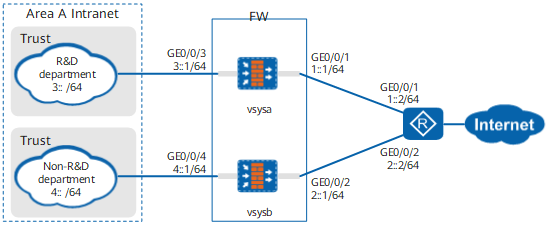
Data Planning
Item |
Data |
Description |
|---|---|---|
vsysa |
|
- |
vsysb |
|
- |
Resource class |
|
- |
Configuration Roadmap
- The public system administrator creates two virtual systems vsysa, and vsysb, assigns resources.
- The public system administrator configures IP addresses, routes, and security policies for vsysa.
- The public system administrator configures IP addresses, routes, and security policies for vsysb.
Procedure
- The public system administrator creates virtual systems vsysa, and vsysb, and assigns resources to them.
# Use the account of the public system administrator to log in to the FW.
# Enable the virtual system function.
<FW> system-view
[FW] vsys enable
# Configure a resource class.
[FW] resource-class r1
[FW-resource-class-r1] resource-item-limit ipv6 session reserved-number 10000 maximum 50000
[FW-resource-class-r1] resource-item-limit policy reserved-number 300
[FW-resource-class-r1] resource-item-limit user reserved-number 300
[FW-resource-class-r1] resource-item-limit user-group reserved-number 10
[FW-resource-class-r1] resource-item-limit bandwidth 20 outbound
[FW-resource-class-r1] quit
# Create virtual systems and allocate resources to them.
[FW] vsys name vsysa
[FW-vsys-vsysa] assign resource-class r1
[FW-vsys-vsysa] assign interface GigabitEthernet 0/0/1
[FW-vsys-vsysa] assign interface GigabitEthernet 0/0/3
[FW-vsys-vsysa] quit
[FW] vsys name vsysb
[FW-vsys-vsysb] assign resource-class r1
[FW-vsys-vsysb] assign interface GigabitEthernet 0/0/2
[FW-vsys-vsysb] assign interface GigabitEthernet 0/0/4
[FW-vsys-vsysb] quit
- The public system administrator configures IP addresses, routes, and security policies for vsysa.
# Enable IPv6.
[FW] ipv6# Set interface IPv6 addresses for vsysa.
[FW] interface GigabitEthernet 0/0/1
[FW-GigabitEthernet0/0/1] set public-interface
[FW-GigabitEthernet0/0/1] ipv6 enable
[FW-GigabitEthernet0/0/1] ipv6 address 1::1 64
[FW-GigabitEthernet0/0/1] quit
[FW] interface GigabitEthernet 0/0/3
[FW-GigabitEthernet0/0/3] ipv6 enable
[FW-GigabitEthernet0/0/3] ipv6 address 3::1 64
[FW-GigabitEthernet0/0/3] quit
# The public system administrator configures a default route for vsysa.
[FW] ipv6 route-static vpn-instance vsysa :: 0 1::2# Assign interfaces of vsysa to security zones.
[FW] switch vsys vsysa
<FW-vsysa> system-view
[FW-vsysa] firewall zone trust
[FW-vsysa-zone-trust] add interface GigabitEthernet 0/0/3
[FW-vsysa-zone-trust] quit
[FW-vsysa] firewall zone untrust
[FW-vsysa-zone-untrust] add interface GigabitEthernet 0/0/1
[FW-vsysa-zone-untrust] quit
# The public system administrator configures an address set for vsysa.
[FW-vsysa] ip address-set ipaddress1 type object
[FW-vsysa-object-address-set-ipaddress1] address range 3::2 3::200
[FW-vsysa-object-address-set-ipaddress1] quit
# Configure a security policy for vsysa. This security policy allows intranet users of a specific network segment to access the Internet. Packets from employees on other network segments to the Internet will match the default security policy and are denied.
[FW-vsysa] security-policy
[FW-vsysa-policy-security] rule name to_internet
[FW-vsysa-policy-security-rule-to_internet] source-zone trust
[FW-vsysa-policy-security-rule-to_internet] destination-zone untrust
[FW-vsysa-policy-security-rule-to_internet] source-address address-set ipaddress1
[FW-vsysa-policy-security-rule-to_internet] action permit
[FW-vsysa-policy-security-rule-to_internet] quit
- The public system administrator configures IP addresses, routes, and security policies for vsysb.
The configuration is similar to that of the R&D department except the following:
- The IP address of the inside interface is different.
- The public interface of vsysb is set to GE0/0/2.
- You do not need to create an IP address range for the non-R&D department. You only need to configure a security policy to allow all IP addresses to access the Internet.
Verification
In the root system, view the routing table of the virtual system.
<sysname> display ipv6 routing-table vpn-instance vsysa
Routing Table : vsysa
	Destinations : 6	Routes : 6

 Destination  : ::                              PrefixLength : 0
 NextHop      : 1::2                            Preference   : 60
 Cost         : 0                               Protocol     : Static
 RelayNextHop : ::                              TunnelID     : 0x0
 Interface    : GigabitEthernet0/0/1            Flags        : RD

 Destination  : 1::                             PrefixLength : 64
 NextHop      : 1::1                            Preference   : 0
 Cost         : 0                               Protocol     : Direct
 RelayNextHop : ::                              TunnelID     : 0x0
 Interface    : GigabitEthernet0/0/1            Flags        : D

 Destination  : 1::1                            PrefixLength : 128
 NextHop      : ::1                             Preference   : 0
 Cost         : 0                               Protocol     : Direct
 RelayNextHop : ::                              TunnelID     : 0x0
 Interface    : GigabitEthernet0/0/1            Flags        : D

 Destination  : 3::                             PrefixLength : 64
 NextHop      : 3::1                            Preference   : 0
 Cost         : 0                               Protocol     : Direct
 RelayNextHop : ::                              TunnelID     : 0x0
 Interface    : GigabitEthernet0/0/3            Flags        : D

 Destination  : 3::1                            PrefixLength : 128
 NextHop      : ::1                             Preference   : 0
 Cost         : 0                               Protocol     : Direct
 RelayNextHop : ::                              TunnelID     : 0x0
 Interface    : GigabitEthernet0/0/3            Flags        : D

 Destination  : FE80::                          PrefixLength : 10
 NextHop      : ::                              Preference   : 0
 Cost         : 0                               Protocol     : Direct
 RelayNextHop : ::                              TunnelID     : 0x0
 Interface    : NULL0                           Flags        : D
The public IP address can be pinged from the PC. Session entries can be queried on the FW.
<sysname> display firewall ipv6 session table verbose vsys vsysa
 Current Total IPv6 Sessions : 1
 icmpv6  VPN: vsysa --> vsysa  ID: a48f339ec631029a3570522b3
 Zone: trust --> untrust TTL: 00:00:45  Left: 00:00:45
 Interface: GigabitEthernet0/0/1 NextHop: 1::2 MAC: 643e-8c48-f14c
 <--packets: 18 bytes: 1,872 --> packets: 18 bytes: 1,872
 3::2.43990 --> 5::5.2048 PolicyName: to_internet
Configuration Scripts
Configuration script of the public system
#
sysname FW
#
ipv6
#
vsys enable
#
resource-class r1
 resource-item-limit ipv6 session reserved-number 10000 maximum 50000
 resource-item-limit policy reserved-number 300
 resource-item-limit user reserved-number 300
 resource-item-limit bandwidth 20 outbound
 resource-item-limit user-group reserved-number 10
#
vsys name vsysa 1
 assign resource-class r1
 assign interface GigabitEthernet0/0/1
 assign interface GigabitEthernet0/0/3
#
vsys name vsysb 2
 assign resource-class r1
 assign interface GigabitEthernet0/0/2
 assign interface GigabitEthernet0/0/4
#
interface GigabitEthernet0/0/1
 set public-interface
 ip binding vpn-instance vsysa
 ipv6 enable
 ipv6 address 1::1 64
#
interface GigabitEthernet0/0/2
 set public-interface
 ip binding vpn-instance vsysb
 ipv6 enable
 ipv6 address 2::1 64
#
interface GigabitEthernet0/0/3
 ip binding vpn-instance vsysa
 ipv6 enable
 ipv6 address 3::1 64
#
interface GigabitEthernet0/0/4
 ip binding vpn-instance vsysb
 ipv6 enable
 ipv6 address 4::1 64
#
ipv6 route-static vpn-instance vsysa :: 0 1::2
ipv6 route-static vpn-instance vsysb :: 0 2::2
#
return
Configuration script of vsysa
#
firewall zone trust
 set priority 85
 add interface GigabitEthernet0/0/3
#
firewall zone untrust
 set priority 5
 add interface GigabitEthernet0/0/1
#
ip address-set ipaddress1 type object
 address 0 range 3::2 3::200
#
security-policy
 rule name to_internet
  source-zone trust
  destination-zone untrust
  source-address address-set ipaddress1
  action permit
#
return
Configuration script of vsysb
#
firewall zone trust
 set priority 85
 add interface GigabitEthernet0/0/4
#
firewall zone untrust
 set priority 5
 add interface GigabitEthernet0/0/2
#
security-policy
 rule name to_internet
  source-zone trust
  destination-zone untrust
  action permit
#
return