CLI: Configuring Internet Users to Access Intranet Servers of Virtual Systems Through Independent WAN Interfaces of the Virtual Systems
Networking Requirements
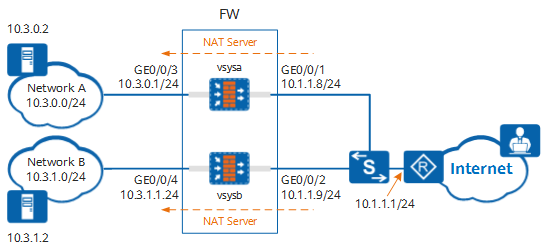
As shown in Figure 1, the device is deployed as a Layer 3 gateway between the intranet and Internet. The intranet is divided into two independent LANs: network A and network B, which are isolated from each other and cannot communicate with each other.
User hosts on the Internet access servers on networks A and B through the independent WAN interface GE0/0/1 of vsysa and the independent WAN interface GE0/0/2 of vsysb. In addition, a NAT Server is configured for each virtual system. User hosts on the Internet can access specific servers on networks A and B attached to the virtual systems through independent public IP addresses.
Item |
Data |
Description |
|---|---|---|
vsysa |
Virtual system name: vsysa WAN interface: GE0/0/1 WAN interface IP address: 10.1.1.8/24 Security zone to which the WAN interface belongs: untrust LAN interface: GE0/0/3 LAN interface IP address: 10.3.0.1/24 Private IP address range: 10.3.0.0/24 Security zone to which the LAN interface belongs: trust Private IP address and port of the intranet server for Internet users: 10.3.0.2:80 Public IP address and port after NAT of the intranet server for Internet users: 10.1.1.2:8080 |
- |
vsysb |
Virtual system name: vsysb WAN interface: GE0/0/2 WAN interface IP address: 10.1.1.9/24 Security zone to which the WAN interface belongs: untrust LAN interface: GE0/0/4 LAN interface IP address: 10.3.1.1/24 Private IP address range: 10.3.1.0/24 Security zone to which the LAN interface belongs: trust Private IP address and port of the intranet server for Internet users: 10.3.1.2:80 Public IP address and port after NAT of the intranet server for Internet users: 10.1.1.3:8080 |
- |
Resource class |
Resource class name: r1 Guaranteed number of IPv4 sessions: 10000 Maximum number of IPv4 sessions: 50000 Guaranteed number of policies: 300 Guaranteed total bandwidth: 20 Mbit/s |
In this example, networks A and B have similar service resource usage requirements and therefore are allocated the same virtual system resources. |
Configuration Roadmap
- Enable the virtual system function.
- Configure resource classes based on service requirements, create virtual systems vsysa and vsysb in the public system, and allocate resources to the virtual systems.
- Configure interfaces for vsysa and vsysb, and add the interfaces to security zones.
- Configure routes in vsysa and vsysb to divert traffic from the Internet to networks A and B.
- Configure security policies in vsysa and vsysb based on service requirements to permit traffic from user hosts on the Internet to servers on networks A and B.
- Configure a NAT Server in both vsysa and vsysb to enable user hosts on the Internet to access specific servers on networks A and B attached to the virtual systems through independent public IP addresses.
Procedure
- Enable the virtual system function.
<FW> system-view
[FW] vsys enable
- Configure a resource class.
[FW] resource-class r1
[FW-resource-class-r1] resource-item-limit session reserved-number 10000 maximum 50000
[FW-resource-class-r1] resource-item-limit policy reserved-number 300
[FW-resource-class-r1] resource-item-limit bandwidth 20 entire
[FW-resource-class-r1] quit
- Create virtual systems and allocate resources to them.
# Create virtual system vsysa and allocate resources to it.
[FW] vsys name vsysa
[FW-vsys-vsysa] assign resource-class r1
[FW-vsys-vsysa] assign interface GigabitEthernet 0/0/1
[FW-vsys-vsysa] assign interface GigabitEthernet 0/0/3
[FW-vsys-vsysa] assign global-ip 10.1.1.2 10.1.1.2 exclusive
[FW-vsys-vsysa] quit
# Create virtual system vsysb and allocate resources to it.
[FW] vsys name vsysb
[FW-vsys-vsysb] assign resource-class r1
[FW-vsys-vsysb] assign interface GigabitEthernet 0/0/2
[FW-vsys-vsysb] assign interface GigabitEthernet 0/0/4
[FW-vsys-vsysb] assign global-ip 10.1.1.3 10.1.1.3 exclusive
[FW-vsys-vsysb] quit
- Switch to the system view of vsysa.
[FW] switch vsys vsysa
<FW-vsysa> system-view
- Configure interfaces for vsysa and add the interfaces to security zones.
[FW-vsysa] interface GigabitEthernet 0/0/1
[FW-vsysa-GigabitEthernet0/0/1] ip address 10.1.1.8 24
[FW-vsysa-GigabitEthernet0/0/1] quit
[FW-vsysa] interface GigabitEthernet 0/0/3
[FW-vsysa-GigabitEthernet0/0/3] ip address 10.3.0.1 24
[FW-vsysa-GigabitEthernet0/0/3] quit
[FW-vsysa] firewall zone trust
[FW-vsysa-zone-trust] add interface GigabitEthernet 0/0/3
[FW-vsysa-zone-trust] quit
[FW-vsysa] firewall zone untrust
[FW-vsysa-zone-untrust] add interface GigabitEthernet 0/0/1
[FW-vsysa-zone-untrust] quit
- Configure a route from the Internet to network A. 10.3.0.254 is the next-hop address of the route from vsysa to network A.
[FW-vsysa] ip route-static 10.3.0.0 255.255.255.0 10.3.0.254 - Configure a security policy to permit traffic from user hosts to servers on network A.
[FW-vsysa] security-policy
[FW-vsysa-policy-security] rule name to_network_allow
[FW-vsysa-policy-security-rule-to_network_allow] source-zone untrust
[FW-vsysa-policy-security-rule-to_network_allow] destination-zone trust
[FW-vsysa-policy-security-rule-to_network_allow] destination-address 10.3.0.0 24
[FW-vsysa-policy-security-rule-to_network_allow] action permit
[FW-vsysa-policy-security-rule-to_network_allow] quit
[FW-vsysa-policy-security] quit
- Configure a NAT Server to enable user hosts on the Internet to access servers on network A through a public IP address.
[FW-vsysa] nat server to_public_server protocol tcp global 10.1.1.2 8080 inside 10.3.0.2 www no-reverse - Switch to the system view of vsysb.
[FW-vsysa] quit
<FW-vsysa> quit
[FW] switch vsys vsysb
<FW-vsysb> system-view
- Configure interfaces for vsysb and add the interfaces to security zones.
[FW-vsysb] interface GigabitEthernet 0/0/2
[FW-vsysb-GigabitEthernet0/0/2] ip address 10.1.1.9 24
[FW-vsysb-GigabitEthernet0/0/2] quit
[FW-vsysb] interface GigabitEthernet 0/0/4
[FW-vsysb-GigabitEthernet0/0/4] ip address 10.3.1.1 24
[FW-vsysb-GigabitEthernet0/0/4] quit
[FW-vsysb] firewall zone trust
[FW-vsysb-zone-trust] add interface GigabitEthernet 0/0/4
[FW-vsysb-zone-trust] quit
[FW-vsysb] firewall zone untrust
[FW-vsysb-zone-untrust] add interface GigabitEthernet 0/0/2
[FW-vsysb-zone-untrust] quit
- Configure a route from the Internet to network B. 10.3.1.254 is the next-hop address of the route from vsysb to network B.
[FW-vsysb] ip route-static 10.3.1.0 255.255.255.0 10.3.1.254 - Configure a security policy to permit traffic from user hosts on the Internet to servers on network B.
[FW-vsysb] security-policy
[FW-vsysb-policy-security] rule name to_network_allow
[FW-vsysb-policy-security-rule-to_network_allow] source-zone untrust
[FW-vsysb-policy-security-rule-to_network_allow] destination-zone trust
[FW-vsysb-policy-security-rule-to_network_allow] destination-address 10.3.1.0 24
[FW-vsysb-policy-security-rule-to_network_allow] action permit
[FW-vsysb-policy-security-rule-to_network_allow] quit
[FW-vsysb-policy-security] quit
- Configure a NAT Server to enable user hosts on the Internet to access servers on network B through a public IP address.
[FW-vsysb] nat server to_public_server protocol tcp global 10.1.1.3 8080 inside 10.3.1.2 www no-reverse
Verifying the Configuration
- User hosts on the Internet can access the web server at 10.3.0.2 on network A through http://10.1.1.2:8080.
- User hosts on the Internet can access the web server at 10.3.1.2 on network B through http://10.1.1.3:8080.
Configuration Scripts
- Public system
# sysname FW # vsys enable # resource-class r1 resource-item-limit session reserved-number 10000 maximum 50000 resource-item-limit policy reserved-number 300 resource-item-limit bandwidth 20 entire # vsys name vsysa 1 assign resource-class r1 assign interface GigabitEthernet0/0/1 assign interface GigabitEthernet0/0/3 assign global-ip 10.1.1.2 10.1.1.2 exclusive # vsys name vsysb 2 assign resource-class r1 assign interface GigabitEthernet0/0/2 assign interface GigabitEthernet0/0/4 assign global-ip 10.1.1.3 10.1.1.3 exclusive # return - Virtual system (vsysa)
#
interface GigabitEthernet0/0/1
 ip address 10.1.1.8 255.255.255.0
#
interface GigabitEthernet0/0/3
 ip address 10.3.0.1 255.255.255.0
#
firewall zone trust
 set priority 85
 add interface GigabitEthernet0/0/3
#
firewall zone untrust
 set priority 5
 add interface GigabitEthernet0/0/1
#
 ip route-static 10.3.0.0 255.255.255.0 10.3.0.254
#
security-policy
 rule name to_network_allow
  source-zone untrust
  destination-zone trust
  destination-address 10.3.0.0 mask 255.255.255.0
  action permit
#
 nat server to_public_server protocol tcp global 10.1.1.2 8080 inside 10.3.0.2 www no-reverse
#
return
- Virtual system (vsysb)
#
interface GigabitEthernet0/0/2
 ip address 10.1.1.9 255.255.255.0
#
interface GigabitEthernet0/0/4
 ip address 10.3.1.1 255.255.255.0
#
firewall zone trust
 set priority 85
 add interface GigabitEthernet0/0/4
#
firewall zone untrust
 set priority 5
 add interface GigabitEthernet0/0/2
#
 ip route-static 10.3.1.0 255.255.255.0 10.3.1.254
#
security-policy
 rule name to_network_allow
  source-zone untrust
  destination-zone trust
  destination-address 10.3.1.0 mask 255.255.255.0
  action permit
#
 nat server to_public_server protocol tcp global 10.1.1.3 8080 inside 10.3.1.2 www no-reverse
#
return