CLI: Configuring Intranet Users of Virtual Systems to Access the Internet Through the WAN Interface of the Public System (Performing NAT in Each Virtual System)
Networking Requirements
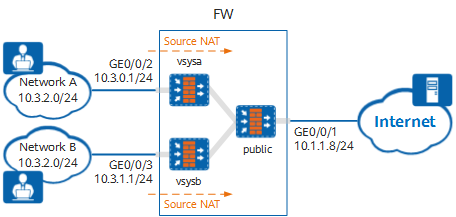
As shown in Figure 1, the device is deployed as a Layer 3 gateway between the intranet and Internet. The intranet is divided into two independent LANs: network A and network B, which are isolated from each other and have overlapping IP addresses.
User hosts on networks A and B access the Internet through the shared WAN interface GE0/0/1 of the public system. On network A, only some user hosts can access the Internet. On network B, all user hosts can access the Internet. In addition, source NAT is performed in the two virtual systems separately to translate the source IP addresses of the packets from the intranet to the Internet into the public IP addresses of the device. In this way, the intranet IP addresses are hidden. Because public IP addresses are limited and NAT ports can be reused, the two virtual systems the same public IP address but different ports.
Item |
Data |
Description |
|---|---|---|
public |
WAN interface: GE0/0/1 WAN interface IP address: 10.1.1.8/24 Security zone to which the WAN interface belongs: untrust LAN interface: virtual system Virtual-if0 of the public system Security zone to which the LAN interface belongs: trust IP address of the carrier access gateway: 10.1.1.1/24 |
In this example, intranet user hosts attached to virtual systems can access the Internet only through the public system. As the private IP addresses of networks A and B attached to the virtual systems overlap, you need to configure a NAT policy in each virtual system. |
vsysa |
Virtual system name: vsysa WAN interface: virtual interface Virtual-if1 of vsysa Security zone to which the WAN interface belongs: untrust LAN interface: GE0/0/2 LAN interface IP address: 10.3.0.1/24 Private IP address range: 10.3.2.0/24 Security zone to which the LAN interface belongs: trust IP addresses allowed to access the Internet: 10.3.2.2 to 10.3.2.10 Public IP address after NAT: 10.10.1.1 (port range: 2048-30000) |
- |
vsysb |
Virtual system name: vsysb WAN interface: virtual interface Virtual-if2 of vsysb Security zone to which the WAN interface belongs: untrust LAN interface: GE0/0/3 LAN interface IP address: 10.3.1.1/24 Private IP address range: 10.3.2.0/24 Security zone to which the LAN interface belongs: trust Public IP address after NAT: 10.10.1.1 (port range: 30001-65535) |
- |
Resource class |
Resource class name: r1 Guaranteed number of IPv4 sessions: 10000 Maximum number of IPv4 sessions: 50000 Guaranteed number of policies: 300 Guaranteed total bandwidth: 20 Mbit/s |
In this example, networks A and B have similar service resource usage requirements and therefore are allocated the same virtual system resources. |
Configuration Roadmap
- Enable the virtual system function.
- Configure resource classes based on service requirements, create virtual systems vsysa and vsysb in the public system, and allocate resources to the virtual systems.
- Configure interfaces for the public system, vsysa, and vsysb, and add the interfaces to security zones.
- Configure routes in the public system, vsysa, and vsysb to divert traffic from networks A and B to the Internet.
- Configure security policies in the public system, vsysa, and vsysb based on service requirements to permit traffic from user hosts on networks A and B to the Internet.
- Configure source NAT policies in vsysa and vsysb to translate the source IP addresses of the packets from the intranet to the Internet into the IP addresses of the independent WAN interfaces of the virtual systems.
Procedure
- Enable the virtual system function.
<FW> system-view
[FW] vsys enable
- Configure a resource class.
[FW] resource-class r1
[FW-resource-class-r1] resource-item-limit session reserved-number 10000 maximum 50000
[FW-resource-class-r1] resource-item-limit policy reserved-number 300
[FW-resource-class-r1] resource-item-limit bandwidth 20 entire
[FW-resource-class-r1] quit
- Create virtual systems and allocate resources to them.
# Create virtual system vsysa and allocate resources to it.
[FW] vsys name vsysa
[FW-vsys-vsysa] assign resource-class r1
[FW-vsys-vsysa] assign interface GigabitEthernet 0/0/2
[FW-vsys-vsysa] assign global-ip 10.10.1.1 10.10.1.1 free
[FW-vsys-vsysa] quit
# Create virtual system vsysb and allocate resources to it.
[FW] vsys name vsysb
[FW-vsys-vsysb] assign resource-class r1
[FW-vsys-vsysb] assign interface GigabitEthernet 0/0/3
[FW-vsys-vsysb] assign global-ip 10.10.1.1 10.10.1.1 free
[FW-vsys-vsysb] quit
- Configure interfaces for the public system and add the interfaces to security zones.
[FW] interface GigabitEthernet 0/0/1
[FW-GigabitEthernet0/0/1] ip address 10.1.1.8 24
[FW-GigabitEthernet0/0/1] quit
[FW] interface Virtual-if 0
[FW-Virtual-if0] ip address 172.16.0.1 24
[FW-Virtual-if0] quit
[FW] firewall zone trust
[FW-zone-trust] add interface Virtual-if 0
[FW-zone-trust] quit
[FW] firewall zone untrust
[FW-zone-untrust] add interface GigabitEthernet 0/0/1
[FW-zone-untrust] quit
- Configure routes in the public system.
# Configure a route from the public system to the Internet to divert traffic from networks A and B to the Internet. 10.1.1.1 is the next-hop address of the route from the public system to the Internet.
[FW] ip route-static 0.0.0.0 0.0.0.0 10.1.1.1# Configure a blackhole route from the public system to the public IP address configured in the NAT address pool to prevent loops.
[FW] ip route-static 10.10.1.1 255.255.255.255 NULL0 - Configure a security policy in the public system to permit traffic from user hosts on networks A and B to the Internet.
[FW] security-policy
[FW-policy-security] rule name trust_to_untrust
[FW-policy-security-rule-trust_to_untrust] source-zone trust
[FW-policy-security-rule-trust_to_untrust] destination-zone untrust
[FW-policy-security-rule-trust_to_untrust] source-address 10.10.1.1 32
[FW-policy-security-rule-trust_to_untrust] action permit
[FW-policy-security-rule-trust_to_untrust] quit
[FW-policy-security] quit
- Switch to the system view of vsysa.
[FW] switch vsys vsysa
<FW-vsysa> system-view
- Configure interfaces for vsysa and add the interfaces to security zones.
[FW-vsysa] interface GigabitEthernet 0/0/2
[FW-vsysa-GigabitEthernet0/0/2] ip address 10.3.0.1 24
[FW-vsysa-GigabitEthernet0/0/2] quit
[FW-vsysa] interface Virtual-if 1
[FW-vsysa-Virtual-if1] ip address 172.16.1.1 24
[FW-vsysa-Virtual-if1] quit
[FW-vsysa] firewall zone trust
[FW-vsysa-zone-trust] add interface GigabitEthernet 0/0/2
[FW-vsysa-zone-trust] quit
[FW-vsysa] firewall zone untrust
[FW-vsysa-zone-untrust] add interface Virtual-if 1
[FW-vsysa-zone-untrust] quit
- Configure routes in vsysa.
# Configure a route from the public system to vsysa to divert the traffic for network A to access the Internet to the public system.
[FW-vsysa] ip route-static 0.0.0.0 0.0.0.0 public# Configure a route from vsysa to network A. 10.3.0.254 is the next-hop address of the route from vsysa to network A.
[FW-vsysa] ip route-static 10.3.2.0 255.255.255.0 10.3.0.254# Configure a blackhole route from vsysa to the public IP address in the NAT address pool to prevent loops.
[FW-vsysa] ip route-static 10.10.1.1 255.255.255.255 NULL0 - Configure security policies in vsysa.
# Allow user hosts in the IP address range of 10.3.2.2 to 10.3.2.10 on network A to access the Internet.
[FW-vsysa] security-policy
[FW-vsysa-policy-security] rule name to_internet_allow
[FW-vsysa-policy-security-rule-to_internet_allow] source-zone trust
[FW-vsysa-policy-security-rule-to_internet_allow] destination-zone untrust
[FW-vsysa-policy-security-rule-to_internet_allow] source-address range 10.3.2.2 10.3.2.10
[FW-vsysa-policy-security-rule-to_internet_allow] action permit
[FW-vsysa-policy-security-rule-to_internet_allow] quit
# Forbid user hosts that are not in the IP address range of 10.3.2.2 to 10.3.2.10 on network A from accessing the Internet.
[FW-vsysa-policy-security] rule name to_internet_block
[FW-vsysa-policy-security-rule-to_internet_block] source-zone trust
[FW-vsysa-policy-security-rule-to_internet_block] destination-zone untrust
[FW-vsysa-policy-security-rule-to_internet_block] action deny
[FW-vsysa-policy-security-rule-to_internet_block] quit
[FW-vsysa-policy-security] quit
- Configure a source NAT policy in vsysa to translate the source IP addresses of the packets from network A to the Internet into the public IP address assigned to vsysa.
# Configure a NAT address pool and disable port translation.
[FW-vsysa] nat address-group address_group_vsysa
[FW-vsysa-address-group-address_group_vsysa] mode pat
[FW-vsysa-address-group-address_group_vsysa] port-block-size 32 port-range 2048 30000
[FW-vsysa-address-group-address_group_vsysa] section 0 10.10.1.1 10.10.1.1
[FW-vsysa-address-group-address_group_vsysa] quit
# Configure a source NAT policy.
[FW-vsysa] nat-policy
[FW-vsysa-policy-nat] rule name nat_vsysa
[FW-vsysa-policy-nat-rule-nat_vsysa] source-zone trust
[FW-vsysa-policy-nat-rule-nat_vsysa] destination-zone untrust
[FW-vsysa-policy-nat-rule-nat_vsysa] source-address 10.3.2.0 24
[FW-vsysa-policy-nat-rule-nat_vsysa] action source-nat address-group address_group_vsysa
[FW-vsysa-policy-nat-rule-nat_vsysa] quit
[FW-vsysa-policy-nat] quit
- Switch to the system view of vsysb.
[FW-vsysa] quit
<FW-vsysa> quit
[FW] switch vsys vsysb
<FW-vsysb> system-view
- Configure interfaces for vsysb and add the interfaces to security zones.
[FW-vsysb] interface GigabitEthernet 0/0/3
[FW-vsysb-GigabitEthernet0/0/3] ip address 10.3.1.1 24
[FW-vsysb-GigabitEthernet0/0/3] quit
[FW-vsysb] interface Virtual-if 2
[FW-vsysb-Virtual-if2] ip address 172.16.2.1 24
[FW-vsysb-Virtual-if2] quit
[FW-vsysb] firewall zone trust
[FW-vsysb-zone-trust] add interface GigabitEthernet 0/0/3
[FW-vsysb-zone-trust] quit
[FW-vsysb] firewall zone untrust
[FW-vsysb-zone-untrust] add interface Virtual-if 2
[FW-vsysb-zone-untrust] quit
- Configure routes in vsysb.
# Configure a route from the public system to vsysb to divert the traffic for network B to access the Internet to the public system.
[FW-vsysb] ip route-static 0.0.0.0 0.0.0.0 public# Configure a route from vsysb to network B. 10.3.1.254 is the next-hop address of the route from vsysb to network B.
[FW-vsysb] ip route-static 10.3.2.0 255.255.255.0 10.3.1.254# Configure a blackhole route from vsysb to the public IP address configured in the NAT address pool to prevent loops.
[FW-vsysb] ip route-static 10.10.1.1 255.255.255.255 NULL0 - Configure security policies in vsysb.
# Allow user hosts on network B to access the Internet.
[FW-vsysb] security-policy
[FW-vsysb-policy-security] rule name to_internet_allow
[FW-vsysb-policy-security-rule-to_internet_allow] source-zone trust
[FW-vsysb-policy-security-rule-to_internet_allow] destination-zone untrust
[FW-vsysb-policy-security-rule-to_internet_allow] source-address 10.3.2.0 24
[FW-vsysb-policy-security-rule-to_internet_allow] action permit
[FW-vsysb-policy-security-rule-to_internet_allow] quit
[FW-vsysb-policy-security] quit
- Configure a source NAT policy in vsysb to translate the source IP addresses of the packets from network B to the Internet into the public IP address assigned to vsysb.
# Configure a NAT address pool and disable port translation.
[FW-vsysb] nat address-group address_group_vsysb
[FW-vsysb-address-group-address_group_vsysb] mode pat
[FW-vsysb-address-group-address_group_vsysb] port-block-size 32 port-range 30001 65535
[FW-vsysb-address-group-address_group_vsysb] section 0 10.10.1.1 10.10.1.1
[FW-vsysba-address-group-address_group_vsysb] quit
# Configure a source NAT policy.
[FW-vsysb] nat-policy
[FW-vsysb-policy-nat] rule name nat_vsysb
[FW-vsysb-policy-nat-rule-nat_vsysb] source-zone trust
[FW-vsysb-policy-nat-rule-nat_vsysb] destination-zone untrust
[FW-vsysb-policy-nat-rule-nat_vsysb] source-address 10.3.2.0 24
[FW-vsysb-policy-nat-rule-nat_vsysb] action source-nat address-group address_group_vsysb
[FW-vsysb-policy-nat-rule-nat_vsysb] quit
[FW-vsysb-policy-nat] quit
Verifying the Configuration
- User hosts in the IP address range of 10.3.2.2 to 10.3.2.10 on network A can access the Internet, but other user hosts cannot.
- All user hosts on network B can access the Internet.
Configuration Scripts
- Public system
# sysname FW # vsys enable # resource-class r1 resource-item-limit session reserved-number 10000 maximum 50000 resource-item-limit policy reserved-number 300 resource-item-limit bandwidth 20 entire # vsys name vsysa 1 assign resource-class r1 assign interface GigabitEthernet0/0/2 assign global-ip 10.10.1.1 10.10.1.1 free # vsys name vsysb 2 assign resource-class r1 assign interface GigabitEthernet0/0/3 assign global-ip 10.10.1.1 10.10.1.1 free # interface GigabitEthernet0/0/1 undo shutdown ip address 10.1.1.8 24 # interface Virtual-if 0 ip address 172.16.0.1 255.255.255.0 # firewall zone trust set priority 85 add interface Virtual-if0 # firewall zone untrust set priority 5 add interface GigabitEthernet0/0/1 # ip route-static 0.0.0.0 0.0.0.0 10.1.1.1 ip route-static 10.10.1.1 255.255.255.255 NULL0 # security-policy rule name trust_to_untrust source-zone trust destination-zone untrust source-address 10.10.1.1 mask 255.255.255.255 action permit # return - Virtual system (vsysa)
#
interface GigabitEthernet0/0/2
 ip address 10.3.0.1 255.255.255.0
#
interface Virtual-if 1
 ip address 172.16.1.1 255.255.255.0
#
firewall zone trust
 set priority 85
 add interface GigabitEthernet0/0/2
#
firewall zone untrust
 set priority 5
 add interface Virtual-if1
#
 ip route-static 0.0.0.0 0.0.0.0 public
 ip route-static 10.3.2.0 255.255.255.0 10.3.0.254
 ip route-static 10.10.1.1 255.255.255.255 NULL0
#
security-policy
 rule name to_internet_allow
  source-zone trust
  destination-zone untrust
  source-address range 10.3.2.2 10.3.2.10
  action permit
 rule name to_internet_block
  source-zone trust
  destination-zone untrust
  action deny
#
nat address-group address_group_vsysa
 mode no-pat global
 port-block-size 32 port-range 2048 30000
 section 0 10.10.1.1 10.10.1.1
#
nat-policy
 rule name nat_vsysa
  source-zone trust
  destination-zone untrust
  source-address 10.3.2.0 mask 255.255.255.0
  action source-nat address-group address_group_vsysa
#
return
- Virtual system (vsysb)
#
interface GigabitEthernet0/0/3
 ip address 10.3.1.1 255.255.255.0
#
interface Virtual-if 2
 ip address 172.16.2.1 255.255.255.0
#
firewall zone trust
 set priority 85
 add interface GigabitEthernet0/0/3
#
firewall zone untrust
 set priority 5
 add interface Virtual-if2
#
 ip route-static 0.0.0.0 0.0.0.0 public
 ip route-static 10.3.2.0 255.255.255.0 10.3.1.254
 ip route-static 10.10.1.1 255.255.255.255 NULL0
#
security-policy
 rule name to_internet_allow
  source-zone trust
  destination-zone untrust
  source-address 10.3.2.0 mask 255.255.255.0
  action permit
#
nat address-group address_group_vsysb
 mode pat
 port-block-size 32 port-range 30001 65535
 section 0 10.10.1.1 10.10.1.1
#
nat-policy
 rule name nat_vsysb
  source-zone trust
  destination-zone untrust
  source-address 10.3.2.0 mask 255.255.255.0
  action source-nat address-group address_group_vsysb
#
return